大公告,如果你不喜欢 AI 生成的内容请阅读
本模组很大程度上是“氛围代码”(vibecoded)的产物。由于其他音乐模组在添加自定义内容时略显繁琐,因此我将其作为个人模组开发。
你可以使用它,也可以不使用,我无所谓。
此外,这并非旨在与 CircuitLords 的模组 “Reactive Music” 竞争。正如我所说,向该模组添加自定义内容有点麻烦,我想做一个更简单、且对不熟悉 Java 的人更友好的模组。
感谢阅读 ^^
BGMCraft 是什么?
BGMCraft(Background Music Craft……我对这个名字真的很自豪……)是一个让你的 Minecraft 更加富有风味(flavors up)的模组,它在背景中播放……音乐。
播放时,你添加到相应文件夹中的所有歌曲都会根据游戏中的情况自动播放并切换,
只是在旅行?播放一些平静的环境音乐;正在与怪物战斗?自动播放战斗音乐;生命值低且正在与怪物战斗?那就放点你的锁屏音乐之类的吧,谁知道呢。
你还可以设置音乐仅在特定的生物群系、地点和结构内播放。
例如,在沙漠主题的音乐……在沙漠中播放,或者在试炼密室中播放工业风格的音乐。
所有这些都可以在文件目录中轻松编辑(并且可分享!)。
你可以在此下载示例配置文件:
如果你不确定如何将其添加到游戏中,请向下滚动一点,直到到达“配置集(Profiles)”部分。
酷炫的设置和功能
所有这些设置都在模组菜单配置中,但也可以通过在游戏中按 B 键访问(你可以关闭此功能,别担心)
- 音量滑块:调整你的音量(太棒了)

- 交叉淡入淡出滑块:让你的音乐无缝过渡到下一首

- 配置集(Profiles):在游戏中即时切换音乐预设,压缩文件并发送给好友或发布到全世界。
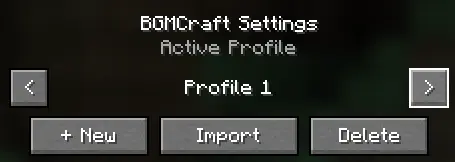
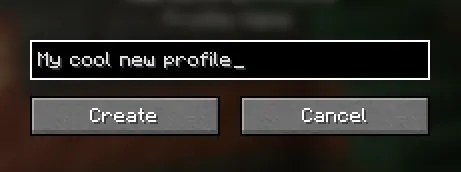
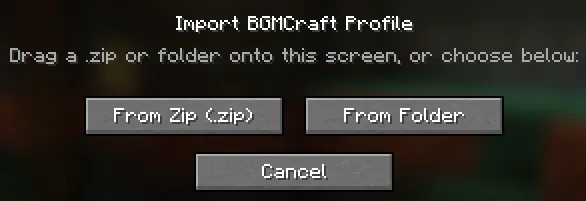
- 区域(Zones):为特定区域设置你自己的自定义音乐。目前仅支持客户端侧,但在未来的更新中将支持全服务器范围。
那么,制作自己的包有多容易?
非常简单。
在 bgmcraft 的配置中,打开 profiles 文件夹并选择你要编辑的配置集。\
在游戏中创建新的配置集更容易,因为它会自动为你创建所有额外的文件夹,而且你不需要重启游戏即可尝试它们。
你应该会看到 4 个选项:
- 主世界 (Overworld)
- 下界 (Nether)
- 末地 (The End)
- 自定义 (Custom)
除了“自定义”外,其他都是不言自明的,我们稍后再讨论那个。
在这个例子中,我们将使用“主世界 (Overworld)”文件夹。
进入文件夹后,你会看到许多不同的生物群系和地点。如果你觉得有必要为每个地方设置音乐,可以这样做;但如果只想设置一个通用的,请使用“地表 (Surface)”文件夹。\
如果某个文件夹缺少音频,它将自动回退到与“地表 (Surface)”状态匹配的音频。
你应该会看到 4 个文件夹:
- 平静 (Calm)
- 紧张 (Tense)
- 警惕 (Alert)
- 危险 (Danger)
平静 (Calm) 是角色健康且未处于战斗状态时的默认背景音乐。
紧张 (Tense) 是在角色被敌对生物发现 OR 受到一定次数攻击时播放的音乐。\
如果你激怒中立生物,它不会自动播放。该生物必须攻击你一定次数才能触发此状态。
当角色生命值低于等于 4 颗心且未处于战斗状态时,将播放警惕 (Alert) 音乐。
当角色生命值低于等于 4 颗心且被敌对生物发现 OR 受到一定次数攻击时,将播放危险 (Danger) 音乐。
这些部分中可以放入多个音轨,系统会从文件夹中的一个音轨随机播放。
分享你的配置集
比制作它更容易。
只需将你的配置集压缩(推荐使用 7zip,Win.Rar 不起作用,必须先解压。)然后发给朋友,再将 zip 文件拖放到游戏中以导入。
嗯,大概就是这样。
鸣谢
Yokai(我):提出创意
Braylon:帮助改善用户体验(QOL),例如配置集功能是他的想法。
Ceemad:也帮助改善了用户体验,例如交叉淡入淡出功能是她的想法。
AI:大概是吧。
计划最终将此模组开源,但要等到 alpha 阶段结束后。
本模组中使用的任何音乐都不是由我或(大多数)使用该模组的用户创作的。
BIG OL NOTICE, YOU SHOULD READ IF YOU DON'T LIKE AI
This mod is considerably vibecoded, it was made as a personal mod as other music mods are a bit tedious to add custom content to.
You don't have to use it, or do, I don't care.
Also this is not an attempt to compete with CircuitLords mod "Reactive Music", Like I said it is just a bit tedious to add custom content to it and I wanted to make one that is simpler and people who aren't familiar with Java.
Thank you for reading ^^
What is BGMCraft?
BGMCraft (Background Music Craft... I am really proud of this name...) is a mod that flavors up your minecraft by playing... Music in the background.
When playing, Any songs you have added to their respective folders will play and change depending on what's happening in your game,
Just travelling? Play some calm ambient music, Fighting mobs? Automatically plays battle music alongside, Low hearts and fighting mobs? Put your lock in music or something idk.
You can also set music to play only in certain Biomes, pois, and structures.
For example, Have desert themed music... In the desert, or play industrial type music in the trial chambers.
All easily editable (and shareable!) in the file directory.
You can download an example profile here:
If you're unsure how to add this to your game, Scroll down just a bit till you reach 'Profiles'
Kick ass settings and features
All of these settings are in mod menu config, but are also accessible by pressing B in game (you can turn this off dw)
- The volume slider: Slide yo volume (Hell yeah)
- The crossfade slider: Make your music seamlessly slide into tha other
- Profiles: Instantly switch your music preset mid game, Zip your files and send to your friends, or to the world.
- Zones: Set specific areas to your own custom music, Currently only client sided but will be server wide in a future update.
Ok but how easy is it to make your own packs
Pretty damn easy.
In the config for bgmcraft, open the profiles folder and pick the profile you want to edit.\
It is easier to create a new one in game as it makes all the extra folders for you, And you don't have to restart your game to try them out.
You should see 4 options
- Overworld
- Nether
- The End
- Custom
Everything is self explanatory except 'Custom', we'll talk about that later.
For this example we're gonna use the 'Overworld' Folder.
Once in the folder, You'll see a ton of different biomes and locations, If you feel like setting music for each one you can, But if you just want one set, Use the 'Surface' folder.\
If a folder is missing audio, It will automatically fallback to whatever audio matches the state in 'Surface'
You should see 4 folders
Calm is the default music that plays when your character is healthy and not fighting.
Tense is the music that plays when your character is either spotted by a hostile mob OR has taken a certain amount of hits.\
It will not automatically play if you anger a neutral mob, Said mob would have to hit you a certain amount of times to trigger it
Alert music will play when you character has 4 hearts or less and is not fighting
Danger music will play when your character has 4 hearts or less and is either spotted by a hostile mob OR has taken a certain amount of hits.
Multiple tracks can be put into these sections and will randomly play from one of the tracks in the folder.
Sharing your profile
Easier than making it
Simply zip your profile (something like 7zip, Win.Rar does not work and must be extracted.) and send it to a friend, then drag and drop the zip into your game to import it.
yeah thats bout it
The creditos
Yokai (me): Coming up with the idea
Braylon: Helping with QOL, Things like profiles were his idea.
Ceemad: Also helped with QOL, Things like crossfades were her idea.
AI: I guess.
Planning on making this open source eventually but not until we're out of alpha.
Any music used in this mod is not made by me or (mostly) any users who use it.


 模组

 模组

 模组

 模组

 模组

 模组

评论 0
登录后参与评分
还没有评论,来抢沙发吧