
这是已停止维护的 BlockMeter 模组的延续版本,基于 MIT 许可证分支开发。
它允许你测量建筑或区域的尺寸,从而验证物体是否按预期对齐,或者确认它们的距离是否符合预期。
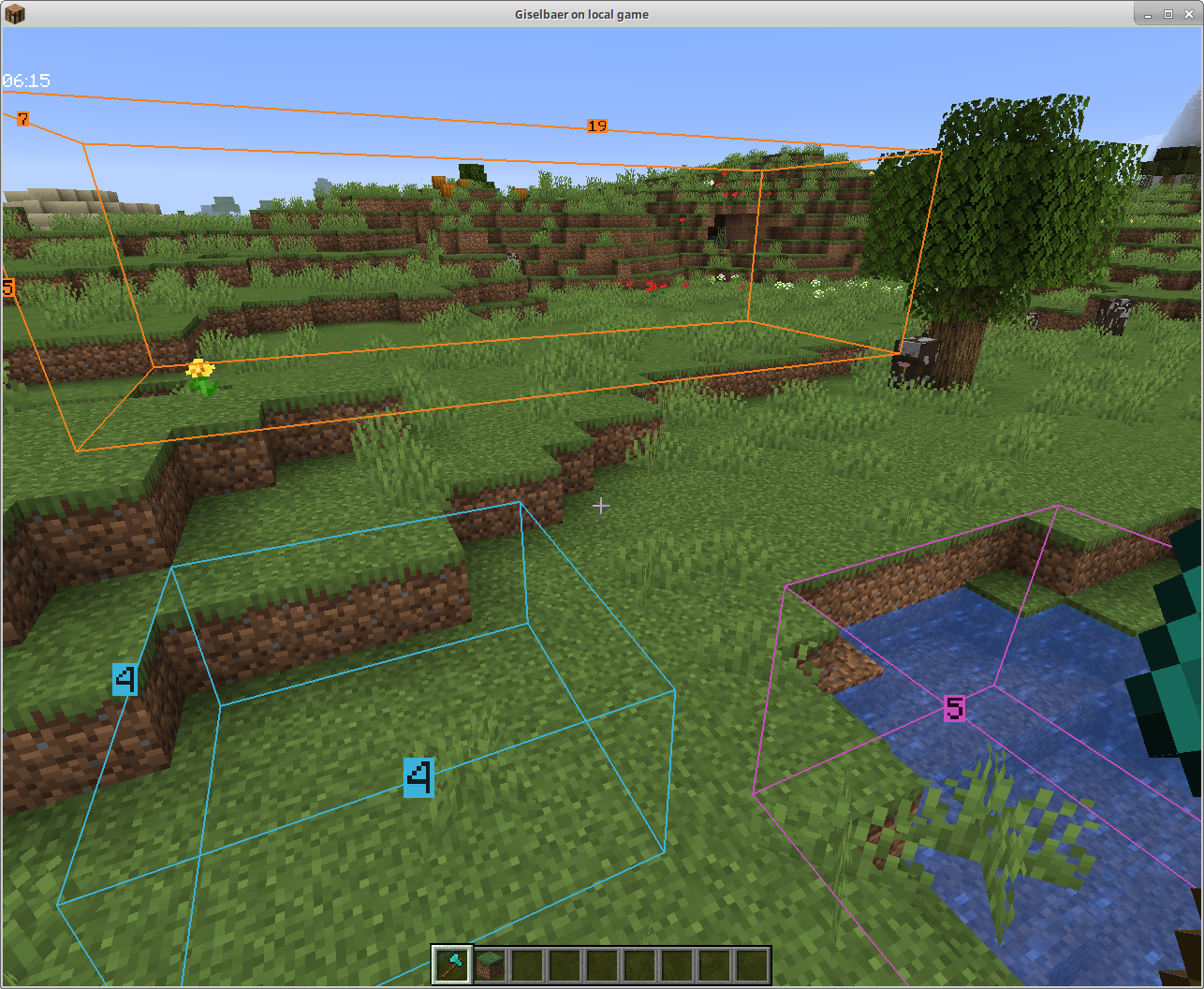
使用方法:手持任意物品并按下 BlockMeter 按键。在任意位置右键点击该物品以设置起点。在其他位置再次右键点击该物品以设置第二个点。BlockMeter 将绘制一个长方体并显示每条边的长度。
再次按下按键可停用 BlockMeter 立方体。按住 Shift 键并按下按键可移除最后一个立方体。按住 Ctrl 键并按下按键可移除所有立方体。
要编辑现有方框,蹲下时右键点击可以“松开”一个角,再次右键点击将其放置在其他位置。
依赖项
使用此模组需要:
必需
- 从 安装 Fabric 加载器
- 从 安装 Fabric API
- 安装本模组
可选
- 从 安装 ModMenu(非绝对必要,但强烈建议安装)
协作建造
从 1.4 版本开始,如果服务器也安装了此模组,你可以协作并查看彼此的方框。
该模组仍然支持纯客户端运行,因此你可以在任何(原版、Spigot、Paper 等)服务器上游玩,而无需服务器管理员进行任何操作。
Fabric 服务器
在主机拥有该模组的主机局域网世界,或拥有该模组的专用 Fabric 服务器上,你可以看到其他人的方框——启用 BlockMeter,手持 BlockMeter 方块时按下 ALT 按钮,然后切换新出现的按钮。现在你将看到其他玩家的方框,每个方框的计数前面都会显示创建者的名字。
Bukkit 服务器
1.4.1 版本也可作为 Bukkit/Spigot/Paper 服务器的服务端插件使用。如果你希望在喜爱的服务器(非模组服务器,但拥有插件)上共享方框轮廓,请联系你的服务器管理员从此处下载 jar 文件并将其放入 plugins 目录(确保是正确版本的 Minecraft,即 1.15,以及至少 1.4.1 版本的模组)。客户端部分与 1.4 相同,因此你没有理由更新客户端。
This is a continuation mod of the discontinued BlockMeter, forked under MIT license.
It allows you to measure sizes of builds or areas, so you can verify things line up the way you want, or having the distances they're expected to.
To use, hold any item and tap the BlockMeter key. Right click that item anywhere to set a starting point. Right-click the item somewhere else to get a second point. BlockMeter will draw a cuboid and show the lengths of each of the sides.
Tap the key again to deactivate the BlockMeter cubes. Tap Shift and the key to remove the last cube. Tap Ctrl and the key to remove all cubes.
To edit an existing box, right click while crouching to "loosen" one corner and right click again to place it somewhere else.
Dependencies
To use this mod, you'll need to:
Required
- install the Fabric modloader from
- install the Fabric API from
- install this mod
Optional
- install ModMenu from (this is not absolutely necessary, but strongly recommended)
Collaborative Building
From version 1.4 on, you can collaborate and see each other's boxes if the mod is installed on the server as well.
The mod will still work client-side only, so you can play on any (vanilla, spigot, paper, ...) servers without the server owner having to do anything.
Fabric Server
In a LAN world with the host having the mod, or with a dedicated Fabric server that has the mod, you can see other people's boxes - enable BlockMeter, press the ALT button while holding the BlockMeter block, and toggle the new button. Now you'll see other players' boxes, and each block count will have the name of the player who created the box in front.
Bukkit Server
Version 1.4.1 works as server part with Bukkit/Spigot/Paper as well. If you want to share block outlines on your favorite server (non-modded, but has plugins), ask your server owner to download the jar file from here and put it in the plugins directory (make sure it's the correct Minecraft version, i.e. 1.15, and at least version 1.4.1 of the mod). The client part is the same as 1.4, so there's no reason to update your client.

下载 Block Meter
需要联机服务器吗?
稳定流畅、一键部署,几分钟即可和朋友联机开服
最低仅需 8 元/月 即可畅快联机
下载 Block Meter
需要联机服务器吗?
稳定流畅、一键部署,几分钟即可和朋友联机开服
最低仅需 8 元/月 即可畅快联机
下载 Block Meter
需要联机服务器吗?
稳定流畅、一键部署,几分钟即可和朋友联机开服
最低仅需 8 元/月 即可畅快联机
下载 Block Meter
需要联机服务器吗?
稳定流畅、一键部署,几分钟即可和朋友联机开服
最低仅需 8 元/月 即可畅快联机
下载 Block Meter
需要联机服务器吗?
稳定流畅、一键部署,几分钟即可和朋友联机开服
最低仅需 8 元/月 即可畅快联机
下载 Block Meter
需要联机服务器吗?
稳定流畅、一键部署,几分钟即可和朋友联机开服
最低仅需 8 元/月 即可畅快联机
下载 Block Meter
需要联机服务器吗?
稳定流畅、一键部署,几分钟即可和朋友联机开服
最低仅需 8 元/月 即可畅快联机
下载 Block Meter
下载 Block Meter
下载 Block Meter
需要联机服务器吗?
稳定流畅、一键部署,几分钟即可和朋友联机开服
最低仅需 8 元/月 即可畅快联机
完整更新日志:
关于这个资源的讨论、问题反馈与使用心得
还没有讨论,来发第一帖吧
你是这个资源的作者?登录后可认领此资源。
相似资源
 模组

显示你正在注视的方块的信息。(适用于 Minecraft 1.16+ 的 Hwyla/Waila 分支)
 模组

查看物品与配方
 模组
在游戏画面角落显示附近世界地形、玩家、生物和实体的地图。可创建路径点,帮助你找到标记过的位置。
 模组
使用 JavaScript 编辑配方、添加自定义物品、编写世界事件!
 模组
添加区块认领和玩家组队功能,并与 Xaero's Minimap 和 World Map 集成
 模组
添加全屏世界地图,显示你在世界中已探索的区域。与 Xaero's Minimap 搭配使用效果极佳。
评论 0
登录后参与评分
还没有评论,来抢沙发吧