
BlockTuner (Fabric 模组)
简介
这是 BlockTuner 的 Fabric 版本,且需要 Fabric API。
如果你使用的是 Forge,你可以查看由 A_Peng215 制作的 Forge 版本。
如果你需要适用于旧版 Minecraft 的数据包,请访问 此页面。
使用说明
安装
将此模组放入你的 mods 文件夹中。如果你尚未安装 Fabric API,也需要进行安装。
此模组同样适用于服务器,无需在客户端进行额外安装。
如何使用 BlockTuner
按住 Ctrl + 右键 点击音符盒以打开调音界面。手持 Ctrl 放置音符盒时也会自动打开该界面。
按住 Ctrl 可在准星处显示当前音符盒的音符。
按住 Ctrl + 鼠标中键 点击音符盒可拾取已调好音的音符盒。
使用烈焰棒右键点击音符盒可直接播放,无需进行调音。
*注意:
如果你使用的是 BlockTuner 1.0.0(Minecraft 1.18.2)或更低版本,你不需要按住 Ctrl 即可打开调音界面。相反,请使用 /blocktuner 命令来切换此功能。
如果你安装了 Tweakeroo 且无法使用 Ctrl 键,请前往 Tweakeroo 配置,在“热键”下找到 flexibleBlockPlacementOffset 并将其设置为其他按键,例如 右 Alt。对于由此带来的不便,深表歉意。
调音界面
右上角(从左到右)
 播放模式 - 切换是否在钢琴键盘上点击音符后立即关闭 GUI。
 打字键盘切换为钢琴键盘 - 切换是否希望使用电脑键盘演奏钢琴键盘。
 MIDI 设备 - 点击以循环切换可用的 MIDI 输入设备。如果图标显示为红色,则表示该设备当前不可用。这通常意味着它正被其他程序占用。
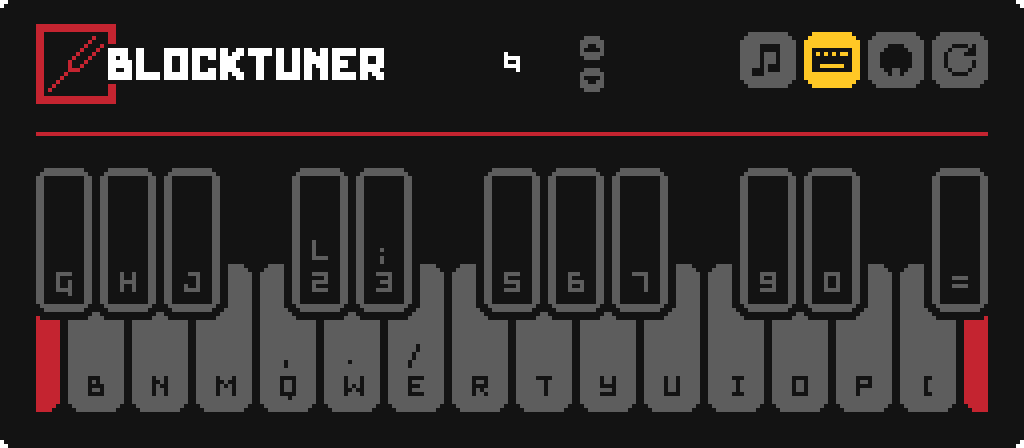
键盘映射:
鸣谢
本地化
- 俄语 - Felix14-v2 (目前已过时)
- 日语 - misaka10843 & hakkaku
Forge 移植
许可证
版权所有 (C) 2021, xwjcool.
本程序是自由软件:你可以根据自由软件基金会发布的 GNU 宽通用公共许可证条款对其进行再分发和/或修改, either 许可证的第 3 版,或(按你的选择)任何更高版本。
本程序的发布希望它能有所帮助,但 没有任何 保证;甚至没有隐含的对 适销性 或 特定用途适用性 的保证。有关更多细节,请参阅 GNU 宽通用公共许可证。
你应该已经随本程序收到了一份 GNU 宽通用公共许可证的副本。如果没有,请参阅 。
BlockTuner (Fabric Mod)
About
This is the fabric version of BlockTuner and requires fabric API.
If you are using forge, you can check out the forge version by A_Peng215.
If you want the data pack for older versions of Minecraft, please visit this page.
Instructions
Installation
Put this mod in your mods folder. You also need to install Fabric API if you haven't installed it yet.
This mod also works on servers and require no client installation.
You can get the latest version here or find a specific release here
How to Use BlockTuner
Ctrl + Right click on a note block to open up tuning UI. Placing a note block while holding Ctrl also opens the UI automatically.
Ctrl to show the note of the note block at crosshair.
Ctrl + Middle click on note blocks to pick up readily tuned note blocks.
Right click note blocks with blaze rods to play with right clicks without tuning.
*Note:
if you are using BlockTuner 1.0.0 (Minecraft 1.18.2) or lower, you don't need to hold Ctrl to open up the tuning UI. Instead, use /blocktuner to toggle this.
if you have Tweakeroo installed and have no access to the Ctrl key, please go to Tweakaroo configs, find flexibleBlockPlacementOffset under Hot Keys and set it to something else. e.g. Right Alt. Sorry for the inconvenience.
Tuning UI
Top-right corner (from left to right)
- Play mode - toggle whether the GUI will turn off immediately upon clicking a note on the piano keyboard.
- Typing keyboard to piano keyboard - toggle whether you want to play the piano keyboard using your computer keyboard.
- MIDI Device - Click to cycle through available MIDI input devices. The icon shows red if the device is currently unavailable. This usually means it is being used by another program.
Keyboard Mapping:
Credits
Localization
- Russian - Felix14-v2 (Currently outdated)
- Japanese - misaka10843 & hakkaku
Forge Port
License
Copyright (C) 2021, xwjcool.
This program is free software: you can redistribute it and/or modify it under the terms of the GNU Lesser General Public License as published by the Free Software Foundation, either version 3 of the License, or (at your option) any later version.
This program is distributed in the hospe that it will be useful, but WITHOUT ANY WARRANTY; without even the implied warranty of MERCHANTABILITY or FITNESS FOR A PARTICULAR PURPOSE. See the GNU Lesser General Public License for more details.
You should have received a copy of the GNU Lesser General Public License along with this program. If not, see .

下载 BlockTuner
下载 BlockTuner
下载 BlockTuner
下载 BlockTuner
下载 BlockTuner
下载 BlockTuner
下载 BlockTuner
下载 BlockTuner
下载 BlockTuner
需要联机服务器吗?
稳定流畅、一键部署,几分钟即可和朋友联机开服
最低仅需 8 元/月 即可畅快联机
下载 BlockTuner
暂无更新日志
关于这个资源的讨论、问题反馈与使用心得
还没有讨论,来发第一帖吧
你是这个资源的作者?登录后可认领此资源。
相似资源
 模组

显示你正在注视的方块的信息。(适用于 Minecraft 1.16+ 的 Hwyla/Waila 分支)
 模组

查看物品与配方
 模组
在游戏画面角落显示附近世界地形、玩家、生物和实体的地图。可创建路径点,帮助你找到标记过的位置。
 模组
使用 JavaScript 编辑配方、添加自定义物品、编写世界事件!
 模组
添加区块认领和玩家组队功能,并与 Xaero's Minimap 和 World Map 集成
 模组
添加全屏世界地图,显示你在世界中已探索的区域。与 Xaero's Minimap 搭配使用效果极佳。
评论 0
登录后参与评分
还没有评论,来抢沙发吧