温馨提示:v1.2.18 将是支持 1.18.2、1.19.2 和 1.19.4 的最后一个版本
Bonfires 现已移植至 Fabric,适用于 1.20.1 和 1.20.4。我将继续支持 NeoForge。这是我第一次使用并开发 Fabric 平台,希望一切顺利 >_<
模组新增内容
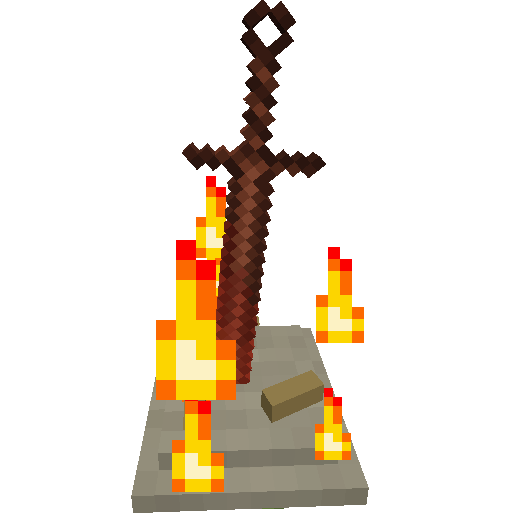
Bonfires 是一个将《黑暗之魂》系列游戏中的篝火引入 Minecraft 的模组。对于那些没有玩过《黑暗之魂》系列的玩家,篝火充当存档点,玩家可以传送至此处并恢复生命值。
在此模组中,这些篝火可以被创建和命名,随后可用于传送到任意维度(包括模组添加的维度)中的其他任何篝火。使用篝火也会像床一样设置你的重生点。
此外,它还添加了“赐福瓶”(Estus Flask),本质上是一种多用途治疗药水,在使用篝火后会得到补充。
“盘绕之剑”(Coiled Sword)是篝火的组件之一,可用作剑,击中生物时会使其着火。
还有两种物品可用于返回你的重生点:“归乡骨”(Homeward Bone)和“盘绕之剑碎片”(Coiled Sword Fragment)。
1.2 版本新增: 武器和工具可以进行强化以提升伤害,赐福瓶也可以进行强化以增加治疗效果。
入门指南
在 1.0.2+ 版本中,你可以开始体验此模组,无需查阅其他资料,只需被怪物杀死以解锁第一个进度,该进度将引导你了解模组的所有其他内容,并解锁配方书里的配方。
方块、物品、功能与合成配方
从 v1.0.2+ 版本开始,你可以在 Minecraft 1.12 中添加的配方书中查看所有这些配方。
要制作篝火,你需要两种物品:一堆骨头与灰烬(Pile of Bone and Ash)和一把盘绕之剑(Coiled Sword)。
一堆骨头与灰烬可以这样合成,你可以留空顶行,改用底行:
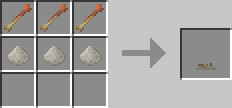
顶行的物品是归乡骨。它们用于返回你的重生点,但使用后会被消耗。你的重生点是按维度存储的。
底行的物品是一堆堆灰烬,当生物被烧死时有几率掉落。
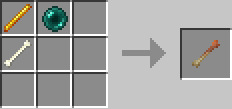
归乡骨的合成方式如下,此配方无固定形状:
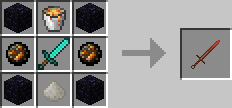
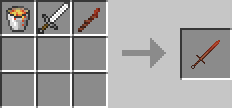
盘绕之剑的合成方式如下:
当你拥有这两种物品后,将一堆骨头与灰烬放置在地面上,然后用盘绕之剑右键点击它。这会将盘绕之剑放置在骨堆上,从而创建一个篝火。现在,要点燃篝火,只需右键点击篝火即可,这将允许你为篝火命名。在为篝火命名时,还可以选择将其设置为私有,这样其他玩家将无法看到该篝火,也就不能传送至此,但可以从此处传送离开。
然而,由于篝火类似于传送点,如果你只制作一个的话实用性不高,通常需要制作两个。
如果你摧毁一个篝火,它会掉落一个盘绕之剑碎片。其作用类似于归乡骨,但不会被消耗。它还可以用于以更少的材料制作盘绕之剑,此配方无固定形状(在 1.2.3+ 版本中,此配方被替换为锻造台配方)。
赐福瓶在合成后有 3 次使用次数,可以使用赐福碎片增加使用次数。要强化赐福瓶,只需在背包持有赐福瓶的同时,右键点击赐福碎片即可。饮用赐福瓶会恢复 3 颗心(1.5 点生命值)。
赐福瓶的合成方式如下,此配方无固定形状:
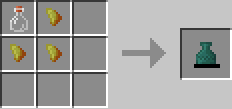
赐福碎片的合成方式如下,此配方无固定形状:
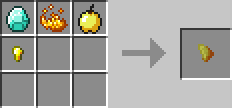
最后,灰烬块的合成方式如下,其特性完全类似于沙子,此配方实际上也是无固定形状的,只是看不出这一点!
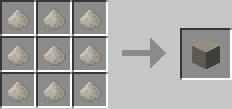
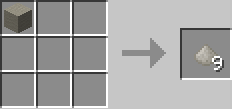
当然,一个灰烬块可以分解为 9 堆灰烬,此配方无固定形状:
1.2+ 版本新增:
已添加泰坦尼特材料,用于在篝火菜单中的强化界面强化工具/武器。
泰坦尼特碎片通过开采旁边有熔岩的黑曜石获得。在 1.2.3+ 版本中,此方法不再适用,改为冶炼黑曜石。
泰坦尼特碎片可以冶炼回黑曜石。此功能已在 1.2.3+ 版本中移除。
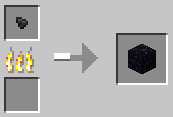
大型泰坦尼特碎片的合成方式如下,此配方无固定形状:
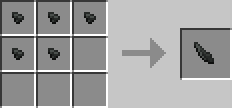
泰坦尼特块的合成方式如下,此配方无固定形状:
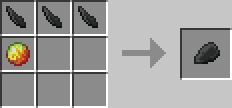
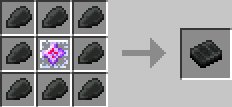
Titanite Slabs 的合成方式如下:
强化 Estus Flask 需要 Undead Bone Shard,这可以通过被爆炸摧毁的篝火获得。
1.2.3+ 新增内容
Titanite Shards 不再从紧邻熔岩的黑曜石掉落,但熔炼配方仍然保留。
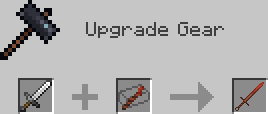
更便宜的 Coiled Sword 合成表现在如下所示:
1.20+:
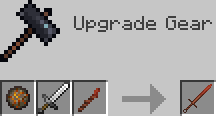
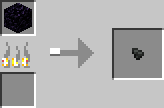
Titanite Chunks 现在按照以下方式合成:
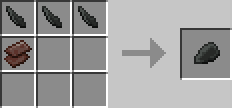
Titanite Shards 现在按照以下方式熔炼:
命令
目前 Bonfires 添加了 2 个命令,均为管理员命令。
/bonfires <filter> [parameter]
此命令用于根据提供的过滤器显示世界中的篝火。
篝火将以名称、UUID、所有者和位置的形式在聊天栏中显示。
支持的过滤器包括:
- all - 此过滤器不需要参数,将显示世界中的所有篝火。例如:/bonfires all
- dim - 此过滤器需要维度 ID 作为参数,将显示给定维度中的所有篝火。例如:/bonfires dim minecraft:overworld
- name - 此过滤器需要名称作为参数,将显示所有名称中包含给定关键词的篝火。例如:/bonfires name bonfire
- owner - 此过滤器需要所有者名称作为参数,将显示由该所有者创建的所有篝火。例如:/bonfires owner Wehavecookies56
- radius - 此过滤器需要区块半径作为参数,将显示指定半径内的所有篝火。例如:/bonfires radius 10
/travel <UUID>
此命令会将执行命令的玩家传送到具有指定 UUID 的篝火处。
篝火的 UUID 可以通过使用 /bonfires 命令或在篝火 GUI 的旅行菜单中将鼠标悬停在篝火名称上来获取。
配置
如果您有关于更多配置选项的想法,请建议可以添加的内容。
配置文件很简单,在 1.2.2 及更低版本中名为 bonfires.cfg。
在 1.2.3+ 中,有两个配置文件 bonfires-client.toml 和 bonfires-common.toml,位于 config 文件夹中。
在 1.2.9+ 中,还有一个 bonfires-server.toml,位于每个世界的 serverconfig 文件夹中。
客户端配置
Render Text Above Bonfires (默认值: true)
这个配置选项一目了然。如果设置为 true,当查看篝火时会在方块上方显示篝火名称;如果设置为 false,则不会显示。在 v1.0.2+ 中,可以在 Forge 的配置 GUI 中更改此选项而无需重启游戏。
Bonfire Dimension Tab Icons
此配置选项用于设置与关联维度 ID 对应的标签页图标。
对于未包含在此列表中的任何维度,图标将是一张地图。
1.2.3+
配置选项接受一个字符串列表,其中包含由等号分隔的维度项对。
例如 "minecraft:overworld=minecraft:grass_block" 仅将主世界(Overworld)的标签页设置为草方块。
1.2.2 及更低版本
默认设置为:
S:"Bonfire dimension tab icons" < 0=minecraft:grass -1=minecraft:netherrack 1=minecraft:end_stone >
它首先取维度 ID,然后是物品名称,并且从 v1.2.1 开始支持元数据(metadata)。
例如:
S:"Bonfire dimension tab icons" < 0=minecraft:grass -1=minecraft:netherrack 1=minecraft:end_stone 2=bonfires:coiled_sword 3=minecraft:stone,2 >
这将把 ID 为 2 的维度的图标设置为来自本模组的 Coiled Sword 作为标签页图标。如果未设置图标或提供的物品不存在,图标将为一张地图。
ID 为 3 的维度的图标将设置为带有元数据 2 的石块,即磨制花岗岩。
如果未指定元数据,则默认使用 0。
1.2.11 新增内容:
以下所有配置选项均与新截图系统相关,在该系统中,旅行菜单会显示篝火截图。创建篝火时会拍摄并保存截图到 Minecraft 实例文件夹中的 bonfires 文件夹内,这些截图不会发送给多人游戏中的其他玩家。即使旅行菜单中没有截图,也可以为篝火拍摄截图。当篝火被摧毁时,截图也会被删除。
Render Screenshots in GUI (默认值: true)
禁用此项可在篝火 GUI 中隐藏篝火截图。
Enable Automatic Screenshot on Creation (默认值: true)
禁用此项可停止在创建篝火时拍摄截图,但仍可通过点击篝火 GUI 中的截图按钮来拍摄截图。
Screenshot Wait Ticks (默认值: 5, 范围 1-100)
这将改变拍摄篝火截图时的等待时间。如果截图中未隐藏 GUI,请增加此值。这通常只会在性能较低的情况下出现问题。
Delete Screenshots on Destroyed (默认值: true)
每当篝火被摧毁时,关联的截图(如果存在)会被删除。禁用此项可阻止此操作。
1.2.15 新增内容:
隐藏 GUI 中的维度(默认:空)
使用此选项可在篝火 GUI 中隐藏特定维度。这并不会禁用在该维度中使用篝火的功能,仅仅是隐藏了 GUI 中的标签页。如果您无法或不愿在该维度中创建篝火,此功能可能非常有用。
示例: "Hidden Dimensions in GUI" = ["minecraft:the_end"]
通用配置
启用在黑曜石旁被岩浆相邻时掉落钛晶石碎片(默认:true)
在 1.2.3+ 版本中已移除此选项。
此配置选项不言自明:如果为 true,当在黑曜石旁边开采时会掉落钛晶石碎片。如果为 false,则无法获得钛晶石碎片,这对于希望拥有自己获取方式的整合包非常有用。
启用通过炸毁篝火掉落亡灵骨片(默认:true)
此配置选项不言自明:如果为 true,当篝火被爆炸摧毁时会掉落亡灵骨片。如果为 false,则无法获得亡灵骨片,这对于希望拥有自己获取方式的整合包非常有用。
启用武器/工具强化(默认:true)
使用此配置选项可以完全禁用武器/工具的强化功能,如果您只想让篝火仅具备传送能力。
强化物品黑名单
此选项用于禁用某些物品出现在强化菜单中。
默认情况下,黑名单为空。
列表格式如下所示:
例如:
在 1.2.2 及更低版本中
S:"Reinforce item blacklist" < minecraft:wooden_sword minecraft:stone_sword >
在 1.2.3+ 版本中 "Reinforce item blacklist" = ["minecraft:wooden_sword", "minecraft:stone_sword"]
这将阻止木剑和石剑进行强化。
服务器配置
对于不熟悉的人来说,服务器配置文件位于每个存档/世界的 serverconfig 文件夹中;您可以将它们放入 defaultconfigs 文件夹以自动复制到新世界。
1.2.9 新增:
设置初始状态下 Estus Flask 的治疗量(默认:6)
设置此值以更改 Estus Flask 在基础等级下治疗的心数,1 等于半颗心。
设置每级提升的 Estus Flask 治疗量(默认:1)
设置此值以更改每个强化等级增加多少心数的治疗量。
设置每级提升的强化工具伤害量(默认:0.5)
设置此值以更改每个强化等级增加多少工具伤害。
已知问题
仅在创意模式的服务器上存在一个 Forge/Minecraft 的 Bug,导致打开创意物品栏时会丢失强化数据。此问题不适用于 1.2.7+ 版本。
所有已知问题均位于 此处,如果您遇到任何问题,请在此处报告 此处
请在报告问题之前确保您使用的是最新版本,并且该问题尚未被报告。
我可以在整合包中使用此模组吗?
当然可以!如果可以的话,我希望你能署名,但这不是必须的。
翻译此模组
会说其他语言吗?想为该模组做出贡献?您可以在 此处 添加翻译文件。请使用 en_us.json 文件作为基础,因为它始终是最更新的语言文件。
计划中的功能
- 一种通过篝火的 UUID 共享私人篝火的功能。
- 添加灵魂系统,其运作方式类似于 Dark Souls,但灵魂将作为平衡机制用于使用篝火。
- 添加原始篝火,这是一种成本更低的篝火,右键点击时会传送到指定的篝火位置。
- 可能来自 Souls 游戏的更多内容,不太可能添加战斗功能,因为这是一个更注重实用性的模组。
特别感谢
- Prophecy_Wrecker 为模组中的所有物品创建了全新、更好且令人惊叹的纹理!
- FromSoftware 和 Bandai Namco 带来的 Dark Souls
Just a heads up v1.2.18 will be the last 1.18.2, 1.19.2 and 1.19.4 version
Bonfires has now been ported to Fabric for 1.20.1 and 1.20.4, I will continue to support NeoForge. This was my first time using and developing for Fabric I hope it's alright >_<
What the mod adds
Bonfires is a mod that brings bonfires from the Souls games to Minecraft. For those who have not played the Souls games, bonfires act like checkpoints which can be teleported to and will heal the player.
In this mod these bonfires can be created and named which then can be used to travel to any other bonfire in any dimension even mod dimensions. Using a bonfire will also set your spawn location like a bed.
It also adds the Estus Flask, which is essentially a multi use healing potion which is restored when using a bonfire.
The Coiled Sword, which is a component of bonfires, can be used as a sword which will set mobs on fire.
There are also 2 items which can be used to return to your spawn point, the Homeward Bone and the Coiled Sword Fragment.
New in 1.2: Weapons and tools can be reinforced to increase their damage, estus flasks can be reinforced to increase the amount healed
Getting started
In 1.0.2+ you can get started with the mod without the need of looking at anything else just get killed by a mob to unlock the first advancement, which will guide you to the everything else in the mod and unlocking recipes for the recipe book.
Blocks, Items, Features and Crafting Recipes
With v1.0.2+ you can see all these recipes inside the recipe book added in Minecraft 1.12
To create a bonfire you need 2 items. A Pile of Bone and Ash and a Coiled Sword.
The Pile of Bone and Ash can be crafted like so, you can leave the top row empty and use the bottom row instead
The items in the top are homeward bones. These are used to return to your spawn point but are consumed on use. Your spawn point is stored per dimension.
The items in the bottom are Piles of Ash which have a chance to drop from mobs when burnt to death.
Homeward Bones are crafted like so, this recipe is shapeless
The Coiled Sword are crafted like so
Once you have both place the Pile of Bone and Ash on the ground and then right click it with the Coiled Sword. This will place the coiled sword on the pile creating a bonfire. Now to light the bonfire you simply right click the bonfire which will then allow you to name the bonfire. When naming the bonfire there is also the option to set the bonfire as private which will hide the bonfire from other players so they can't travel to it but can travel from it.
However, since bonfires are like teleporters they are only really useful if you make 2 of them.
If you destroy a bonfire it will drop a Coiled Sword Fragment which acts just like the Homeward Bone but is not consumed. It can also be used to create a Coiled Sword for less materials, this recipe is shapeless (This recipe is replaced by a smithing recipe in 1.2.3+).
The Estus Flask when crafted has 3 uses which can be increased using Estus Shards. To reinforce the Estus Flask simply right click while holding an Estus Shard with the Estus Flask in your inventory. Drinking the Estus Flask will heal 3 hearts.
The Estus Flask is crafted like so, this recipe is shapeless
And Estus Shards are crafted like so, this recipe is shapeless
Lastly Ash Blocks are crafted like so, which act exactly like sand, this recipe is actually also shapeless but there's no way to tell that!
And of course a block will create 9 Piles of Ash, this recipe is shapeless
New in 1.2+:
Titanite materials have been added which are used for reinforcing tools/weapons in the reinforce GUI located in the Bonfire menu.
Titanite Shards are obtained by mining obsidian that has lava adjacent to it. In 1.2.3+ this no longer happens instead smelt Obsidian.
Titanite Shards can be smelted back into obsidian. This has been removed in 1.2.3+
Large Titanite Shards are crafted like so, this recipe is shapeless
Titanite Chunks are crafted like so, this recipe is shapeless
Titanite Slabs are crafted like so
To reinforce the Estus Flask an Undead Bone Shard is required which are obtained when a bonfire is destroyed by an explosion.
New in 1.2.3+
Titanite Shards no longer drop from obsidian adjacent to lava, the smelting recipe still remains.
The cheaper Coiled Sword recipe is now crafted like so
In 1.20+:
Titanite Chunks are now crafted like so
Titanite Shards are now smelted like so
Commands
There are currently 2 commands added by Bonfires both of which are admin commands
/bonfires <filter> [parameter]
This command is used to display the bonfires in the world based on the filters given to it.
Bonfires are displayed in the chat with the name, UUID, owner and position
The filters include:
- all - this filter takes no parameters, and will display every bonfire in the world. ex. /bonfires all
- dim - this filter requires the dimension ID as a parameter and will display every bonfire in the given dimension. ex. /bonfires dim minecraft:overworld
- name - this filter requires the name as a parameter and will display every bonfire that contains the given name in its name. ex. /bonfires name bonfire
- owner - this filter requires the owner as a parameter and will display every bonfire created by the given owner. ex. /bonfires owner Wehavecookies56
- radius - this filter requires the block radius as a parameter and will display every bonfire within the given radius of blocks. ex. /bonfires radius 10
/travel <UUID>
This command will teleport the user of the command to the bonfire with the given UUID
The UUID of a bonfire can be found either using the /bonfires command or by hovering over the name of the bonfire in the travel menu in the bonfire GUI
Configuration
If you have any ideas for more config options please suggest more that could be added.
The config file is simply named, in 1.2.2 and below, bonfires.cfg
In 1.2.3+ there are 2 config files bonfires-client.toml and bonfires-common.toml located in the config folder
In 1.2.9+ there is also bonfires-server.toml located in each world's serverconfig folder
Client config
Render Text Above Bonfires (Default: true)
This config option is quite self explanatory, simply if set to true it will display the name of the bonfire above the block when looked at otherwise if set to false it will not. In v1.0.2+ this option can be changed within Forge's config GUI without restarting the game.
Bonfire Dimension Tab Icons
This config option is used to set the icon for the tab for associated dimension ID.
For any dimension not included in this list the icon will be a filled map.
In 1.2.3+
The config option takes a list of strings which contain a pair of a dimension and an item separated by an =.
For example "minecraft:overworld=minecraft:grass_block" simply sets the tab for the overworld to a grass block
In 1.2.2 and below
By default it is set to:
S:"Bonfire dimension tab icons" < 0=minecraft:grass -1=minecraft:netherrack 1=minecraft:end_stone >
It takes the dimension ID then the item name and as of v1.2.1 the metadata is supported
For example:
S:"Bonfire dimension tab icons" < 0=minecraft:grass -1=minecraft:netherrack 1=minecraft:end_stone 2=bonfires:coiled_sword 3=minecraft:stone,2 >
This will set the icon for the dimension with ID 2 to have the Coiled Sword from this mod as the icon for the tab, if the icon is not set or the item given doesn't exist the icon will be a map.
The icon for dimension 3 will be set to Stone with metadata 2 which is Polished Granite.
If the metadata isn't specified it will use 0.
New in 1.2.11:
All the config options below are related to the new screenshot system where in the travel menu Bonfire screenshots are displayed, when creating a Bonfire a screenshot will be taken and saved in the bonfires folder located in your Minecraft instance folder these screenshots are not sent to other players in multiplayer. Screenshots can be taken for Bonfires without a screenshot in the travel menu. When a Bonfire is destroyed the screenshot is deleted.
Render Screenshots in GUI (Default: true)
Disable this to hide the Bonfire screenshots in the Bonfire GUI
Enable Automatic Screenshot on Creation (Default: true)
Disable this to stop taking screenshots when creating a Bonfire, screenshots can still be taken by clicking the screenshot button in the Bonfire GUI
Screenshot Wait Ticks (Default: 5, Range 1-100)
This will change how long it waits while taking a Bonfire screenshot, increase this value if the GUI is not hidden in the screenshot this should only be a problem if you have low performance.
Delete Screenshots on Destroyed (Default: true)
Whenever a Bonfire is destroyed the associated screenshot (if it exists) is deleted, disable this to stop that.
New in 1.2.15:
Hidden Dimensions in GUI (Default: empty)
Use this to hide dimensions from the Bonfire GUI, this does not disable using Bonfires in said dimension it just simply hides the tab in the GUI. This might be useful if you can't or won't create a Bonfire in that dimension.
Example: "Hidden Dimensions in GUI" = ["minecraft:the_end"]
Common config
Enable titanite shard drops from obsidian when adjacent to lava (Default: true)
In 1.2.3+ this option has been removed.
This config option should speak for itself, if true titanite shards will drop when obsidian is mined next to lava. If false titanite shards will be unobtainable this is useful for modpacks which may want to have their own method of obtaining them
Enable undead bone shard drops from blowing up a bonfire (Default: true)
This config option should speak for itself, if true undead bone shards will drop when a bonfire is destroyed by an explosion. If false undead bone shards will be unobtainable this is useful for modpacks which may want to have their own method of obtaining them
Enable weapon/tool reinforcing (Default: true)
Use this config option to completely disable weapon/tool reinforcing if you just want to have the bonfires only have teleportation capabilities
Reinforce item blacklist
This is used to disable certain items showing up in the reinforce menu.
By default the blacklist is empty
The list simply takes the item name like so
For example:
In 1.2.2 and below
S:"Reinforce item blacklist" < minecraft:wooden_sword minecraft:stone_sword >
In 1.2.3+ "Reinforce item blacklist" = ["minecraft:wooden_sword", "minecraft:stone_sword"]
This will stop wooden swords and stone swords from being reinforced.
Server config
For those unfamiliar, server configs are located in the serverconfig folder for each save/world they can be placed in the defaultconfigs folder to copy automatically to new worlds.
New in 1.2.9:
Set how much the Estus Flask heals by default (Default: 6)
Set this value to change how many hearts the Estus Flask heals at its base level, 1 is equal to half a heart
Set the amount to increase Estus Flask healing per level (Default: 1)
Set this value to change how much each reinforcement level increases the amount of hearts healed with the Estus Flask
Set the amount to increase damage for reinforced tools per level (Default: 0.5)
Set this value to change how much each reinforcement level increases the damage tools deal
Known issues
Only when on a server in creative mode there is a forge/minecraft bug that causes the reinforce data to be lost when opening the creative inventory. This does not apply for 1.2.7+
All the known issues are located here, if you do come accross one please report it here
Please make sure before reporting an issue that you are using the latest version and that it has not already been reported.
Can I use this in a modpack?
Of course! I would prefer if you credited me, however, it is not required.
Translate this mod
Speak another language? Want to contribute something to the mod? You can add translation files here. Use the en_us.json file as a base as that will always be the most up to date language file.
Planned Features
- A system to share private bonfires through the UUID of the bonfire.
- Add souls to which will work similarly to Dark Souls however souls will be spent on using the bonfire as a balancing feature.
- Add primal bonfires, one way cheaper bonfires which are assigned a bonfire to travel to when right clicked.
- Potentially more things from the Souls games, combat features are unlikely to be added as this is more of a utility focused mod.
Big thanks to
- Prophecy_Wrecker for creating new, better and amazing textures for everything in the mod!
- FromSoftware and Bandai Namco for Dark Souls

 模组

 模组

 模组
 模组

 模组
 模组
评论 0
登录后参与评分
还没有评论,来抢沙发吧