
用 CalcMod 将计算的力量带入你的 Minecraft 聊天栏!享受从简单计算到优化游戏体验的高级工具等各种功能。
| /calc 3+(28/8)^2 |
 |
| /calc craft piston 3 sb |
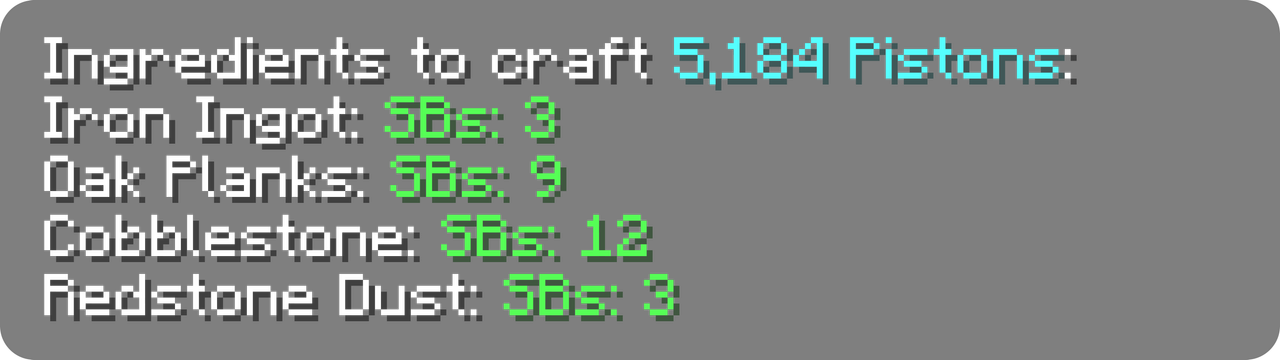 |
| /calc nether ~ ~ ~ |
 |
点击任意绿色文本即可将其复制到剪贴板!
? 兼容性
CalcMod 支持 Fabric、Forge、Quilt、Paper 和 NeoForge 模组加载器,最低支持 Minecraft 1.12 版本。
CalcMod 可安装在客户端和服务端两方,也可在不要求服务器安装该模组的客户端上使用(反之亦然)。
✅ 功能:
在图库中查看一些示例
? 简易计算器
一个直观的计算器,带有一些实用的变量。要查看变量列表,请运行 /calc variables。
支持的运算符
| 符号 |
语法 |
运算 |
| + |
a+b |
加法 |
| – |
a–b |
减法 |
| * , × , ∙ |
a*b |
乘法 |
| / , : , ÷ |
a/b |
除法 |
| ^ |
a^b |
幂运算(乘方) |
| ! |
n! |
阶乘 |
| # |
a#b |
取模 |
| % |
x% |
百分比 |
| ^^ |
a^^b |
四则运算(幂塔) |
| √ |
√x |
平方根 |
| ∛ |
∛x |
立方根 |
| ∜ |
∜x |
四次方根 |
CalcMod 还有更多可在表达式中使用的高级函数和变量,详见此电子表格。
(CalcMod 1.6.0+) 可在原版按键设置中设置快捷键,以便更快调出 /calc。
用法:/calc <expression>
? 存储工具
给定每小时物品速率*(允许使用表达式)*,返回按时分拣所需的最少物品分拣器数量。
可为多个漏斗速度分拣器提供额外输入,并另有针对悦灵的非可堆叠物品分拣器的独立命令。
用法:/calc storage <itemsPerHour>
用法:/calc storage <timesHopperSpeed> <numberOfItems>
用法:/calc allaystorage <itemsPerHour>
?️ 合成工具
给定要合成的配方数量*(允许使用表达式)*,返回合成该数量配方所需的所有物品。
(CalcMod 1.3.2+) 可选参数 depth 指定对配方执行多少层递归合成。默认 depth 为 1。
用法:/calc craft <item> <amount>
用法:/calc craft <item> <depth> <amount>
当 craftinv 命令给定一个物品时,返回玩家使用当前背包*(包括潜影盒中的物品)*能够合成的该物品的最大数量。
用法:/calc craftinv <item>
(Minecraft 1.21.3+) 由于 Minecraft 合成系统更新,CalcMod 的 craft 命令在单人模式下现在只能使用用户配方书中已解锁的配方。
? 传送门坐标转换
给定一个方块坐标,返回命令所对应维度的坐标。如果未给出坐标,命令将假设为当前玩家位置。
用法:/calc nether <x> <y> <z>
用法:/calc overworld <x> <y> <z>
? 农场速率计算器
给定物品数量和农场运行时间(秒)(允许使用表达式),返回农场的每小时物品产率。
用法:/calc rates <numberOfItems> <seconds>
? 生成随机数
给定最大值和/或最小值,返回这些值之间(含端点)的随机数。如果只输入最大值,则从 0 到最大值(含端点)中选取一个随机数。
用法:/calc random <max>
用法:/calc random minmax <min> <max>
? 比较器信号强度查找器
给定容器和所需的比较器信号强度*(允许使用表达式)*,返回达到该信号强度所需的物品数量。
用法:/calc signaltoitems <container> <powerLevel>
? 猪灵以物易物工具
计算以物易物获取特定数量所需物品所需的金锭平均数量*(togold),或以特定数量金锭进行以物易物时获得的所需物品平均数量(toitem)*。
用法: /calc barter togold <numberOfItems> <item>
用法: /calc barter toitem <amountOfGold> <item>
? 旅行距离计算器
给定两个方块坐标时,返回它们之间的距离。如果只给定一个坐标,则使用玩家所在位置。3D 模式提供包含高度 (y 坐标) 的距离。
用法: /calc dist <x1> <y1> <z1>
用法: /calc dist <x1> <y1> <z1> <x2> <y2> <z2>
用法: /calc dist 3d <x1> <y1> <z1>
用法: /calc dist 3d <x1> <y1> <z1> <x2> <y2> <z2>
? 自定义函数
自定义函数是可重复使用的命令,用于执行特定的计算。自定义函数可在任何数字字段中运行,格式为函数名后跟括号中的参数 functionName(<param1>, ...,<paramN>)。
创建函数:
自定义函数可以有任意数量的参数,添加函数时在[方]括号中指定。
| ⚠️ 在参数中使用任何数字、特殊字符或变量都可能导致函数失效。 |
例如: /calc custom add blockstoingots [numBlocks]*9
| /calc blockstoingots(72) |
 |
用法: /calc custom add <functionName> <function>
用法: /calc custom run <functionName> <input>
用法: /calc <functionName>(<parameters>)
用法: /calc custom list
用法: /calc custom remove <functionName>
➡️ 转换器:
潜影盒 ↔ 物品
给定一定数量的装满的潜影盒 (允许使用表达式),返回其中包含的物品数量,或反过来。
用法: /calc itemtosb <numberOfItems>
用法: /calc sbtoitem <numberOfSbs>
物品 ↔ 组:
给定一定数量的组 (允许使用表达式),返回这些组中的物品数量,或反过来。
用法: /calc itemtostack <numberOfItems>
用法: /calc stacktoitem <numberOfStacks>
秒 → 漏斗时钟物品数
给定一个以秒为单位的时间 (允许使用表达式),返回要放入漏斗时钟以达到该时间的物品数量。
使用来自 hoppertimer.net 的公式和漏斗时钟。

用法: /calc secondstohopperclock <seconds>
秒 → 中继器延迟
给定一个以秒为单位的时间 (允许使用表达式),返回要达到该时间所需的中继器数量及其延迟。
用法: /calc secondstorepeater <seconds>
❎ 变量
变量可在命令中的任何数字字段内使用。它们作为快捷方式,让你无需记住“一个装满 16 个可堆叠物品的双箱子是 864”。
如果未指定堆叠大小,变量将默认采用各命令中上下文的堆叠大小。
常量变量
| 名称 |
值 |
| dub |
3456(默认) |
| dub64 |
3456 |
| dub16 |
864 |
| dub1 |
54 |
| sb |
1728(默认) |
| sb64 |
1728 |
| sb16 |
432 |
| sb1 |
27 |
| stack |
64(默认) |
| stack64 |
64 |
| stack16 |
16 |
| stack1 |
1 |
| min |
60 |
| h |
3600 |
此电子表格中列出了一些与 Minecraft 关系不大的其他变量
动态变量
动态变量会根据游戏内状态而变化。这些变量在自定义函数中可能特别有用。
| 名称 |
值 |
| x |
玩家 x 坐标 |
| y |
玩家 y 坐标 |
| z |
玩家 z 坐标 |
| health |
玩家生命值 |
下载 calcmod!!
Bring the power of calculation to your Minecraft chat with CalcMod! Enjoy features from simple calculations to advanced tools for optimizing gameplay.
| /calc 3+(28/8)^2 |
|
| /calc craft piston 3 sb |
|
| /calc nether ~ ~ ~ |
|
Click any green text to copy it to your clipboard!
🔄 Compatibility
CalcMod supports Fabric, Forge, Quilt, Paper, and NeoForge mod loaders, down to Minecraft version 1.12.
CalcMod can be installed on both the client and server, and also works on clients without requiring servers to have the mod (and vice versa.)
✅ Features:
See a few examples in gallery
🔢 Simple Calculator
An intuitive calculator with some handy variables. To see a list of variables run /calc variables.
Supported Operators
| Symbol(s) |
Syntax |
Operation |
| + |
a+b |
Addition |
| – |
a–b |
Subtraction |
| * , × , ∙ |
a*b |
Multiplication |
| / , : , ÷ |
a/b |
Division |
| ^ |
a^b |
Exponentiation (power) |
| ! |
n! |
Factorial |
| # |
a#b |
Modulo |
| % |
x% |
Percentage |
| ^^ |
a^^b |
Tetration |
| √ |
√x |
Square root |
| ∛ |
∛x |
Cube root |
| ∜ |
∜x |
Fourth root |
CalcMod has some more advanced functions and variables that can be used within expressions in this spreadsheet.
(CalcMod 1.6.0+) A keybind can be set in the vanilla keybinds section to pull up /calc faster.
Usage: /calc <expression>
📦 Storage Utils
When given a rate of items per hour (expressions allowed), returns the minimum number of item sorters needed to sort in time.
Additional input for multiple times hopper speed sorters, and a separate command for Allay based non stackable sorters.
Usage: /calc storage <itemsPerHour>
Usage: /calc storage <timesHopperSpeed> <numberOfItems>
Usage: /calc allaystorage <itemsPerHour>
🛠️ Crafting Utils
When given an amount of a recipe to craft *(expressions allowed)*, returns all the items required to craft that quantity of the recipe.
(CalcMod 1.3.2+) The optional depth argument specifies how many levels of recursive crafting to perform on the recipe. Default depth is 1.
Usage: /calc craft <item> <amount>
Usage: /calc craft <item> <depth> <amount>
When the craftinv command is given an item, it returns the maximum number of that item the player can craft using their current inventory (including items in shulker boxes).
Usage: /calc craftinv <item>
(Minecraft 1.21.3+) Due to Minecraft's crafting system updates, CalcMod's craft command can now only use recipes unlocked in the user's recipe book in single player mode.
🌐 Portal Linking Coords
When given a block position, returns the dimension in the command's corresponding coordinates. If no coordinates are given, command assumes current player position.
Usage: /calc nether <x> <y> <z>
Usage: /calc overworld <x> <y> <z>
🌾 Farm Rates Calculator
When given an amount of items and a farm run time in seconds (expressions allowed), returns the items per hour of the farm.
Usage: /calc rates <numberOfItems> <seconds>
🎲 Generate Random Number
When given a maximum and/or minimum value, returns a random number between those values (inclusive). If just a maximum value is entered, picks a random number from 0 to the max value (inclusive).
Usage:/calc random <max>
Usage: /calc random minmax <min> <max>
💪 Comparator Power Level Finder
When given a container and a desired comparator power level (expressions allowed), returns the number of items needed to achieve that power level.
Usage: /calc signaltoitems <container> <powerLevel>
🐷 Piglin Bartering Utils
Calculates the average number of gold ingots needed to barter for a specific quantity of a desired item (togold), or the average number of a desired item received when bartering a specific number of gold ingots (toitem).
Usage: /calc barter togold <numberOfItems> <item>
Usage: /calc barter toitem <amountOfGold> <item>
🧭 Travel Distance Evaluator
When given two block positions, returns the distance between them. If only one position is given, uses player's location. The 3D mode provides distance including height (y coord).
Usage: /calc dist <x1> <y1> <z1>
Usage: /calc dist <x1> <y1> <z1> <x2> <y2> <z2>
Usage: /calc dist 3d <x1> <y1> <z1>
Usage: /calc dist 3d <x1> <y1> <z1> <x2> <y2> <z2>
🧮 Custom Functions
Custom functions are reusable commands that perform a specific computation. Custom functions can be run in any number field formatted with the function name and its parameters in parentheses functionName(<param1>, ...,<paramN>).
Creating a Function:
Custom functions can have any number of parameters, specified in [square] brackets when adding a function.
| ⚠️ Using any numbers, special characters, or variables in a parameter may result in a broken function. |
e.g. /calc custom add blockstoingots [numBlocks]*9
| /calc blockstoingots(72) |
|
Usage: /calc custom add <functionName> <function>
Usage: /calc custom run <functionName> <input>
Usage: /calc <functionName>(<parameters>)
Usage: /calc custom list
Usage: /calc custom remove <functionName>
➡️ Converters:
Shulker Boxes ↔ Items
When given an amount of full shulker boxes (expressions allowed), returns the number of items they contain, or vice versa.
Usage: /calc itemtosb <numberOfItems>
Usage: /calc sbtoitem <numberOfSbs>
Items ↔ Stacks:
When given an amount of stacks (expressions allowed), returns the number of items in those stacks, or vice versa.
Usage: /calc itemtostack <numberOfItems>
Usage: /calc stacktoitem <numberOfStacks>
Seconds → Hopper Clock Items
When given a time in seconds (expressions allowed) returns the number of items to put in a hopper clock to achieve that time.
Uses formula and hopper clock from hoppertimer.net.
Usage: /calc secondstohopperclock <seconds>
Seconds → Repeater Delay
When given a time in seconds (expressions allowed), returns the number of repeaters and their delays to achieve that time.
Usage: /calc secondstorepeater <seconds>
❎ Variables
Variables can be used inside commands in any number field. They act as shortcuts instead of having to remember that "a double chest full of 16 stackable items is 864."
If no stack size is given, variables default to the contextualized stack size in each command.
Constant Variables
| Name |
Value |
| dub |
3456 (default) |
| dub64 |
3456 |
| dub16 |
864 |
| dub1 |
54 |
| sb |
1728 (default) |
| sb64 |
1728 |
| sb16 |
432 |
| sb1 |
27 |
| stack |
64 (default) |
| stack64 |
64 |
| stack16 |
16 |
| stack1 |
1 |
| min |
60 |
| h |
3600 |
There are some extra less Minecraft specific variables listed in this spreadsheet
Dynamic Variables
Dynamic variables change depending on an in-game status. These can be particularly useful inside custom functions.
| Name |
Value |
| x |
player x coord |
| y |
player y coord |
| z |
player z coord |
| health |
player health |
Download calcmod!!

 模组

 模组

 模组
 模组
 模组
 模组
评论 0
登录后参与评分
还没有评论,来抢沙发吧