
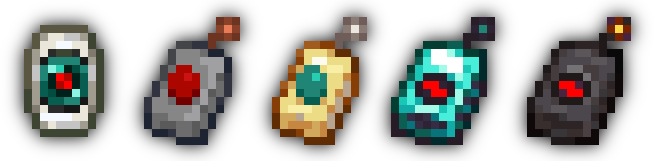
本模组添加了四种新的**远程访问器(Remote Accessor)**物品,允许玩家与方块建立校准连接后,从任何位置打开其界面;在更高等级的支持下,甚至可以从不同的维度进行操作!
要开始使用,请先在锻造台(Smithing Table)中放置一颗末影珍珠和一些红石粉尘,以制作校准器(Calibrator)——这是所有访问器的核心组件。接着,使用一些外壳材料和天线材料制作一个访问器,然后潜行并右键点击一个功能正常的方块进行校准,最后即可在任何距离下通过远程设备打开该方块的界面!
为什么?
本模组的诞生源于对 keepInventory(保留经验/物品)游戏规则的替代需求。简单来说,在 Minecraft 中死亡非常令人沮丧! 当意外或非公平事件导致死亡时,保留物品栏确实很有帮助。然而,这一机制很容易被滥用:如果没有限制,玩家岂不是可以故意跳下悬崖,以便更轻松地从基地复活?
Calibrated Access 提供了在前期即可获取的系统,例如可用于随时“寄存”物品,以防灾难发生时物品丢失。担心平衡性问题?请参阅下方的 Balance(平衡性) 章节!
详情
平衡性
第一级远程访问器——新手访问器(Novice Accessor),制作起来非常简单。事实上,它的配方专为前期设计。然而,较低等级的访问器在功能上相当有限。平衡性的关键因素在于每个远程设备拥有的访问次数(accesses)。
每次使用校准后的远程设备,都会消耗一个访问点。只有当远程设备至少剩余一个访问点时,玩家才能使用它。补充访问计数量的唯一方法是重新校准另一个方块。新手访问器拥有 3 次访问机会;这个数量足够少,迫使玩家在决定是否使用远程设备时必须三思。熟练访问器(Skilled Accessor)拥有 7 次访问机会;专家访问器(Expert Accessor)拥有 15 次;无限访问器(Unlimited Accessor)则没有访问次数限制。
此外,还存在一个 15 秒的宽限期(grace period),从使用远程设备时开始计时。在此期间,玩家可以自由地打开和关闭远程界面而不会额外消耗访问点。同时,在宽限期内,远程设备的天线上会出现“电击”视觉效果。不过,无限访问器的电击效果仅为视觉表现。
另一个平衡因素是访问器的跨维度能力。只有新手访问器无法打开其他维度中方块的界面。第二级远程设备——熟练访问器,需要石英来制作,这意味着玩家需要先前往其他维度,才能获得这一层额外的安全保障。
最后一个属性是一次可以同时使用的远程设备数量。默认情况下仅限一个,但你可以通过下文 Additional Features(额外功能) 部分描述的游戏规则更改此设置。尽管你可以尝试利用系统漏洞,但这里采用了“会话(sessions)”系统来实现,将每次校准实例映射到一个 UUID。作为副作用,这使得所有校准后的访问器都成为玩家专属(per-player)。
额外功能
- 冒险(Adventure) 标签页中的四个新进度
- 一个 API,用于在访问特定方块时添加自定义行为。
maxRemoteSessions游戏规则,用于控制玩家一次可以同时校准多少个访问器allowSyncedIdMismatch游戏规则,用于控制远程设备是否可以在已校准的位置尝试访问不同类型的方块
许可证
MIT © 2023 spadeteam
This mod adds four new Remote Accessor items that allow players to calibrate with a block and open its screen from anywhere; with higher tiers, even from different dimensions!
To get started, craft a Calibrator, the central component of all Accessors, by placing an Ender Pearl and some Redstone Dust in a Smithing Table. Craft an Accessor with some casing and antenna materials, sneak-interact with a functional block, and use the remote to open its screen from any distance!
Why?
This mod was created out of a need for an alternative to the keepInventory game rule. Simply put, dying in Minecraft is annoying! Keeping your inventory on death is great when the event was unintentional or unfair. However, it can be easily abused: what's stopping players from careening off a cliff so they can get back to base more easily?
Calibrated Access provides systems accessible to the early-game that, for example, could be used to "bank" items on-the-fly to prevent item loss in case disaster strikes. Concerned about balance? See the Balance section in the details below!
Details
Balance
The first tier of remote, the Novice Accessor, is simple to craft. Indeed, its recipe is designed for the early game. However, the lower tiers of Accessor are quite limited in their functionality. The most effective factor for balance is the number of accesses a specific remote has.
Upon using a calibrated remote, one access point is consumed. Players can only use a remote if it has at least one access point left. The only way to replenish the access counter is to recalibrate with another block. A Novice Accessor has three accesses; this amount is small enough that players will have to stop and think about whether they want to use the remote at a time. A Skilled Accessor has seven accesses; an Expert Accessor has fifteen; an Unlimited Accessor does not have an access counter.
There is also a 15-second grace period that begins when a remote is used. During this period, players can freely open and close the remote without losing another access point. Additionally, the remote will have a "zap" effect on its antenna while the grace period is active. However, an Unlimited Accessor's zap is merely visual.
Another balancing factor is the interdimensional capability of an Accessor. Only the Novice Accessor is unable to open blocks' screens from other dimensions. The second tier of remote, the Skilled Accessor, requires Quartz to craft, requiring players to first venture into a different dimension before they have that extra level of safety.
A final property is the number of remotes that can be used at once. This defaults to just one, though you can change this with a game rule described in the Additional Features section below. Go ahead and try to game the system; this is implemented with a "sessions" system that maps each calibration instance to a UUID. As a side-effect, this makes all calibrated Accessors per-player.
Additional Features
- Four new advancements in the Adventure tab
- An API to add custom behavior when accessing specific blocks.
maxRemoteSessionsgame rule to control the number of Accessors that a player can have calibrated at onceallowSyncedIdMismatchgame rule to control whether a remote can try to access a different block type at the same position it was calibrated to
License
MIT © 2023 spadeteam

下载 Calibrated Access
需要联机服务器吗?
稳定流畅、一键部署,几分钟即可和朋友联机开服
最低仅需 8 元/月 即可畅快联机
下载 Calibrated Access
需要联机服务器吗?
稳定流畅、一键部署,几分钟即可和朋友联机开服
最低仅需 8 元/月 即可畅快联机
下载 Calibrated Access
需要联机服务器吗?
稳定流畅、一键部署,几分钟即可和朋友联机开服
最低仅需 8 元/月 即可畅快联机
下载 Calibrated Access
需要联机服务器吗?
稳定流畅、一键部署,几分钟即可和朋友联机开服
最低仅需 8 元/月 即可畅快联机
下载 Calibrated Access
下载 Calibrated Access
需要联机服务器吗?
稳定流畅、一键部署,几分钟即可和朋友联机开服
最低仅需 8 元/月 即可畅快联机
下载 Calibrated Access
下载 Calibrated Access
下载 Calibrated Access
需要联机服务器吗?
稳定流畅、一键部署,几分钟即可和朋友联机开服
最低仅需 8 元/月 即可畅快联机
下载 Calibrated Access
- 修复了 NBT 序列化中的一个 bug
关于这个资源的讨论、问题反馈与使用心得
还没有讨论,来发第一帖吧
你是这个资源的作者?登录后可认领此资源。
相似资源
 模组

可定制的鞘翅模组,支持装饰纹饰、旗帜图案等更多功能!
 模组

一个用于收集生物掉落物的多区块模组。
 模组

显示你正在注视的方块的信息。(适用于 Minecraft 1.16+ 的 Hwyla/Waila 分支)
 模组
使用 JavaScript 编辑配方、添加自定义物品、编写世界事件!
 模组

查看物品与配方
 模组
在游戏画面角落显示附近世界地形、玩家、生物和实体的地图。可创建路径点,帮助你找到标记过的位置。
评论 0
登录后参与评分
还没有评论,来抢沙发吧