

为你提供披风!
你可以从各种提供程序中进行选择,也可以添加你自己的。
"Capes" 模组 的改进/重构版本:
- 改进了披风提供程序的集成方式,更加简便
- 允许对提供程序进行排序
- 支持自定义提供程序
- 提供更多选项以微调披风的显示方式
- 仅使用 Java 编写(无需 Kotlin)
- 修复了各种问题并进行了多项改进
创建自定义披风提供程序
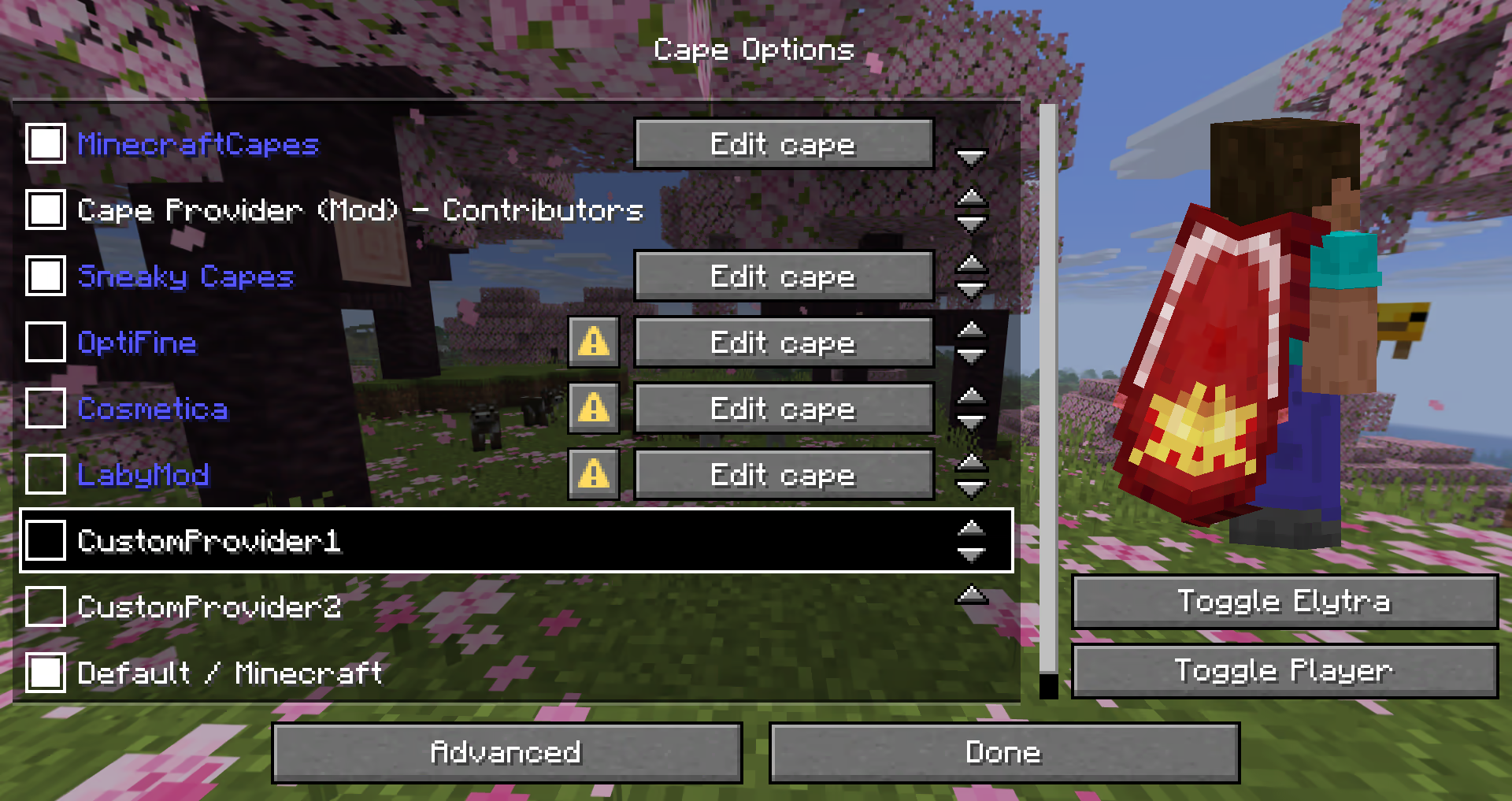
该模组提供了多种不同的方式来添加提供程序。
以下可能性按简单程度排序:
简易本地提供程序
推荐用于:
- 仅需自定义披风的用户
- 整合包(使用
config/cape-provider/simple-custom)
显示披风的最简单方法是进入 config/cape-provider 目录,并创建一个名为 cape.png 的披风纹理文件。
此外还有以下可选文件:
owners.txt- 确定哪些玩家名称或 UUID 将显示披风。如果不存在此文件,则所有玩家都将显示披风。name.txt- 用于覆盖提供程序的显示名称
你还可以通过在 config/cape-provider/simple-custom 中创建相应的目录来添加更多提供程序。
示例:config/cape-provider/simple-custom/my-super-cool-provider/cape.png
配置中的远程提供程序
推荐用于:
- 希望添加自定义远程提供程序的用户
本演示展示了如何在 custom-cape-demo 中应用披风。
-
打开位于
config/cape-provider/config.json的配置文件 -
在
remoteCustomProviders部分中添加以下条目:{ "id": "cp1", "name": "CustomProvider1", // 你可以用 $id、$name 或 $idNoHyphen 替换 uuid,以便为每位玩家定制披风 "uriTemplate": "https://raw.githubusercontent.com/litetex-oss/mcm-cape-provider/refs/heads/dev/custom-cape-demo/uuid.png" }SkinMC 示例
{ "id": "skinmc", "name": "SkinMC", "uriTemplate": "https://skinmc.net/api/v1/skinmcCape/$id" } -
重启游戏并激活提供程序
更多详细信息请参阅 RemoteCustomProvider 和 RemoteCustomProviderConfig
注意:可以使用 textureResolverId 属性选择纹理解析器(详情见下文)。
通过模组
推荐用于:
- 模组开发者
如果你是模组开发者,并希望例如为你的模组的赞助者或贡献者显示披风,你可以使用模组的资源和/或 fabric.mod.json 中的元数据来提供它。
整体行为类似于 modmenu 处理此方式的方法。
本地/简易(推荐)
此方法不需要网络通信,是推荐的方式。
它通过读取 cape 目录中的元数据和资源来实现。
以下是一个示例:
- 添加以下模组元数据:
fabric.mod.json{ ... "custom": { "cape": "Contributors" } } - 在
resources内创建一个cape目录 - 在
cape/cape.png中添加披风纹理 - 在
cape/owners.txt中添加应获得披风的玩家的 UUID 或名称
注意:还有一种更详细的变体
fabric.mod.json
{
  "custom": {
    "cape": {
      "name-extra": "Contributors",
      "owners": {
        // 你也可以使用 UUID
        "names": [
          "Notch"
        ]
      }
    }
  }
}
该模组本身也使用此策略。有关详细信息,请参阅 fabric.mod.json 或 cape 目录。
远程
以下是一个示例实现,展示了如何添加远程披风提供程序:
fabric.mod.json
{
  ...
  "custom": {
    "cape": "https://raw.githubusercontent.com/litetex-oss/mcm-cape-provider/refs/heads/dev/custom-cape-demo/uuid.png"
  }
}
这里有一个更详细的变体
fabric.mod.json
{
  "custom": {
    "cape": {
      // 给所有人一个圣诞披风
      // 你也可以在这里使用变量,如 $uuid。详见上文
      // 你可能需要用 \ 转义 $,或者你可以选择使用 § 代替 $
      // 备选方案:"uriTemplate"
      "url": "https://example.org/textures/§uuid.png",
      "changeCapeUrl": "https://...",
      "rateLimitedReqPerSec": 20 // 默认为 20
    }
  }
}
编程方式
你还可以创建一个 编程式披风提供程序。
其他说明
最大尺寸
图像/纹理不应超过 10MB。否则它们可能会被忽略。
纹理解析器 / 动态纹理
目前内置的解析器如下:
| 解析器 ID | 是否支持动画 | 格式 | 示例 | 备注 |
|---|---|---|---|---|
default / null |
❌ | PNG | uuid.png | |
sprite |
✔ | 堆叠式 PNG | animated.png | |
gif |
✔ | GIF | animated.gif | 不推荐使用 与 PNG 等更现代的格式相比,GIF 需要消耗更多资源。 |


请注意,动画纹理可能在设置中被冻结或完全禁用。
Provides you with capes!
You can choose from various providers or add your own.
Improved/Reworked version of the "Capes" mod:
- Improved and easier cape provider integration
- Allows ordering providers
- Support for custom providers
- More options to fine tune how capes are applied
- Written only in Java (no Kotlin needed)
- Various fixes and improvements
Creating a custom cape provider
The mod provides many different ways how a provider can be added.
The following possibilities are sorted by simplicity:
Simple Local Provider
Recommended for:
- Users that just want a customizable cape
- Modpacks (using
config/cape-provider/simple-custom)
The simplest way to display a cape is by going into the config/cape-provider directory and creating a cape texture file named cape.png.
Additionally there are the following optional files:
owners.txt- Determines which player names or UUIDs will get the cape displayed. If this file is not present then all players will display with the cape.name.txt- To override the display name of the provider
You can also add more providers by creating corresponding directories in config/cape-provider/simple-custom.
Example: config/cape-provider/simple-custom/my-super-cool-provider/cape.png
Remote Provider in configuration
Recommended for:
- Users that want to add a custom remote provider
This demo showcases how to apply the capes inside custom-cape-demo.
-
Open the config file located in
config/cape-provider/config.json -
In the
remoteCustomProviderssection add the following entry:{ "id": "cp1", "name": "CustomProvider1", // You can replace uuid with $id, $name or $idNoHyphen to customize the cape per Player "uriTemplate": "https://raw.githubusercontent.com/litetex-oss/mcm-cape-provider/refs/heads/dev/custom-cape-demo/uuid.png" }Example for SkinMC
{ "id": "skinmc", "name": "SkinMC", "uriTemplate": "https://skinmc.net/api/v1/skinmcCape/$id" } -
Restart the game and activate the provider
For more details have a look at RemoteCustomProvider and RemoteCustomProviderConfig
NOTE: Texture resolvers can be selected using the textureResolverId attribute (see below for details).
via Mods
Recommended for:
- Mods
If you are a mod developer and want to e.g. display a cape for supporters or contributors of your mod, you can provide it using the mod's resources and/or metadata in fabric.mod.json.
The overall behavior is similar to how modmenu handles this.
Local/Simple (Recommended)
This approach requires no network communication and is the recommended way.
It works by reading metadata and resources from the cape directory.
Here is an example:
- Add the following mod metadata:
fabric.mod.json{ ... "custom": { "cape": "Contributors" } } - Create a
capedirectory insideresources - Add the cape texture in
cape/cape.png - Add the players that should be given the cape in
cape/owners.txtwith their UUIDs or names
Note: There is also a more detailed variant
fabric.mod.json
{
  "custom": {
    "cape": {
      "name-extra": "Contributors",
      "owners": {
        // You can also used UUIDs
        "names": [
          "Notch"
        ]
      }
    }
  }
}
The mod uses this strategy itself. See the fabric.mod.json or cape directory for details.
Remote
Here's an example implementation that shows how a remote cape provider can be added:
fabric.mod.json
{
  ...
  "custom": {
    "cape": "https://raw.githubusercontent.com/litetex-oss/mcm-cape-provider/refs/heads/dev/custom-cape-demo/uuid.png"
  }
}
Here's a more detailed variant
fabric.mod.json
{
  "custom": {
    "cape": {
      // Gives everyone a christmas cape
      // You can also use variables here, like $uuid. See above for more details
      // You may have to escape the $ with \ or you can alternatively use § instead of $
      // Alternative: "uriTemplate"
      "url": "https://example.org/textures/§uuid.png",
      "changeCapeUrl": "https://...",
      "rateLimitedReqPerSec": 20 // Default is 20
    }
  }
}
Programmatic
You can also create a programmatic cape provider.
Further notes
Maximum size
Images/Textures should not exceed 10MB. Otherwise they might be ignored.
Texture resolvers / Animated textures
The following resolvers are currently built-in:
| Resolver-ID | Animated | Format | Example | Notes |
|---|---|---|---|---|
default / null |
❌ | PNG | uuid.png | |
sprite |
✔ | Stacked PNG | animated.png | |
gif |
✔ | GIF | animated.gif | Usage not recommended GIFs require more resources when compared to more modern formats like PNG. |
Please note that animated textures can be frozen or completely disabled in the settings.

下载 Cape Provider
需要联机服务器吗?
稳定流畅、一键部署,几分钟即可和朋友联机开服
最低仅需 8 元/月 即可畅快联机
下载 Cape Provider
需要联机服务器吗?
稳定流畅、一键部署,几分钟即可和朋友联机开服
最低仅需 8 元/月 即可畅快联机
下载 Cape Provider
下载 Cape Provider
需要联机服务器吗?
稳定流畅、一键部署,几分钟即可和朋友联机开服
最低仅需 8 元/月 即可畅快联机
下载 Cape Provider
需要联机服务器吗?
稳定流畅、一键部署,几分钟即可和朋友联机开服
最低仅需 8 元/月 即可畅快联机
下载 Cape Provider
需要联机服务器吗?
稳定流畅、一键部署,几分钟即可和朋友联机开服
最低仅需 8 元/月 即可畅快联机
下载 Cape Provider
需要联机服务器吗?
稳定流畅、一键部署,几分钟即可和朋友联机开服
最低仅需 8 元/月 即可畅快联机
下载 Cape Provider
需要联机服务器吗?
稳定流畅、一键部署,几分钟即可和朋友联机开服
最低仅需 8 元/月 即可畅快联机
下载 Cape Provider
需要联机服务器吗?
稳定流畅、一键部署,几分钟即可和朋友联机开服
最低仅需 8 元/月 即可畅快联机
下载 Cape Provider
需要联机服务器吗?
稳定流畅、一键部署,几分钟即可和朋友联机开服
最低仅需 8 元/月 即可畅快联机
- Sneaky Capes
- 添加了基础内置编辑器 #314
- 默认启用
- 修复透明问题
- 通过更改下载 URL 修复内置的 LabyMod 提供程序
- 移除了旧版配置文件迁移
关于这个资源的讨论、问题反馈与使用心得
还没有讨论,来发第一帖吧
你是这个资源的作者?登录后可认领此资源。
相似资源
 模组

可定制的鞘翅模组,支持装饰纹饰、旗帜图案等更多功能!
 模组

显示你正在注视的方块的信息。(适用于 Minecraft 1.16+ 的 Hwyla/Waila 分支)
 模组
在游戏画面角落显示附近世界地形、玩家、生物和实体的地图。可创建路径点,帮助你找到标记过的位置。
 模组
使用 JavaScript 编辑配方、添加自定义物品、编写世界事件!
 模组

查看物品与配方
 模组
AE2:一款流行的自动化与存储模组
评论 0
登录后参与评分
还没有评论,来抢沙发吧