ENGLISH
你是否热爱在 Minecraft 中探索,却厌倦了在夜晚死亡或躲进任何洞穴?那么这个模组正是为你而设!
通过这一令人惊叹的添加内容,你可以无限制地进行探索。
无需担心与其他知名模组的兼容性问题,因为本模组不存在任何冲突。此外,你只需将胶囊抛向地面即可建造你的庇护所。难道不很棒吗?而且这还不是全部!
这些胶囊不仅为你提供安全的休息场所,而且每个结构内还包含有价值的资源。最棒的是,有不同类型的胶囊可供选择。从基础款开始,它提供简单的庇护所以度过夜晚并快速继续你的冒险,到更高级的版本,提供额外的舒适设施。
如何升级它们呢?很简单,你只需要用更高等级的方块围绕基本胶囊,遵循 Minecraft 矿石的模式。就这么简单!
但这还不是这个模组所能提供的一切。你还将发现两种制作基本胶囊所需的重要新材料的新矿石,它们在世界的各个角落 abundant 分布。
还有更多,一套完整的方块、武器、工具和全套盔甲也包含在内!如何获得它们呢?只需对每种情况使用传统方法,使用合适的物品即可!
此外,世界中的居民将能够习得新职业并出售新物品。准备好通过这个激动人心的模组获得完全更新的游戏体验吧!
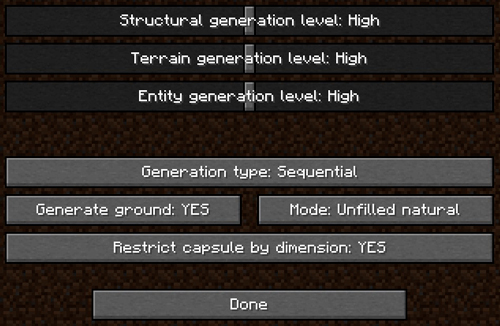
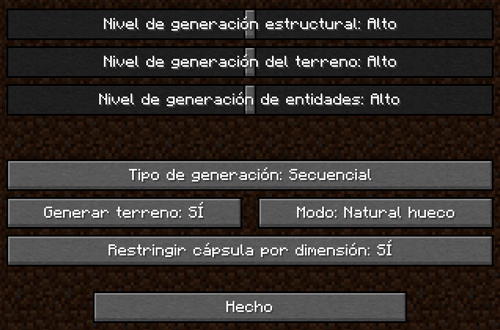
你还拥有一个配置屏幕可用,可以调整参数,以改善到你喜欢的体验。
¡目前已有超过 40 种结构可供使用!
在客户端模式下,它与 Xareo 的 WorldMap/Minimap 兼容,并在创建结构的位置生成一个点/标记。在服务器模式下,虽然不冲突,但目前不执行此操作。
高级模式
我自定义了一个胶囊,你可以在其中添加自己的结构并在世界中使用它们。为此,你需要遵循一系列简单的步骤。
首先你需要的是 NBT 格式的结构文件。这可以使用 Minecraft 已经提供的结构方块来获取。YouTube 上有数百个教程教你怎么做。
一旦你有了 NBT 文件,你需要找到首次启动模组时生成的“structures”文件夹,或者自己在 Minecraft 安装文件夹中创建它,默认为“C:\Users\YOUR WINDOWS USERNAME\AppData\Roaming.minecraft”,并将 NBT 文件粘贴到文件夹内。
最后一步是创建一个 JSON 文件。为此,你可以使用这里提供的示例:
查看 JSON
{
"capsuleType": "PLATINUM",
"dimension": {
"namespace": "minecraft",
"path": "overworld"
},
"structure": {
"name": "testchest",
"properties": []
},
"parts": []
}
你只需要修改几件事:
- 在“structure.name”中:示例中包含“testchest”,它必须与你获得的 NBT 文件的名称匹配,省略文件扩展名(“省略 .nbt”)。
- 在“structure.properties”中:这是可选的。你可以设置一些属性,这些属性将在世界中构建结构时确立。
- 在“parts”中:这是可选的,仅在你添加的结构由多个部分组成时才需要。Minecraft 中的建筑被限制为 48 x 48 x 48 方块的立方体,因此只有在这个限制内的部分会被保存。此选项允许你串联尽可能多的结构,使得构建巨型结构成为可能。
这样,你现在就可以使用 PLATINUM 胶囊来使用该结构,这是唯一允许此功能的胶囊。
参数和选项的解释:
查看 JSON 解释
{
"capsuleType": "PLATINUM", -- 必需,但更改其值不会影响
"dimension": {
"namespace": "minecraft",
"path": "overworld | the_nether | the_end" -- 必需。设置允许使用的维度。只能有一个值。
},
"structure": {
"name": "NAME_STRUCTURE", -- 必需。它必须与你获得的 NBT 文件的名称匹配,省略文件扩展名(“省略 .nbt”)。
"properties": [
{
"property": "below", -- 可选。表示结构应在胶囊接触点下方 X 个方块处建造。如果结构有必须位于地下的区域,你必须使用此属性。
"value": NUMBER INTEGER -- 整数:1, 2, 3, ..., X
}
]
},
"parts": [ OPTIONAL, IF REQUIRED -- 添加部分是可选的,仅在你决定这样做时才需要。你可以添加任意数量的部分。你拥有的每个部分都需要列表中的一个部分,用逗号分隔。
{
"name": "PART_NAME", -- 必需。它必须与你获得的零件的 NBT 文件的名称匹配,省略文件扩展名(“省略 .nbt”)。
"startPos": { -- 必需。在 X、Y 和 Z 轴上从胶囊的接触点设置一个原点。这对于正确拟合多个结构的部件非常有用。
"x": NUMBER INTEGER, -- 整数:1, 2, 3, ..., X
"y": NUMBER INTEGER, -- 整数:1, 2, 3, ..., X
"z": NUMBER INTEGER -- 整数:1, 2, 3, ..., X
},
"properties": [
SAME PROPERTIES FROM "structure.properties" -- 你可以指定与结构中相同的属性或设置它们
]
}, {...}, ... -- 如果需要,添加更多零件块...
]
}
ESPAÑOL
你是否热爱在 Minecraft 中探索,却厌倦了夜晚的死亡威胁或不得不躲进任何狭小的角落?那么这款模组正是为你量身打造的!
有了这个令人惊叹的添加内容,你将能够毫无限制地自由探索。
无需担心与其他知名模组的兼容性问题,因为本模组不存在任何冲突。此外,你只需向地面投掷一枚胶囊,即可建造你的庇护所。这难道不酷吗?而且这还不是全部!
这些胶囊不仅为你提供安全的休息场所,每座结构内部还包含宝贵的资源。最棒的是,有多种不同等级的胶囊可供选择。从基础款——仅提供一个简易庇护所让你度过夜晚并迅速继续冒险,到更高级的版本——提供额外的便利设施。
如何升级它们呢?很简单,你只需要用更高类别的方块围绕基础胶囊进行包裹,遵循 Minecraft 矿物的模式即可。就是这么简单!
但这还不是这款模组的全部内容。你还将发现两种用于制作基础胶囊的关键材料的新矿石,它们在世界各地丰富分布。
同时还包括一套完整的方块、武器、工具和盔甲!如何获取它们呢?只需针对每种情况使用传统方法,并使用相应的物品即可!
此外,世界中的居民还可以获得新职业并出售新物品。准备好通过这款激动人心的模组体验焕然一新的游戏玩法吧!
你还拥有一个配置屏幕,可以调整参数,以个性化提升你的游戏体验。
目前已有超过 40 种可用结构!
在客户端模式下,它兼容 Xareo's WorldMap/Minimap,并在结构生成处创建标记点。在服务器模式下并不冲突,但当前不会执行此操作。
高级模式
我自定义了一种胶囊,你可以在其中添加自己的结构并在世界中使用。为此,你需要执行一系列简单的步骤。
首先,你需要拥有 NBT 格式的结构文件。你可以使用 Minecraft 自带的结构方块来获取。YouTube 上有数百个教程教你如何做这件事。
一旦获得 NBT 文件,你需要找到首次启动模组时生成的 "structures" 文件夹,或者在 Minecraft 安装目录(默认为 "C:\Users\你的Windows用户名\AppData\Roaming.minecraft")中手动创建该文件夹,并将 NBT 文件粘贴到其中。
最后一步是创建一个 JSON 文件。为此,你可以使用我提供的示例:
查看 JSON
{
"capsuleType": "PLATINUM",
"dimension": {
"namespace": "minecraft",
"path": "overworld"
},
"structure": {
"name": "testchest",
"properties": []
},
"parts": []
}
你只需修改少数几项内容:
- 在 "structure.name" 中:示例中包含 "testchest",它必须与你获得的 NBT 文件的文件名相匹配(忽略文件扩展名,即省略 ".nbt")。
- 在 "structure.properties" 中:这是可选的。可以设置一些属性,这些属性将在世界中构建结构时生效。
- 在 "parts" 中:这是可选的,仅在你添加的结构由多个部分组成时才需要。Minecraft 中的建筑被限制在 48 x 48 x 48 方块的立方体内,因此只有在此限制内的部分会被保存。此选项允许链接尽可能多的结构,从而能够构建巨型结构。
这样你就可以使用 PLATINUM 胶囊来使用该结构,这是唯一支持此功能的胶囊类型。
参数和选项说明:
查看 JSON 说明
{
"capsuleType": "PLATINUM", -- 必需,但更改其值不会产生影响
"dimension": {
"namespace": "minecraft",
"path": "overworld | the_nether | the_end" -- 必需。设定允许使用的维度。仅支持一个值
},
"structure": {
"name": "NAME_STRUCTURE", -- 必需。应与已获取的 NBT 文件名(省略扩展名 ".nbt")相匹配。
"properties": [
{
"property": "below", -- 可选。指示结构应在胶囊接触点下方 X 个方块处生成。如果结构有部分需要位于地下,请使用此属性。
"value": NUMBER INTEGER -- 整数:1, 2, 3, ..., X
}
]
},
"parts": [ OPTIONAL, IF REQUIRED -- 添加部件是可选的,仅在你决定这样做时才需要。你可以添加任意数量的部件。每个部件都需要在列表中添加一个对应的部分,用逗号分隔。
{
"name": "PART_NAME", -- 必需。应与该部件对应的 NBT 文件名(省略扩展名 ".nbt")相匹配。
"startPos": { -- 必需。从胶囊接触点开始,设置 X、Y 和 Z 轴上的起始坐标。这对于正确拼接多个结构的部件非常有用。
"x": NUMBER INTEGER, -- 整数:1, 2, 3, ..., X
"y": NUMBER INTEGER, -- 整数:1, 2, 3, ..., X
"z": NUMBER INTEGER -- 整数:1, 2, 3, ..., X
},
"properties": [
SAME PROPERTIES FROM, "structure.properties" -- 你可以指定与结构相同的属性,或单独设置
]
}, {...}, ... -- 如需更多部件块...
]
}
在 Patreon 上关注我! / Sígueme en Patreon! OlivaDevelopModding
感谢 文本生成器 的帮助
ENGLISH
Do you love exploring Minecraft but are you tired of dying at night or hiding in any hole? Then this mod is for you!
With this incredible addition, you can explore without limits.
Forget about compatibility concerns with other well-known mods, since this one does not present any conflict. In addition, you can build your shelter just by throwing a capsule to the ground. Isn't it great? And that's not all!
These capsules not only offer you a safe place to rest, but they also contain valuable resources within each structure. And best of all, there are different levels of capsules available. From the basic one, which provides you with a simple shelter to spend the night and quickly continue your adventure, to more advanced versions that offer additional comforts.
How can you improve them? It's simple, you just need to surround the basic capsules with blocks from the higher category, following the Minecraft ore pattern. That easy!
But that's not all this mod has to offer. You will also find new ores of two different materials essential to creating the basic capsule, both of which are scattered throughout the world in abundance.
And that's not all, a complete set of blocks, weapons, tools and full armor is also included! How to get them? Simply use the traditional method for each case, using the appropriate item!
In addition, the inhabitants of the world will be able to acquire a new profession and sell the new items. Get ready for a completely renewed gaming experience with this exciting mod!
You also have a configuration screen available to adjust the parameters, improving the experience to your liking.
¡Currently it has more than 40 structures available!
In client mode it is compatible with Xareo's WorldMap/Minimap and creates a point/mark where the structure is created. In server mode it is not incompatible but does not perform this action at the moment.
ADVANCED MODE
I have customized a capsule where you can add your own structures and use them in the world. To do this, you need to follow a series of simple steps.
The first thing you will need is your structure in NBT format. This can be obtained using the structural blocks already offered by Minecraft. There are hundreds of tutorials on YouTube that teach you how to do this.
Once you have the NBT file, you need to locate the "structures" folder that is generated when the mod is first launched or create it yourself in the Minecraft installation folder, by default "C:\Users\YOUR WINDOWS USERNAME\AppData\Roaming.minecraft", and you must paste the NBT file inside the folder.
The final step is to create a JSON file. For this, you can use the example provided here:
View JSON
{
"capsuleType": "PLATINUM",
"dimension": {
"namespace": "minecraft",
"path": "overworld"
},
"structure": {
"name": "testchest",
"properties": []
},
"parts": []
}
You only need to modify a few things:
- In "structure.name": in the example, it contains "testchest", it must match the name of the NBT file you obtained, omitting the file extension ("omit the .nbt").
- In "structure.properties": it is optional. You can set some properties that will be established when the structure is built in the world.
- In "parts": it is optional, only necessary if the structure you are going to add consists of several parts. Constructions in Minecraft are limited to a cube of 48 x 48 x 48 blocks, so only what is within that limit will be saved. This option allows you to chain as many structures as necessary, making it possible to build gigantic structures.
With this, you can now use that structure with the PLATINUM capsule, which is the only one that allows this feature.
Explanation of parameters and options:
View JSON Explanation
{
"capsuleType": "PLATINUM", -- Required, but changing its value will not affect
"dimension": {
"namespace": "minecraft",
"path": "overworld | the_nether | the_end" -- Required. Sets the dimension where it is allowed to be used. Only 1 value.
},
"structure": {
"name": "NAME_STRUCTURE", -- Required. It must match the name of the NBT file you obtained, omitting the file extension ("omit the .nbt").
"properties": [
{
"property": "below", -- Optional. Indicates that the structure should be built X blocks below where the capsule makes contact. If the structure has an area that must go underground, you must use this property.
"value": NUMBER INTEGER -- Integer: 1, 2, 3, ..., X
}
]
},
"parts": [ OPTIONAL, IF REQUIRED -- Adding parts is optional, only if you have decided to do so. You can add as many parts as you consider. Each part you have will need a section within the list, separated by commas.
{
"name": "PART_NAME", -- Required. It must match the name of the NBT file of the part you obtained, omitting the file extension ("omit the .nbt").
"startPos": { -- Required. Sets an origin point in the X, Y, and Z axes from the capsule's contact point. It is useful for correctly fitting the parts of multiple structures.
"x": NUMBER INTEGER, -- Integer: 1, 2, 3, ..., X
"y": NUMBER INTEGER, -- Integer: 1, 2, 3, ..., X
"z": NUMBER INTEGER -- Integer: 1, 2, 3, ..., X
},
"properties": [
SAME PROPERTIES FROM "structure.properties" -- You can specify the same properties as in the structure or set them
]
}, {...}, ... -- MORE PARTS BLOCK IF REQUIRED...
]
}
ESPAÑOL
¿Te encanta explorar Minecraft pero estás cansado de morir durante las noches o de esconderte en cualquier hueco? ¡Entonces este mod es para ti!
Con esta increíble adición, podrás explorar sin límites.
Olvídate de las preocupaciones por compatibilidad con otros mods conocidos, ya que este no presenta ningún conflicto. Además, podrás construir tu refugio con tan solo lanzar una cápsula al suelo. ¿No es genial? ¡Y eso no es todo!
Estas cápsulas no solo te ofrecen un lugar seguro para descansar, sino que también contienen valiosos recursos dentro de cada estructura. Y lo mejor de todo es que hay diferentes niveles de cápsulas disponibles. Desde la básica, que te proporciona un refugio simple para pasar la noche y seguir con tu aventura rápidamente, hasta versiones más avanzadas que ofrecen comodidades adicionales.
¿Cómo puedes mejorarlas? Es simple, solo necesitas rodear las cápsulas básicas con bloques de la categoría superior, siguiendo el patrón de minerales de Minecraft. ¡Así de fácil!
Pero eso no es todo lo que este mod tiene para ofrecer. También encontrarás nuevas menas de dos materiales distintos esenciales para crear la cápsula básica, las cuales están dispersas por todo el mundo en abundancia.
¡También se incluye un set completo de bloques, armas, herramientas y armaduras! ¿Cómo obtenerlos? ¡Simplemente utiliza el método tradicional para cada caso, utilizando el ítem adecuado!
Además, los habitantes del mundo podrán adquirir una nueva profesión y vender los nuevos ítems. ¡Prepárate para una experiencia de juego completamente renovada con este emocionante mod!
También tienes disponible una pantalla de configuración para ajustar los parámetros, mejorando la experiencia a tu gusto.
¡Actualmente cuenta con más de 40 estructuras disponibles!
En modo cliente es compatible con Xareo's WorldMap/Minimap y crea un punto/marca donde se crea la estructura. En modo servidor no es incompatible pero no realiza esta acción por el momento.
MODO AVANZADO
He personalizado una cápsula en la que puedes añadir tus propias estructuras y usarlas en el mundo. Para hacer deberás realizar una serie de sencillos pasos para llevarlo a cabo.
Lo primero que necesitarás es tu estructura en formato NBT. Esto lo puedes obtener con los bloques estructurales que ya ofrece Minecraft. Hay cientos de tutoriales en Youtube que te enseñan a hacer esto.
Una vez obtenido el fichero NBT, deberás localizar la carpeta "structures" que se genera al arrancar el mod por primera vez o crearla tu mismo en la carpeta de instalación de minecraft, por defecto "C:\Users\TU NOMBRE USUARIO WINDOWS\AppData\Roaming.minecraft" y deberás pegar el fichero NBT dentro de la carpeta.
El último paso es crear un fichero JSON. Para ello puedes usar el ejemplo que te dejo aquí:
Ver JSON
{
"capsuleType": "PLATINUM",
"dimension": {
"namespace": "minecraft",
"path": "overworld"
},
"structure": {
"name": "testchest",
"properties": []
},
"parts": []
}
Debes modificar solamente unas pocas cosas:
- En "structure.name": en el ejemplo contiene "testchest", deberá coincidir con el nombre del fichero NBT que has obtenido, obviando la extensión del fichero ("omites el .nbt").
- En "structure.properties": es opcional. Se pueden establecer algunas propiedades que se establecerán cuando se contruya la estructura en el mundo.
- En "parts": es opcional, únicamente necesario si la estructura que vas a añadir se constituye en varias partes. Las construcciones en Minecraft están limitadas a un cubo de 48 x 48 x 48 bloques, por lo que solo lo que hay dentro de ese límite sería guardado. Esta opción permite encadenar tantas estructuras como sea necesario haciendo que puedan construirse estructura gigantescas.
Con esto ya podrás usar esa estructura con la cápsula PLATINUM, que es la única que permite esta característica.
Explicación de los parámetros y opciones:
Ver explicación del JSON
{
"capsuleType": "PLATINUM", -- Requerido, pero cambiar su valor no afectará
"dimension": {
"namespace": "minecraft",
"path": "overworld | the_nether | the_end" -- Requerido. Establece la dimensión en la que tiene permitido usarse. Solamente 1 valor
},
"structure": {
"name": "NAME_STRUCTURE", -- Requerido. Deberá coincidir con el nombre del fichero NBT que has obtenido, obviando la extensión del fichero ("omitir el .nbt").
"properties": [
{
"property": "below", -- Opcional. Le indica que debe construir la estructura a X bloques desde donde la cápsula hace contacto. Si la estructura tiene zona que debe ir bajo el suelo debes usar esta propiedad.
"value": NUMBER INTEGER -- Numero entero: 1, 2, 3, ..., X
}
]
},
"parts": [ OPTIONAL, IF REQUIRED -- Añadir partes es opcional, solo si has decidico hacerlo así. Puedes añadir tantas partes como consideres. Cada parte que tengas necesitará una sección dentro de la lista, separadas por comas.
{
"name": "PART_NAME", -- Requerido. Deberá coincidir con el nombre del fichero NBT de la parte que has obtenido, obviando la extensión del fichero ("omitir el .nbt").
"startPos": { -- Requerido. Establece un punto de origen en los ejex X, Y y Z desde el punto de contacto de la cápsula. Es útil para encajar correctamente las partes de varias estructuras.
"x": NUMBER INTEGER, -- Numero entero: 1, 2, 3, ..., X
"y": NUMBER INTEGER, -- Numero entero: 1, 2, 3, ..., X
"z": NUMBER INTEGER -- Numero entero: 1, 2, 3, ..., X
},
"properties": [
SAME PROPERTIES FROM, "structure.properties" -- Puedes especificar las mismas propiedades que en la estructura o establecerla
]
}, {...}, ... -- MORE PARTS BLOCK IF REQUIRED...
]
}
Follow me on Patreon! / Sígueme en Patreon! OlivaDevelopModding
Con la ayuda de Generador de fuentes


 模组

 模组

 模组

 模组
 模组

 模组
评论 0
登录后参与评分
还没有评论,来抢沙发吧