CC: 空间投影仪
为 CC:Tweaked 电脑和潜行者提供可编程的世界空间叠加层。
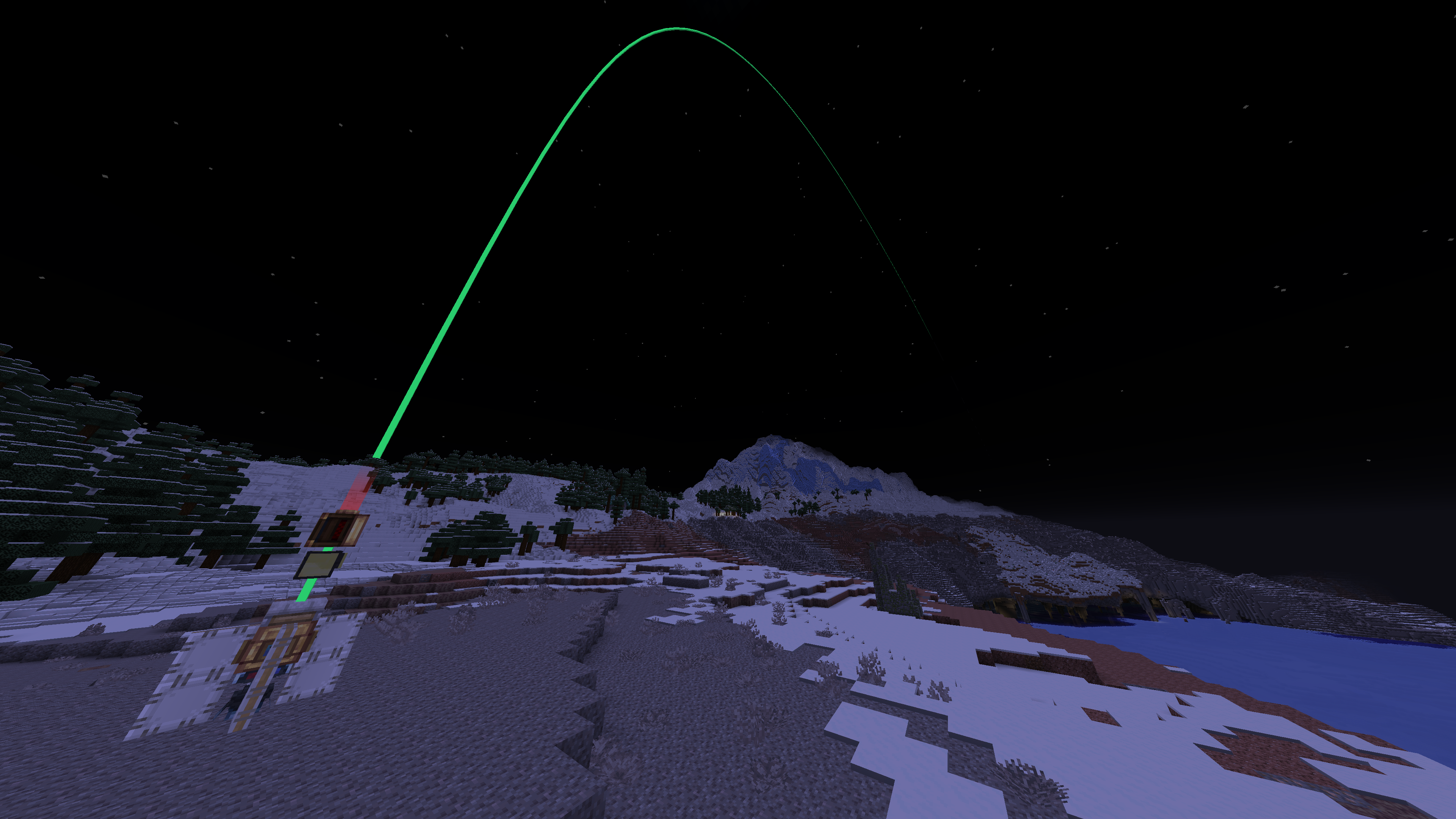
CC: 空间投影仪允许 ComputerCraft 程序直接在 Minecraft 世界中绘制线条、路径、方块和标记。
放置一个 空间投影仪,将其连接到 ComputerCraft 电脑、潜行者或有线调制解调器,并佩戴已绑定的 空间护目镜 以查看其输出。可用于技术建筑规划、导航、潜行者调试、自动化显示以及自定义空间界面。
视觉效果仅为叠加层。它们不会放置方块、生成实体或影响碰撞检测。
功能特性
- 名为
spatial_projector 的 ComputerCraft 外围设备
- 用于查看投影仪输出的空间护目镜
- 支持线条、多段线、方块和标记的 Lua API
- 命名视觉对象,可更新、移除、列出或清除
- 默认持久化显示
- 可选的 TTL(生存时间)用于临时视觉元素
- 可配置的极限值和默认值
- 内置演示和实用命令
- 可选 Curios 模组支持,可在支持的 Curios 槽位中佩戴护目镜
快速入门
- 放置一个 空间投影仪。
- 在其旁边放置一台 ComputerCraft 电脑或潜行者,或使用有线调制解调器进行连接。
- 使用 空间护目镜 右键点击投影仪以完成绑定。
- 佩戴已绑定的护目镜。
- 运行内置演示:
spatial_projector
有用的 CraftOS 命令:
spatial_projector          -- 运行演示
spatial_projector demo 30  -- 运行持续时间为 30 秒的演示
spatial_projector clear    -- 清除所有视觉元素
spatial_projector stats    -- 显示投影仪统计信息
spatial_projector list     -- 列出缓冲区中的对象 ID
Lua 示例
local projector = peripheral.find("spatial_projector")
if not projector then
    error("spatial_projector not found")
end

projector.clear()

projector.line("axis.x", 0, 64, 0, 16, 64, 0, {
    color = 0xff3333,
    width = 0.07,
})

projector.marker("target", 16, 64, 0, {
    color = 0xff33cc,
    size = 1.0,
})

projector.sync()
绘图 API
每个视觉元素都存储在投影仪缓冲区内的字符串 ID 下。使用相同的 ID 绘制新对象将替换之前的视觉元素。
projector.line(id, x1, y1, z1, x2, y2, z2, options)
projector.polyline(id, points, options)
projector.box(id, x1, y1, z1, x2, y2, z2, options)
projector.marker(id, x, y, z, options)
options 是可选参数。如果省略该参数,投影仪将使用其配置的默认值。
{
    color = 0x33ff88, -- RGB 颜色
    width = 0.0625,   -- 线条、多段线和方块的宽度
    ttl = 0,          -- 自动移除前的秒数;0 表示持久化
    size = 0.35,      -- 标记的大小
}
线条 (Line)
在两个世界坐标之间绘制线段。
projector.line("line.id", 0, 64, 0, 10, 64, 0, {
    color = 0xff3333,
    width = 0.07,
    ttl = 30,
})
多段线 (Polyline)
通过一组密集的 {x, y, z} 点数组绘制连续路径。
projector.polyline("route", {
    {0, 64, 0},
    {4, 65, 4},
    {8, 64, 8},
    {12, 64, 4},
}, {
    color = 0x33ff88,
    width = 0.06,
})
方块 (Box)
在两个对角顶点之间绘制方块。
projector.box("build.area", 0, 63, 0, 10, 70, 10, {
    color = 0x3399ff,
    width = 0.05,
})
标记 (Marker)
在世界坐标位置绘制标记。
projector.marker("target", 16, 64, 0, {
    color = 0xff33cc,
    size = 1.0,
})
缓冲区工具函数
projector.clear()       -- 移除所有视觉元素
projector.remove(id)    -- 按 ID 移除单个视觉元素
projector.list()        -- 列出对象 ID
projector.stats()       -- 获取投影仪统计信息
projector.getLimits()   -- 获取配置的限制值
projector.sync()        -- 发送待处理的绘图更改
在一批绘图更改后调用 sync()。
需求
需要 Minecraft 1.21.1、NeoForge 21.1.x、Java 21、CC:Tweaked 1.120.0+ 和 Create 6.0.10+。
Create 用作渲染/库依赖项。CC: 空间投影仪不添加 Create 的机械装置机制。
可选: Curios API 9.x,用于在支持的 Curios 槽位中佩戴空间护目镜。如果没有 Curios,护目镜可作为普通头盔佩戴。
注意事项
- 只有佩戴了与投影仪绑定的护目镜的玩家才能看到其视觉效果。
- 坐标使用标准的 Minecraft 世界坐标。
list() 返回的是对象 ID,而非完整的几何数据。- 视觉元素会一直保留,直到被清除、移除、覆盖、因 TTL 过期而消失,或在区块或世界卸载时清理。
CC: Spatial Projector
Programmable world-space overlays for CC:Tweaked computers and turtles.
CC: Spatial Projector lets ComputerCraft programs draw lines, paths, boxes, and markers directly in the Minecraft world.
Place a Spatial Projector, connect it to a ComputerCraft computer, turtle, or wired modem, and wear bound Spatial Goggles to see its output. Use it for technical build planning, navigation, turtle debugging, automation displays, and custom spatial interfaces.
Visuals are overlays only. They do not place blocks, spawn entities, or affect collisions.
Features
- ComputerCraft peripheral named
spatial_projector
- Spatial Goggles for viewing projector output
- Lua API for lines, polylines, boxes, and markers
- Named visual objects that can be updated, removed, listed, or cleared
- Persistent visuals by default
- Optional TTL for temporary visuals
- Configurable limits and default values
- Built-in demo and utility commands
- Optional Curios support for wearing goggles in a supported Curios slot
Quick start
- Place a Spatial Projector.
- Put a ComputerCraft computer or turtle next to it, or connect it using a wired modem.
- Right-click the projector with Spatial Goggles to bind them.
- Wear the bound goggles.
- Run the built-in demo:
spatial_projector
Useful CraftOS commands:
spatial_projector          -- run the demo
spatial_projector demo 30  -- run the demo with a 30-second TTL
spatial_projector clear    -- clear all visuals
spatial_projector stats    -- show projector statistics
spatial_projector list     -- list object IDs in the buffer
Lua example
local projector = peripheral.find("spatial_projector")
if not projector then
    error("spatial_projector not found")
end

projector.clear()

projector.line("axis.x", 0, 64, 0, 16, 64, 0, {
    color = 0xff3333,
    width = 0.07,
})

projector.marker("target", 16, 64, 0, {
    color = 0xff33cc,
    size = 1.0,
})

projector.sync()
Drawing API
Each visual is stored under a string ID inside the projector buffer. Drawing another object with the same ID replaces the previous visual.
projector.line(id, x1, y1, z1, x2, y2, z2, options)
projector.polyline(id, points, options)
projector.box(id, x1, y1, z1, x2, y2, z2, options)
projector.marker(id, x, y, z, options)
options is optional. If it is omitted, the projector uses its configured defaults.
{
    color = 0x33ff88, -- RGB color
    width = 0.0625,  -- line, polyline, and box width
    ttl = 0,         -- seconds before auto-removal; 0 means persistent
    size = 0.35,     -- marker size
}
Line
Draws a segment between two world positions.
projector.line("line.id", 0, 64, 0, 10, 64, 0, {
    color = 0xff3333,
    width = 0.07,
    ttl = 30,
})
Polyline
Draws a connected path through a dense array of {x, y, z} points.
projector.polyline("route", {
    {0, 64, 0},
    {4, 65, 4},
    {8, 64, 8},
    {12, 64, 4},
}, {
    color = 0x33ff88,
    width = 0.06,
})
Box
Draws a box between two opposite corners.
projector.box("build.area", 0, 63, 0, 10, 70, 10, {
    color = 0x3399ff,
    width = 0.05,
})
Marker
Draws a marker at one world position.
projector.marker("target", 16, 64, 0, {
    color = 0xff33cc,
    size = 1.0,
})
Buffer utilities
projector.clear()       -- remove all visuals
projector.remove(id)    -- remove one visual by ID
projector.list()        -- list object IDs
projector.stats()       -- get projector statistics
projector.getLimits()   -- get configured limits
projector.sync()        -- send pending drawing changes
Call sync() after a batch of drawing changes.
Requirements
Requires Minecraft 1.21.1, NeoForge 21.1.x, Java 21, CC:Tweaked 1.120.0+, and Create 6.0.10+.
Create is used as a rendering/library dependency. CC: Spatial Projector does not add Create contraption mechanics.
Optional: Curios API 9.x for wearing Spatial Goggles in a supported Curios slot. Without Curios, goggles can be worn as a normal helmet.
Notes
- Only players wearing goggles bound to a projector receive its visuals.
- Coordinates use normal Minecraft world coordinates.
list() returns object IDs, not full geometry data.- Visuals remain until they are cleared, removed, overwritten, expire through TTL, or are cleaned up when the chunk or world unloads.


 模组

 模组

 模组

 模组
 模组

 模组
评论 0
登录后参与评分
还没有评论,来抢沙发吧