Cell⁴
适用于 Applied Energistics 2 的无限 ME 存储单元格
Cell⁴ 是一款专为整合包开发设计的 AE2 附加模组。它添加了无限单元格(Infinity Cells),可通过 NBT 或数据组件绑定到特定物品,从而允许从 ME 网络中无限提取。插入的匹配物品会被静默丢弃,不消耗任何实际存储空间。
支持版本: 1.20.1 (Forge)、1.21.1 (NeoForge)、26.1.2 (NeoForge)
无限单元格类型
- 无限物品单元格(Infinity Item Cell) — 绑定特定物品/流体,包括带有完整 NBT/组件的条目
- 无限标签单元格(Infinity Tag Cell) — 绑定所有匹配标签和/或来自指定模组的物品
- 无限模组 ID 单元格(Infinity ModID Cell) — 绑定某个模组的所有物品
- 便携式无限物品/标签/模组 ID 单元格 — 使用 AE2 的便携终端 UI 的可携带变体,具有可配置的能量
单元格配置器
单元格配置器(Cell Configurator) 是一个用于可视化编辑单元格数据的内置游戏工具。手持该物品时右键点击以打开配置 GUI,然后将单元格放入槽位中。
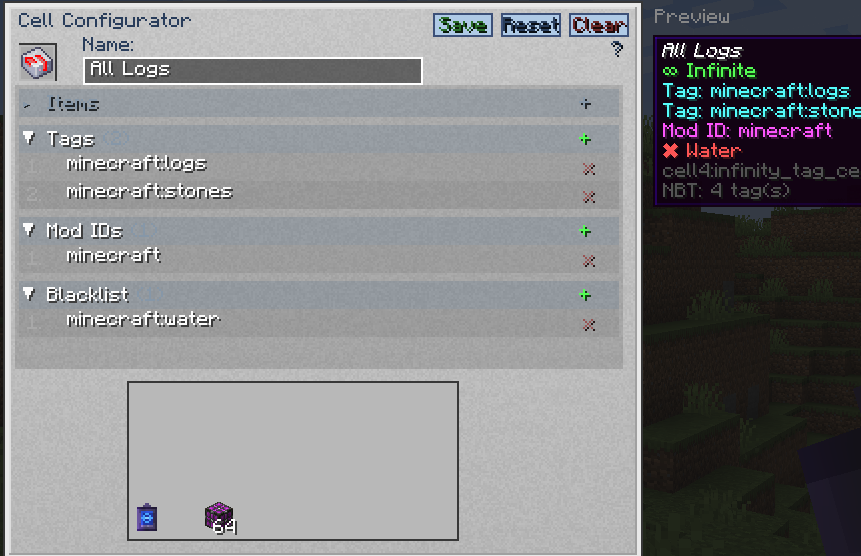
- 可编辑字段会根据放入槽位的单元格类型而变化。
- 非活动字段无法获得焦点。
- 每个条目都有各自的字段。通过
+ 按钮添加条目,或在按住物品的同时点击“物品/黑名单”部分,或者从 JEI / REI / EMI 拖拽物品。
- 在黑名单字段中,标签前缀为
#(例如 #minecraft:birch_logs),模组 ID 前缀为 @(例如 @mekanism)。
- 按 Tab 键在可编辑字段间循环,按 Enter 保存,或点击 Save(保存) / Reset(重置) / Clear(清除)。
- 右侧显示**预览(Preview)**面板,展示单元格在你物品栏中的提示文本样式;自定义名称会实时更新。
| 单元格类型 |
可编辑字段 |
| 物品单元格 |
cell4item, cell4blacklist |
| 标签单元格 |
cell4tag, cell4modid, cell4blacklist |
| 模组 ID 单元格 |
cell4modid, cell4blacklist |
| 便携变体 |
与对应基础单元格相同,加上能量字段 |
工作台 UI
左侧边栏可以切换为适用于无限物品单元格的 AE2 单元格工作台风格 UI:
- 每页包含 63 个配置槽位以及单元格槽位。
- 绑定、替换或删除条目会自动保存。
- 点击空槽位会按顺序追加;点击已占用的槽位会替换它。
- 支持自由翻页,包括空白页面。
命令
/cell4 gui — 打开单元格配置器/cell4 texfile — 打开自定义纹理文件夹
数据键
| 键 |
目标 |
示例 |
cell4item |
特定物品/流体或完整的物品条目 |
"minecraft:diamond" |
cell4tag |
标签 |
"minecraft:logs" |
cell4modid |
模组 ID(标签单元格也支持此选项) |
"mekanism" |
cell4blacklist |
排除物品/标签/模组(可选) |
见下文 |
cell4name |
自定义显示名称(可选) |
"My Diamond Cell" |
cell4texture |
自定义纹理名称(可选) |
"example" |
cell4power |
便携单元格当前能量 |
5000.0d |
cell4power_max |
便携单元格容量 |
100000L |
cell4power_cost |
每提取一个物品消耗的能量 |
20L |
cell4power_charge |
每秒充电量 |
8.0d |
1.20.1 将这些键存储为原始 NBT({...})。1.21.1 & 26.1.2 将它们存储在数据组件内部([custom_data={...}])。
便携性能量规则:max=0 表示无电源且无能量条;max>0 && cost=0 显示能量条但不消耗能量;max>0 && cost>0 则每提取一个物品消耗能量。
物品条目
在 1.20.1 中,cell4item 接受纯 ID、id{完整 NBT} 和完整化合物 {id:"...",Count:1,tag:{...}}。嵌套 NBT(包括来自其他模组如 AE2 便携单元格的数据)将被保留。
在 1.21.1/26.1.2 中,cell4item 接受纯 ID、id[组件]、id{custom_data:{...}} 和完整化合物 {id:"...",count:1,components:{...}}。支持由其他模组注册的组件。
组件版本说明:
- 1.21.1:
minecraft:enchantments={levels:{'minecraft:sharpness':5}}。
- 26.1.2:附魔使用裸映射
{'minecraft:sharpness':5};属性修饰符使用裸列表;dyed_color 为整数。
- 文本组件:在 26.1.2 上优先使用
{text:'...'};'{"text":"..."}' 被视为纯文本。
命令示例
1.21.1 & 26.1.2 使用 [custom_data={...}] 语法;1.20.1 使用 {...} 语法。标签命名空间:在 1.21.1/26.1.2 中使用 c:,在 1.20.1 中使用 forge:。
单值
# 1.21.1 / 26.1.2
/give @p cell4:infinity_item_cell[custom_data={cell4item:"minecraft:diamond"}]
/give @p cell4:infinity_tag_cell[custom_data={cell4tag:"minecraft:logs"}]
/give @p cell4:infinity_modid_cell[custom_data={cell4modid:"mekanism"}]

# 1.20.1
/give @p cell4:infinity_item_cell{cell4item:"minecraft:diamond"}
/give @p cell4:infinity_tag_cell{cell4tag:"minecraft:logs"}
/give @p cell4:infinity_modid_cell{cell4modid:"mekanism"}
多值
# 1.21.1 / 26.1.2
/give @p cell4:infinity_item_cell[custom_data={cell4item:["minecraft:diamond","minecraft:oak_log"]}]
/give @p cell4:infinity_tag_cell[custom_data={cell4tag:["minecraft:logs","c:ingots/iron"]}]
/give @p cell4:infinity_modid_cell[custom_data={cell4modid:["mekanism","thermal"]}]

# 1.20.1
/give @p cell4:infinity_item_cell{cell4item:["minecraft:diamond","minecraft:oak_log"]}
/give @p cell4:infinity_tag_cell{cell4tag:["minecraft:logs","forge:ingots/iron"]}
/give @p cell4:infinity_modid_cell{cell4modid:["mekanism","thermal"]}
带模组 ID 过滤器的标签单元格
无限标签单元格同时支持 cell4tag 和 cell4modid:
# 1.21.1 / 26.1.2
/give @p cell4:infinity_tag_cell[custom_data={cell4tag:"minecraft:logs",cell4modid:"mekanism"}]
/give @p cell4:infinity_tag_cell[custom_data={cell4tag:["minecraft:logs","c:ingots/iron"],cell4modid:["mekanism","thermal"]}]

# 1.20.1
/give @p cell4:infinity_tag_cell{cell4tag:"minecraft:logs",cell4modid:"mekanism"}
/give @p cell4:infinity_tag_cell{cell4tag:["minecraft:logs","forge:ingots/iron"],cell4modid:["mekanism","thermal"]}
带有 NBT / Components 的物品
# 1.21.1
/give @p cell4:infinity_item_cell[custom_data={cell4item:["minecraft:diamond_sword[minecraft:custom_name={text:'Test Sword'},minecraft:enchantments={levels:{'minecraft:sharpness':5}}]","minecraft:stone{custom_data:{CustomTag:'test'}}","{id:'minecraft:golden_apple',count:1,components:{'minecraft:custom_name':{text:'Full'}}}"]}]

# 26.1.2
/give @p cell4:infinity_item_cell[custom_data={cell4item:["minecraft:diamond_sword[minecraft:custom_name={text:'Test Sword'},minecraft:enchantments={'minecraft:sharpness':5},minecraft:attribute_modifiers=[{type:'minecraft:attack_damage',id:'test:atk',amount:10,operation:'add_value',slot:'mainhand'}]]","minecraft:stone{custom_data:{CustomTag:'test'}}"]}]

# 1.20.1
/give @p cell4:infinity_item_cell{cell4item:["minecraft:diamond_sword{Enchantments:[{id:'minecraft:sharpness',lvl:5}],display:{Name:'{\"text\":\"Test Sword\"}'}}","minecraft:stone{CustomTag:'test',CustomNumber:42}","{id:'minecraft:golden_apple',Count:1,tag:{CustomTag:'full'}}"]}
便携式能量细胞
# 1.21.1 / 26.1.2
/give @p cell4:portable_infinity_item_cell[custom_data={cell4item:"minecraft:diamond",cell4power:5000.0d,cell4power_max:100000L,cell4power_cost:20L,cell4power_charge:8.0d}]

# 1.20.1
/give @p cell4:portable_infinity_item_cell{cell4item:"minecraft:diamond",cell4power:5000.0d,cell4power_max:100000L,cell4power_cost:20L,cell4power_charge:8.0d}
黑名单
黑名单条目支持三种类型:
- 物品 — 普通标识符(例如
minecraft:birch_log)
- 标签 — 以
# 为前缀(例如 #minecraft:birch_logs)
- 模组 ID — 以
@ 为前缀(例如 @mekanism)
# 1.21.1 / 26.1.2
/give @p cell4:infinity_tag_cell[custom_data={cell4tag:"minecraft:logs",cell4blacklist:"minecraft:birch_log"}]
/give @p cell4:infinity_modid_cell[custom_data={cell4modid:"mekanism",cell4blacklist:["mekanism:steel_ingot","#c:ingots/steel","@thermal"]}]

# 1.20.1
/give @p cell4:infinity_tag_cell{cell4tag:"minecraft:logs",cell4blacklist:"minecraft:birch_log"}
/give @p cell4:infinity_modid_cell{cell4modid:"mekanism",cell4blacklist:["mekanism:steel_ingot","#forge:ingots/steel","@thermal"]}
被加入黑名单的物品会在细胞的工具提示中以 ✖ 标记显示。
自定义纹理
将 cell4texture 设置为纹理名称(也接受 cell4textrue 这个拼写错误):
/give @p cell4:infinity_item_cell[custom_data={cell4item:"minecraft:diamond",cell4texture:"example"}]
将 <name>.png 和可选的 <name>.png.mcmeta 放置在 config/Cell4/.pack/assets/cell4/textures/item/ 中。通过配置器的文件夹按钮或 /cell4 texfile 命令打开,然后按 F3+T 重新加载。
模组兼容性
- JEI / REI / EMI:当预览出现时,物品面板会移开,并且可以将物品拖放到配置器中。
- 1.20.1 / 1.21.1:JEI + REI + EMI。
- 26.1.2:JEI + REI(EMI 没有 26.1 版本)。
构建
./gradlew build
输出的 JAR 文件将在 build/libs/ 中。
依赖项
| Minecraft |
Loader |
AE2 |
| 1.20.1 |
Forge 47.1.0+ |
15.0.23+ |
| 1.21.1 |
NeoForge 21.1.169+ |
19.2.17+ |
| 26.1.2 |
NeoForge 26.1.2.55-beta+ |
26.1.8-alpha+ |
致谢
本模组参考了 ExtendedAE 的 InfinityCell 的设计,用于无限提取概念和 getAsIntMax() 显示逻辑。标签细胞和模组 ID 细胞是该概念的原始扩展。
许可证
MIT
Cell⁴
Infinite ME Storage Cells for Applied Energistics 2
Cell⁴ is an AE2 addon designed for modpack development. It adds Infinity Cells that can be bound to specific items via NBT or data components, allowing infinite extraction from the ME network. Inserted matching items are silently discarded, consuming no actual storage.
Supported versions: 1.20.1 (Forge), 1.21.1 (NeoForge), 26.1.2 (NeoForge)
Infinity Cell Types
- Infinity Item Cell — bind specific items/fluids, including entries with full NBT/components
- Infinity Tag Cell — bind all items matching tags and/or from specified mods
- Infinity ModID Cell — bind all items from a mod
- Portable Infinity Item / Tag / ModID Cell — portable variants using AE2's portable terminal UI, with configurable energy
Cell Configurator
The Cell Configurator is an in-game tool for editing cell data visually. Right-click while holding it to open the configuration GUI, then place a cell into the slot.
- Editable fields change based on the cell type placed in the slot.
- Inactive fields cannot be focused.
- Each entry has its own field. Add entries with the
+ button, by holding an item and clicking the Item / Blacklist section, or by dragging items from JEI / REI / EMI.
- In the blacklist field, prefix tags with
# (e.g. #minecraft:birch_logs) and mod IDs with @ (e.g. @mekanism).
- Press Tab to cycle between editable fields, Enter to save, or click Save / Reset / Clear.
- The right side shows a Preview panel with the cell tooltip as it would appear in your inventory; a custom name updates in real time.
| Cell Type |
Editable Fields |
| Item Cell |
cell4item, cell4blacklist |
| Tag Cell |
cell4tag, cell4modid, cell4blacklist |
| ModID Cell |
cell4modid, cell4blacklist |
| Portable variants |
Same as the corresponding base cell, plus energy fields |
Workbench UI
The left sidebar can switch to an AE2 cell-workbench-style UI for Infinity Item Cells:
- 63 configuration slots per page plus the cell slot.
- Binding, replacing, or removing an entry saves automatically.
- Clicking an empty slot appends in order; clicking an occupied slot replaces it.
- Free page navigation, including blank pages.
Commands
/cell4 gui — open the Cell Configurator/cell4 texfile — open the custom texture folder
Data Keys
| Key |
Target |
Example |
cell4item |
Specific items/fluids or full item entries |
"minecraft:diamond" |
cell4tag |
Tag |
"minecraft:logs" |
cell4modid |
Mod ID (Tag Cell also supports this) |
"mekanism" |
cell4blacklist |
Exclude items/tags/mods (optional) |
See below |
cell4name |
Custom display name (optional) |
"My Diamond Cell" |
cell4texture |
Custom texture name (optional) |
"example" |
cell4power |
Portable cell current energy |
5000.0d |
cell4power_max |
Portable cell capacity |
100000L |
cell4power_cost |
Energy per extracted item |
20L |
cell4power_charge |
Charge per tick |
8.0d |
1.20.1 stores these keys as raw NBT ({...}). 1.21.1 & 26.1.2 store them inside data components ([custom_data={...}]).
Portable energy rules: max=0 means no power and no energy bar; max>0 && cost=0 shows the bar but consumes no power; max>0 && cost>0 consumes energy per item.
Item Entries
On 1.20.1, cell4item accepts plain IDs, id{full NBT}, and full compounds {id:"...",Count:1,tag:{...}}. Nested NBT, including data from other mods such as AE2 portable cells, is preserved.
On 1.21.1/26.1.2, cell4item accepts plain IDs, id[components], id{custom_data:{...}}, and full compounds {id:"...",count:1,components:{...}}. Components registered by other mods are supported.
Version notes for components:
- 1.21.1:
minecraft:enchantments={levels:{'minecraft:sharpness':5}}.
- 26.1.2: enchantments use a bare map
{'minecraft:sharpness':5}; attribute modifiers use a bare list; dyed_color is an int.
- Text components: prefer
{text:'...'} on 26.1.2; '{"text":"..."}' is treated as plain text.
Command Examples
1.21.1 & 26.1.2 use [custom_data={...}] syntax; 1.20.1 uses {...} syntax. Tag namespace: c: in 1.21.1/26.1.2, forge: in 1.20.1.
Single Value
# 1.21.1 / 26.1.2
/give @p cell4:infinity_item_cell[custom_data={cell4item:"minecraft:diamond"}]
/give @p cell4:infinity_tag_cell[custom_data={cell4tag:"minecraft:logs"}]
/give @p cell4:infinity_modid_cell[custom_data={cell4modid:"mekanism"}]

# 1.20.1
/give @p cell4:infinity_item_cell{cell4item:"minecraft:diamond"}
/give @p cell4:infinity_tag_cell{cell4tag:"minecraft:logs"}
/give @p cell4:infinity_modid_cell{cell4modid:"mekanism"}
Multiple Values
# 1.21.1 / 26.1.2
/give @p cell4:infinity_item_cell[custom_data={cell4item:["minecraft:diamond","minecraft:oak_log"]}]
/give @p cell4:infinity_tag_cell[custom_data={cell4tag:["minecraft:logs","c:ingots/iron"]}]
/give @p cell4:infinity_modid_cell[custom_data={cell4modid:["mekanism","thermal"]}]

# 1.20.1
/give @p cell4:infinity_item_cell{cell4item:["minecraft:diamond","minecraft:oak_log"]}
/give @p cell4:infinity_tag_cell{cell4tag:["minecraft:logs","forge:ingots/iron"]}
/give @p cell4:infinity_modid_cell{cell4modid:["mekanism","thermal"]}
Tag Cell with Mod ID Filter
The Infinity Tag Cell supports both cell4tag and cell4modid simultaneously:
# 1.21.1 / 26.1.2
/give @p cell4:infinity_tag_cell[custom_data={cell4tag:"minecraft:logs",cell4modid:"mekanism"}]
/give @p cell4:infinity_tag_cell[custom_data={cell4tag:["minecraft:logs","c:ingots/iron"],cell4modid:["mekanism","thermal"]}]

# 1.20.1
/give @p cell4:infinity_tag_cell{cell4tag:"minecraft:logs",cell4modid:"mekanism"}
/give @p cell4:infinity_tag_cell{cell4tag:["minecraft:logs","forge:ingots/iron"],cell4modid:["mekanism","thermal"]}
Items with NBT / Components
# 1.21.1
/give @p cell4:infinity_item_cell[custom_data={cell4item:["minecraft:diamond_sword[minecraft:custom_name={text:'Test Sword'},minecraft:enchantments={levels:{'minecraft:sharpness':5}}]","minecraft:stone{custom_data:{CustomTag:'test'}}","{id:'minecraft:golden_apple',count:1,components:{'minecraft:custom_name':{text:'Full'}}}"]}]

# 26.1.2
/give @p cell4:infinity_item_cell[custom_data={cell4item:["minecraft:diamond_sword[minecraft:custom_name={text:'Test Sword'},minecraft:enchantments={'minecraft:sharpness':5},minecraft:attribute_modifiers=[{type:'minecraft:attack_damage',id:'test:atk',amount:10,operation:'add_value',slot:'mainhand'}]]","minecraft:stone{custom_data:{CustomTag:'test'}}"]}]

# 1.20.1
/give @p cell4:infinity_item_cell{cell4item:["minecraft:diamond_sword{Enchantments:[{id:'minecraft:sharpness',lvl:5}],display:{Name:'{\"text\":\"Test Sword\"}'}}","minecraft:stone{CustomTag:'test',CustomNumber:42}","{id:'minecraft:golden_apple',Count:1,tag:{CustomTag:'full'}}"]}
Portable Cell with Energy
# 1.21.1 / 26.1.2
/give @p cell4:portable_infinity_item_cell[custom_data={cell4item:"minecraft:diamond",cell4power:5000.0d,cell4power_max:100000L,cell4power_cost:20L,cell4power_charge:8.0d}]

# 1.20.1
/give @p cell4:portable_infinity_item_cell{cell4item:"minecraft:diamond",cell4power:5000.0d,cell4power_max:100000L,cell4power_cost:20L,cell4power_charge:8.0d}
Blacklist
Blacklist entries support three types:
- Item — plain identifier (e.g.
minecraft:birch_log)
- Tag — prefixed with
# (e.g. #minecraft:birch_logs)
- Mod ID — prefixed with
@ (e.g. @mekanism)
# 1.21.1 / 26.1.2
/give @p cell4:infinity_tag_cell[custom_data={cell4tag:"minecraft:logs",cell4blacklist:"minecraft:birch_log"}]
/give @p cell4:infinity_modid_cell[custom_data={cell4modid:"mekanism",cell4blacklist:["mekanism:steel_ingot","#c:ingots/steel","@thermal"]}]

# 1.20.1
/give @p cell4:infinity_tag_cell{cell4tag:"minecraft:logs",cell4blacklist:"minecraft:birch_log"}
/give @p cell4:infinity_modid_cell{cell4modid:"mekanism",cell4blacklist:["mekanism:steel_ingot","#forge:ingots/steel","@thermal"]}
Blacklisted items are shown in the cell tooltip with a ✖ marker.
Custom Textures
Set cell4texture to a texture name (the cell4textrue typo is also accepted):
/give @p cell4:infinity_item_cell[custom_data={cell4item:"minecraft:diamond",cell4texture:"example"}]
Place <name>.png and optional <name>.png.mcmeta in config/Cell4/.pack/assets/cell4/textures/item/. Open it with the Configurator's folder button or /cell4 texfile, then press F3+T to reload.
Mod Compatibility
- JEI / REI / EMI: the item panel moves aside when the preview appears, and items can be dragged onto the configurator.
- 1.20.1 / 1.21.1: JEI + REI + EMI.
- 26.1.2: JEI + REI (EMI has no 26.1 version).
Building
./gradlew build
The output JAR will be in build/libs/.
Dependencies
| Minecraft |
Loader |
AE2 |
| 1.20.1 |
Forge 47.1.0+ |
15.0.23+ |
| 1.21.1 |
NeoForge 21.1.169+ |
19.2.17+ |
| 26.1.2 |
NeoForge 26.1.2.55-beta+ |
26.1.8-alpha+ |
Attribution
This mod references the design of ExtendedAE's InfinityCell for the infinite extraction concept and getAsIntMax() display logic. The Tag Cell and ModID Cell are original extensions of this concept.
License
MIT


 模组

 模组

 模组
 模组
 模组
 模组
评论 0
登录后参与评分
还没有评论,来抢沙发吧