
?需要帮助?
- 新的翻译人员
- 新的网页机器翻译员
欢迎在 Github 上提交 PR。
? 概述
Chat Tools 是一款高度可定制的 Minecraft 客户端模组,支持多种功能,并允许它们通过命令等方式进行交互。
? 术语表与技术细节
- 会话标识符 (Chat Tools 专有术语) 是一个字符串,在单人模式中对应当前存档名称,在多人模式中对应服务器地址。相关的正则表达式使用
matches()方法进行匹配。 - 模式 (通用术语) 指正则表达式的模式。Chat Tools 使用正则表达式的 MULTILINE(多行)模式,并使用
find()方法进行匹配。 - Chat Tools 通过宏替换来维护多版本兼容性。同一版本的 Chat Tools 在不同 Minecraft 版本中可能会表现出细微差异。
- 在处理玩家消息时,Chat Tools 会移除颜色代码 (§.)。
- 启用高级工具提示 (F3+H),您可以在配置页面上悬停在配置项上以查看其键名、默认值及其他详细信息。
?️ 命令
/chattools on- 启用模组。/chattools off- 禁用模组。/chattools opengui- 打开配置页面。/chattools download- 下载附加组件。/chattools regex_checker <pattern> [<test_content>]- 无测试内容:检查该模式是否为有效的正则表达式。有测试内容:验证该模式并测试其是否与内容匹配。/chattools send_to_client text <text_JSON_component>- 向客户端聊天栏发送特定文本。/chattools send_to_client actionbar <text_JSON_component>- 在客户端操作栏显示特定文本。/chattools config openfile- 打开配置文件(编辑后需重启游戏以应用更改)。/chattools config get <key>- 获取当前会话中特定配置键的值。/chattools config set <key> <value> [<save>]- 设置特定配置键的值。如果 save 设置为 true,更改也将保存到文件中。/chattools config toggle <key> [<save>]- 切换布尔类型配置键的状态。如果 save 设置为 true,更改也将保存到文件中。
✨ 功能介绍
如需详细描述和示例,请参阅 >>常见问题解答<<。
常规设置
这些是 Chat Tools 的核心设置:
- 显示时间戳
为每条消息添加时间戳。

- 恢复消息
恢复来自之前会话的消息。 - 昵称隐藏器
从你的视角隐藏你的真实昵称。

- 翻译器
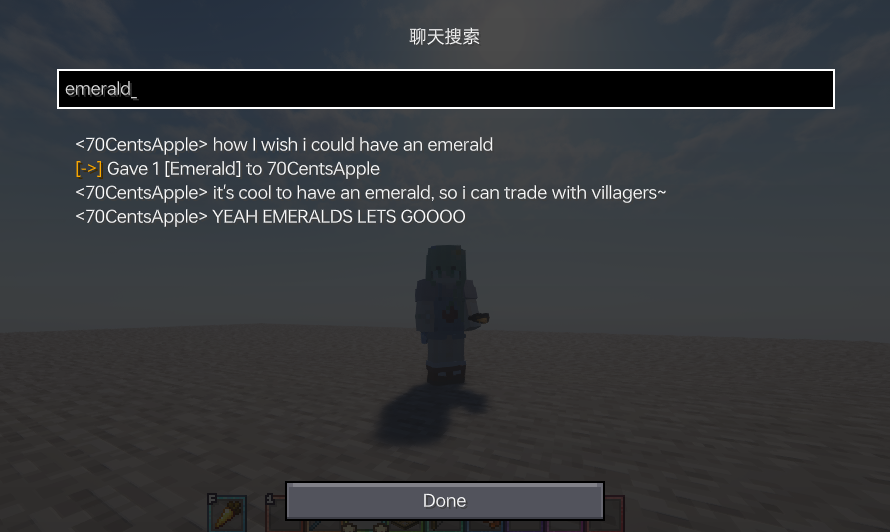
在聊天栏中按 Shift + Tab 开始翻译。 - 启用聊天历史导航器
使用 Ctrl + F 开始在聊天中导航!
- 最大历史记录长度
设置存储的聊天消息的最大数量。

通知者设置
各种聊天警报功能:
- Toast 通知

- 声音
支持自定义音效。 - 操作栏
在操作栏中显示警报。 - 高亮
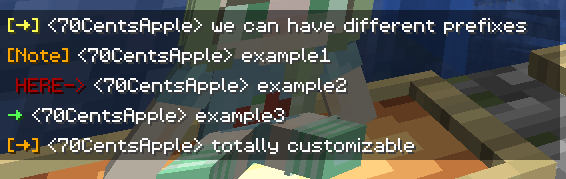
支持自定义高亮前缀。
- 白名单
匹配此列表的消息将被允许。 - 黑名单
匹配此列表的消息将被阻止(优先级高于白名单)。
格式化器设置
使用指定模式自定义您的消息。为不同的服务器应用不同的规则。查看气泡规则。
- 模式
根据指定的样式自动格式化消息。
例如:
&e{text}使您在支持颜色前缀 '&' 的服务器上显示金色文本。
&e{text} ~(ovo)~添加个性化后缀。
My coordinates are: {pos}将{pos}替换为您的当前坐标。 - 匹配时自动禁用...
在某些情况下,您不希望对文本进行格式化。
这包括(但不限于):
在向 Chest Shop 出售物品时的物品数量或all;
以特殊字符开头的命令。
默认正则表达式模式^\d+$|^[.#%$/].*|\ball\b涵盖了大多数情况。
您可以根据需要修改或添加更多。
聊天快捷键
使用热键执行常用命令:
- 触发上一条命令热键
按下设定的热键以重复上一条命令。
例如:
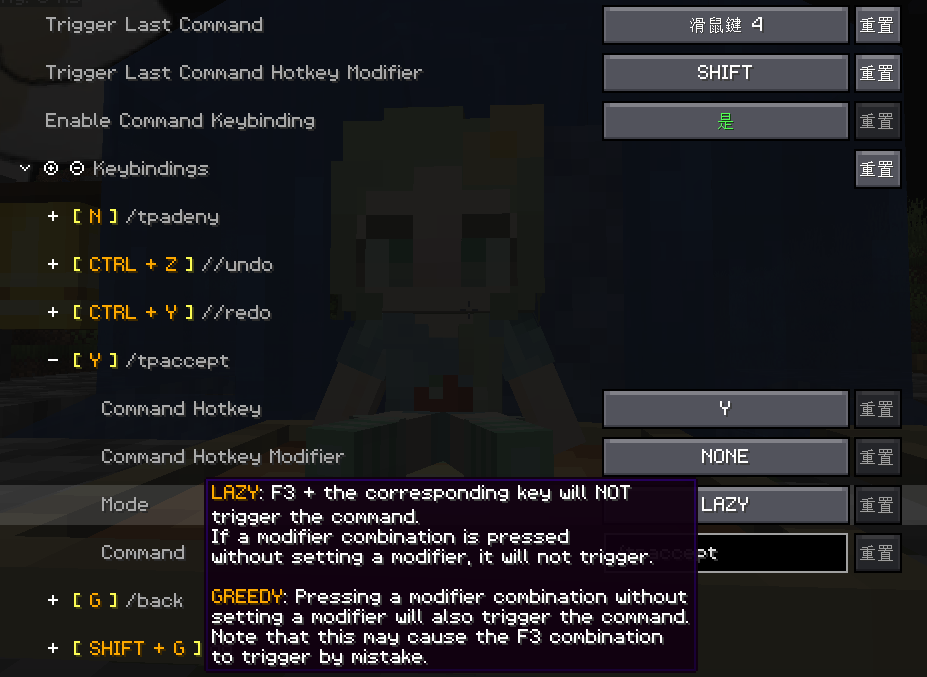
在玩跑酷地图时,按 F3+C 并激活它一段时间,然后每次按下热键都可以快速回到记录的位置。 - 命令快捷键
为常用命令分配热键。
气泡设置
- 启用聊天气泡
在头顶显示聊天气泡。

- 气泡规则
在不同的服务器上应用不同的气泡规则。

响应者设置
警告:在服务器上使用此功能之前,请先与其他玩家和管理员确认!
- 启用响应者
自动回复他人的消息。 - 响应者规则
在不同的服务器上应用不同的响应者规则。
聊天过滤设置
- 启用聊天过滤
根据特定规则过滤聊天消息。 - 过滤规则
如果传入的消息与列表中的任何模式匹配,该消息将被过滤。
?Help Needed?
- New Translations
- New Web Machine Translators
Feel free to make a PR on Github.
? Overview
Chat Tools is a highly customizable Minecraft client mod that supports various features, allowing them to interoperate through commands and more.
? Glossary and Technical Details
- Session Identifier (Chat Tools-specific term) is a string that, in single-player mode, corresponds to the current save name, and in multiplayer mode, corresponds to the server address. Related Regular Expressions use the
matches()method for matching. - Pattern (General term) refers to the Regular Expression pattern. Chat Tools uses the MULTILINE mode for Regular Expressions and matches them using the
find()method. - Chat Tools maintains multi versions by using macro replacement. The same version of Chat Tools may exhibit slight differences between Minecraft versions.
- When processing player messages, Chat Tools removes color codes (§.).
- By enabling Advanced Tooltips (F3+H), you can hover over configuration items on the configuration page to view their keys, default values, and other details.
?️ Commands
/chattools on- Enable the mod./chattools off- Disable the mod./chattools opengui- Open the configuration page./chattools download- Download addons./chattools regex_checker <pattern> [<test_content>]- Without test content: check if the pattern is a valid regex. With test content: validate the pattern and test if it matches the content./chattools send_to_client text <text_JSON_component>- Send specific text to the client chat bar./chattools send_to_client actionbar <text_JSON_component>- Display specific text on the client actionbar./chattools config openfile- Open the configuration file (editing requires a game restart to apply changes)./chattools config get <key>- Retrieve the value of a specific configuration key for the current session./chattools config set <key> <value> [<save>]- Set the value of a specific configuration key. If save is set to true, the changes will also be saved to the file./chattools config toggle <key> [<save>]- Toggle the state of a boolean-type configuration key. If save is set to true, the changes will also be saved to the file.
✨ Function introduction
For elaborate descriptions and examples, please see >>FAQ<<.
General Settings
These are the core settings for Chat Tools:
- Show Timestamp
Adds a timestamp to each message.
- Restore Messages
Recovers messages from previous sessions. - Nickname Hider
Conceals your real nickname from your view.
- Translator
Press Shift + Tab in the chat bar to start translating. - Enable Chat History Navigator
Use Ctrl + F to start navigating in chat!
- Max History Length
Sets the maximum number of chat messages stored.
Notifier Settings
Various chat alert features:
- Toast Notification
- Sound
Supports custom sound effects. - Actionbar
Displays alerts in the action bar. - Highlight
Supports custom highlighting prefixes.
- Allow List
Messages matching this list are allowed. - Ban List
Messages matching this list are blocked (higher priority than Allow List).
Formatter Settings
Customize your messages using specified patterns. Apply different rules for different servers. See Bubble Rules.
- Pattern
Automatically formats messages based on the specified style.
For example:
&e{text}makes your message gold on servers supporting the color prefix '&'.
&e{text} ~(ovo)~adds a personalized suffix.
My coordinates are: {pos}replaces{pos}with your current coordinates. - Auto-Disable for Matching...
In some cases, you don't want your text to be formatted.
This includes (but isn't limited to):
Item counts orallwhen selling items to the Chest Shop;
Commands starting with special characters.
The default RegEx pattern^\d+$|^[.#%$/].*|\ball\bcovers most cases.
You can modify or add more as needed.
Chat Keybindings
Use hotkeys for frequently used commands:
- Trigger Last Command Hotkey
Press a set hotkey to repeat the previous command.
For example:
While playing a Parkour map, do F3+C and activate it for a time, then you can quickly go back to the recorded point location every time you press the hotkey. - Command Keybindings
Assign hotkeys to frequently used commands.
Bubble Settings
- Enable Chat Bubbles
Displays a chat bubble over your head.
- Bubble Rules
Apply different bubble rules on different servers.
Responder Settings
Warning: Before using this feature on a server, please check with other players and admins first!
- Enable Responder
Automatically responds to others' messages. - Responder Rules
Apply different responder rules on different servers.
Chat Filter Settings
- Enable Chat Filter
Filter chat messages based on specific rules. - Filter Rules
If any of the patterns in this list matches an incoming message, the message will be filtered.

下载 Chat Tools
需要联机服务器吗?
稳定流畅、一键部署,几分钟即可和朋友联机开服
最低仅需 8 元/月 即可畅快联机
下载 Chat Tools
下载 Chat Tools
下载 Chat Tools
需要联机服务器吗?
稳定流畅、一键部署,几分钟即可和朋友联机开服
最低仅需 8 元/月 即可畅快联机
下载 Chat Tools
下载 Chat Tools
需要联机服务器吗?
稳定流畅、一键部署,几分钟即可和朋友联机开服
最低仅需 8 元/月 即可畅快联机
下载 Chat Tools
下载 Chat Tools
下载 Chat Tools
下载 Chat Tools
简体中文
v2.4.5
- 新增:自动响应支持更复杂的命令串
完整更新日志:
关于这个资源的讨论、问题反馈与使用心得
还没有讨论,来发第一帖吧
你是这个资源的作者?登录后可认领此资源。
相似资源
 模组

显示你正在注视的方块的信息。(适用于 Minecraft 1.16+ 的 Hwyla/Waila 分支)
 模组

查看物品与配方
 模组
在游戏画面角落显示附近世界地形、玩家、生物和实体的地图。可创建路径点,帮助你找到标记过的位置。
 模组
使用 JavaScript 编辑配方、添加自定义物品、编写世界事件!
 模组
AE2:一款流行的自动化与存储模组
 模组
添加区块认领和玩家组队功能,并与 Xaero's Minimap 和 World Map 集成
评论 0
登录后参与评分
还没有评论,来抢沙发吧