
?需要帮助?
- 新的翻译人员
- 新的网页机器翻译员
欢迎在 Github 上提交 PR。
? 概述
Chat Tools 是一款高度可定制的 Minecraft 客户端模组,支持多种功能,并允许它们通过命令等方式进行交互。
? 术语表与技术细节
- 会话标识符 (Chat Tools 专有术语) 是一个字符串,在单人模式中对应当前存档名称,在多人模式中对应服务器地址。相关的正则表达式使用
matches()方法进行匹配。 - 模式 (通用术语) 指正则表达式的模式。Chat Tools 使用正则表达式的 MULTILINE(多行)模式,并使用
find()方法进行匹配。 - Chat Tools 通过宏替换来维护多版本兼容性。同一版本的 Chat Tools 在不同 Minecraft 版本中可能会表现出细微差异。
- 在处理玩家消息时,Chat Tools 会移除颜色代码 (§.)。
- 启用高级工具提示 (F3+H),您可以在配置页面上悬停在配置项上以查看其键名、默认值及其他详细信息。
?️ 命令
/chattools on- 启用模组。/chattools off- 禁用模组。/chattools opengui- 打开配置页面。/chattools download- 下载附加组件。/chattools regex_checker <pattern> [<test_content>]- 无测试内容:检查该模式是否为有效的正则表达式。有测试内容:验证该模式并测试其是否与内容匹配。/chattools send_to_client text <text_JSON_component>- 向客户端聊天栏发送特定文本。/chattools send_to_client actionbar <text_JSON_component>- 在客户端操作栏显示特定文本。/chattools config openfile- 打开配置文件(编辑后需重启游戏以应用更改)。/chattools config get <key>- 获取当前会话中特定配置键的值。/chattools config set <key> <value> [<save>]- 设置特定配置键的值。如果 save 设置为 true,更改也将保存到文件中。/chattools config toggle <key> [<save>]- 切换布尔类型配置键的状态。如果 save 设置为 true,更改也将保存到文件中。
✨ 功能介绍
如需详细描述和示例,请参阅 >>常见问题解答<<。
常规设置
这些是 Chat Tools 的核心设置:
- 显示时间戳
为每条消息添加时间戳。

- 恢复消息
恢复来自之前会话的消息。 - 昵称隐藏器
从你的视角隐藏你的真实昵称。

- 翻译器
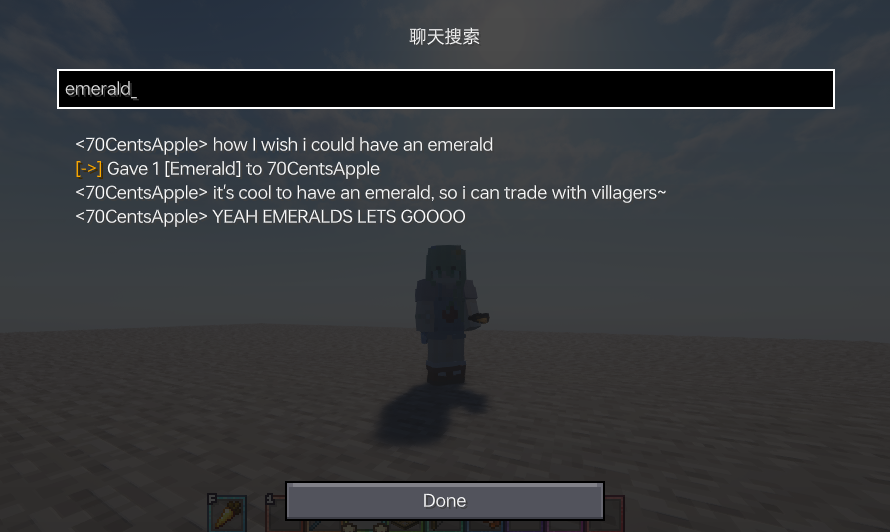
在聊天栏中按 Shift + Tab 开始翻译。 - 启用聊天历史导航器
使用 Ctrl + F 开始在聊天中导航!
- 最大历史记录长度
设置存储的聊天消息的最大数量。

通知者设置
各种聊天警报功能:
- Toast 通知

- 声音
支持自定义音效。 - 操作栏
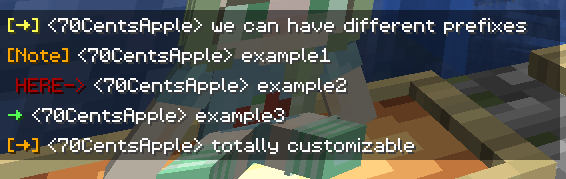
在操作栏中显示警报。 - 高亮
支持自定义高亮前缀。
- 白名单
匹配此列表的消息将被允许。 - 黑名单
匹配此列表的消息将被阻止(优先级高于白名单)。
格式化器设置
使用指定模式自定义您的消息。为不同的服务器应用不同的规则。查看气泡规则。
- 模式
根据指定的样式自动格式化消息。
例如:
&e{text}使您在支持颜色前缀 '&' 的服务器上显示金色文本。
&e{text} ~(ovo)~添加个性化后缀。
My coordinates are: {pos}将{pos}替换为您的当前坐标。 - 匹配时自动禁用...
在某些情况下,您不希望对文本进行格式化。
这包括(但不限于):
在向 Chest Shop 出售物品时的物品数量或all;
以特殊字符开头的命令。
默认正则表达式模式^\d+$|^[.#%$/].*|\ball\b涵盖了大多数情况。
您可以根据需要修改或添加更多。
聊天快捷键
使用热键执行常用命令:
- 触发上一条命令热键
按下设定的热键以重复上一条命令。
例如:
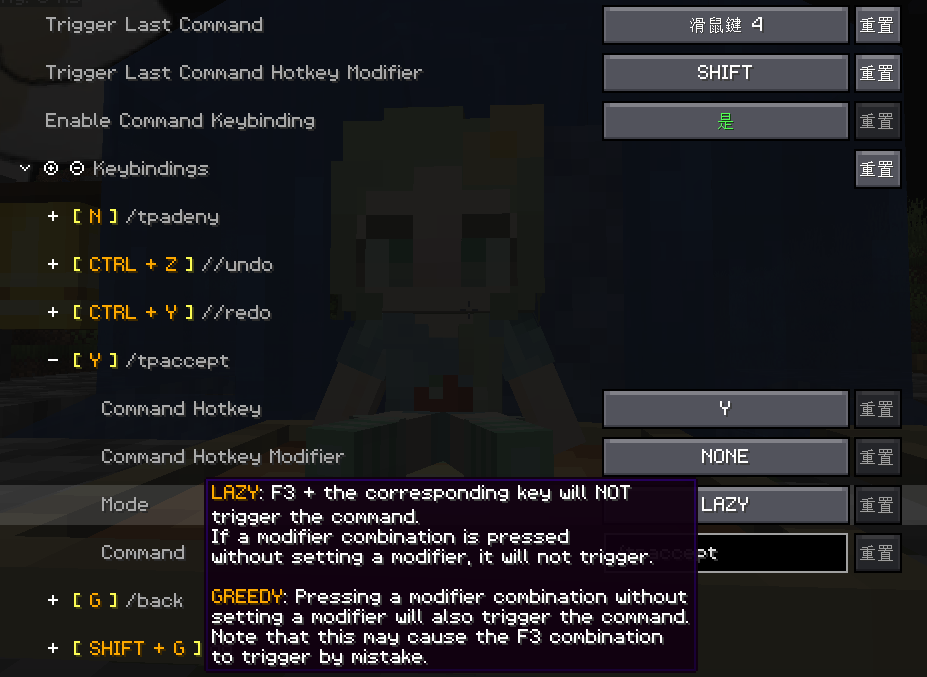
在玩跑酷地图时,按 F3+C 并激活它一段时间,然后每次按下热键都可以快速回到记录的位置。 - 命令快捷键
为常用命令分配热键。
气泡设置
- 启用聊天气泡
在头顶显示聊天气泡。

- 气泡规则
在不同的服务器上应用不同的气泡规则。

响应者设置
警告:在服务器上使用此功能之前,请先与其他玩家和管理员确认!
- 启用响应者
自动回复他人的消息。 - 响应者规则
在不同的服务器上应用不同的响应者规则。
聊天过滤设置
- 启用聊天过滤
根据特定规则过滤聊天消息。 - 过滤规则
如果传入的消息与列表中的任何模式匹配,该消息将被过滤。
?Help Needed?
- New Translations
- New Web Machine Translators
Feel free to make a PR on Github.
? Overview
Chat Tools is a highly customizable Minecraft client mod that supports various features, allowing them to interoperate through commands and more.
? Glossary and Technical Details
- Session Identifier (Chat Tools-specific term) is a string that, in single-player mode, corresponds to the current save name, and in multiplayer mode, corresponds to the server address. Related Regular Expressions use the
matches()method for matching. - Pattern (General term) refers to the Regular Expression pattern. Chat Tools uses the MULTILINE mode for Regular Expressions and matches them using the
find()method. - Chat Tools maintains multi versions by using macro replacement. The same version of Chat Tools may exhibit slight differences between Minecraft versions.
- When processing player messages, Chat Tools removes color codes (§.).
- By enabling Advanced Tooltips (F3+H), you can hover over configuration items on the configuration page to view their keys, default values, and other details.
?️ Commands
/chattools on- Enable the mod./chattools off- Disable the mod./chattools opengui- Open the configuration page./chattools download- Download addons./chattools regex_checker <pattern> [<test_content>]- Without test content: check if the pattern is a valid regex. With test content: validate the pattern and test if it matches the content./chattools send_to_client text <text_JSON_component>- Send specific text to the client chat bar./chattools send_to_client actionbar <text_JSON_component>- Display specific text on the client actionbar./chattools config openfile- Open the configuration file (editing requires a game restart to apply changes)./chattools config get <key>- Retrieve the value of a specific configuration key for the current session./chattools config set <key> <value> [<save>]- Set the value of a specific configuration key. If save is set to true, the changes will also be saved to the file./chattools config toggle <key> [<save>]- Toggle the state of a boolean-type configuration key. If save is set to true, the changes will also be saved to the file.
✨ Function introduction
For elaborate descriptions and examples, please see >>FAQ<<.
General Settings
These are the core settings for Chat Tools:
- Show Timestamp
Adds a timestamp to each message.
- Restore Messages
Recovers messages from previous sessions. - Nickname Hider
Conceals your real nickname from your view.
- Translator
Press Shift + Tab in the chat bar to start translating. - Enable Chat History Navigator
Use Ctrl + F to start navigating in chat!
- Max History Length
Sets the maximum number of chat messages stored.
Notifier Settings
Various chat alert features:
- Toast Notification
- Sound
Supports custom sound effects. - Actionbar
Displays alerts in the action bar. - Highlight
Supports custom highlighting prefixes.
- Allow List
Messages matching this list are allowed. - Ban List
Messages matching this list are blocked (higher priority than Allow List).
Formatter Settings
Customize your messages using specified patterns. Apply different rules for different servers. See Bubble Rules.
- Pattern
Automatically formats messages based on the specified style.
For example:
&e{text}makes your message gold on servers supporting the color prefix '&'.
&e{text} ~(ovo)~adds a personalized suffix.
My coordinates are: {pos}replaces{pos}with your current coordinates. - Auto-Disable for Matching...
In some cases, you don't want your text to be formatted.
This includes (but isn't limited to):
Item counts orallwhen selling items to the Chest Shop;
Commands starting with special characters.
The default RegEx pattern^\d+$|^[.#%$/].*|\ball\bcovers most cases.
You can modify or add more as needed.
Chat Keybindings
Use hotkeys for frequently used commands:
- Trigger Last Command Hotkey
Press a set hotkey to repeat the previous command.
For example:
While playing a Parkour map, do F3+C and activate it for a time, then you can quickly go back to the recorded point location every time you press the hotkey. - Command Keybindings
Assign hotkeys to frequently used commands.
Bubble Settings
- Enable Chat Bubbles
Displays a chat bubble over your head.
- Bubble Rules
Apply different bubble rules on different servers.
Responder Settings
Warning: Before using this feature on a server, please check with other players and admins first!
- Enable Responder
Automatically responds to others' messages. - Responder Rules
Apply different responder rules on different servers.
Chat Filter Settings
- Enable Chat Filter
Filter chat messages based on specific rules. - Filter Rules
If any of the patterns in this list matches an incoming message, the message will be filtered.

下载 Chat Tools
下载 Chat Tools
下载 Chat Tools
需要联机服务器吗?
稳定流畅、一键部署,几分钟即可和朋友联机开服
最低仅需 8 元/月 即可畅快联机
下载 Chat Tools
下载 Chat Tools
需要联机服务器吗?
稳定流畅、一键部署,几分钟即可和朋友联机开服
最低仅需 8 元/月 即可畅快联机
下载 Chat Tools
下载 Chat Tools
下载 Chat Tools
需要联机服务器吗?
稳定流畅、一键部署,几分钟即可和朋友联机开服
最低仅需 8 元/月 即可畅快联机
下载 Chat Tools
下载 Chat Tools
简体中文
v2.4.5
- 新增:自动响应支持更复杂的命令串
完整更新日志:
关于这个资源的讨论、问题反馈与使用心得
还没有讨论,来发第一帖吧
你是这个资源的作者?登录后可认领此资源。
相似资源
 模组

显示你正在注视的方块的信息。(适用于 Minecraft 1.16+ 的 Hwyla/Waila 分支)
 模组
在游戏画面角落显示附近世界地形、玩家、生物和实体的地图。可创建路径点,帮助你找到标记过的位置。
 模组

查看物品与配方
 模组
使用 JavaScript 编辑配方、添加自定义物品、编写世界事件!
 模组
AE2:一款流行的自动化与存储模组
 模组
那是什么?一个 Waila/Hwyla 的分支。
评论 0
登录后参与评分
还没有评论,来抢沙发吧