Chat-with-NPC

该模组仍处于公开测试阶段,如果您发现任何问题,请提交 Issue。如果您想使用最新版本,
请自行编译源代码,请参阅 Build。
Chinese Version
1. 简介
Chat With NPC 允许玩家与 NPC 自由对话,NPC 会根据其设定(基础提示词)及其所属群体(国家、城市、城镇等)的设定来回答问题。适用于 RPG 地图或解谜地图。NPC 不会改变游戏规则(除非您使用高级功能)。如果您定义了相关指令,NPC 还可以根据聊天内容执行某些操作。
在未来的版本中,我们将添加诸如 NPC 之间互相聊天、NPC 对事件发表观点等创新功能,从而使同一群体中的 NPC 能够相互交互。
2. 使用方法
任何玩家都可以通过对已注册的 NPC 按住 Shift 键并点击 与其交谈。随后 NPC 会与玩家打招呼。
NPC 的发言可以通过两种方式展示:所有人可见(在其头顶上方的聊天气泡中),或者仅在一定范围内的玩家可见(在聊天栏中)。
任何附近的玩家都可以直接在聊天栏中回复 NPC(如果玩家附近有多个 NPC,则回复最近的 NPC)。
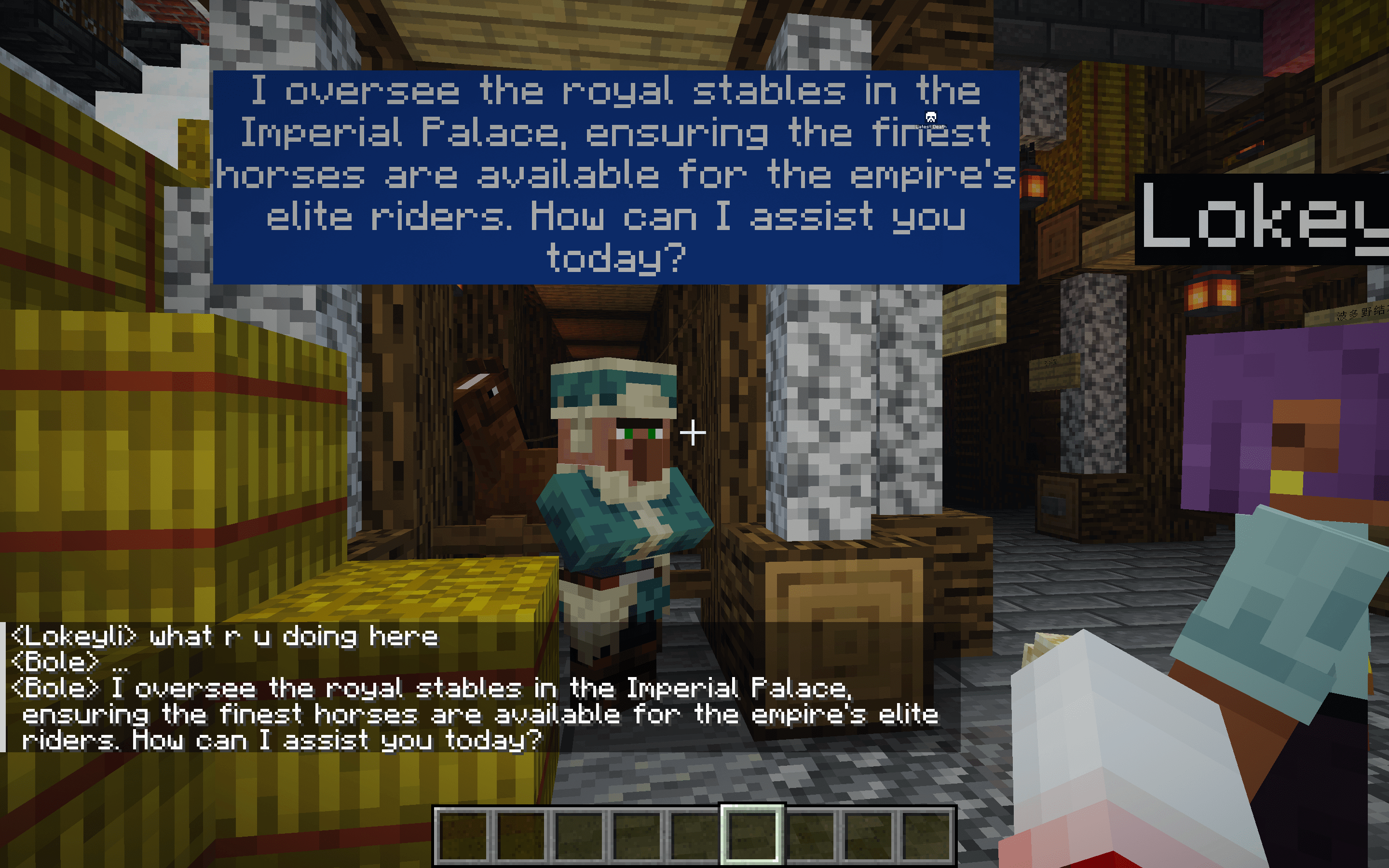
如果您是管理员,请参阅 安装 以获取更多信息。
3. 功能
- 每个
NPC 都有自己的 Instructions(指令/提示词),并且可以属于一个 Group(群体)。
- 每个
NPC 都会通过 OpenAI 自动管理其对话上下文。
- 每个
Group 也有自己的 Instructions 来描述它们,并且可以记录一些易于更改的 Event(事件)。
- 每个
Group 可以记录一个 ParentGroup(父群体),直到群体的父群体为 Global(全局),Global 不能有父群体。
- 每个
NPC 的对话将结合其自身的 Instructions、本次对话的上下文(如果需要记忆且 needMemory 为 true,则为所有对话)、其 Group 和所有 ParentGroup 的 Intructions(指令/提示词),以及 Event 的内容。
- 您可以定义 NPC 在对话中可以调用的
Functions(函数)。
4. 要求
- Minecraft Server 1.19.4 或更高版本
- Fabric Loader 0.12.0 或更高版本
- 包含 Fabric API
5. 安装
- 将模组安装到
mods 文件夹后,从 此处 获取您的 OpenAI API 密钥,并使用 /npchat setkey <key> 命令进行设置。
- 您可以使用 Commands 中的命令来设置模组的基本配置。
- 关于注册 NPC,请阅读 RegisterNPC。
- 关于注册群体,请阅读 RegisterGroup。
- 关于模组的配置,请阅读 Configuration。
- 如果您想使用某些高级功能,请阅读 Advanced。
6. 命令
/npchat - 查看配置状态
/npchat help - 查看命令帮助
/npchat enable/disable - 启用/禁用模组
/npchat setKey <key> - 设置 OpenAI API 密钥
/npchat setModel <model> - 设置 AI 模型
/npchat setRange <range> - 设置对话范围
/npchat setLanguage <language> - 设置响应语言
/npchat setWordLimit <wordLimit> - 设置响应的字数限制
/npchat setURL <url> - 设置 OpenAI API 代理 URL
/npchat saveAll - 将所有数据保存到磁盘
/npchat setChatBar <true/false> - 设置是否在左下角聊天栏显示对话,true 显示,false 隐藏。
/npchat setBubble <true/false> - 设置是否在我们可爱的 NPC 上方显示对话气泡,true 显示,false 隐藏。
/npchat setBubbleStyle Color <color preset> - 设置字体和背景色的预设颜色。
/npchat setBubbleStyle timeLastingPerChar <time> - 设置每个字符在气泡中显示的持续时间(单位为秒)。例如,将时间设置为 1.5 秒意味着一个包含 6 个字符的句子,其气泡总共显示 9 秒。
7. 待办事项
- 改进聊天气泡。
- NPC 之间互相聊天并交流对事件的看法。(见 Advanced)
- NPC 对其
Group 中的每个事件发表意见。
- NPC 根据聊天内容执行动作。(见 Advanced)
8. 参考
Chat-with-NPC

The mod is still in public test, please submit an issue if you find any problems. If you want to use the latest version,
please compile the source code yourself, see Build.
Chinese Version
1. Introduction
Chat With NPC allows players to freely chat with NPCs, who will answer questions based on his setting (Basic Prompt)
and the setting of their Groups (Nation, City, Town ,etc.). Suitable for RPG maps or puzzle maps. The NPCs would not
change the game rule (if you don't use the advanced features). NPC can also perform some actions based on the chat
content if you define it.
In the future version, we will add innovative features such as NPCs chatting with each other, NPCs' viewpoints on
events, etc., so that NPCs in the same Group can interact with each other.
2. How to use
Any player can talk to NPCs by shift+clicking on them, if the NPC has been registered by OPs. Then the NPC will
greet with players.
The NPC's speech can be seen by everyone (in the chat bubble above their head), or by players within a certain range
around NPC (in the Chat bar).
Any nearby players can reply to the NPC in the chat bar directly (or the nearest NPC if there are multiple NPCs near
the player).

If you are administrator, see the Installation for more information.
3. Features
- Each
NPC has his own Instructions, and he can belong to a Group.
- Each
NPC will manager their context of the conversation automatically by OpenAI.
- Each
Group also has its own Instructions to describe them, and can also record some Event that can be easy to
change.
- Each
Group can record a ParentGroup until the group's parent group is Global, Global cannot have a parent
group.
- Each
NPC's conversation will combine his own Instructions, the context of this
conversation (or all the conversation if needMemory is true), the Intructions of his Group and all
its ParentGroup, and the content of Event.
- You can define the
Functions that could be call by the NPC in the conversation.
4. Requirements
- Minecraft Server 1.19.4 or higher
- Fabric Loader 0.12.0 or higher
- Fabric API included
5. Installation
- After installing the mod in
mods folder, grab your OpenAI API key
from here, and set it with the /npchat setkey <key> command.
- You can use the command in Commands to set the basic configuration of the mod.
- For register the NPCs, please read RegisterNPC.
- For register the Groups, please read RegisterGroup.
- To know about the configuration of the mod, please read Configuration.
- If you want to use some advanced features, please read Advanced.
6. Commands
/npchat - View configuration status
/npchat help - View commands help
/npchat enable/disable - Enable/disable the mod
/npchat setKey <key> - Set OpenAI API key
/npchat setModel <model> - Set AI model
/npchat setRange <range> - Set the range of the conversation
/npchat setLanguage <language> - Set the response language
/npchat setWordLimit <wordLimit> - Set the word limit of the response
/npchat setURL <url> - Set the OpenAI API proxy URL
/npchat saveAll - Save all the data to the disk
/npchat setChatBar <true/false> - Set to display the conversation at the chat bat at the bottom left or not, true to display, false to hide.
/npchat setBubble <true/false> - Set to display the bubble of the conversation above our lovely NPC or not, true to display, false to hide.
/npchat setBubbleStyle Color <color preset> - Set the preset colors for font and background.
/npchat setBubbleStyle timeLastingPerChar <time> - Set the time lasting for a character in unit of second. For example, setting the time to 1.5 seconds means a sentence with 6 characters will have its bubble displayed for a total of 9 seconds.
7. To do list
- Improve the chat bubble.
- NPCs chat with each other and communicate their opinion of events. (See Advanced)
- NPCs have their opinion on every event in their
Group.
- NPCs performing actions based on the chat content. (See Advanced)
8. Reference
评论 0
登录后参与评分
还没有评论,来抢沙发吧
