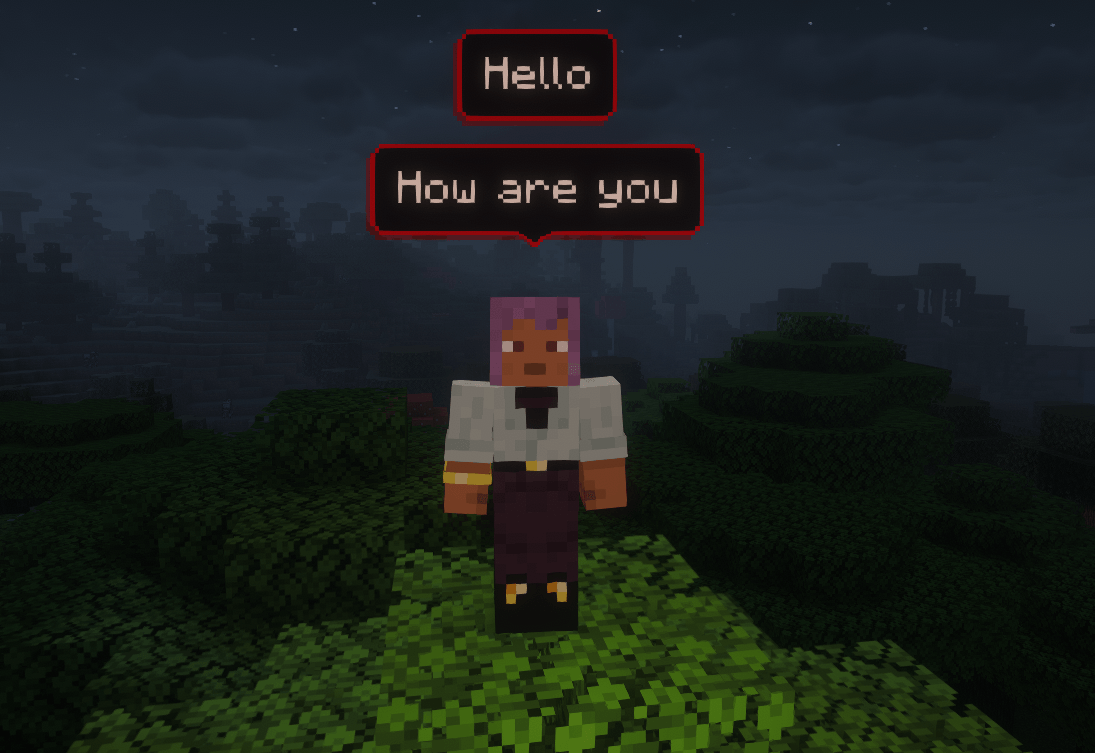
ChatBubbles 是一款模组,它会将你的聊天消息直接显示在你的头顶(字面意义上的)。这意味着你可以看到其他玩家头顶气泡中的消息。
无论是角色扮演服务器还是普通生存服务器,这款模组都能让交互更加自然和沉浸。
ChatBubbles 是一款高度可自定义的模组,你可以根据需要更改气泡的外观或设置一些与服务器相关的选项。
⚠️ 注意:此模组必须同时安装在客户端和服务端上。
? 最新更新:设置界面!
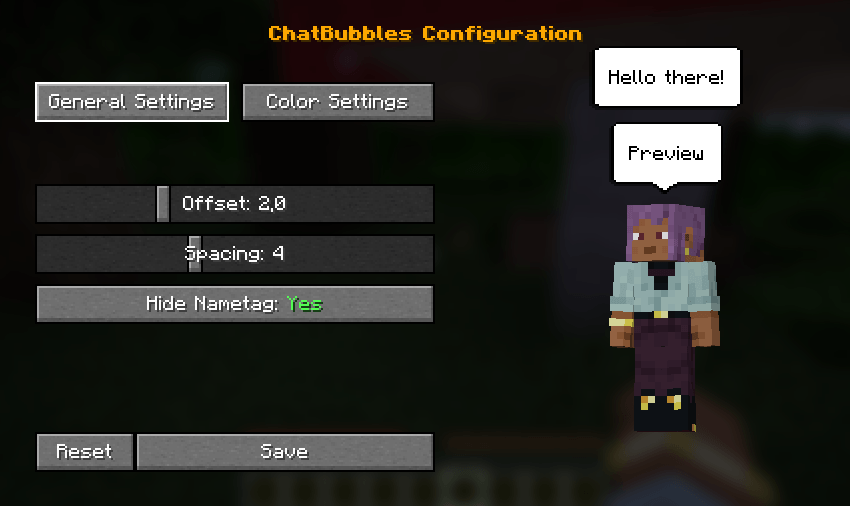
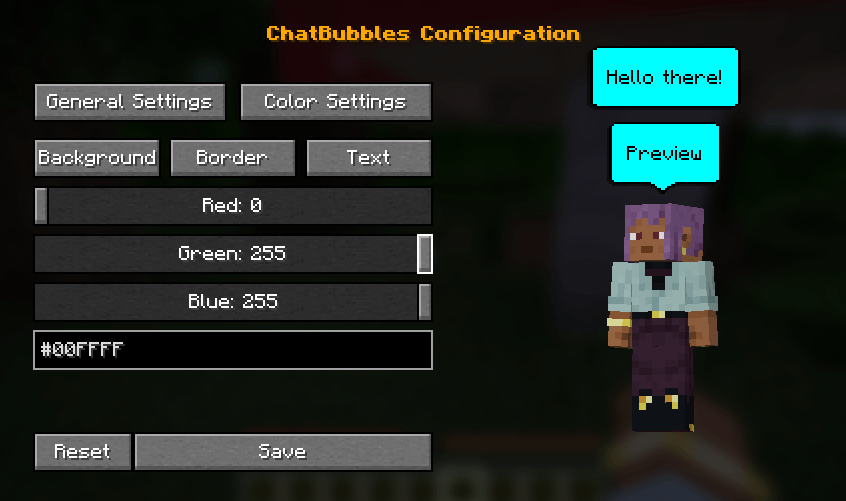
- 游戏内设置界面: 可直接在游戏中轻松配置气泡颜色、间距和高度偏移量。
- 实时预览: 在调整设置时,可以实时查看聊天气泡的变化。
- 使用默认快捷键 "C"(可在控制菜单中更改)或通过
/chatbubbles settings 命令打开配置菜单。
功能与自定义
? 外观设置
通过全新的 游戏内设置界面 自定义你的气泡比以往任何时候都更容易,该界面包含 实时预览 功能!按 C 键(默认按键绑定)或输入 /chatbubbles settings 即可访问。
如果你更喜欢使用命令,仍然可以通过聊天窗口自定义所有内容:
- 颜色自定义: 更改气泡颜色以匹配你的风格。
/chatbubbles bgColor <hexCode> (背景颜色)
/chatbubbles borderColor <hexCode> (边框颜色)
/chatbubbles textColor <hexCode> (文字颜色)
- 注意:十六进制代码中请勿包含
# 符号(例如,使用 FFFFFF)。
- 高度偏移: 调整气泡与头部之间的距离。
/chatbubbles offset <value>
- 注意:可以为负数,但建议使用 2.0 及以上值。负数值对于比原版玩家模型更小的自定义模型很有用。
- 气泡间距: 控制头顶上方多个活动气泡之间的距离。
/chatbubbles spacing <value>
- 注意:值必须在 1.0 到 10.0 之间。
- 隐藏名称标签: 当气泡处于活动状态时,选择隐藏原版的名称标签以获得更整洁的外观。
/chatbubbles hideNametag <true/false>
⚙️ 服务端设置
- 玩家头顶上方的最大气泡数量;
- 偏移量、间距和隐藏名称标签的默认值;
- 气泡的内边距;
- 气泡的持续时间。
ChatBubbles is a mod that brings your chat messages to your head (literally), that means you can see any player's message on bubbles right above their head.
Perfect for roleplay server or simple SMP, this mod makes interactions more natural and immersive.
ChatBubbles is a highly customizable mod, that means you can change your bubble's appearence or set some server-related settings.
⚠️ Note: This mod must be installed on BOTH the Client and the Server.

? Latest Update: Settings GUI!
- In-Game Settings GUI: Easily configure bubble colors, spacing, and height offsets directly in-game.
- Live Preview: See your chat bubble changes update in real-time while tweaking the settings.
- Open the configuration menu using the default "C" keybind (can be changed in the controls menu) or via the
/chatbubbles settings command.
Features & Customization
? Appearance Settings
Customizing your bubbles is easier than ever with our new in-game settings screen, which includes a live preview! Access it by pressing C (default keybind) or by typing /chatbubbles settings.
If you prefer using commands, you can still customize everything via chat:
- Color Customization: Change your bubble's colors to match your style.
/chatbubbles bgColor <hexCode> (Background color)
/chatbubbles borderColor <hexCode> (Border color)
/chatbubbles textColor <hexCode> (Text color)
- Note: Do not include the
# symbol in the hex code (e.g., use FFFFFF).
- Height Offset: Adjust the distance between the bubble and your head.
/chatbubbles offset <value>
- Note: Can be negative, but 2.0+ is recommended. Negative values are useful for custom models smaller than the vanilla player.
- Bubble Spacing: Control the distance between multiple active bubbles above your head.
/chatbubbles spacing <value>
- Note: Value must be between 1.0 and 10.0.
- Hide Nametag: Choose to hide your vanilla nametag while a bubble is active for a cleaner look.
/chatbubbles hideNametag <true/false>
⚙️ Server-Side Settings
- Max. of bubbles above the players' head;
- Default values for offset, spacing and hideNametag;
- Bubble's padding;
- Duration of a bubble.
评论 0
登录后参与评分
还没有评论,来抢沙发吧