
ChatSphere
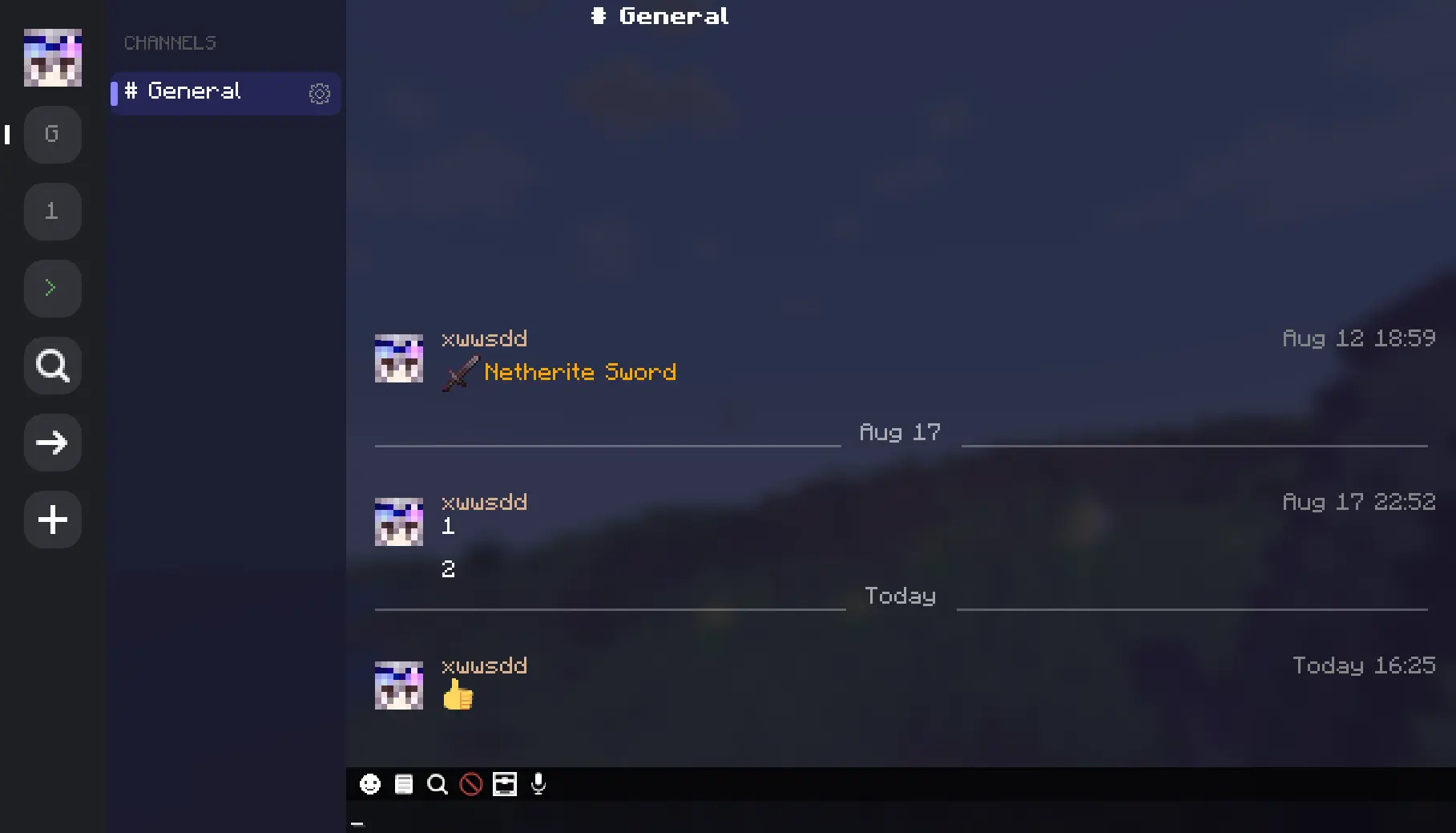
一款面向 Minecraft 1.21.1(NeoForge & Fabric)和 1.20.1(Fabric & Forge)的现代即时通讯聊天模组。以频道、私聊、表情符号、语音房间及完整图形界面取代原版聊天。
仅在客户端运行——在单人游戏或原版/插件服务器(启用“允许原版连接”后重启)上,它以本地存储模式运行。在 NeoForge 或 Fabric 服务器上,需在两端安装以实现频道同步、玩家间私聊和语音聊天。
功能特性
- 频道系统:公开/私有频道、邀请码、子频道、探索发现
- 私聊功能,支持
/msg和/tell命令 - 自定义表情符号:本地使用或服务器共享,支持 png/gif 格式及动画
- 内置 349 个表情符号,支持搜索和
:shortcode:自动补全 - 通过 Simple Voice Chat 或 PlasmoVoice 实现语音房间
- 聊天窗口内带历史记录的命令控制台
- 消息搜索、引用回复、右键菜单
- 成员管理:管理员、禁言、踢出、邀请、所有权转让
- 反垃圾信息重复消息合并
- 设置图形界面;管理员可在游戏内配置服务器设置
- 兼容 No Chat Reports
操作按键
| 按键 | 动作 |
|---|---|
T |
打开聊天图形界面 |
/ |
以命令模式打开聊天 |
F7 |
打开设置 |
配置
客户端 — 按 F7
| 选项卡 | 选项 |
|---|---|
| UI | 时间戳、发送者名称、头像、深色主题、保留输入内容、右侧栏、频道切换 |
| Bubbles(气泡) | 自身/他人颜色(ARGB)、圆角半径 |
| Skin(皮肤) | 头像缓存开关、自定义 API URL |
| NCR | NCR 兼容性开关、安全状态显示、preventsChatReports 设置(当安装了 No Chat Reports 时) |
| Behavior(行为) | 聊天记录上限、滚动限制 |
| Sound(声音) | 总开关、@提及 / 耳语 / 系统 / 公共声音、屏幕弹窗提示 |
服务器端 — config/chatsphere-server.json
| 选项 | 默认值 | 描述 |
|---|---|---|
| Anti-Spam(反垃圾信息) | true |
折叠重复消息 |
| Max Chat History(最大聊天记录) | 200 |
每个会话存储的消息数 |
| Enable Channels(启用频道) | true |
切换频道系统 |
| Explore Enabled(启用探索) | true |
公开频道发现功能 |
| Explore Min Members(探索最小成员数) | 2 |
出现在探索列表中的最少成员数 |
| Backup Interval(备份间隔) | 30 分钟 |
服务器数据备份频率 |
| Prevents Chat Reports(阻止聊天报告) | true |
在服务器状态中广播 preventsChatReports(对应客户端 UI 的 NCR 部分) |
常见问题
模组是否需要安装在服务器上? 仅在客户端即可在本地模式下工作。在两端安装可解锁频道同步、跨玩家私聊和语音聊天。
支持哪些语音聊天模组? Simple Voice Chat 和 PlasmoVoice。如果同时安装,两者均可正常工作。
如何加入频道? 点击 → 按钮并输入邀请码,或者从探索屏幕浏览公开频道(→ 旁边的搜索图标)。
如何创建频道? 点击频道标题旁的 + 号,或在输入框中输入 #名称 然后按回车。
我的数据存储在哪里? 客户端数据存储在 ChatSphere/client/(按世界/服务器区分)。服务器数据存储在 ChatSphere/server/。
能否用于整合包? 可以。
命令
| 命令 | 描述 |
|---|---|
/chatsphere help |
显示帮助信息 |
/chatsphere list |
列出所有频道 |
/chatsphere info <name> |
查看频道详情 |
许可协议
GNU LGPLv3
表情符号由 twemoji 提供(Twitter / CC-BY 4.0)。
ChatSphere
A modern instant-messaging chat mod for Minecraft 1.21.1 (NeoForge & Fabric) and 1.20.1 (Fabric & Forge). Replaces vanilla chat with channels, private messaging, emoji, voice rooms, and a full GUI.
Works on the client side — in singleplayer or on vanilla/plugin servers (with "Allow Vanilla Connection" enabled, then restart), it runs in local storage mode. On NeoForge or Fabric servers, install on both sides for channel sync, private messaging, and voice chat.
Features
- Channel system: public/private, invite codes, sub-channels, explore
- Private messaging,
/msgand/tell - Custom emoji — local or server-shared, png/gif, animated
- 349 built-in emoji with search and
:shortcode:autocomplete - Voice rooms via Simple Voice Chat or PlasmoVoice
- Command console with history inside the chat window
- Message search, quote reply, right-click menu
- Member management: admins, mute, kick, invites, ownership
- Anti-spam duplicate merging
- Settings GUI; in-game server config for ops
- No Chat Reports compatible
Controls
| Key | Action |
|---|---|
T |
Open chat GUI |
/ |
Open chat in command mode |
F7 |
Open settings |
Configuration
Client — press F7
| Tab | Options |
|---|---|
| UI | Timestamps, sender name, avatar, dark theme, preserve input, right sidebar, channel toggle |
| Bubbles | Own/other color (ARGB), corner radius |
| Skin | Avatar cache toggle, custom API URL |
| NCR | NCR compatibility toggle, safety status display, preventsChatReports setting (when No Chat Reports is installed) |
| Behavior | Chat history limit, scroll limit |
| Sound | Master toggle, @mention / whisper / system / public sounds, screen popup |
Server — config/chatsphere-server.json
| Option | Default | Description |
|---|---|---|
| Anti-Spam | true |
Collapse duplicate messages |
| Max Chat History | 200 |
Messages stored per conversation |
| Enable Channels | true |
Toggle the channel system |
| Explore Enabled | true |
Public channel discovery |
| Explore Min Members | 2 |
Min members to appear in explore |
| Backup Interval | 30 min |
Server data backup frequency |
| Prevents Chat Reports | true |
Advertise preventsChatReports in server status (NCR section in client UI) |
FAQ
Does the mod need to be on the server? It works on the client alone in local mode. Install on both sides to unlock channel sync, private messaging across players, and voice chat.
Which voice chat mods are supported? Simple Voice Chat and PlasmoVoice. Both work simultaneously if installed.
How do I join a channel? Use the → button and enter an invite code, or browse public channels from the Explore screen (search icon next to →).
How do I create a channel? Click + next to the Channels header, or type #name in the input and press Enter.
Where is my data stored? Client data in ChatSphere/client/ per world/server. Server data in ChatSphere/server/.
Can I use this in a modpack? Yes.
Commands
| Command | Description |
|---|---|
/chatsphere help |
Show help |
/chatsphere list |
List all channels |
/chatsphere info <name> |
Channel details |
License
GNU LGPLv3
Emoji by twemoji (Twitter / CC-BY 4.0).

下载 ChatSphere
下载 ChatSphere
下载 ChatSphere
下载 ChatSphere
下载 ChatSphere
下载 ChatSphere
下载 ChatSphere
下载 ChatSphere
下载 ChatSphere
下载 ChatSphere
2.5.2
已更改
- 具有子频道的频道现在会保持主聊天关闭,并自动打开其第一个子频道
- 默认子频道可以在频道设置中更改,或在创建频道时直接输入指定
- 探索屏幕会在你加入之前,以图标形式列出每个公共频道
已修复
- 频道模板中的描述、主聊天开关和默认子频道现在能正确应用到所创建的频道
- 删除或退出频道后,不再遗留空的频道信息面板
- 删除频道现在会清除其历史记录,因此同名新创建的频道将为空
- 删除或退出当前正在阅读的频道,会将你切换回默认频道

2.5.1
新增
- 频道图标:在设置完成前,轨道、侧边栏、信息头和浏览器均显示名称首字母
- 频道图标:将 PNG/JPG 图片拖入图标行或粘贴链接后,非正方形图片会自动居中裁剪
- 语音房间:在频道树中拥有独立区域,并显示在线人数及每位成员列表
更改
- 服务器配置拆分为「常规」和「聊天媒体」两部分,每个页面由可折叠的标题组构成
- 「常规」包含聊天、同步、语音、表情符号和备份;「聊天媒体」包含链接预览和聊天图片
- 侧边栏频道行保留
#前缀,并在设置图标后显示该图标 - 重绘了工具栏和面板图标;语音房间行使用扬声器图标,语音消息使用麦克风图标
修复
- 无法下载的图像 URL 会保留在聊天框中,以便重试
- 图像缺失时查看器原本没有关闭按钮;现在该状态会提示如何退出
- UI 边框设置在每次重启后自动重新开启的问题已修复
2.5.0
新增
- 消息下的链接卡片:包含标题、描述和缩略图,提供三种模式(关闭、文字加卡片、仅卡片)
- 仅对屏幕上的消息获取链接预览;服务器可禁用该功能或限制允许的主机
- 聊天中的图片:将 PNG/JPG 文件拖入聊天框,或粘贴图片 URL,它们将从服务器缓存中按需加载
[Image]用于在无法显示图片的位置(如 HUD 气泡和搜索结果)作为占位符- 客户端图片设置,以及服务器的“Images”类别,用于调整大小、尺寸、有效期、冷却时间和每位玩家的图片上限
- 支持 Forge 1.20.1
修复
- 控制台标签页在发送命令后仍保持所选标签状态,且编辑标签后会刷新视图
- 重复计数器的位置从控制台行右侧边缘溢出改为位于左侧
关于这个资源的讨论、问题反馈与使用心得
还没有讨论,来发第一帖吧
你是这个资源的作者?登录后可认领此资源。
相似资源
 模组

可定制的鞘翅模组,支持装饰纹饰、旗帜图案等更多功能!
 模组

显示你正在注视的方块的信息。(适用于 Minecraft 1.16+ 的 Hwyla/Waila 分支)
 模组
使用 JavaScript 编辑配方、添加自定义物品、编写世界事件!
 模组

查看物品与配方
 模组
在游戏画面角落显示附近世界地形、玩家、生物和实体的地图。可创建路径点,帮助你找到标记过的位置。
 模组
AE2:一款流行的自动化与存储模组
评论 0
登录后参与评分
还没有评论,来抢沙发吧