
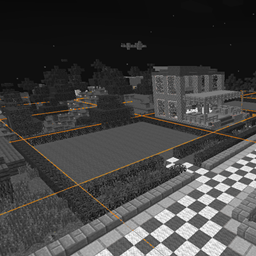
ChunkBorders 提供了一种简便的方式来查看区块的边界和中心,并识别你所在世界的出生点区块(spawn chunks)及出生区域。对于在 Towny、Factions 或类似服务器上进行游戏的人来说,这非常有用,因为这些服务器的城镇建设、建筑搭建和保护机制都依赖于区块边界。尽管 Minecraft 本身通过按 F3+G 即可显示区块边界,但本模组不仅包含了该功能,还在此基础上进行了多项扩展。
使用方法:
- 要启用此模组,安装后只需在游戏内按下 F9(默认按键)。
- 你可以使用 NumPad7(默认按键)在游戏内调整半径和其他设置。
设置选项:
- Radius(半径):
将可视化地面上向各个方向延伸多少个区块的边界(设为 0 时仅显示你当前所在的单个区块,最大可设为 16,范围非常大)。
- Auto Height (Block Below)(自动高度-下方方块):
使边界渲染在你脚下最高方块的上方,并随你的移动而动态调整。
- Auto Height (Player)(自动高度-玩家):
使边界始终渲染在玩家脚部位置,当你改变高度时会自动跟随调整。
- Manual Height(手动高度):
保持边界在同一固定高度,默认情况下可使用 (+) 和 (-) 键进行调整。
- Show center of current chunk(显示当前区块的中心):
显示你当前所处区块的 2x2 区块中心
- Show spawn chunks and spawn area(显示出生点区块和出生区域):
切换是否可视化出生点区块以及 20x20 的出生区域。
安装方法:
适用于 1.14 及更高版本:
1. 安装 Fabric Mod Loader。
2. 下载 Fabric API,并将 .jar 文件放入 /.minecraft/mods/ 文件夹中。
3. 下载 ChunkBorders,并将 .jar 文件放入 /.minecraft/mods/ 文件夹中。
4. 使用 Fabric 配置文件启动 Minecraft。
适用于 1.12.2 及更早版本
1. 安装 LiteLoader。
点击此处下载 LiteLoader
2. 下载 ChunkBorders,并将 .litemod 文件放入 /.minecraft/mods/ 文件夹中。请勿更改文件扩展名从 .litemod 变为其他格式,否则将无法加载。
3. 使用 LiteLoader 配置文件启动 Minecraft。
ChunkBorders provides an easy way to see the edges and centers of chunks, as well as identify your world's spawn chunks and spawn area. This can be very useful for people who play on Towny, Factions, or similar servers where chunk boundaries are important for setting up a town, building, and protection. While Minecraft includes chunk border functionality via F3+G, this mod includes that functionality and expands upon it in a few ways.
Usage:
- To enable the mod, install it and simply press F9 (by default) in-game.
- You can adjust the radius and other settings using NumPad7 (by default) in-game.
Settings:
- Radius:
How many chunks in each direction will be visualized for the ground borders (0 will display only the single chunk you're in, up to 16 which is huge).
- Auto Height (Block Below):
Makes the borders render at highest block below the player. Moves as you move.
- Auto Height (Player):
Makes the borders render at the player's feet and move automatically when you change height.
- Manual Height:
Keeps the borders at the same height, adjustable using the (+) and (-) keys by default.
- Show center of current chunk:
Shows the 2x2 chunk center for the chunk you're currently standing in
- Show spawn chunks and spawn area:
Toggles visualizing spawn chunks and the 20x20 spawn area.
Installation:
For 1.14 and later:
1. Install the Fabric Mod Loader.
2. Download the Fabric API and place the .jar file in the /.minecraft/mods/ folder.
3. Download ChunkBorders and place the .jar file in the /.minecraft/mods/ folder.
4. Launch Minecraft using the Fabric profile.
For 1.12.2 and Earlier
1. Install LiteLoader.
Click here for LiteLoader downloads
2. Download ChunkBorders and place the .litemod file in the /.minecraft/mods/ folder. Do not change the extension from .litemod or it will not load.
3. Launch Minecraft using the LiteLoader profile.
下载 ChunkBorders
需要联机服务器吗?
稳定流畅、一键部署,几分钟即可和朋友联机开服
最低仅需 8 元/月 即可畅快联机
下载 ChunkBorders
需要联机服务器吗?
稳定流畅、一键部署,几分钟即可和朋友联机开服
最低仅需 8 元/月 即可畅快联机
下载 ChunkBorders
需要联机服务器吗?
稳定流畅、一键部署,几分钟即可和朋友联机开服
最低仅需 8 元/月 即可畅快联机
下载 ChunkBorders
需要联机服务器吗?
稳定流畅、一键部署,几分钟即可和朋友联机开服
最低仅需 8 元/月 即可畅快联机
下载 ChunkBorders
需要联机服务器吗?
稳定流畅、一键部署,几分钟即可和朋友联机开服
最低仅需 8 元/月 即可畅快联机
下载 ChunkBorders
需要联机服务器吗?
稳定流畅、一键部署,几分钟即可和朋友联机开服
最低仅需 8 元/月 即可畅快联机
下载 ChunkBorders
需要联机服务器吗?
稳定流畅、一键部署,几分钟即可和朋友联机开服
最低仅需 8 元/月 即可畅快联机
下载 ChunkBorders
需要联机服务器吗?
稳定流畅、一键部署,几分钟即可和朋友联机开服
最低仅需 8 元/月 即可畅快联机
下载 ChunkBorders
需要联机服务器吗?
稳定流畅、一键部署,几分钟即可和朋友联机开服
最低仅需 8 元/月 即可畅快联机
下载 ChunkBorders
需要联机服务器吗?
稳定流畅、一键部署,几分钟即可和朋友联机开服
最低仅需 8 元/月 即可畅快联机
• 更新以支持 Minecraft 1.16.4 和 1.16.5 版本
• 配置菜单现在通过 Cloth Config 进行处理
关于这个资源的讨论、问题反馈与使用心得
还没有讨论,来发第一帖吧
你是这个资源的作者?登录后可认领此资源。
相似资源
 模组

显示你正在注视的方块的信息。(适用于 Minecraft 1.16+ 的 Hwyla/Waila 分支)
 模组

查看物品与配方
 模组
在游戏画面角落显示附近世界地形、玩家、生物和实体的地图。可创建路径点,帮助你找到标记过的位置。
 模组
使用 JavaScript 编辑配方、添加自定义物品、编写世界事件!
 模组
添加区块认领和玩家组队功能,并与 Xaero's Minimap 和 World Map 集成
 模组
添加全屏世界地图,显示你在世界中已探索的区域。与 Xaero's Minimap 搭配使用效果极佳。
评论 0
登录后参与评分
还没有评论,来抢沙发吧