

? 让双手忙碌起来。
Cinematic Interactions 将支持的 Minecraft 工作台转化为动画化的第一人称场景。走近合成台,在其表面放置材料,手动加载熔炉,或在铁砧上锻造物品。你的角色手臂会使用你自己的皮肤贴图,而镜头的运镜动作则将工作过程呈现在眼前。
?️ 在世界中直接制作。
合成台变成了一个可见的 3×3 工作区。其配方指南允许你搜索配方、查看你拥有哪些材料,并直接在桌面上预览食材。缺少的材料会被高亮显示,“Lay out”(铺出)功能让你的手从背包中取出可用的材料并摆放在桌面上。
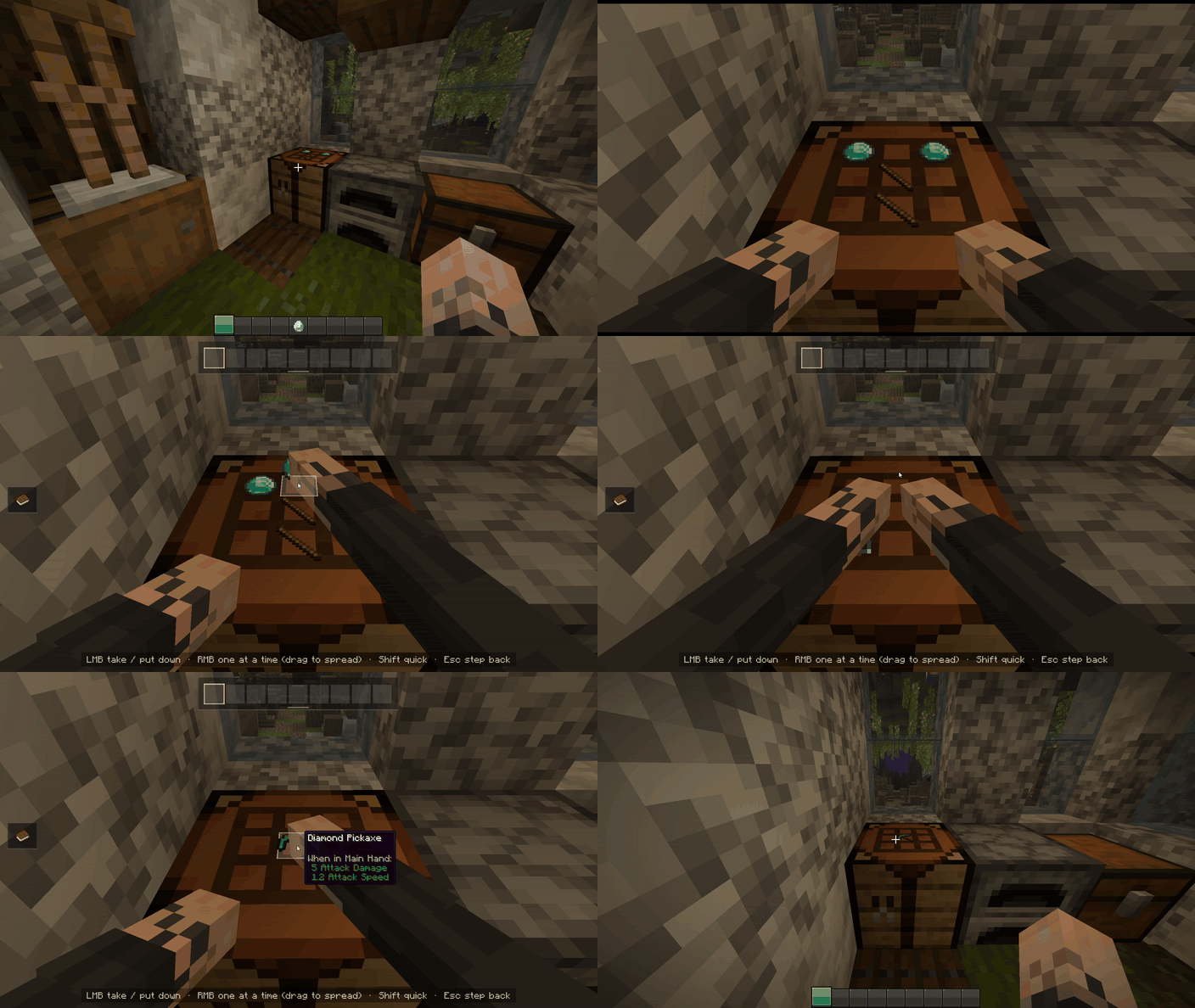
当你离开时,放置在合成台上的材料会保留在原处,并且其他玩家也能看到它们。

✨ 每个工作站都有专属场景
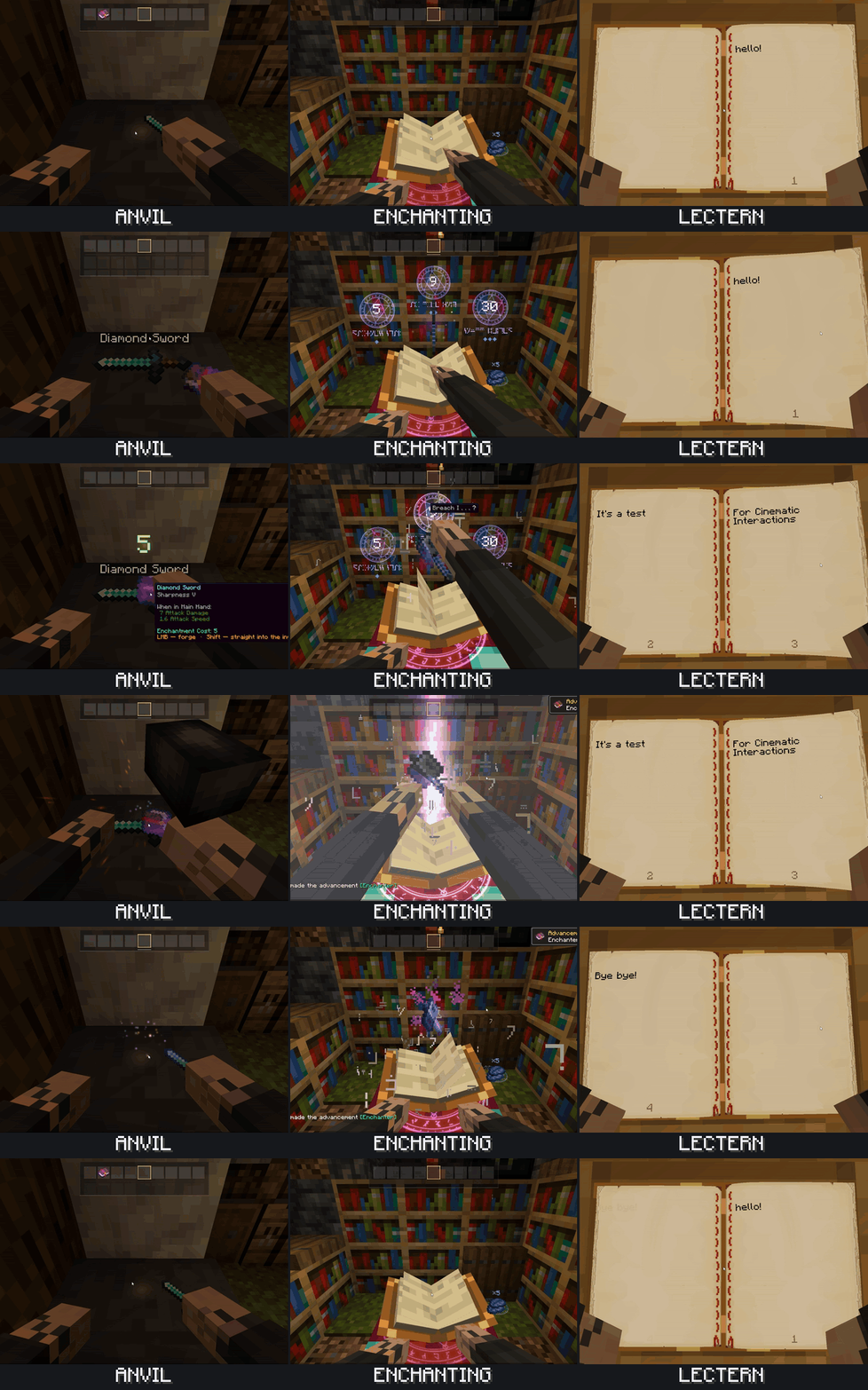
用锤子锻造,在砂轮上磨刀,编织旗帜,或观看材料溶解进你的药水。在讲台上阅读带有翻页动画的书籍,将音乐唱片插入唱片机,或坐在营火旁进行烹饪。
| 活动 | 支持的工作站 |
|---|---|
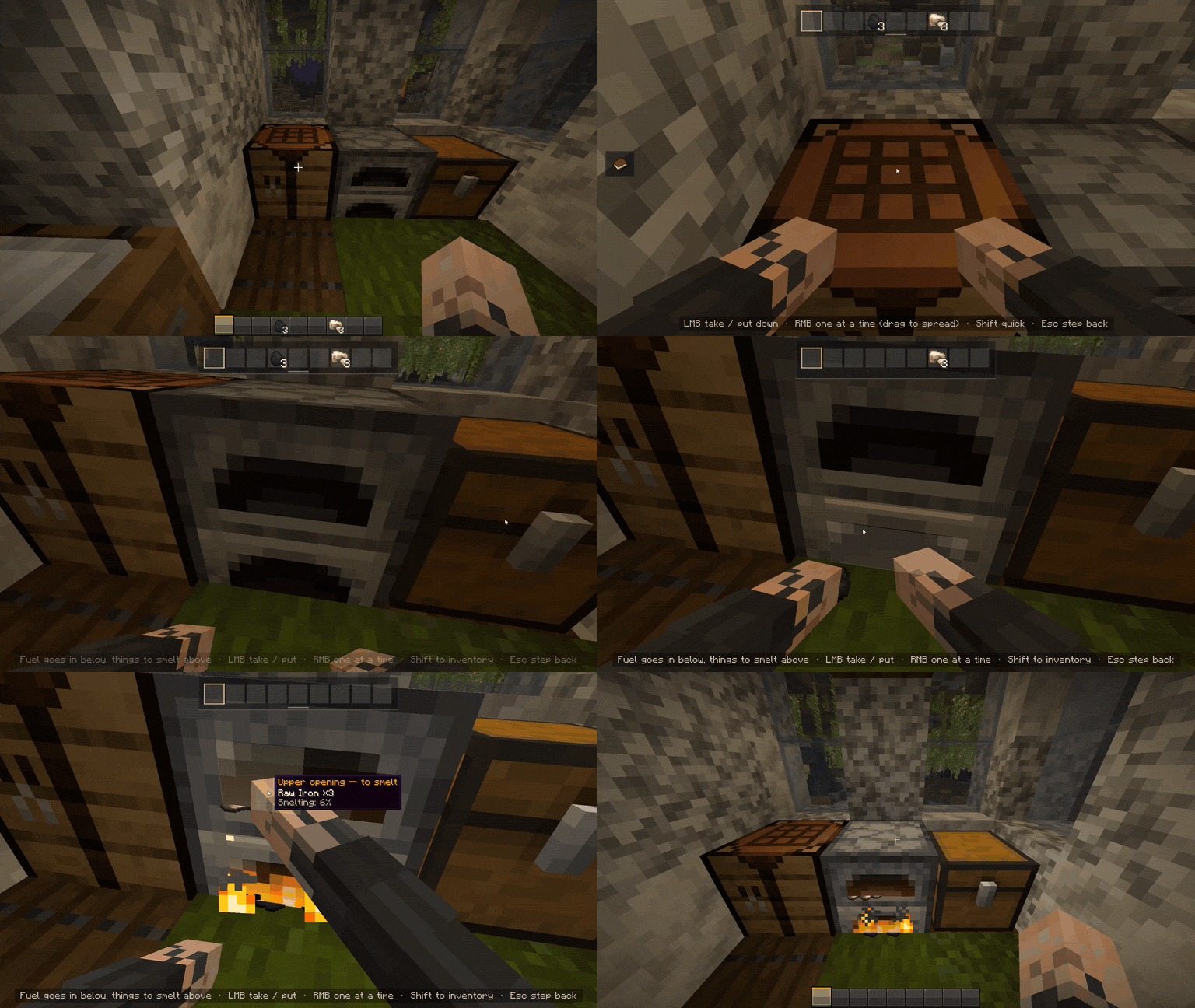
| 合成与冶炼 | 合成台、熔炉、烟熏炉、高炉、工匠台 |
| 工具与装备 | 铁砧、砂轮、锻造台、切石机 |
| 附魔与酿造 | 附魔台、酿造台 |
| 旗帜与地图 | 织布机、制图台 |
| 阅读与音乐 | 讲台、雕花书架、唱片机 |
| 营火与信标 | 营火、灵魂营火、信标 |
? 保持你的工作室流畅运转
通过平滑的镜头和手部过渡,直接在附近的支持工作站之间移动。如果不久后返回同一个工作站,进入动画会更快。
一个库存面板让你的物品触手可及。按住左 Alt 可以从第三人称视角查看你在工作站的角色,松开则回到工作状态。
⚙️ 自定义体验
选择哪些工作站使用场景,并调整镜头倾斜度、缩放、进出速度以及快速返回功能。提示、电影黑边、镜头运动、震动和屏幕闪光等效果均可单独切换。
在 NeoForge 上,打开Mods → Cinematic Interactions → Config。在 Fabric 上,Mod Menu 提供设置访问入口。Cloth Config 提供了可选的设置界面。
? 入门指南
- 右键点击支持的工作站开始操作。
- 左键/右键点击与物品和工作站互动;屏幕上的提示说明了可用的操作。
- 看着营火时按H 坐在旁边。
- 右键点击附近高亮显示的工作站以移动到那里。
- 按Esc、E、移动键或跳跃 退出。
- 潜行 + 空手右键点击 以使用区块原有的常规界面(如果有的话)。
营火和第三人称视角的按键可以在 Minecraft 的控制设置中重新绑定。
? 安装
- Fabric: Minecraft 1.21–1.21.11。 安装与你确切的 Minecraft 版本匹配的构建版。需要 Fabric API。 Mod Menu 和 Cloth Config 是可选的客户端侧设置集成。
- NeoForge: Minecraft 1.21.1。 使用NeoForge 21.1.255 开发和测试。Cloth Config 为可选。
- 在客户端和服务器端都安装一个匹配的 JAR 文件以支持多人游戏。在单人游戏中,内置服务器会自动处理。
箱子、桶和潜影盒保留其通常的界面。如果某个工作台无法访问或其工作空间被阻塞,默认设置会回退到其通常的界面(如有)。
? 支持本项目
Cinematic Interactions 是一个个人项目。如果你喜欢这个模组并希望支持其开发,可以加入我的 Patreon。页面仍在搭建中;稍后我会添加帖子和更多详细信息。感谢游玩并帮助我改进模组。
? 鸣谢与许可
由 Southware 创建并维护。原始项目代码采用 MIT 许可证授权。RDiamonds 改编的 Just a Hammer 模型采用 CC BY 4.0 许可证授权。详见 鸣谢与开发披露。
非官方 Minecraft 产品。未经 Mojang 或 Microsoft 批准或与它们无关。
? Put your hands to work.
Cinematic Interactions turns supported Minecraft workstations into animated first-person scenes. Step up to a crafting table, place ingredients on its surface, load a furnace by hand, or forge an item at the anvil. Your character's arms use your own skin, while camera movements bring the work into view.
?️ Craft directly in the world.
The crafting table becomes a visible 3×3 workspace. Its recipe guide lets you search recipes, check which materials you have, and preview ingredients directly on the tabletop. Missing materials are highlighted, and Lay out makes your hands place available ingredients from your inventory.
Placed ingredients stay on the crafting table when you leave and are visible to other players.
✨ Each station has its own scene
Forge with a hammer, grind a blade against the wheel, weave a banner, or watch ingredients dissolve into your potions. Read a book on a lectern with animated page turns, insert a music disc into a jukebox, or sit beside a campfire to cook.
| Activity | Supported blocks |
|---|---|
| Crafting and smelting | Crafting table, furnace, smoker, blast furnace, crafter |
| Tools and equipment | Anvil, grindstone, smithing table, stonecutter |
| Enchanting and brewing | Enchanting table, brewing stand |
| Banners and maps | Loom, cartography table |
| Reading and music | Lectern, chiseled bookshelf, jukebox |
| Campfires and beacons | Campfire, soul campfire, beacon |
? Keep your workshop flowing
Move directly between nearby supported stations with a smooth camera and hand transition. Returning to the same station shortly after leaving gives you a quicker entrance.
An inventory panel keeps your items within reach. Hold Left Alt to view your character at the station from third person, then release it to return to work.
⚙️ Adjust the experience
Choose which blocks use scenes and adjust camera lean, zoom, entrance and exit speed, and quick return. Control hints, cinematic bars, camera motion, shake and screen flashes can be toggled individually.
On NeoForge, open Mods → Cinematic Interactions → Config. On Fabric, Mod Menu provides access to settings. Cloth Config provides an optional settings interface.
? Getting started
- Right-click a supported block to begin.
- Left-click / right-click to interact with items and the station; the on-screen hints explain the available actions.
- H while looking at a campfire to sit beside it.
- Right-click a highlighted nearby station to move to it.
- Esc, E, movement keys or jump to leave.
- Sneak + right-click with an empty hand to use the usual interface where the block has one.
The campfire and third-person view keys can be rebound in Minecraft's controls.
? Installation
- Fabric: Minecraft 1.21–1.21.11. Install the build matching your exact Minecraft version. Fabric API is required. Mod Menu and Cloth Config are optional client-side settings integrations.
- NeoForge: Minecraft 1.21.1. Developed and tested with NeoForge 21.1.255. Cloth Config is optional.
- Install one matching JAR on both the client and server for multiplayer. In singleplayer, the integrated server is handled automatically.
Chests, barrels and shulker boxes keep their usual interfaces. If a station cannot be reached or its workspace is obstructed, the default settings fall back to its usual interface where available.
? Support the project
Cinematic Interactions is a solo project. If you enjoy the mod and would like to support its development, you can join my Patreon. The page is still being set up; I’ll add posts and more details there later. Thank you for playing and helping me improve the mod.
? Credits & license
Created and maintained by Southware. Original project code is licensed under MIT. The adapted Just a Hammer model by RDiamonds is licensed under CC BY 4.0. See credits and development disclosures.
Not an official Minecraft product. Not approved by or associated with Mojang or Microsoft.

下载 Cinematic Interactions
需要联机服务器吗?
稳定流畅、一键部署,几分钟即可和朋友联机开服
最低仅需 8 元/月 即可畅快联机
下载 Cinematic Interactions
需要联机服务器吗?
稳定流畅、一键部署,几分钟即可和朋友联机开服
最低仅需 8 元/月 即可畅快联机
下载 Cinematic Interactions
需要联机服务器吗?
稳定流畅、一键部署,几分钟即可和朋友联机开服
最低仅需 8 元/月 即可畅快联机
下载 Cinematic Interactions
需要联机服务器吗?
稳定流畅、一键部署,几分钟即可和朋友联机开服
最低仅需 8 元/月 即可畅快联机
下载 Cinematic Interactions
需要联机服务器吗?
稳定流畅、一键部署,几分钟即可和朋友联机开服
最低仅需 8 元/月 即可畅快联机
下载 Cinematic Interactions
需要联机服务器吗?
稳定流畅、一键部署,几分钟即可和朋友联机开服
最低仅需 8 元/月 即可畅快联机
下载 Cinematic Interactions
需要联机服务器吗?
稳定流畅、一键部署,几分钟即可和朋友联机开服
最低仅需 8 元/月 即可畅快联机
下载 Cinematic Interactions
需要联机服务器吗?
稳定流畅、一键部署,几分钟即可和朋友联机开服
最低仅需 8 元/月 即可畅快联机
下载 Cinematic Interactions
需要联机服务器吗?
稳定流畅、一键部署,几分钟即可和朋友联机开服
最低仅需 8 元/月 即可畅快联机
下载 Cinematic Interactions
需要联机服务器吗?
稳定流畅、一键部署,几分钟即可和朋友联机开服
最低仅需 8 元/月 即可畅快联机
Cinematic Interactions 0.18.30 Beta
所有受支持的版本现已共享最新的 0.18.30 改进。
第三人称视角下的篝火坐姿已得到优化。抬起的腿部现在会自然弯曲,包括裤子和盔甲的贴合效果,同时玩家会向后倚靠在一侧手臂上。
设置界面现已整合为一个可搜索的页面,包含选项卡、相机预设以及“减少动作”选项。不再需要 Cloth Config。
新增了西班牙语(西班牙)和拉丁美洲西班牙语翻译。
提升了场景可靠性:在跳跃期间开始的交互将在落地后启动;在过场动画期间打开物品栏不再中断场景。
修复了当所有篝火烹饪位置都被占用时显示的消息。弯曲的腿部在玩家受到伤害时现在也能正确响应。
已知问题:在某些场景中,“自然手臂模式”可能仍显示不正确。我们计划在后续的 Beta 版本中对其进行改进。
关于这个资源的讨论、问题反馈与使用心得
还没有讨论,来发第一帖吧
你是这个资源的作者?登录后可认领此资源。
相似资源
 模组

可定制的鞘翅模组,支持装饰纹饰、旗帜图案等更多功能!
 模组

显示你正在注视的方块的信息。(适用于 Minecraft 1.16+ 的 Hwyla/Waila 分支)
 模组
使用 JavaScript 编辑配方、添加自定义物品、编写世界事件!
 模组

查看物品与配方
 模组
在游戏画面角落显示附近世界地形、玩家、生物和实体的地图。可创建路径点,帮助你找到标记过的位置。
 模组
AE2:一款流行的自动化与存储模组
评论 0
登录后参与评分
还没有评论,来抢沙发吧