
Clean Tooltips
是否觉得默认的提示框(Tooltips)不够美观?那么这正是你所需要的。
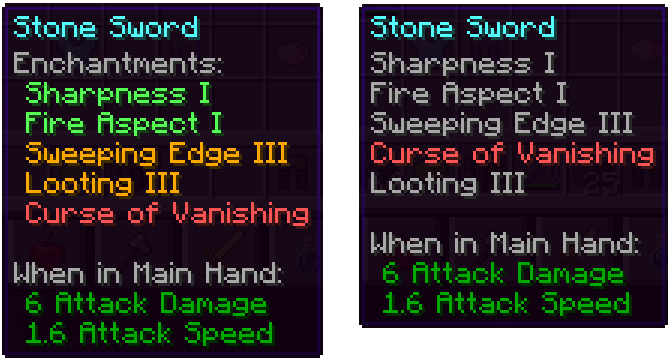
该模组主要对附魔在提示框中的显示方式进行了 overhaul:
- 它们现在拥有独立的“Enchantents:”子分类
- 使用颜色编码以便更轻松地区分好的附魔(绿色)和诅咒(红色)
- 满级附魔将以金色显示
- 诅咒始终排在列表底部
安装模组后: 未安装模组(原版):
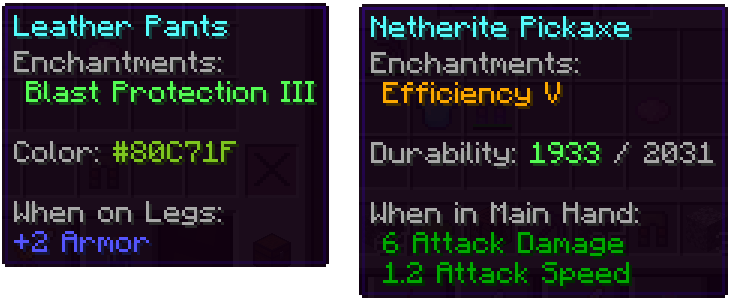
此外,其他部分也得到了改进:
- 染色物品的颜色条现在实际显示所使用的颜色
- 受损物品在提示框中显示其剩余耐久度
我们还有许多关于如何进一步改进提示框的想法,用于未来的更新。除了添加新功能外,接下来的更新还将增加许多可配置选项。
Clean Tooltips
Ever felt like the default tooltips could be fancied up a bit? Then this is exactly what you're looking for.
Mainly the mod overhauls the way enchantments get displayed in the tooltip:
- they now have their own "Enchantents:" subcategory
- color coding to easier tell apart good enchantments (green) and curses (red)
- max level enchantments will be displayed in gold
- curses are always ordered at the bottom of the list
With the mod installed: Without the mod installed (Vanila):
Besides that, other parts got also improved:
- the color line on dyed items now actually shows the used color
- damaged items show their remaining durability in the tooltip
We have many more ideas on how tooltips could be improved for future updates. Besides adding new features, the next updates will also add many configurability options.
下载 Clean Tooltips
下载 Clean Tooltips
下载 Clean Tooltips
下载 Clean Tooltips
下载 Clean Tooltips
下载 Clean Tooltips
下载 Clean Tooltips
下载 Clean Tooltips
下载 Clean Tooltips
下载 Clean Tooltips
暂无更新日志
关于这个资源的讨论、问题反馈与使用心得
还没有讨论,来发第一帖吧
你是这个资源的作者?登录后可认领此资源。
相似资源
 模组

可定制的鞘翅模组,支持装饰纹饰、旗帜图案等更多功能!
 模组

显示你正在注视的方块的信息。(适用于 Minecraft 1.16+ 的 Hwyla/Waila 分支)
 模组

查看物品与配方
 模组
在游戏画面角落显示附近世界地形、玩家、生物和实体的地图。可创建路径点,帮助你找到标记过的位置。
 模组
使用 JavaScript 编辑配方、添加自定义物品、编写世界事件!
 模组
AE2:一款流行的自动化与存储模组
评论 0
登录后参与评分
还没有评论,来抢沙发吧