

本页面中的模组描述仅准确反映该模组的 1.7+ 版本。
该模组的较新版本 (v1.6+) 仅支持 Fabric 和 NeoForge。
你可以在整合包中使用此模组。
我不介意此模组被包含在整合包中,也不需要署名。

版本 1.7 说明:
这次被称为 “Bug & Burdens Update”(漏洞与负担更新)的版本解决了大量塌方相关的 bug,添加了具有精细逻辑的质量生活 (QoL) 配置选项,以确保玩家可以在不被恶意破坏或过度困扰的情况下享受模组内容;在塌方触发后增加了一个短暂的缓冲期;改进了音效逻辑(并添加了一些新音效!);并为测试和实验添加了额外的命令。

版本 1.6 说明:
这次被称为 “Annoyance Fix Update”(烦扰修复更新)的版本解决了一个显著的问题:防止塌方的“力量”不足、环境被破坏且变得难看,以及塌方在不恰当的时候、以不正确的方式发生得过于频繁。
此模组的作用
你在地下挖掘一个方块时,头顶的天花板有时会坍塌。
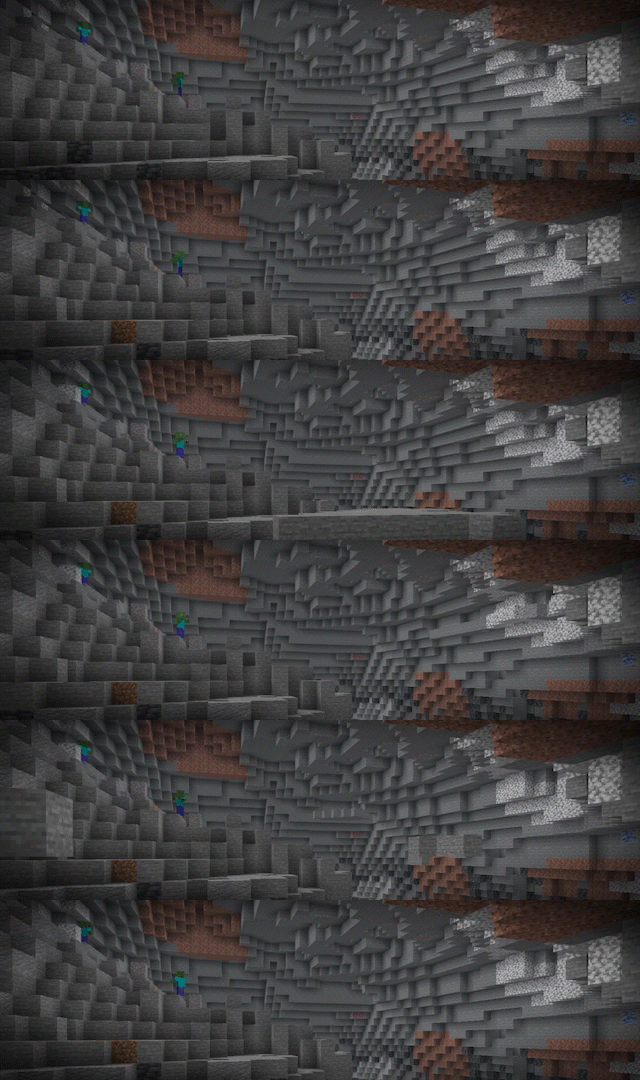
当塌方开始时,屏幕会震动,你会听到深沉的轰鸣声。前 3 秒是警告时间。在此期间不会有方块掉落。利用这个警告时间移动到安全位置。这段时间包含在塌方的总时长内。模组不会将其添加到塌方结束后的末尾。

警告过后,成组的方块会从天花板落下。掉落的方块会对玩家和生物造成伤害,落地时会扬起尘土,产生音效,并停留在落地的位置。

塌方有一个固定的中心点,即你破坏的那个方块。它不会跟随你移动。如果你远离中心点,你就是安全的。
塌方是如何开始的
当你破坏以下方块时,可能会引发塌方:
- 石头及其各种变体
- 深板岩
- 所有矿石
- 泥土、黏土及其各种变体
- 砂砾
- 硫磺和朱砂,仅在游戏较新版本中存在

你破坏的每个符合条件的方块都有 512 分之一 的概率引发塌方。
“可能发生塌方”的条件
以下规则同样适用:
- 如果你能看到天空,则无法引发塌方。
- 你破坏的方块也不能看到天空。
- 你的高度必须低于或等于世界海平面加上 15 个方块。在主世界中,这对应的是 Y 78。
- 登录后 20 分钟内,无法引发塌方。
- 在上一次塌方发生后 20 分钟内,无法引发新的塌方。
- 附魔了 精准采集 (Gentle) 的工具永远不会引发塌方。
- 同时发生的塌方数量不超过 3 次。

某些方块 不会 遮挡天空。
- 树叶、原木、玻璃、玻璃板、蜂箱、红树根、雪层、草、藤蔓和其他小型植物会让天空透过来。
- 你不能在头顶放置树叶并在其下方采矿以求安全。如果这些方块上方有实心方块,天空就会被遮挡,塌方再次成为可能。
- 模组从世界生成数据中读取海平面高度。如果某个模组或数据包改变了海平面,高度限制也会随之改变。你可以在设置文件中关闭此限制。你无法手动设置海平面,因为该值由世界生成决定。
塌方规模
共有三种规模。小规模塌方是最常见的类型。
| 规模 | 概率 | 持续时间 | 每组方块数量 | 侧向距离 | 上方高度 |
|---|---|---|---|---|---|
| 小 | 60% | 60 秒 | 14 至 17 | 16 个方块 | 24 个方块 |
| 中 | 30% | 90 秒 | 18 至 21 | 24 个方块 | 32 个方块 |
| 大 | 10% | 120 秒 | 22 至 35 | 32 个方块 | 48 个方块 |
屏幕震动和轰鸣声的效果范围比表格中的侧向距离多出 10 个方块。在中心点效果最强,并在该极限处减弱至无。警告过后,大约每秒有一组方块落下。一组是指相互接触的方块集合。模组还可以将这一组方块分割成多个形状。
哪些方块会掉落
模组在选择要掉落的方块时会非常谨慎。只有满足以下所有条件时,方块才会掉落:
- 该方块是你所在开放空间的天花板的一部分。墙壁后面的另一个洞穴不会坍塌。
- 方块下方必须是空气。
- 该方块不能看到天空。树叶、原木、玻璃和上述列表中的其他方块不会遮挡天空。
- 该方块不是由玩家放置的。
第三个条件确保了世界表面的安全。洞穴顶部的方块会掉落,但支撑地面的方块会保持在原位。方块在掉落时保持其类型不变。石头依然是石头,矿石也依然是矿石。方块的掉落速度为正常速度的 五分之二,因此你有足够的时间逃离。
温和附魔
Gentle(温和) 是一种适用于镐和其他挖掘工具的新附魔。模组添加的工具也支持此附魔。
- 你可以从附魔台获得“温和”附魔。
- 最高等级为 1。
- 拥有“温和”附魔的工具永远不会引发塌方。

当你必须在大型洞穴中挖矿且不希望承担风险时,请使用“温和”附魔。
伤害
掉落的方块每下落一个方块单位会造成 2 点伤害。
伤害上限为 6 点,即 3 颗心。

单个方块不会杀死你。
如果方块将你掩埋,窒息会造成额外的伤害。
晕动症模式
屏幕的晃动可能会让部分玩家感到不适。
将设置文件顶部的 MotionSicknessMode 设置为 true 以禁用此效果。

开启此模式后,屏幕将不再晃动。取而代之的是,模组会在屏幕中央显示一条消息。当塌方开始时,消息显示为 Cave-In Triggered!;当塌方结束时,消息显示为 Cave-In Over!。每条消息持续显示 3 秒。此设置仅对你的游戏生效,不会改变服务器中其他玩家的游戏体验。
配置
模组会在 config 文件夹中生成一个名为 collapsingcaves.conf 的设置文件。文件中包含 27 个设置项。每个设置项都有简短的描述及其允许的值。
你可以更改这些值以及更多选项:
- 晕动症模式
- 塌方发生的几率
- 同时发生的塌方数量
- 海平面以上的最大高度限制
- 方块掉落前的警告持续时间
- 每次塌方的时间、规模大小和距离
- 掉落方块的速度和伤害
- 宽限期和冷却时间
- 屏幕震动、音效和尘土效果
- 可以掉落或绝对不能掉落的方块列表
默认值经过平衡调整。使用这些默认值时,模组不会成为玩家的困扰。
指令
管理员可以使用以下指令。
| 指令 | 功能说明 |
|---|---|
/triggercollapse <size> <player> |
该玩家破坏的下一个符合条件的方块将引发指定规模的塌方。此指令还会清除该玩家的冷却时间。如果方块破坏未满足规则要求,模组会告知你具体是哪条规则阻止了它。 |
/cancollapsecheck |
检查你的位置和当前条件是否允许发生塌方。此指令还会检测你注视的方块。如果有规则阻止了你,指令会显示相应的规则。 |
/collapsecooldown <player> |
显示是否有冷却时间正在阻止该玩家发生塌方。 |
/setcooldown <seconds> [player] |
设置你的冷却时间,或你指定的玩家的冷却时间。设置为 0 则移除冷却时间。 |
Bug/反馈
请在模组 Github 页面的 issues(问题) 板块报告 Bug、提出建议或提供反馈。报告 Bug 时,请提供你的加载器名称和游戏版本。
特别感谢与致谢
Cave-Ins 由 Lettooce 制作,是本模组的灵感来源。这是一个优秀的整合数据包,每个人都应该尝试一下。本模组采用了不同的实现方式,但这个数据包给了我及我的朋友许多在 Minecraft 中的美好回忆。没有它,本模组就不会存在。
由 CCDelic 制作。

This pages mod description only accurately portrays version 1.7+ of the mod.
New versions of this mod (v1.6+) are for Fabric and NeoForge only.
You can use this mod in modpacks.
I have zero issue with this mod being in modpacks and I don't need to be credited.
Version 1.7 Notes:
This update, called the 'Bugs & Burdens Update' addressed a large number of cave-in bugs, added QoL configuration options with fine-tuned logic to ensure players can enjoy the mod without being griefed or burdened, added a small buffer before a cave-in begins after it's been triggered, improved sound effect logic (and a few new sounds!) and added extra commands for bug-testing and experimentations.
Version 1.6 Notes:
This update, called the 'Annoyance Fix Update' addressed a notable lack of 'power' to prevent cave-ins, issues with environments being griefed and turned ugly, and caved-ins happening inappropriately, incorrectly and far too frequently.
What This Mod Does
You mine a block below ground. Sometimes the ceiling above you falls.
When a cave-in starts, the screen shakes and you hear a deep rumble. The first 3 seconds are a warning. No block falls in this time. Use the warning to move to a safe position. This time is part of the time of the cave-in. The mod does not add it to the end.
After the warning, groups of blocks fall from the ceiling. The blocks hurt players and mobs, they make dust when they hit the ground, produce a sound effect and stay in the position where they land.
A cave-in has a fixed centre at the block that you broke. It does not follow you. If you move away from the centre, you are safe.
How A Cave-In Starts
These blocks can start a cave-in when you break them:
- Stone and the different types of stone
- Deepslate
- All ore
- Dirt, clay and the different types of dirt
- Gravel
- Sulfur and cinnabar, in the newer versions of the game only
Each applicable block that you break has a 1 in 512 chance to start a cave-in.
"Cave-In Possible" Conditions
These rules also apply:
- You cannot start a cave-in if you can see the sky.
- The block that you break must also not see the sky.
- You must be at or below the sea level of the world plus 15 blocks. In the Overworld this is Y 78.
- You cannot start a cave-in for 20 minutes after you log in.
- You cannot start a new cave-in for 20 minutes after your last one.
- A tool with the Gentle enchantment never starts a cave-in.
- No more than 3 cave-ins can occur at the same time.
Some blocks do not hide the sky from you.
- Leaves, logs, glass, glass panes, beehives, mangrove roots, snow layers, grass, vines and the other small plants let the sky through.
- You cannot put leaves above your head and mine in safety. If a solid block is above these blocks, the sky is hidden and a cave-in is possible again.
- The mod reads the sea level from the world generation. If a mod or a data pack moves the sea level, the height limit moves with it. You can turn off this limit in the settings file. You cannot set the sea level, because the world gives this value.
Cave-In Sizes
There are three sizes. A small cave-in is the most frequent size.
| Size | Chance | Time | Blocks in each group | Distance to the side | Height above you |
|---|---|---|---|---|---|
| Small | 60% | 60 seconds | 14 to 17 | 16 blocks | 24 blocks |
| Medium | 30% | 90 seconds | 18 to 21 | 24 blocks | 32 blocks |
| Large | 10% | 120 seconds | 22 to 35 | 32 blocks | 48 blocks |
The screen shake and the rumble sound go to 10 blocks past the distance to the side in the table. They are at full strength at the centre, and they decrease to nothing at that limit. After the warning, one group of blocks falls each second, approximately. A group is a set of blocks that touch each other. The mod can also divide the group into more than one shape.
Which Blocks Fall
The mod is careful about the blocks that it selects. A block falls only if all of these conditions are true:
- The block is part of the ceiling of the open space that you are in. A different cave behind a wall does not fall.
- There is air below the block.
- The block cannot see the sky. Leaves, logs, glass and the other blocks in the list above do not hide the sky.
- A player did not put the block in position.
The third condition keeps the surface of the world safe. The blocks at the top of a cave fall, but the blocks that hold up the ground stay in position. A block keeps its type when it falls. Stone stays stone and ore stays ore. The blocks fall at two fifths of the usual speed, thus you have time to move away.
The Gentle Enchantment
Gentle is a new enchantment for pickaxes and other mining tools. Modded tools also accept it.
- You can get Gentle from an enchanting table.
- The maximum level is 1.
- A tool with Gentle never starts a cave-in.
Use Gentle when you must mine in a large cave and you do not want the risk.
Damage
A falling block causes 2 points of damage for each block of the fall distance.
The limit is 6 points, which is 3 hearts.
One block does not kill you.
If the blocks cover you, suffocation causes more damage.
Motion Sickness Mode
The movement of the screen can make some players ill.
Set MotionSicknessMode to true at the top of the settings file to remove it.
With this mode on, the screen does not shake. The mod shows a message across the middle of your screen instead. The message is Cave-In Triggered! when a cave-in starts, and Cave-In Over! when it ends. Each message stays for 3 seconds. This setting is for your game only. It does not change the game for the other players on a server.
Configuration
The mod writes a settings file with the name collapsingcaves.conf in the config folder. There are 27 settings in the file. Each setting has a short description and its permitted values.
You can change these values and more:
- The motion sickness mode
- The chance of a cave-in
- The number of cave-ins at the same time
- The height limit above the sea level
- The length of the warning before the blocks fall
- The time, the group size and the distance of each cave-in size
- The speed and the damage of the falling blocks
- The grace period and the cooldown
- The screen shake, the sounds and the dust
- The blocks that can fall or must never fall
The default values are balanced. The mod does not become an annoyance with them.
Commands
An operator can use these commands.
| Command | What it does |
|---|---|
/triggercollapse <size> <player> |
The next applicable block that the player breaks starts a cave-in of this size. The command also removes the cooldown of the player. If a block break does not meet the rules, the mod tells you which rules stop it. |
/cancollapsecheck |
Shows if your position and your current conditions permit a cave-in. The command also examines the block that you look at. If a rule stops you, the command gives the rule. |
/collapsecooldown <player> |
Shows if a cooldown prevents a cave-in for this player. |
/setcooldown <seconds> [player] |
Sets your cooldown, or the cooldown of the player that you give. A value of 0 removes it. |
Bugs/Feedback
Report bugs, make suggestions or give feedback in the issues section of the mod Github page. When you report a bug, give your mod loader and your game version.
Special Thanks & Credits
Cave-Ins by Lettooce was the inspiration for this mod. It is an excellent datapack and everyone must try it. This mod uses a different approach, but that datapack gave me and my friends some of our best memories in Minecraft. Without it, this mod would not exist.
Made by CCDelic.

下载 Collapsing Caves
下载 Collapsing Caves
下载 Collapsing Caves
需要联机服务器吗?
稳定流畅、一键部署,几分钟即可和朋友联机开服
最低仅需 8 元/月 即可畅快联机
下载 Collapsing Caves
需要联机服务器吗?
稳定流畅、一键部署,几分钟即可和朋友联机开服
最低仅需 8 元/月 即可畅快联机
下载 Collapsing Caves
下载 Collapsing Caves
下载 Collapsing Caves
需要联机服务器吗?
稳定流畅、一键部署,几分钟即可和朋友联机开服
最低仅需 8 元/月 即可畅快联机
下载 Collapsing Caves
下载 Collapsing Caves
需要联机服务器吗?
稳定流畅、一键部署,几分钟即可和朋友联机开服
最低仅需 8 元/月 即可畅快联机
下载 Collapsing Caves
- 移植至 NeoForge 26.3。
关于这个资源的讨论、问题反馈与使用心得
还没有讨论,来发第一帖吧
你是这个资源的作者?登录后可认领此资源。
相似资源
 模组
在游戏画面角落显示附近世界地形、玩家、生物和实体的地图。可创建路径点,帮助你找到标记过的位置。
 模组

新增 50+ 个独特生物群系,为你的世界增添新树木、花卉等更多元素!
 模组
添加全屏世界地图,显示你在世界中已探索的区域。与 Xaero's Minimap 搭配使用效果极佳。
 模组

让你能够在世界中的任何位置定位结构。
 模组

添加睡袋和吊床,分别用于便携性和昼夜转换,同时不会设置新的出生点。共有16种颜色可选!
 模组

TerraFirmaCraft (TFC) 是一个全面转换模组,对生存模式进行了彻底的改造与重新设计。
评论 0
登录后参与评分
还没有评论,来抢沙发吧