Combat Persistence
有人正在战斗中落败,于是他们退出了游戏。在大多数服务器上,事情到此为止:他们是安全的,并且保留着他们的物品。
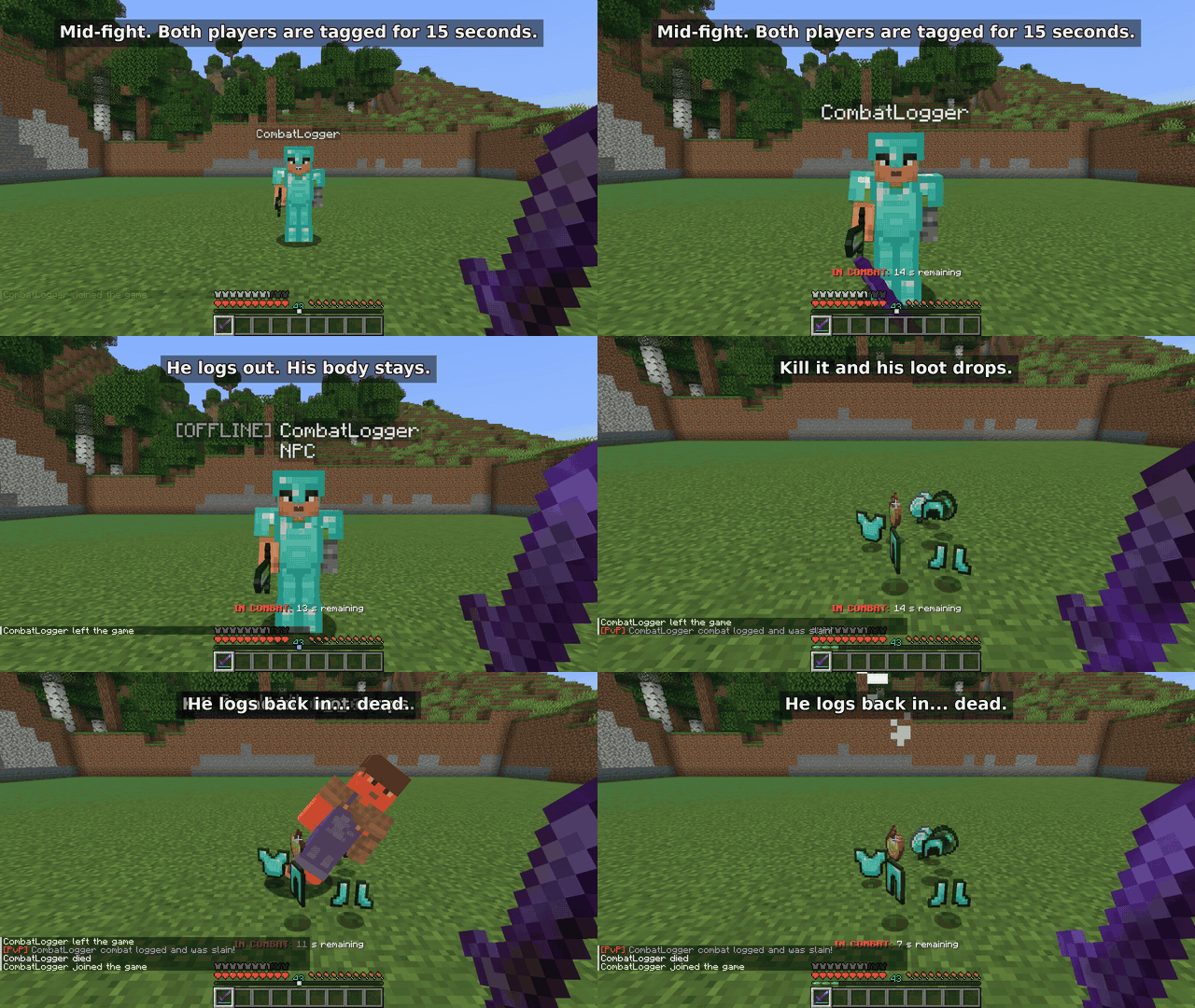
但有了这个模组就不是这样了。如果玩家处于战斗状态时离开,一个副本会留在原地直到战斗计时器结束,穿着他们的装备。杀死它会掉落他们的物品。当他们重新登录时,他们就死了。
它仅在服务器上运行。你的玩家不需要安装任何东西。
工作原理
- 攻击另一名玩家会使双方进入持续 15 秒的战斗状态。倒计时显示在快捷栏上方。你可以在配置中更改持续时间。
- 如果你在战斗期间注销,一个带有你装备的
[OFFLINE] 假人模型会停留在你站立的位置。
- 如果有人杀死了假人模型,你的物品会掉落,并且你下次加入时会死亡。
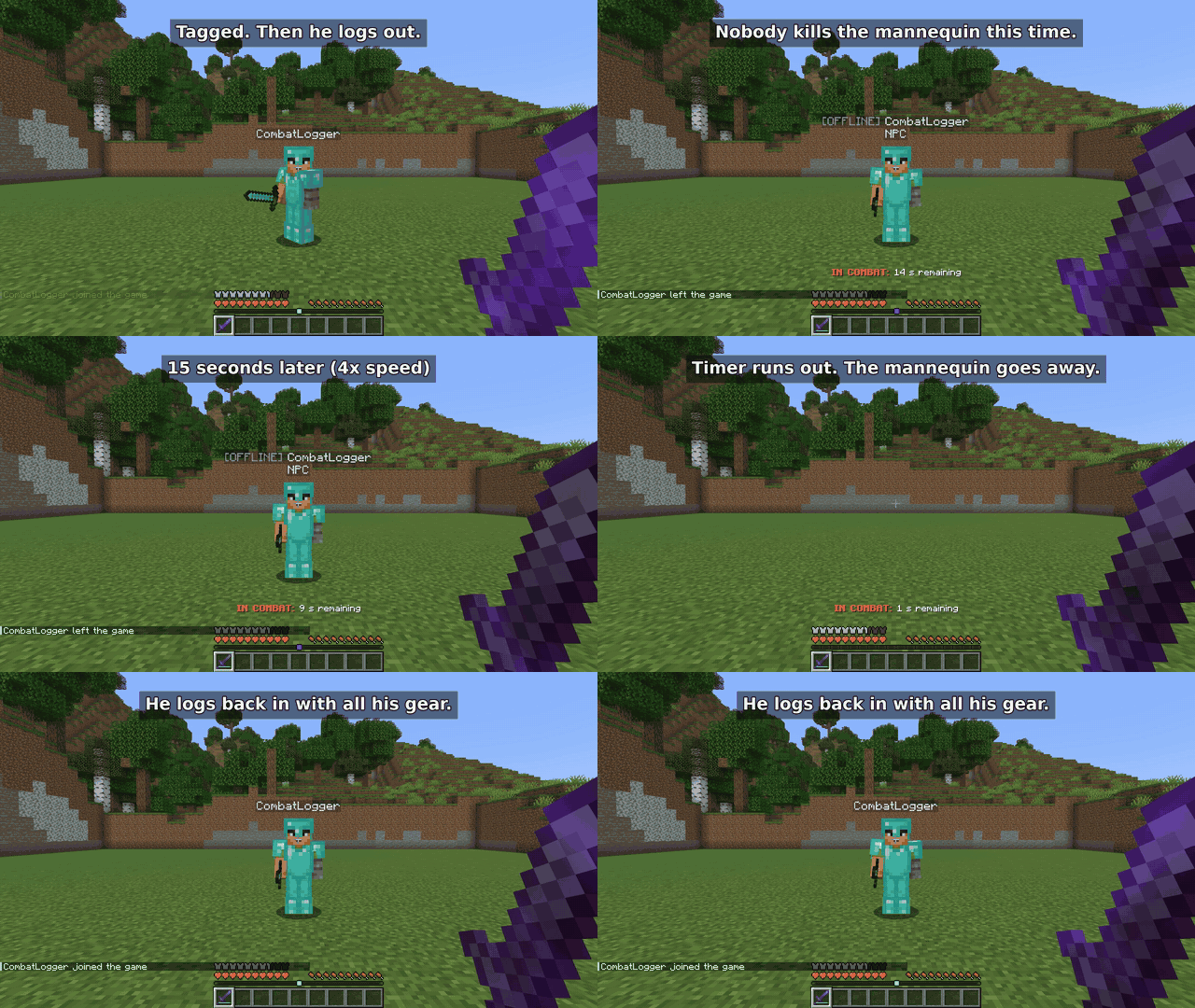
- 如果计时器耗尽前没有人杀死它,它就会消失,当你重新登录时会拿回所有物品。
- 只有 PvP 会启动计时器。怪物、跌落伤害和岩浆不会。失去连接等同于退出。
这是第二种情况,即没有人杀死假人模型:
禁止通过传送逃离战斗
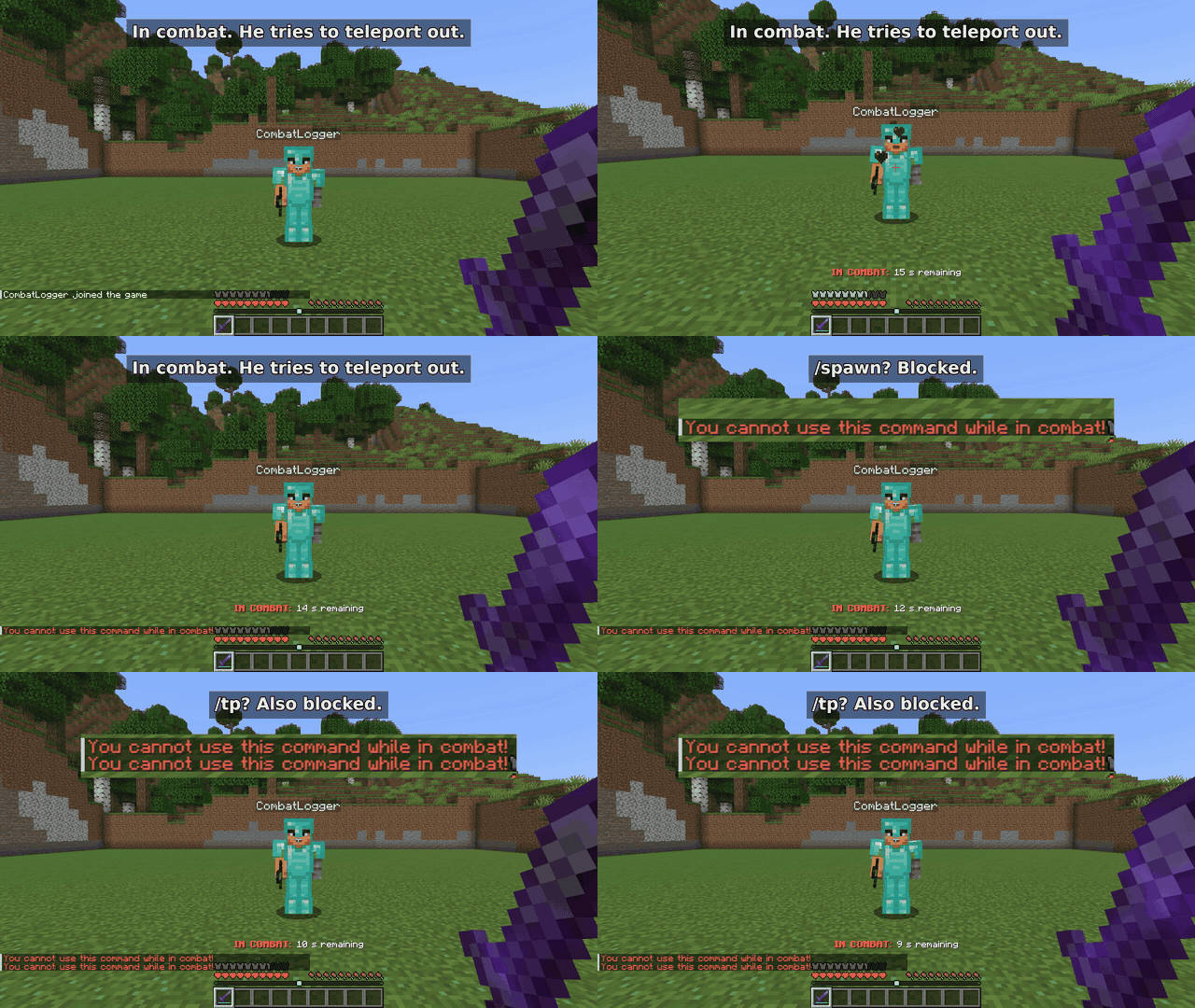
当玩家处于战斗状态时,/spawn、/home、/tp、/tpa、/warp 和 /back 命令将被禁用。你可以将自己的命令添加到列表中。
安装
- 你需要一个 Minecraft 26.3 的 Fabric 服务器,使用 Fabric Loader 0.20.1 或更高版本以及 Java 25。
- 将 Combat Persistence 和 Fabric API 放入
mods 文件夹。
- 启动服务器一次。配置文件将在
config/combatpersistence.json 处创建。
使用的是较旧的 Minecraft 版本?请查看 Versions 选项卡。每个文件仅适用于为其列出的版本。
大多数人会更改的设置
| 设置项 |
默认值 |
作用 |
combatTagDurationSeconds |
15 |
最后一次攻击后战斗持续的时长。 |
blockedCommands |
/spawn, /home, /tp, /tpa, /warp, /back |
战斗中无法使用的命令。添加你的服务器使用的别名。 |
combatMessage |
IN COMBAT: %s s remaining |
倒计时文本。 |
npcNamePrefix |
[OFFLINE] |
显示在假人模型名称之前。 |
npcDeathBroadcast |
[PvP] %s combat logged and was slain! |
假人模型死亡时的聊天消息。 |
disableEnderChests |
false |
关闭整个服务器的末影箱功能。 |
完整配置列表 位于 GitHub 上。
离线模式服务器
如果你的服务器以离线模式运行,内置了一个可选的登录系统:/register 和 /login、哈希密码、多次错误尝试后的锁定以及登录超时。在线模式服务器跳过所有这些步骤,因为 Mojang 已经验证了账户。
一个警告:离线模式不加密流量,因此任何能看到连接的人都可以读取密码。如果可以的话请使用在线模式,并告知玩家不要重复使用真实世界的密码。
常见问题
玩家需要安装这个模组吗? 不需要,只有服务器需要。
它能在 Paper、Spigot、Forge 或 NeoForge 上运行吗? 不能,它仅限 Fabric。
如果假人模型站在那里时服务器重启会发生什么? 假人模型会消失,但物品栏已保存到磁盘,所以玩家下次加入时会拿回物品。
它能与其他模组兼容吗? 原版物品栏、盔甲和副手物品都涵盖在内。我还没有测试过添加自己物品栏槽位的模组(如背包、饰品),所以请先在测试世界中尝试。
有什么它处理不了的情况吗? 如果假人模型死亡后世界保存前服务器崩溃,掉落的物品可能会丢失。更多详细信息请参阅 安全说明。
Bug 与支持
发现了 Bug?请在 Open an issue 中提供你的 Minecraft 版本、模组版本和服务器日志,我会查看一下。请先从日志中移除密码和 IP 地址。
如果这为你的服务器省去了一些麻烦,关注本项目会有帮助,并且在 Ko-fi 上请我喝杯咖啡也会有所帮助。
Combat Persistence
Someone is losing a fight, so they quit the game. On most servers that's the end of it: they're safe and they keep their stuff.
Not with this mod. If a player leaves while they're in combat, a copy of them stays behind for the rest of the combat timer, wearing their gear. Kill it and their items drop. When they log back in, they're dead.
It runs on the server only. Your players don't need to install anything.
How it works
- Hitting another player puts you both in combat for 15 seconds. The countdown shows above the hotbar. You can change the length in the config.
- If you log out during combat, an
[OFFLINE] mannequin with your gear stays where you were standing.
- If someone kills the mannequin, your items drop and you die the next time you join.
- If nobody kills it before the timer runs out, it disappears and you get everything back when you log in.
- Only PvP starts the timer. Mobs, fall damage and lava don't. Losing connection counts the same as quitting.
Here's the second case, where nobody kills the mannequin:
No teleporting out of a fight
While a player is in combat, /spawn, /home, /tp, /tpa, /warp and /back are blocked. You can add your own commands to the list.
Installing
- You need a Fabric server on Minecraft 26.3, with Fabric Loader 0.20.1 or newer and Java 25.
- Drop Combat Persistence and Fabric API into the
mods folder.
- Start the server once. The config is created at
config/combatpersistence.json.
On an older Minecraft version? Check the Versions tab. Each file only works on the versions listed for it.
Settings most people change
| Setting |
Default |
What it does |
combatTagDurationSeconds |
15 |
How long combat lasts after the last hit. |
blockedCommands |
/spawn, /home, /tp, /tpa, /warp, /back |
Commands you can't use in combat. Add aliases your server uses. |
combatMessage |
IN COMBAT: %s s remaining |
The countdown text. |
npcNamePrefix |
[OFFLINE] |
Shown before the mannequin's name. |
npcDeathBroadcast |
[PvP] %s combat logged and was slain! |
Chat message when a mannequin dies. |
disableEnderChests |
false |
Turns off ender chests for the whole server. |
The full config list is on GitHub.
Offline-mode servers
If your server runs in offline mode, there's an optional login system built in: /register and /login, hashed passwords, a lockout after too many wrong attempts and a login timeout. Online-mode servers skip all of this because Mojang already checks accounts.
One warning: offline mode doesn't encrypt traffic, so passwords can be read by anyone who can see the connection. Use online mode if you can, and tell players not to reuse real passwords.
Questions
Do players need the mod? No, only the server does.
Does it work on Paper, Spigot, Forge or NeoForge? No, it's Fabric only.
What happens if the server restarts while a mannequin is standing there? The mannequin is gone, but the inventory is saved to disk, so the player gets it back the next time they join.
Does it work with other mods? Vanilla inventories, armor and the offhand are covered. I haven't tested mods that add their own inventory slots (backpacks, trinkets), so try it on a test world first.
Anything it can't handle? If the server crashes right after a mannequin dies, before the world saves, the dropped items can be lost. More detail is in the security notes.
Bugs and support
Found a bug? Open an issue with your Minecraft version, mod version and server log, and I'll take a look. Remove passwords and IP addresses from the log first.
If this saves your server some drama, following the project here helps, and so does a coffee on Ko-fi.


 模组

 模组

 模组
 模组
 模组
 模组
评论 0
登录后参与评分
还没有评论,来抢沙发吧