此模组在原版按键绑定基础上增加了连击支持,允许你将任意操作绑定到一个组合键(chord)或按键序列(key sequence),而非单个按键。
该模组仅客户端有效,无需在服务器端安装。
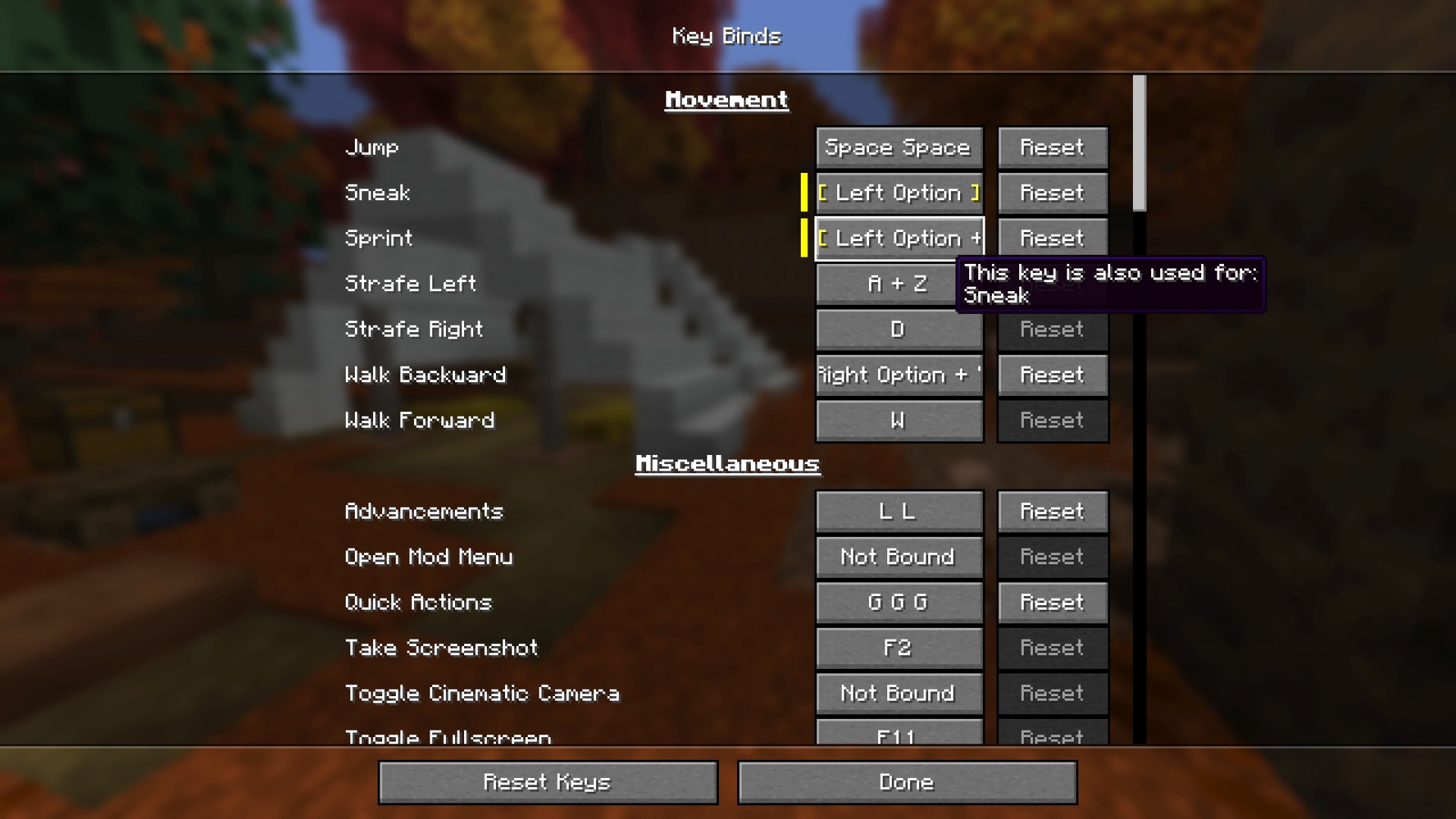
功能特性
组合键连击 (Chord Combos)
- 将操作绑定到按键组合上,例如 左Shift + E、左Control + 鼠标左键,或其他“按住键 + 触发键”的组合
- 任何按键或鼠标按钮都可以作为组合中的触发键或按住键。在录制时最后按下的键将成为触发键,而之前按住的所有键则构成组合的一部分
- 没有限制!你可以按住任意数量的按键,创建任意复杂的组合
- 组合键之后可以跟随一个序列连击
序列连击 (Sequence Combos)
- 将操作绑定到重复按键上,例如 双击 Q 或 三击空格键
- 可配置的时间窗口决定了按键之间必须多快连续按下才能被识别
- 没有限制!你可以绑定任意次数的敲击
控制屏幕集成
- 连击录制直接嵌入在原版的 控制 > 按键绑定 界面中,无需单独的 UI
- 按 Escape 取消绑定某个按键
配置项
- 允许冲突:当禁用此项时,按下某个组合键不会同时触发其完全包含的子按键绑定。例如,同时绑定了 E 和 左Shift + E,正常情况下按下 左Shift + E 会同时触发两者。禁用此选项后,只有 左Shift + E 会被触发。序列同理:如果同一个键既绑定了单次按下又绑定了多次敲击(例如 Q 和 Q Q),按下该键只会触发单次按下的绑定。左Control + E 和 左Shift + E 这样的两个绑定不被视为冲突,因为按下其中一个永远不会意外触发另一个。只有当你刻意同时按住 左Control + 左Shift + E 时,两者才会同时触发。此设置仅适用于共享相同触发键的绑定(默认:开启)
- 序列窗口:在游戏中重复按下按键以注册序列所需的速度(默认:400 毫秒)
- 序列录制窗口:在控制界面录制序列时,录制器在两次敲击之间等待的时间长度(默认:200 毫秒)
- 设置保存在
config/combind.json 中
使用场景
此模组在整合包中尤为出色,因为这些包中按键资源稀缺,每个绑定都需要精心设计;但在原版游戏中也能提供额外的灵活性。
实用示例
双击 Q (Q Q)(甚至是 **三击 Q (Q Q Q)****!)来丢弃物品,而不是单击。再也不用担心误丢物品了。
兼容性
此模组除了 Fabric API 外没有必需的依赖项。它与以下模组兼容:
- ModMenu (推荐) —— 为模组列表添加配置按钮,作为手动编辑
config/combind.json 的替代方案
- Controlling 和 Searchables —— 可以使用类似
key:"Left Shift + E" 或 key:"Q Q" 的语法通过连击搜索绑定。自 combind-v1.0.0+26.3 起暂不支持,直到这两个模组发布与 26.3 兼容的版本
注意:某些原版的特殊交互机制依赖于特定的输入类型,重新绑定后可能无法正常工作。例如,将鼠标按钮绑定到“打开物品栏”后,它关闭物品栏的方式将与按键不同;将按键绑定到“选取方块”后,它在容器内拖拽复制方块的方式将与鼠标按钮不同。
注意:如果遇到任何兼容性问题,请在 GitHub Issues 页面 报告。
给模组开发者
使用 Combind API
Combind 在 net.pemiridosa.combind.api 包下暴露了三个 API 类,让你的模组能够注册具有完整连击支持的按键绑定。
依赖设置
通过 Modrinth Maven 仓库将 Combind 添加为编译时依赖:
// build.gradle
repositories {
    maven { url "https://api.modrinth.com/maven" }
}

dependencies {
    compileOnly "maven.modrinth:combind:VERSION"
    localRuntime "maven.modrinth:combind:VERSION" // 可选:用于开发运行
}
在 fabric.mod.json 中声明依赖。如果你的模组需要 Combind,请使用 depends;如果是可选依赖,请使用 suggests:
"depends": {
    "combind": "*"
}
API 类
| 类名 |
用途 |
CombindKeyBinding |
包装原版的 KeyMapping 以支持连击 —— 主要入口点 |
KeyCombo |
描述一个连击:单键、组合键、序列,或组合键+序列 |
InputKey |
代表一个物理输入源 —— InputKey.keyboard(scancode) 或 InputKey.mouse(button) |
示例
组合键 —— 按住修饰键 + 触发键
将操作绑定到 左Shift + E:
KeyMapping.Category category = KeyMapping.Category.register(
    Identifier.fromNamespaceAndPath("mymod", "mymod")
);

KeyMapping someActionMapping = KeyMappingHelper.registerKeyMapping(
    new KeyMapping("key.mymod.someaction", InputConstants.KEY_E, category)
);

// 左Shift + E
CombindKeyBinding someActionBinding = CombindKeyBinding.of(someActionMapping,
    new KeyCombo(
        InputKey.keyboard(InputConstants.KEY_E),
        new InputKey[]{ InputKey.keyboard(InputConstants.KEY_LSHIFT) }
    )
);

someActionBinding
    .onPress(ctx -> LOGGER.info("Some action PRESSED — combo: {}", ctx.combo().getDisplayName()))
    .onRelease(ctx -> LOGGER.info("Some action RELEASED — combo: {}", ctx.combo().getDisplayName()));
带多个修饰键的组合键
将操作绑定到 左Control + 左Shift + E:
KeyMapping someActionMapping = KeyMappingHelper.registerKeyMapping(
    new KeyMapping("key.mymod.someaction", InputConstants.KEY_E, category)
);

// 左 Ctrl + 左 Shift + E
CombindKeyBinding someActionBinding = CombindKeyBinding.of(someActionMapping,
    new KeyCombo(
        InputKey.keyboard(InputConstants.KEY_E),
        new InputKey[]{
            InputKey.keyboard(InputConstants.KEY_LCONTROL),
            InputKey.keyboard(InputConstants.KEY_LSHIFT)
        }
    )
);

someActionBinding
    .onPress(ctx -> LOGGER.info("Some action PRESSED — combo: {}", ctx.combo().getDisplayName()))
    .onRelease(ctx -> LOGGER.info("Some action RELEASED — combo: {}", ctx.combo().getDisplayName()));
序列 —— 多次敲击同一按键
将操作绑定到 M M(双击)或 M M M(三击):
KeyMapping someActionMapping = KeyMappingHelper.registerKeyMapping(
    new KeyMapping("key.mymod.someaction", InputConstants.KEY_M, category)
);

// 双击 M (M M)
CombindKeyBinding someActionBinding = CombindKeyBinding.of(someActionMapping,
    KeyCombo.sequence(InputKey.keyboard(InputConstants.KEY_M), 2)
);

// 三击 M (M M M) —— 更稳妥的方式
CombindKeyBinding someActionBinding = CombindKeyBinding.of(someActionMapping,
    KeyCombo.sequence(InputKey.keyboard(InputConstants.KEY_M), 3)
);

someActionBinding
    .onPress(ctx -> LOGGER.info("Some action PRESSED — combo: {}", ctx.combo().getDisplayName()))
    .onRelease(ctx -> LOGGER.info("Some action RELEASED — combo: {}", ctx.combo().getDisplayName()));
组合键 + 序列 —— 在连续敲击时按住修饰键
将操作绑定到 左 Shift + Q Q(按住 Shift 的同时双击 Q):
// 左 Shift + Q Q
CombindKeyBinding binding = CombindKeyBinding.of(mapping,
    new KeyCombo(
        InputKey.keyboard(InputConstants.KEY_Q),
        new InputKey[]{ InputKey.keyboard(InputConstants.KEY_LSHIFT) },
        2
    )
);
鼠标按键作为触发器
将操作绑定到 左 Ctrl + 左键:
// 左 Ctrl + 鼠标左键
CombindKeyBinding binding = CombindKeyBinding.of(mapping,
    new KeyCombo(
        InputKey.mouse(InputConstants.MOUSE_BUTTON_LEFT),
        new InputKey[]{ InputKey.keyboard(InputConstants.KEY_LCONTROL) }
    )
);
单个按键(无需显式指定组合)
CombindKeyBinding.of(mapping) 会根据 KeyMapping 的默认按键推断初始组合:
CombindKeyBinding binding = CombindKeyBinding.of(mapping); // 默认为 KeyMapping 的按键
未绑定 —— 默认不分配按键
// 玩家必须在“控制 > 按键绑定”界面中手动配置此项
CombindKeyBinding binding = CombindKeyBinding.of(mapping, KeyCombo.unbound());
基于刻轮询(原版风格)
如果你更喜欢标准的基于刻轮询模式而非回调,可以通过原版的 KeyMapping 无缝实现:
ClientTickEvents.END_CLIENT_TICK.register(client -> {
    while (someActionMapping.consumeClick()) {
        // 处理每个排队中的点击事件
    }

    if (someActionMapping.isDown()) {
        // 绑定当前处于按下状态
    }
});
更多详情请参阅完整实现代码:src/client/java/net/pemiridosa/combind/api。
This mod expands vanilla keybinds with combo support, letting you bind any action to a chord or a key sequence instead of a single key.
It is client-side only and requires no server-side installation.
Features
Chord Combos
- Bind actions to key combinations such as Left Shift + E, Left Control + Left Button, or any other held key + trigger pair
- Any key or mouse button can be the trigger or a held key in a combo. The last key pressed during recording becomes the trigger, and all previously held keys complete the combination
- No limits! Hold as many keys as you want for as wild a combination as you need
- Can be followed by a sequence combo
Sequence Combos
- Bind actions to repeated key presses such as double-tap Q or triple-tap Space
- A configurable time window determines how quickly the taps must occur
- No limits! Bind to as many taps as you want
Controls Screen Integration
- Combo recording is embedded directly in the vanilla Controls > Key Binds screen, meaning no separate UI
- Press Escape to unbind a key
Configuration
- Allow Conflicts: When disabled, pressing a combo will not also trigger bindings whose keys are fully contained in it. For example, binding both E and Left Shift + E means pressing Left Shift + E would normally fire both. Disabling this ensures only Left Shift + E fires. The same applies to sequences: if a single press and a multi-tap are bound to the same key (e.g. Q and Q Q), pressing that key will only trigger the single press binding. Two bindings like Left Control + E and Left Shift + E are not considered conflicting, since pressing one can never accidentally fire the other. They only both trigger if you deliberately hold Left Control + Left Shift + E. This setting only applies to bindings that share the same trigger key (default: on)
- Sequence Window: How quickly you must press the key repeatedly in-game for a sequence to register (default: 400 ms)
- Sequence Recording Window: How long the recorder waits between taps when capturing a sequence in the Controls screen (default: 200 ms)
- Settings are saved to
config/combind.json
Use Cases
This mod shines in modpacks where keys are scarce and every binding needs to be deliberate, but works just as well in vanilla for extra flexibility.
A Practical Example
Double-tap Q (Q Q) (or even triple-tap Q (Q Q Q)!) to drop items instead of a single press. No more accidental drops.
Compatibility
This mod has no required dependencies beyond Fabric API. It works with:
- ModMenu (recommended) — adds a config button to the mod list as an alternative to manually editing
config/combind.json
- Controlling and Searchables — search for bindings by their combo using syntax like
key:"Left Shift + E" or key:"Q Q". Unsupported as of combind-v1.0.0+26.3, until both mods release a version compatible with 26.3
Note: Some niche vanilla interactions are tied to a specific input type and may not work when rebound. For example, a mouse button bound to "Open Inventory" will not close it the way a key would, and a key bound to "Pick Block" will not support block duplication dragging inside containers the way a mouse button would.
Note: If you encounter any compatibility issues, please report them on the GitHub Issues page.
For Mod Developers
Using the Combind API
Combind exposes three API classes under net.pemiridosa.combind.api that let your mod register key bindings with full combo support.
Dependency Setup
Add Combind as a compile-time dependency via the Modrinth Maven repository:
// build.gradle
repositories {
    maven { url "https://api.modrinth.com/maven" }
}

dependencies {
    compileOnly "maven.modrinth:combind:VERSION"
    localRuntime "maven.modrinth:combind:VERSION" // optional: for dev runs
}
Declare the dependency in fabric.mod.json. Use depends if your mod requires Combind, or suggests if it is optional:
"depends": {
    "combind": "*"
}
API Classes
| Class |
Purpose |
CombindKeyBinding |
Wraps a vanilla KeyMapping with combo support — the main entry point |
KeyCombo |
Describes a combo: single key, chord, sequence, or chord + sequence |
InputKey |
Represents one physical input — InputKey.keyboard(scancode) or InputKey.mouse(button) |
Examples
Chord — held modifier(s) + trigger key
Bind an action to Left Shift + E:
KeyMapping.Category category = KeyMapping.Category.register(
    Identifier.fromNamespaceAndPath("mymod", "mymod")
);

KeyMapping someActionMapping = KeyMappingHelper.registerKeyMapping(
    new KeyMapping("key.mymod.someaction", InputConstants.KEY_E, category)
);

// Left Shift + E
CombindKeyBinding someActionBinding = CombindKeyBinding.of(someActionMapping,
    new KeyCombo(
        InputKey.keyboard(InputConstants.KEY_E),
        new InputKey[]{ InputKey.keyboard(InputConstants.KEY_LSHIFT) }
    )
);

someActionBinding
    .onPress(ctx -> LOGGER.info("Some action PRESSED — combo: {}", ctx.combo().getDisplayName()))
    .onRelease(ctx -> LOGGER.info("Some action RELEASED — combo: {}", ctx.combo().getDisplayName()));
Chord with multiple modifiers
Bind an action to Left Control + Left Shift + E:
KeyMapping someActionMapping = KeyMappingHelper.registerKeyMapping(
    new KeyMapping("key.mymod.someaction", InputConstants.KEY_E, category)
);

// Left Control + Left Shift + E
CombindKeyBinding someActionBinding = CombindKeyBinding.of(someActionMapping,
    new KeyCombo(
        InputKey.keyboard(InputConstants.KEY_E),
        new InputKey[]{
            InputKey.keyboard(InputConstants.KEY_LCONTROL),
            InputKey.keyboard(InputConstants.KEY_LSHIFT)
        }
    )
);

someActionBinding
    .onPress(ctx -> LOGGER.info("Some action PRESSED — combo: {}", ctx.combo().getDisplayName()))
    .onRelease(ctx -> LOGGER.info("Some action RELEASED — combo: {}", ctx.combo().getDisplayName()));
Sequence — tap the same key multiple times
Bind an action to M M (double-tap) or M M M (triple-tap):
KeyMapping someActionMapping = KeyMappingHelper.registerKeyMapping(
    new KeyMapping("key.mymod.someaction", InputConstants.KEY_M, category)
);

// Double-tap M (M M)
CombindKeyBinding someActionBinding = CombindKeyBinding.of(someActionMapping,
    KeyCombo.sequence(InputKey.keyboard(InputConstants.KEY_M), 2)
);

// Triple-tap M (M M M) — even safer
CombindKeyBinding someActionBinding = CombindKeyBinding.of(someActionMapping,
    KeyCombo.sequence(InputKey.keyboard(InputConstants.KEY_M), 3)
);

someActionBinding
    .onPress(ctx -> LOGGER.info("Some action PRESSED — combo: {}", ctx.combo().getDisplayName()))
    .onRelease(ctx -> LOGGER.info("Some action RELEASED — combo: {}", ctx.combo().getDisplayName()));
Chord + sequence — hold modifier(s) while multi-tapping
Bind an action to Left Shift + Q Q (double-tap Q while holding Shift):
// Left Shift + Q Q
CombindKeyBinding binding = CombindKeyBinding.of(mapping,
    new KeyCombo(
        InputKey.keyboard(InputConstants.KEY_Q),
        new InputKey[]{ InputKey.keyboard(InputConstants.KEY_LSHIFT) },
        2
    )
);
Mouse button as trigger
Bind an action to Left Control + Left Button:
// Left Control + Left Mouse Button
CombindKeyBinding binding = CombindKeyBinding.of(mapping,
    new KeyCombo(
        InputKey.mouse(InputConstants.MOUSE_BUTTON_LEFT),
        new InputKey[]{ InputKey.keyboard(InputConstants.KEY_LCONTROL) }
    )
);
Single key (no explicit combo needed)
CombindKeyBinding.of(mapping) infers the initial combo from the KeyMapping's default key:
CombindKeyBinding binding = CombindKeyBinding.of(mapping); // defaults to the KeyMapping's key
Unbound — no key assigned by default
// Player must configure this in the Controls > Key Binds screen
CombindKeyBinding binding = CombindKeyBinding.of(mapping, KeyCombo.unbound());
Tick-Based Polling (Vanilla Style)
If you prefer the standard tick-polling pattern instead of callbacks, it works unchanged via the vanilla KeyMapping:
ClientTickEvents.END_CLIENT_TICK.register(client -> {
    while (someActionMapping.consumeClick()) {
        // handle each queued click
    }

    if (someActionMapping.isDown()) {
        // binding is currently held
    }
});
For more details, see the full implementation at src/client/java/net/pemiridosa/combind/api.


 模组

 模组

 模组
 模组
 模组
 模组
评论 0
登录后参与评分
还没有评论,来抢沙发吧