
Construction Wand
使用 Construction Wand 可以一次性放置多个方块(最多 1024 个),沿你面向的方向扩展你的建筑。如果这还不够:你可以用额外的核心升级你的法杖,允许你在面向的方块后方放置方块、在空中召唤方块或非常快速地破坏大量方块。

注意: 这些是 ConstructionWand 2.0+ 版本的说明,该版本引入了一些新功能。如果你仍在使用 1.x 版本,请参阅 这些 说明。
法杖
有由石头、铁和钻石制成的基础法杖以及 Infinity 法杖。更高级别的法杖功能更强且更耐用。这些属性可以在配置文件中更改。
| 法杖 | 耐久度 | 最大方块数 | 可升级 | 天使模式距离 | 最大破坏方块数 |
|---|---|---|---|---|---|
| Stone | 131 | 9 | 否 | - | - |
| Iron | 250 | 27 | 是 | 1 | 9 |
| Diamond | 1561 | 128 | 是 | 4 | 25 |
| Infinity | 不可破坏 | 1024 | 是 | 8 | 81 |
合成
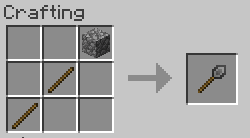
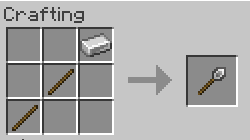
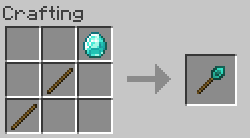
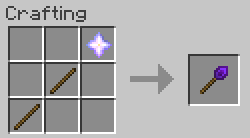
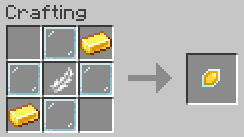
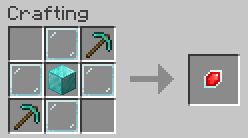
按键绑定
要更改法杖的核心和选项或撤销放置操作,你需要按住法杖选项键(称为 OPTKEY)。默认为 CTRL,但可以在客户端配置文件中更改。为了防止意外更改选项,你可以配置为必须同时按住 SNEAK 才能更改选项或打开 GUI。
法杖核心
法杖核心是魔法宝石,使你的法杖发挥作用。
每把法杖都附带一个 Construction 核心。通过将额外的核心放入其中,可以使你的法杖变得更好。将新核心与法杖一起放入合成网格中以安装它。要切换核心,按住 OPTKEY 并用左键点击空白空间。 Stone 法杖无法升级。
Construction 核心
沿面向你的方向扩展建筑。最大方块数取决于法杖等级。 按住 OPTKEY 并滚动以更改放置限制 (水平、垂直、南北、东西、无锁定)。
Angel 核心
在你面向的方块(或一排方块)的对面放置一个方块。最大距离取决于法杖等级。右键点击空白空间可在半空中放置方块(类似于天使方块,因此得名)。 为此,你需要在主手持有想要放置的方块。如果你坠落超过 10 格深,则无法在半空中放置方块(防止坠入虚空时没有简单的救援工具)。
Destruction 核心
破坏面向你的方向的方块(不包括方块实体)。最大方块数取决于法杖等级。 限制条件与 Construction 核心相同。被破坏的方块会消失到虚空中,如果犯了错误可以使用撤销功能。
选项
SNEAK+OPTKEY+右键点击空白空间会打开法杖的选项屏幕。
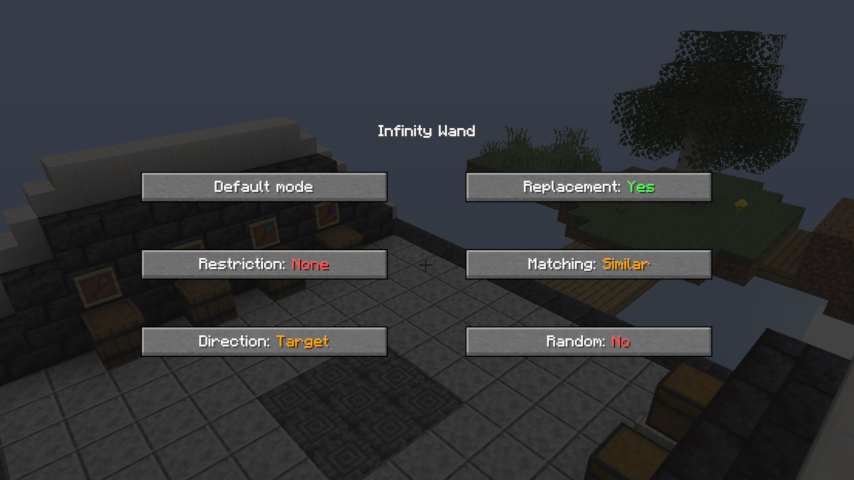
限制: 如果启用了限制,法杖只会在一行或一列中放置方块 (在水平平面上选择南北或东西,在垂直平面上选择水平或垂直)。 如果方向锁定关闭,法杖将扩展其指向的建筑的整个面。此选项在启用 Angel 核心时无效。
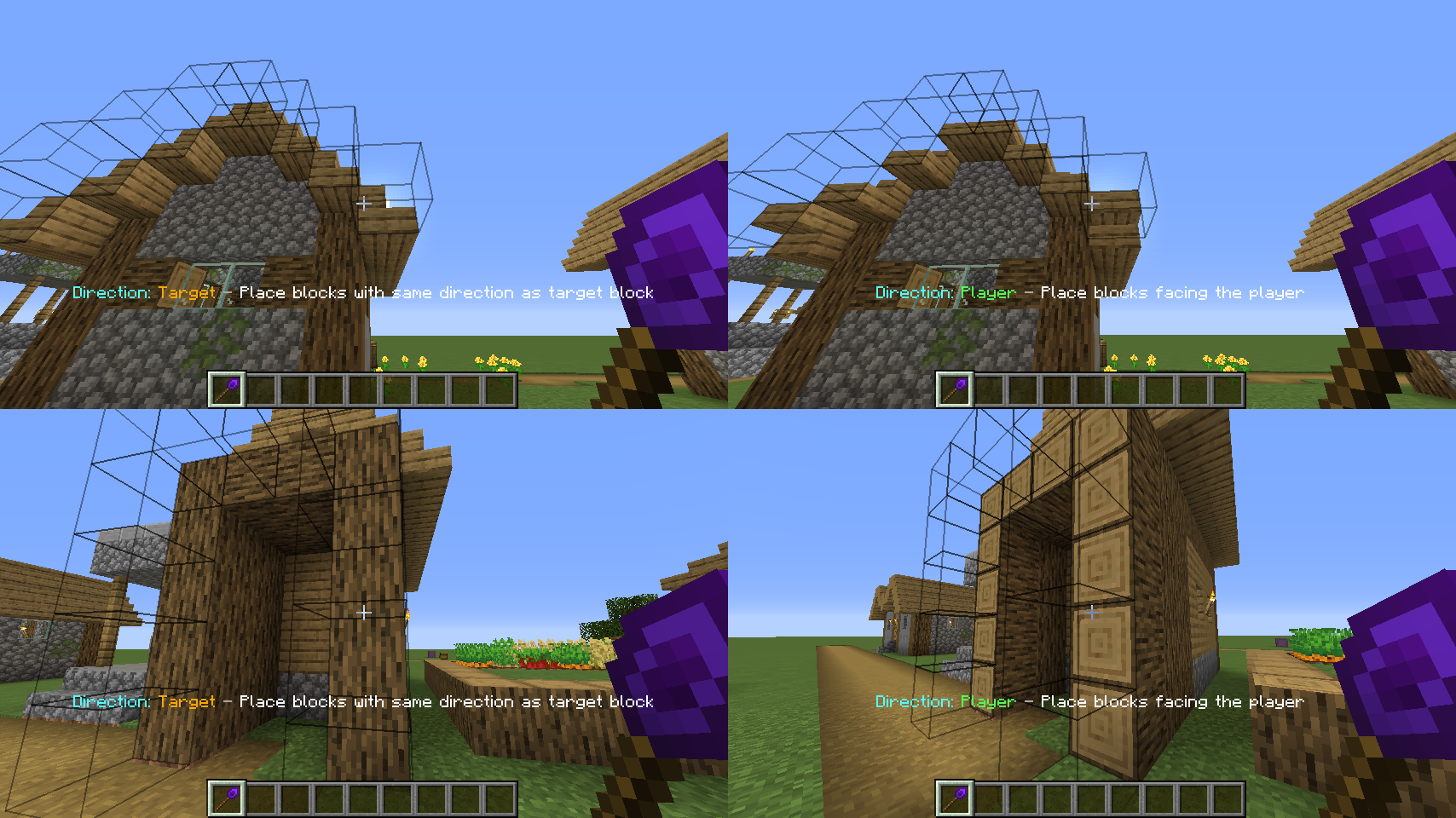
方向: 如果设置为“Player”,法杖会以与你自行放置相同的方向放置方块。 目标模式将以其支撑方块相同的方向放置方块。见下图:
替换: 启用/禁用可替换方块的替换(流体、雪、高草)。
匹配: 选择哪些方块会被法杖扩展。如果设置为“EXACT”,它将仅扩展与选定方块完全相同的方块。
“SIMILAR”会将相似的方块视为同等对待(例如扩展泥土和草方块)。
“ANY”将扩展你看向的建筑面上的任何方块。
随机: 如果启用随机模式,法杖会从你的快捷栏中随机放置方块。
无耻地窃取 灵感来源于 Quark 中的 Trowel。
撤销
按住 Sneak+OPTKEY 并注视一个方块,会用绿色边框显示你最近放置的方块。Sneak+OPTKEY+右键点击其中任何一个都会撤销操作,归还所有物品。如果你使用了 Destruction 核心,它将恢复这些方块。
其他功能
-
潜影盒、Bundle(MC 1.17+)以及其他模组中的许多容器可以为法杖提供建筑方块
-
Botania 兼容性:Black Hole Talisman 可以提供方块,就像潜影盒一样。背包中有 Rod of the Lands / Rod of the Depths 将以消耗 Mana 为代价为你提供无限的泥土/圆石。
-
副手持有方块时,将放置副手中的方块而不是你注视的方块
-
查看你的统计数据,了解使用法杖放置了多少方块
-
仅支持 1.16+: 无限法杖不会像下界合金装备那样在熔岩中燃烧。
-
内置 Just Enough Items (JEI) 的游戏内文档
TileEntity 黑名单
某些模组添加的 TileEntity 在使用法杖放置时可能会引发问题。它们可能变成不可见且无法移除的幽灵方块,变得无法破坏,或导致其他不良效果。
因此,我在 CW 1.7 版本中为 TileEntity 加入了黑白名单系统。Chisels&Bits 的方块默认被列入黑名单。可能还有其他模组的 TileEntity 也会引起类似问题。如果你发现了这样的 TileEntity,可以通过提交 Issue、在 CurseForge 上评论,或直接编辑默认黑名单(位于 )并提交 PR 来告知我。
Construction Wand
With a Construction Wand you can place multiple blocks (up to 1024) at once, extending your build on the side you're facing. If that's not enough: you can upgrade your wand with additional cores, allowing you to place a block behind the block you are facing, conjure blocks in mid air or destroy lots of blocks very fast.
Note: These are the instructions for ConstructionWand version 2.0+, which introduced some new features. If you are still using version 1.x, refer to those instructions.
Wands
There are basic wands made from stone, iron and diamond and the Infinity wand. Wands from higher tiers are more powerful and last longer. These properties can be changed in the config.
| Wand | Durability | Max. Blocks | Upgradeable | Angel distance | Max. Blocks (Destroy) |
|---|---|---|---|---|---|
| Stone | 131 | 9 | No | - | - |
| Iron | 250 | 27 | Yes | 1 | 9 |
| Diamond | 1561 | 128 | Yes | 4 | 25 |
| Infinity | Unbreakable | 1024 | Yes | 8 | 81 |
Crafting
Keybindings
To change a wand's core and options or undo your placement you need to hold down the wand option key (refered as OPTKEY). By default, this is CTRL, but it can be changed in the client config file. To prevent unwanted changes to your options, you can configure that you have to hold down SNEAK as well to change options or open up the GUI.
Wand cores
Wand cores are magical gemstones that make your wand do its thing.
Every wand comes with a Construction core. You can make your wand even better by putting aditional cores into it. Put your new core together with your wand in a crafting grid to install it. To switch between cores, hold down OPTKEY and left click empty space with your wand. Stone wands can't be upgraded.
Construction core
Extend your build on the side facing you. Maximum number of blocks depends on wand tier. Hold down OPTKEY and scroll to change placement restriction (Horizontal, Vertical, North/South, East/West, No lock).
Angel core
Place a block on the opposite side of the block (or row of blocks) you are facing. Maximum distance depends on wand tier. Right click empty space to place a block in midair (similar to angel blocks, hence the name). To do that, you'll need to have the block you want to place in your offhand. You can't place a block in midair if you've fallen more than 10 blocks deep (no easy rescue tool from falling into the void).
Destruction core
Destroy blocks (no tile entities) on the side facing you. Maximum number of blocks depends on wand tier. Restrictions work just like with the Construction core. Destroyed blocks disappear into the void, you can use the undo feature if you've made a mistake.
Options
SNEAK+OPTKEY+Right clicking empty space opens the option screen of your wand.
Restriction: If restriction is enabled the wand will only place blocks in one row or column (choose between North/South, East/West on a horizontal plane and Horizontal, Vertical on a vertical plane). If the direction lock is switched off, the wand will extend the entire face of the building it's pointed at. This option has no effect if the angel core is enabled.
Direction: If set to "Player" the wand places blocks in the same direction as if they were placed by yourself. Target mode places the blocks in the same direction as their supporting block. See the picture below:
Replacement: Enables/disables the replacement of replaceable blocks (Fluids, snow, tallgrass).
Matching: Select which blocks are extended by the wand. If set to "EXACT" it will only extend blocks that
are exactly the same as the selected block.
"SIMILAR" will treat similar blocks equally (e.g. extend dirt and grass blocks).
"ANY" will extend any block on the face of the building you're looking at.
Random: If random mode is enabled, the wand places random blocks from your hotbar.
Shamelessly stolen Inspired by the Trowel from Quark.
Undo
Holding down Sneak+OPTKEY while looking at a block will show you the last blocks you placed with a green border around them. Sneak+OPTKEY+Right clicking any of them will undo the operation, giving you all the items back. If you used the Destruction core, it will restore the blocks.
Additional features
-
Shulker boxes, bundles (MC 1.17+) and many containers from other mods can provide building blocks for the wand
-
Botania compatibility: The Black Hole Talisman can supply blocks just like shulker boxes can. Having a Rod of the Lands / Rod of the Depths in your inventory will provide you with infinite dirt/cobble at the cost of Mana.
-
Having blocks in your offhand will place them instead of the block you're looking at
-
Look at your statisics to see how many blocks you have placed using your wand
-
1.16+ only: The Infinity Wand won't burn in lava just like netherite gear.
-
Ingame documentation with Just Enough Items (JEI)
TileEntity Blacklist
Some modded TileEntitys can cause issues when placed using a wand. They may turn into invisible and unremovable ghost blocks, become unbreakable or cause other unwanted effects.
That's why I've included a Black/Whitelist system for TileEntities in CW Version 1.7. Chisels&Bits blocks are blacklisted by default. There are probably a few other tile entities from other mods out there which may cause issues as well. If you find some of them you can tell me by creating an issue, commenting on Curse or editing the default blacklist yourself (it is located at ) and making a PR.

下载 Construction Wand
下载 Construction Wand
下载 Construction Wand
下载 Construction Wand
下载 Construction Wand
需要联机服务器吗?
稳定流畅、一键部署,几分钟即可和朋友联机开服
最低仅需 8 元/月 即可畅快联机
下载 Construction Wand
下载 Construction Wand
下载 Construction Wand
下载 Construction Wand
下载 Construction Wand
需要联机服务器吗?
稳定流畅、一键部署,几分钟即可和朋友联机开服
最低仅需 8 元/月 即可畅快联机
ConstructionWand 2.12 现已支持 MC 1.20.2
- 添加了日语翻译 (#78,感谢 @ALFEECLARE)
关于这个资源的讨论、问题反馈与使用心得
还没有讨论,来发第一帖吧
你是这个资源的作者?登录后可认领此资源。
相似资源
 模组

可定制的鞘翅模组,支持装饰纹饰、旗帜图案等更多功能!
 模组

基于 GTCEu 1.12.2 的现代 GregTech
 模组

让你能够在世界中的任何位置定位结构。
 模组

为你的终界增添新生物群系、神秘仪式和全新生物
 模组

更多生物群系,更多生物,更多工具,为炽热的维度
 模组
高科技机械、强大的能量生成、炫酷的小工具以及更多内容。现已登陆 Modrinth!
评论 0
登录后参与评分
还没有评论,来抢沙发吧