
Continue Button Continued
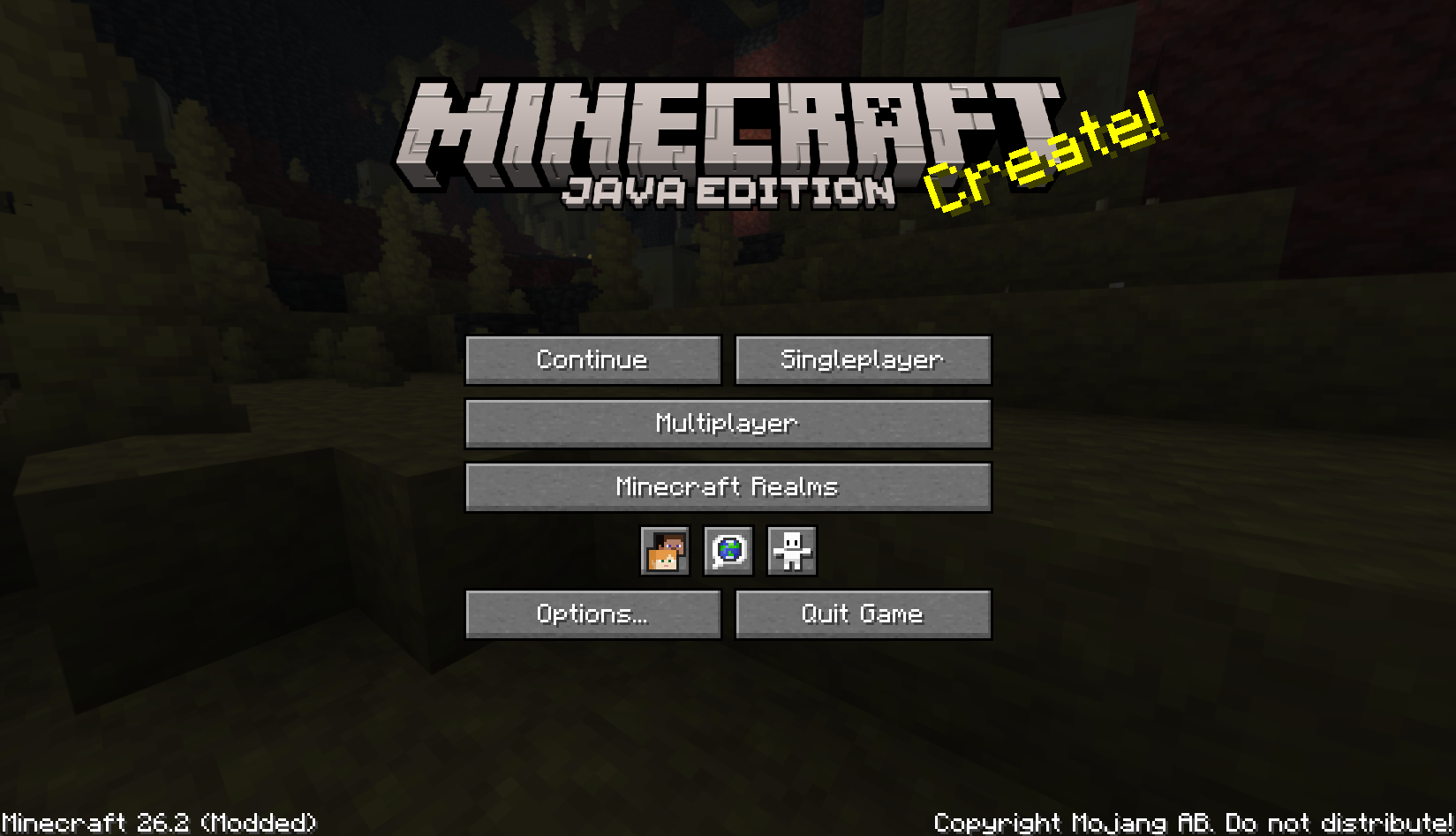
一款轻量级的 Fabric 和 NeoForge 客户端模组,在主菜单中添加了一个紧凑的继续按钮。
Continue Button Continued 会记住你上次加入的单人生存世界或多玩家服务器,让你能从标题界面一键快速返回。
功能特性
- 在主菜单中添加一个紧凑的继续按钮。
- 自动打开上次游玩的单人生存世界。
- 自动重新连接上次加入的多玩家服务器。
- 当保存的目标(世界或服务器)不可用时,回退到世界/服务器选择界面。
- 为保存的世界或服务器显示有用的工具提示。
- 在显示多玩家服务器的状态提示前,先向该服务器发送 Ping 请求。
- 如果可能,将旧版
continuebutton配置迁移至continuebuttoncontinued。 - 仅限客户端;服务器无需安装此模组。
- 包含多种语言的翻译。
安装方法
- 将 Continue Button Continued 的
.jar文件放入你的.minecraft/mods文件夹中。 - 启动游戏,并在主菜单中使用继续按钮。
配置
模组将其最后的目标记录存储在以下位置:
.minecraft/config/continuebuttoncontinued/config.properties
旧版的 Continue Button 安装使用的是:
.minecraft/config/continuebutton/config.properties
首次启动时,Continue Button Continued 会尝试将旧版配置复制到新位置,以便现有用户保留其上次保存的世界或服务器信息。
致谢
Continue Button Continued 是 Continue Button(由 umollu 开发)的持续维护分支。
许可证
本项目采用 MIT 许可证授权。
原始 Continue Button 的版权声明保留在
LICENSE 文件中,持续维护项目的版权声明也已添加其中。
Continue Button Continued
A lightweight Fabric and NeoForge client-side mod that adds a compact Continue button to Minecraft's main menu.
Continue Button Continued remembers the last singleplayer world or multiplayer server you joined, then lets you jump back in with one click from the title screen.
Features
- Adds a compact Continue button to the main menu.
- Opens the last played singleplayer world automatically.
- Reconnects to the last joined multiplayer server automatically.
- Falls back to the world/server selection screen when the saved target is missing.
- Shows helpful tooltips for the saved world or server.
- Pings the last multiplayer server before showing its status tooltip.
- Migrates legacy
continuebuttonconfiguration tocontinuebuttoncontinuedwhen possible. - Client-side only; servers do not need to install this mod.
- Includes translations for multiple languages.
Installation
- Put the Continue Button Continued
.jarfile into your.minecraft/modsfolder. - Start the game and use the Continue button on the main menu.
Configuration
The mod stores its last target in:
.minecraft/config/continuebuttoncontinued/config.properties
Older Continue Button installations used:
.minecraft/config/continuebutton/config.properties
On first launch, Continue Button Continued attempts to copy the legacy configuration into the new location so existing users can keep their last saved world or server.
Credits
Continue Button Continued is a continued fork of Continue Button by umollu.
License
This project is licensed under the MIT License.
The original Continue Button copyright notice is preserved in
LICENSE, and the
continued project copyright notice has been added there as well.

下载 Continue Button Continued
下载 Continue Button Continued
下载 Continue Button Continued
下载 Continue Button Continued
下载 Continue Button Continued
需要联机服务器吗?
稳定流畅、一键部署,几分钟即可和朋友联机开服
最低仅需 8 元/月 即可畅快联机
下载 Continue Button Continued
需要联机服务器吗?
稳定流畅、一键部署,几分钟即可和朋友联机开服
最低仅需 8 元/月 即可畅快联机
下载 Continue Button Continued
下载 Continue Button Continued
下载 Continue Button Continued
需要联机服务器吗?
稳定流畅、一键部署,几分钟即可和朋友联机开服
最低仅需 8 元/月 即可畅快联机
下载 Continue Button Continued
新增
- NeoForge 支持。 该模组现已同时支持 Fabric 和 NeoForge。
- 多版本支持: Minecraft 26.1.2、26.2 和 26.3。
更改
- “继续”按钮现在使用 Minecraft 内置的
gui.continue标签,因此它在游戏支持的所有语言中均已本地化。模组自带的翻译包已被移除。 - 构建系统已迁移至 Stonecutter 并使用 Architectury Loom;每个加载器/版本现在会生成一个独立的 jar 文件,命名为
continue-button-continued-<loader>-<version>.jar(例如continue-button-continued-fabric-1.1.0+26.3.jar)。 - 内部重构:移除了标题屏幕的 mixin,改用 Architectury 的跨加载器事件(
ClientGuiEvent、ClientTickEvent、ClientPlayerEvent)。
修复
- 主菜单在保存的服务器宕机时不再卡顿/延迟 (#1)。状态检测 ping 操作现改为脱离渲染线程执行,且仅在每次进入标题屏幕时执行一次。
- 当保存的服务器不可达时,“继续”按钮的提示框现在显示 "无法连接到服务器",而不再是卡在 "正在 ping" 的状态。
- 在已知宕机的服务器上点击“继续”,现在会显示清晰的 "连接服务器失败" 界面,而不会再泄露原始连接异常信息(
finishConnect(..) failed with error(-111): Connection refused)。 - 修复了一个竞态条件问题:之前为旧标题屏幕发起的 ping 请求可能会覆盖当前屏幕的状态。
依赖项
- 运行时需安装 Architectury API(Fabric 或 NeoForge 构建版)。在 Fabric 上,还需要 Fabric API(由 Architectury API 引入)。
- NeoForge 26.3 目前对应 NeoForge
26.3.0.46-beta。
完整更新日志:
关于这个资源的讨论、问题反馈与使用心得
还没有讨论,来发第一帖吧
你是这个资源的作者?登录后可认领此资源。
相似资源
 模组

显示你正在注视的方块的信息。(适用于 Minecraft 1.16+ 的 Hwyla/Waila 分支)
 模组

查看物品与配方
 模组
在游戏画面角落显示附近世界地形、玩家、生物和实体的地图。可创建路径点,帮助你找到标记过的位置。
 模组
使用 JavaScript 编辑配方、添加自定义物品、编写世界事件!
 模组
添加区块认领和玩家组队功能,并与 Xaero's Minimap 和 World Map 集成
 模组
添加全屏世界地图,显示你在世界中已探索的区域。与 Xaero's Minimap 搭配使用效果极佳。
评论 0
登录后参与评分
还没有评论,来抢沙发吧