




为 Minecraft:Java 版提供最佳手柄支持的模组。
分屏模式!
(广告)
Controlify Splitscreen 是一个正在开发中的独立模组,可为游戏添加分屏支持!目前 JAR 文件仅在 Patreon 上提供!
Wiki
阅读 Controlify Wiki 以获取有关如何使用 Controlify、如何配置它以及如何为其开发的更多信息。
什么是 Controlify?
Controlify 是 Minecraft:Java 版最优秀的手柄支持模组。它在各个方面都超越了官方基岩版的手柄支持。功能完整,支持震动、陀螺仪、HD 触觉反馈等更多特性。
得益于使用了最先进的跨平台输入库 SDL3,Controlify 支持所有手柄。
Controlify 旨在既用户友好又功能丰富。它拥有合理的默认设置,默认灵敏度与基岩版匹配以便轻松过渡,并且拥有一个简单但信息丰富的设置界面,允许您根据自己的喜好调整体验。
功能概览
- 震动支持;Controlify 会在受到伤害、破坏方块、闪电击中等事件时震动手柄。
- 陀螺仪支持;Controlify 可以使用手柄中的陀螺仪进行精确瞄准。
- 特定厂商输入支持;Controlify 支持读取部分手柄(包括 Xbox、DualSense 和 Steam Deck)上的背键、静音按钮(及其 LED)、触控板等。
- GUI 操作:Controlify 允许你仅用手柄导航所有 Minecraft GUI,无需鼠标或键盘。这包括物品栏、游戏外菜单以及模组 GUI。它在物品栏界面中提供了光标吸附功能,让你无需精确控制光标即可使用手柄。
- DualSense/DualShock 支持;即使是在 Windows 上,Controlify 也无需任何额外软件即可支持 PlayStation 手柄。
- 手柄识别;Controlify 为许多手柄型号定制了按钮图标,包括 Xbox、Playstation、Nintendo Switch、Steam Deck 等。
- 屏幕键盘;Controlify 包含一个功能完整的屏幕键盘,允许你用手柄打字——真正无需键盘!
- 径向菜单;Controlify 提供了一个可配置的菜单,允许你将较少使用的动作绑定到径向菜单,从而节省按键。
- DualSense HD 触觉反馈支持;Controlify 允许在 DualSense 手柄上实现高级震动效果。
- DualSense 自适应扳机支持;Controlify 允许在 DualSense 手柄上实现高级扳机效果。
- 数据驱动设计;Controlify 允许资源包更改默认绑定、主题按钮图标、屏幕按钮指南、屏幕键盘布局、添加更多手柄模型等。
- Steam Deck 支持
- 模组兼容性;Controlify 致力于使手柄支持与 Sodium、Iris、Simple Voice Chat、Do A Barrel Roll 等模组无缝协作。
- 跨平台和多版本;Controlify 适用于 Fabric 和 NeoForge,并积极支持和更新 Minecraft 1.21.1 及以上版本。
- 更新迅速;Controlify 甚至为 Minecraft 快照版本进行更新,尽管快照构建版本仅对 Patreon 会员开放。
- 操纵杆支持;Controlify 支持飞行摇杆、赛车方向盘和其他非标准操纵杆。此类设备的用户可以选择将操纵杆映射为标准游戏手柄,或者为自己的操纵杆创建自定义绑定、默认值和图标,从而实现功能齐全的体验。
谁在使用 Controlify?
以下是我从 Controlify 用户那里收到的真实反馈,我很自豪能够帮助他们以前所未有的方式享受 Minecraft:
- 喜欢坐在沙发上放松游玩你最爱版 Minecraft 的沙发玩家。
- 首次体验模组化 Minecraft 的玩家,此前曾在主机上玩过 Minecraft,且不想学习如何使用键盘和鼠标。
- 有辅助需求、无法使用键盘和鼠标和/或需要适配手柄的玩家。
- 希望以易于上手的方式让孩子接触模组化 Minecraft 的家长。
- 比起键盘和鼠标更偏好使用手柄的玩家。
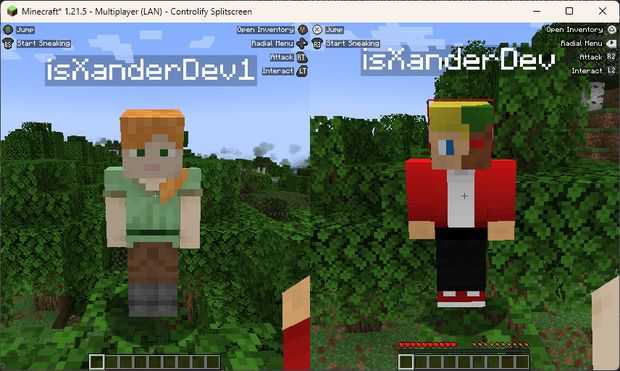
- 希望借助配套 分屏模组 与亲友进行本地多人游戏的玩家。
- 当然也包括希望成为该模组用户的你!
功能特性
手柄震动
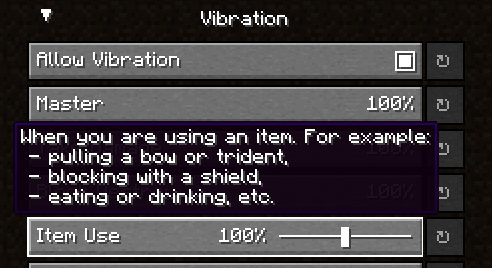
Controlify 支持手柄震动,这在 PC 版 Minecraft(包括 Windows 10 基岩版)中尚属首次。你可以配置每种震动源的强度,并为游戏中的众多方面设置复杂的震动模式(例如受到伤害时)。
径向菜单
为了节省手柄上的按键,你可以将一些较少使用的操作分配到径向菜单中。它可通过设置完全自定义,且使用直观。所有模组按键绑定均兼容此菜单。
陀螺仪支持
Controlify 内置对手柄陀螺仪的支持,允许你通过手柄在游戏内进行精细的操作。这可以与 拨杆式操控 (Flick Stick) 结合使用,从而在不妥协的前提下仅用手柄进行操作。
容器游标
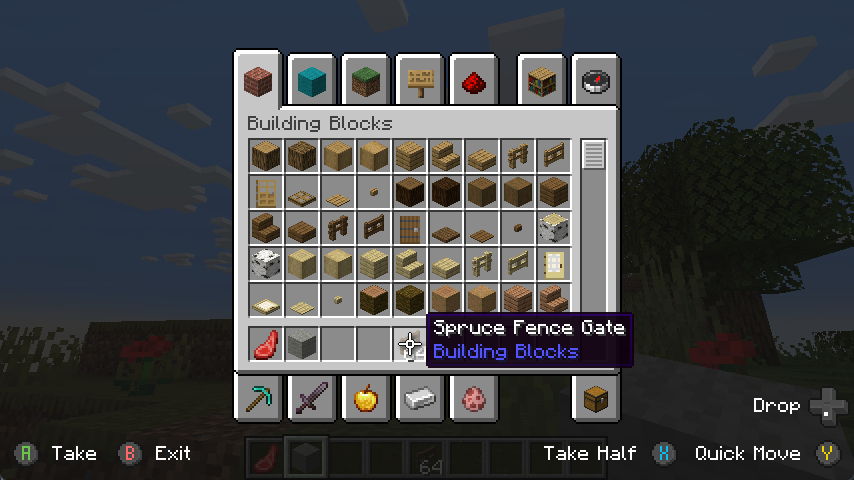
就像在基岩版中一样,你可以在物品栏中移动游标,并以对手柄友好的方式进行交互。控制性拥有专门的快速移动、丢弃等按钮。Controlify 还自带游标吸附功能,因此你无需在游标移动上过于精准。
手柄识别
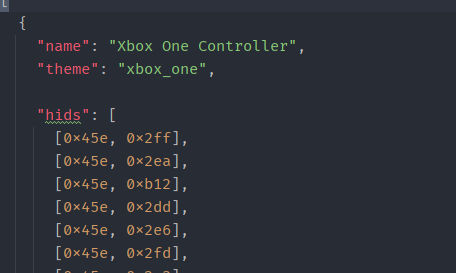
Controlify 能够自动识别你所用手柄的品牌和型号,并显示与该手柄相关的按键纹理。此功能也可通过资源包进行扩展,以不同风格更改按键纹理,并添加一些针对更小众手柄型号的标识。
操纵杆支持
你可以将任何操纵杆连接至该模组,并使用自己的名称和纹理对其进行映射,每个手柄支持无限数量的输入。
按键指南
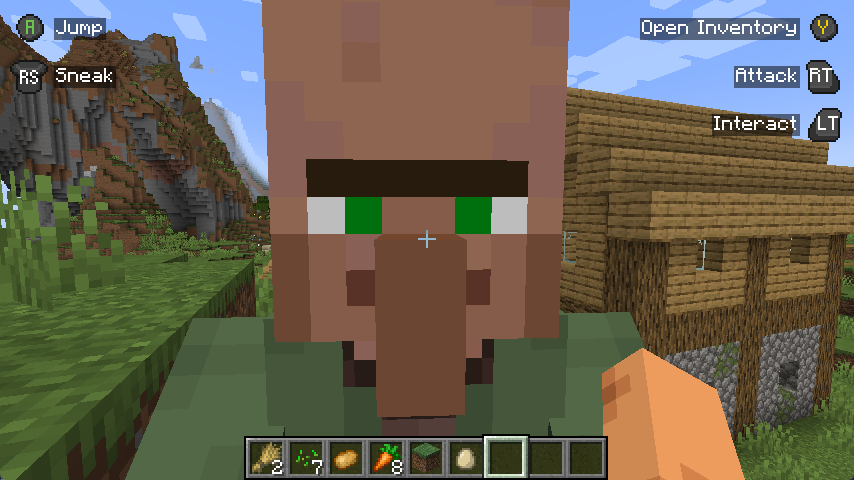
游戏内有一个简单的叠加层,会根据玩家的状态和朝向显示可按下的按键。这对于尚未记住控制的玩家非常有用。
此外,某些 GUI 会在具有手柄快捷键的元素上显示手柄按键,以便你能像理应那样轻松地用手柄进行导航。
独立手柄容器
本模组基于这样一个事实构建:每个手柄都是完全独立的,拥有各自的配置、按键绑定等。这意味着未来添加对分屏游戏的支持将轻而易举。
专为模组兼容性打造
GUI 操作已被抽象为一个简单的 API,允许其他模组轻松为其自身的 GUI 添加支持,而无需在整个模组的代码库中进行繁琐的支持逻辑,从而避免第三方集成困难。
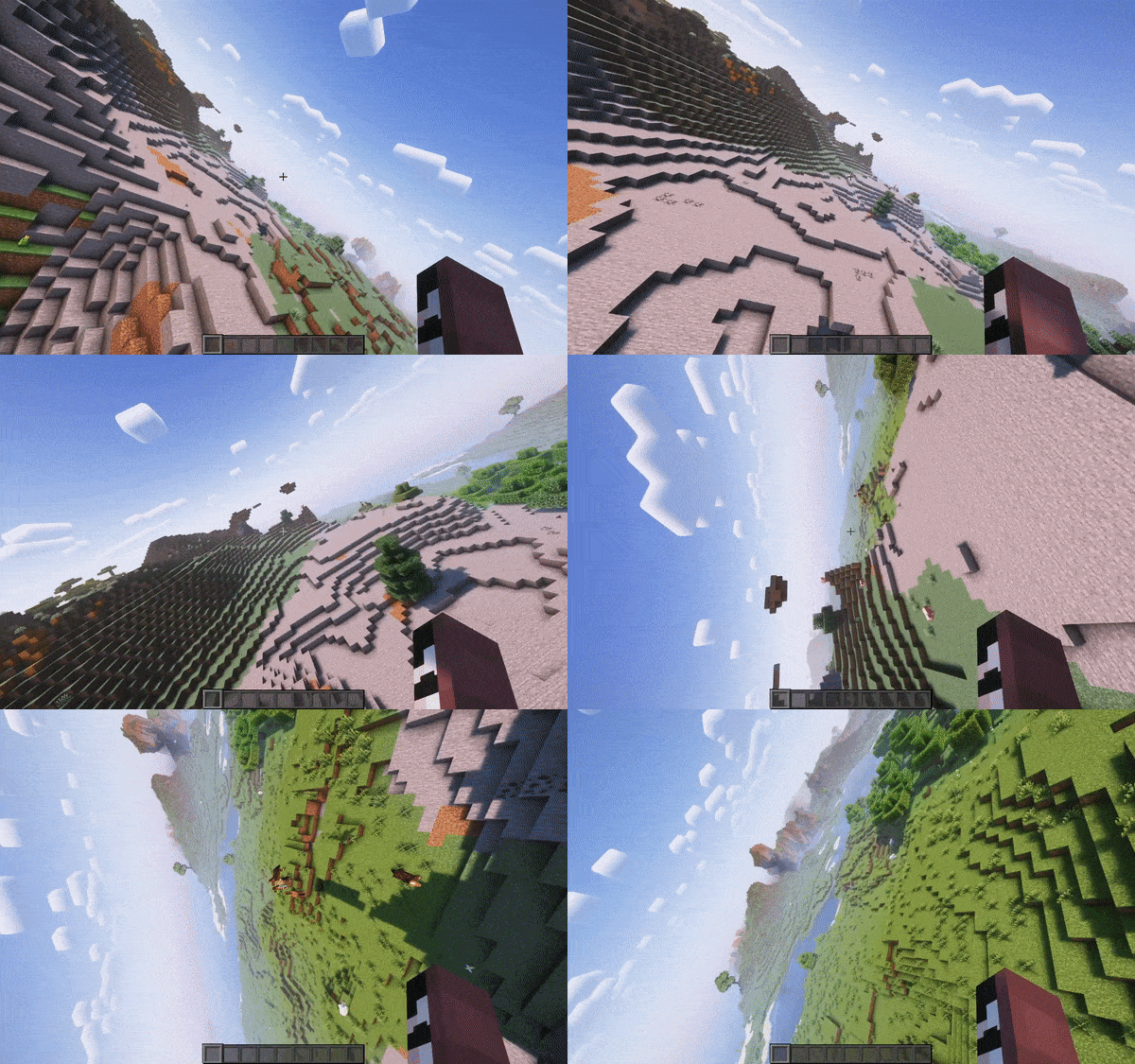
视频录制时使用 do-a-barrel-roll 配合 Thrustmaster HOTAS 飞行摇杆
自动手柄死区校准
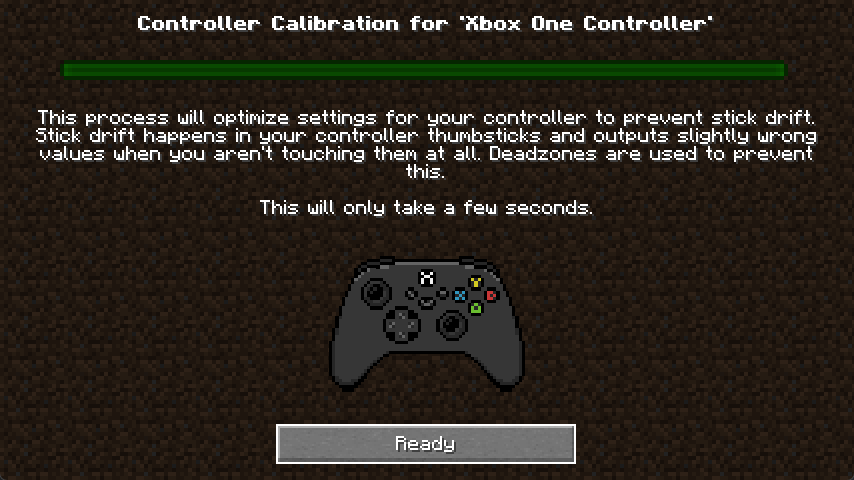
你的手柄死区值会自动校准,无需你为此操心。
向下移植?
本模组仅在 1.19.4 及更高版本提供,这是因为 Mojang 在 1.19.4 中引入了箭头键导航功能,该功能可以轻松移植到手柄;而在 1.19.4 之前的版本中,这是不可能的。
A mod that adds the best controller support for Minecraft: Java Edition.
SPLITSCREEN!
(Advertisement)
Controlify Splitscreen is a separate mod in development that adds splitscreen support to the game! JARs are currently only available on Patreon!
Wiki
Read up on the Controlify Wiki for more information on how to use Controlify, how to configure it, and how to develop for it.
What is Controlify?
Controlify is the best controller support mod for Minecraft: Java Edition. It exceeds the first-party Bedrock Edition controller support in every way possible. It is feature-complete, with support for vibration, gyroscope, HD haptics, and more.
Controlify supports all controllers, thanks to its usage of the SDL3 library, which is the most advanced cross-platform input library available.
Controlify is designed to be both user-friendly and feature-rich. It has sensible defaults, with default sensitivity matched to Bedrock Edition for easy transition, and a simple yet informative settings screen that allows you to tweak your experience to your liking.
Feature overview
- Vibration support; Controlify vibrates your controller upon events such as taking damage, breaking blocks, lightning strikes.
- Gyroscope support; Controlify can use the gyroscope in your controller for precise aiming.
- Vendor-specific input support; Controlify supports reading paddles, mute buttons (and their LEDs), touchpads, and more, on some controllers including Xbox, DualSense and Steam Deck.
- GUI operation: Controlify allows you to navigate all Minecraft GUIs with your controller, without needing a mouse or keyboard. This includes the inventory, out-of-game menus, and modded GUIs. It features cursor snapping in inventory screens, allowing you to use your controller without needing to be precise with your cursor movements.
- DualSense/DualShock support; Controlify does not require any additional software for PlayStation controllers, even on Windows.
- Controller identification; Controlify has bespoke button glyphs for many controller models, including Xbox, Playstation, Nintendo Switch, Steam Deck, and more.
- On-screen keyboard; Controlify includes a fully functional on-screen keyboard that allows you to type with your controller - truly no keyboard needed!
- Radial menu; Controlify features a configurable menu that allows you to bind less-used actions to a radial menu, saving up buttons.
- DualSense HD haptics support; Controlify allows for advanced vibration effects on DualSense controllers.
- DualSense adaptive triggers support; Controlify allows for advanced trigger effects on DualSense controllers.
- Data-driven design; Controlify allows resource packs to change default bindings, theme button glyphs, on-screen button guides, on-screen keyboard layouts, add more controller models, and more.
- Steam Deck support
- Mod compatibility; Controlify has led the efforts to make controller support work seamlessly with mods like Sodium, Iris, Simple Voice Chat, Do A Barrel Roll, and more.
- Cross-platform and multi-version; Controlify works on Fabric and NeoForge, and actively supports and updates for Minecraft versions 1.21.1 and above.
- Quick to update; Controlify is updated even for Minecraft snapshots, although snapshot builds are only available to patreon members.
- Joystick support; Controlify supports flight sticks, racing wheels, and other non-standard joysticks. Users of such devices have the option between mapping the joystick to a standard gamepad, or creating their own custom bindings and defaults and glyphs for the joystick, allowing for a fully-featured experience.
Who uses Controlify?
The following is actual feedback I have received from users of Controlify, and I'm very proud to have been able to help them enjoy Minecraft in a way they couldn't before:
- Couch gamers who want to sit back and relax playing their favourite edition of Minecraft.
- First-time modded players who have previously played Minecraft on a console and don't want to learn how to use a keyboard and mouse.
- People with accessibility requirements who cannot use a keyboard and mouse and/or requires an adaptive controller.
- Parents who want to expose their kids to modded Minecraft in an accessible manner.
- People who just prefer using a controller over a keyboard and mouse.
- People who want to play local multiplayer with their friends and family using the companion Splitscreen Mod
- Hopefully you!
Features
Controller vibration
Controlify supports controller vibration, which has not been seen before for PC versions of Minecraft, including Bedrock Windows 10 Edition. Configure the intensity of each vibration source, with complex vibration patterns for lots of aspects of the game (e.g. when you take damage).
Radial menu
To save up some buttons on your controller, dedicate some less-used actions to the radial menu. It is fully customizable through the settings and intuitive to use. Any modded keybind is compatible with this menu.
Gyro support
Controlify has built-in support for controller gyroscopes, allowing you to make fine movements in-game with your controller. This can be combined with flick stick to be able to use a controller without the compromise.
Container cursor
Just like in bedrock edition, you can move a cursor across your inventory, and interact with it in a controller-friendly way. With dedicated buttons for quick move, dropping etc. Controlify also comes with cursor snapping, so you don't need to be so precise with cursor movements.
Controller identification
Controlify has the ability to identify the make and model of your controller automatically, and displays relevant button textures for your controller. This is also extendable by resource packs, changing up the button textures in a different style and adding some of your own, more niche controller identifiers.
Joystick support
You can connect any joystick to the mod and map it with your own names and textures, with an unlimited amount of inputs per controller.
Button guide
There is a simple overlay in-game that displays the buttons you can press based on your player's state and look direction. This is useful for new players, who have not yet memorised the controls.
Also, some GUIs display controller buttons on elements that have a controller shortcut, to easily navigate with a controller like you should be able to.
Containerised Controllers
This mod is built around the fact that each controller is completely separate, with it's own configuration, bindings etc. This means it will be trivial to add support for split-screen play in the future.
Built for mod compatibility
GUI operation has been abstracted into a simple API, which allows other mods to easily add support for their own GUIs, without convoluted support throughout the whole mod's codebase, making it difficult for third parties to integrate.
Video recorded using do-a-barrel-roll with a Thrustmaster HOTAS flightstick
Automatic controller deadzone calibration
The deadzone values of your controller are automatically calibrated, meaning you don't have to worry about it.
Backports?
This mod is only and will only be available for 1.19.4 and above, this is because in 1.19.4, Mojang introduced arrow key navigation which was easily ported to controller, below 1.19.4, this is not possible.

下载 Controlify (Controller support)
需要联机服务器吗?
稳定流畅、一键部署,几分钟即可和朋友联机开服
最低仅需 8 元/月 即可畅快联机
下载 Controlify (Controller support)
需要联机服务器吗?
稳定流畅、一键部署,几分钟即可和朋友联机开服
最低仅需 8 元/月 即可畅快联机
下载 Controlify (Controller support)
需要联机服务器吗?
稳定流畅、一键部署,几分钟即可和朋友联机开服
最低仅需 8 元/月 即可畅快联机
下载 Controlify (Controller support)
需要联机服务器吗?
稳定流畅、一键部署,几分钟即可和朋友联机开服
最低仅需 8 元/月 即可畅快联机
下载 Controlify (Controller support)
需要联机服务器吗?
稳定流畅、一键部署,几分钟即可和朋友联机开服
最低仅需 8 元/月 即可畅快联机
下载 Controlify (Controller support)
需要联机服务器吗?
稳定流畅、一键部署,几分钟即可和朋友联机开服
最低仅需 8 元/月 即可畅快联机
下载 Controlify (Controller support)
需要联机服务器吗?
稳定流畅、一键部署,几分钟即可和朋友联机开服
最低仅需 8 元/月 即可畅快联机
下载 Controlify (Controller support)
需要联机服务器吗?
稳定流畅、一键部署,几分钟即可和朋友联机开服
最低仅需 8 元/月 即可畅快联机
下载 Controlify (Controller support)
需要联机服务器吗?
稳定流畅、一键部署,几分钟即可和朋友联机开服
最低仅需 8 元/月 即可畅快联机
下载 Controlify (Controller support)
需要联机服务器吗?
稳定流畅、一键部署,几分钟即可和朋友联机开服
最低仅需 8 元/月 即可畅快联机
Controlify 4.0.0-beta.1
此版本支持以下目标:
- 26.1
- 26.2
- 26.3
通过在 Patreon 捐赠,您将能够获取支持分屏游玩和快照版本的 Controlify 构建版
Controlify v4 是 Controlify 迄今为止最大的更新。模组的大部分内容都已重写,从控制器输入读取方式到模组如何接入该模组。这是一个测试版,因此如果有任何感觉不对劲的地方,请报告。
您的设置和绑定将从 v3 迁移过来。为 v3 制作的插件和资源包需要更新。完整的 迁移指南 可在文档网站找到。
更改内容
全新的输入管线
Controlify 过去每秒检查 20 次控制器的状态。现在它作为事件接收每个输入,并在每一帧中通过管线运行。包括陀螺仪在内的鼠标输入也每帧更新,因此整体响应速度应该更加灵敏。
对于初始轴值已处于非零位置(例如摇杆)的控制器,现在会被检测并重新映射。
动作、手势与组合键
绑定已被动作取代,一个动作可以通过一个按钮实现更多功能:
- 每个动作最多可以有两个绑定
- 绑定可以是修饰符组合键,例如按住一个按钮的同时按下另一个按钮
- 动作由手势触发:按下、释放、轻触、长按、持续按住或超长按住。同一按钮上的轻触和长按不会冲突,因此可以在控制器上放置更多动作。许多动作现在允许在控制设置中更改其手势。
- 轻触和长按的时间间隔可以在设置中调整
- 按钮图标会显示一个小徽章,表示该绑定使用的手势类型
- 许多内置动作现在改为通过轻触而非按下触发
- 绑定冲突现在考虑了动作层,因此永远不会同时运行的动作不再报告虚假冲突,而确实同时运行的动作现在会被正确捕获
反馈:震动、HD 触觉和灯光
震动系统已被一个新的反馈系统取代,该系统统一驱动震动、HD 触觉和控制器 LED 灯。
- 效果是数据文件,因此资源包可以改变任何效果的触感或添加新效果
- 控制器灯光可以对游戏做出反应。您可以在设置中关闭 LED 效果。
- 效果可以根据游戏中的情况选择,使用与按钮指南和自适应扳机相同的系统。例如,当生命值较低时会播放新的“心跳”效果。
- 每个反馈组都有独立的强度设置
- 资源包和服务端管理员无需编写代码即可创建新的反馈效果
全面重构的陀螺仪
陀螺仪已完全重建,并包含许多新设置:
- 陀螺仪空间:选择是转向、倾斜还是两者都移动相机,或者使用世界空间或玩家空间,后者利用加速度计跟随您在现实世界中的转动方向
- 通过触摸 Steam Controller 和 Steam Deck 上的电容式摇杆或握把来激活陀螺仪
- 垂直灵敏度比例以及瞄准时的独立灵敏度倍增器
- 陀螺仪加速,使快速甩动比缓慢移动产生更大的转向幅度
- 陀螺仪平滑和收紧功能,以稳定微小且颤抖的动作
- 陀螺仪校准更加可靠,不再将缓慢稳定的转动误判为漂移
- Flick stick(甩杆模式)具有新的甩动时间、吸附、前向死区和随摇杆旋转设置
完整的 Valve 硬件支持
Steam Controller 和 Steam Deck 现开箱即用,包括陀螺仪、触控板、背键和 HD 触觉。旧的增强驱动程序已移除。
Controlify 现在直接与 Steam 通信,因此即使 Minecraft 不是通过 Steam 启动,Steam 也不会将您的控制器转换为键盘和鼠标。
重组的设置界面
设置屏幕已从三个标签页拆分为常规、瞄准、绑定、界面、反馈和硬件,以便更容易查找设置。
数据驱动的控制器映射
操纵杆映射现在是数据文件。资源包可以为 SDL 无法识别的控制器提供映射,并通过 mapping_id 将控制器识别条目指向其中一个。游戏内的映射制作器也已修复:它不再将静止的轴记录为按下操作,也不再保存未完成的映射,清除映射现在可以正常保存。
面向资源包制作者
几乎所有 Controlify 的资源现在都位于 assets/<namespace>/controller/ 下。反馈效果、反馈规则、动作激活器和操纵杆映射均为新格式。xbox_one 控制器类型已重命名为 xbox。内置图标已移至 Unicode 私有使用区,因此包含这些图标的文本不会再在不恰当的位置换行。
面向模组开发者
Controlify v4 拥有全新、更小且更稳定的 API,旨在确保插件不会因每次 Controlify 更新而失效:
- 动作 API:替换了绑定 API。动作具有脉冲、锁存和连续通道,其手势在数据中定义,并且可以自动代理您的原版按键映射。
- 屏幕操作 API:屏幕处理器和组件处理器被小型屏幕和元素行为取代,这些行为可以组合在一起。大多数屏幕可以通过组合 Controlify 的内置行为来支持。
- 反馈 API:替换了震动 API。从您的模组触发或保持事件,让效果和规则决定播放什么。
- 上下文 API:将您模组的状态贡献给按钮指南、自适应扳机和反馈规则,或者为您的模组化屏幕注册自己的域。
- 视角 API:添加您自己的视角来源和缩放器,例如在放大时降低灵敏度。
- 事件:事件监听器现在可以取消订阅。
- 文档网站提供了新的开发者指南,Controlify 仓库中包含一个完整的示例插件,文档中的所有代码片段均源自于此。
面向服务端
- 震动数据包已替换为通过 ID 播放反馈效果的一个数据包,因此效果定义不再通过网络发送
/vibratecontroller命令现在改为/controlify feedback play。所有 Controlify 命令现在都位于/controlify下。
Bug fixes(Bug 修复)
- 修复了 vanilla 滑块无法使用键盘调节的问题
- 修复了每当屏幕打开或重建其控件时失去键盘焦点的问题
- 修复了虚拟鼠标在没有释放的情况下发送第二次点击的问题
- 修复了世界和服务器列表条目在按下时播放点击音效的问题
- 修复了创造模式下挖掘方块时的震感不播放,以及在挖掘同一方块时每刻重复触发的问题
- 修复了菜单导航反馈被暂停菜单静音的问题
- 修复了具有相同 ID 的控制器未获得唯一 ID 的问题
- 修复了用于疾跑、攻击和使用等键位映射的径向菜单条目未注册的问题
- 修复了在屏幕打开时 Simple Voice Chat 按住说话和耳语功能无效的问题
- 修复了一个损坏的键盘布局或控制器映射文件导致其余文件无法加载的问题
- 修复了与 Sodium 26.1 版本视频设置界面的兼容性问题
Removed(移除内容)
- “未检测到控制器”按钮
- 全局 GUI 按钮指南缩放设置
- Reese's Sodium Options 兼容性支持,因为 Reese's Sodium Options 现已提供自己的支持
Controlify 3.5.3
此版本支持以下目标:
- 26.1
- 26.2
- 26.3
通过在我的 Patreon 上捐赠,您将获得用于分屏支持和快照版本的 Controlify 构建包的访问权限
变更
- 修复虚拟鼠标光标出现卡顿问题
- 修复在玩家游戏模式对客户端未知的情况下渲染按钮指南时崩溃的问题
关于这个资源的讨论、问题反馈与使用心得
还没有讨论,来发第一帖吧
你是这个资源的作者?登录后可认领此资源。
相似资源
 模组

显示你正在注视的方块的信息。(适用于 Minecraft 1.16+ 的 Hwyla/Waila 分支)
 模组
在游戏画面角落显示附近世界地形、玩家、生物和实体的地图。可创建路径点,帮助你找到标记过的位置。
 模组

查看物品与配方
 模组
使用 JavaScript 编辑配方、添加自定义物品、编写世界事件!
 模组
AE2:一款流行的自动化与存储模组
 模组
那是什么?一个 Waila/Hwyla 的分支。
评论 0
登录后参与评分
还没有评论,来抢沙发吧