



为 Minecraft:Java 版提供最佳手柄支持的模组。
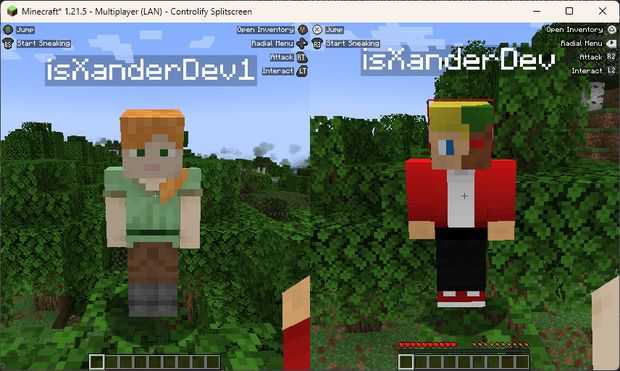
分屏模式!
(广告)
Controlify Splitscreen 是一个正在开发中的独立模组,可为游戏添加分屏支持!目前 JAR 文件仅在 Patreon 上提供!
Wiki
阅读 Controlify Wiki 以获取有关如何使用 Controlify、如何配置它以及如何为其开发的更多信息。
什么是 Controlify?
Controlify 是 Minecraft:Java 版最优秀的手柄支持模组。它在各个方面都超越了官方基岩版的手柄支持。功能完整,支持震动、陀螺仪、HD 触觉反馈等更多特性。
得益于使用了最先进的跨平台输入库 SDL3,Controlify 支持所有手柄。
Controlify 旨在既用户友好又功能丰富。它拥有合理的默认设置,默认灵敏度与基岩版匹配以便轻松过渡,并且拥有一个简单但信息丰富的设置界面,允许您根据自己的喜好调整体验。
功能概览
- 震动支持;Controlify 会在受到伤害、破坏方块、闪电击中等事件时震动手柄。
- 陀螺仪支持;Controlify 可以使用手柄中的陀螺仪进行精确瞄准。
- 特定厂商输入支持;Controlify 支持读取部分手柄(包括 Xbox、DualSense 和 Steam Deck)上的背键、静音按钮(及其 LED)、触控板等。
- GUI 操作:Controlify 允许你仅用手柄导航所有 Minecraft GUI,无需鼠标或键盘。这包括物品栏、游戏外菜单以及模组 GUI。它在物品栏界面中提供了光标吸附功能,让你无需精确控制光标即可使用手柄。
- DualSense/DualShock 支持;即使是在 Windows 上,Controlify 也无需任何额外软件即可支持 PlayStation 手柄。
- 手柄识别;Controlify 为许多手柄型号定制了按钮图标,包括 Xbox、Playstation、Nintendo Switch、Steam Deck 等。
- 屏幕键盘;Controlify 包含一个功能完整的屏幕键盘,允许你用手柄打字——真正无需键盘!
- 径向菜单;Controlify 提供了一个可配置的菜单,允许你将较少使用的动作绑定到径向菜单,从而节省按键。
- DualSense HD 触觉反馈支持;Controlify 允许在 DualSense 手柄上实现高级震动效果。
- DualSense 自适应扳机支持;Controlify 允许在 DualSense 手柄上实现高级扳机效果。
- 数据驱动设计;Controlify 允许资源包更改默认绑定、主题按钮图标、屏幕按钮指南、屏幕键盘布局、添加更多手柄模型等。
- Steam Deck 支持
- 模组兼容性;Controlify 致力于使手柄支持与 Sodium、Iris、Simple Voice Chat、Do A Barrel Roll 等模组无缝协作。
- 跨平台和多版本;Controlify 适用于 Fabric 和 NeoForge,并积极支持和更新 Minecraft 1.21.1 及以上版本。
- 更新迅速;Controlify 甚至为 Minecraft 快照版本进行更新,尽管快照构建版本仅对 Patreon 会员开放。
- 操纵杆支持;Controlify 支持飞行摇杆、赛车方向盘和其他非标准操纵杆。此类设备的用户可以选择将操纵杆映射为标准游戏手柄,或者为自己的操纵杆创建自定义绑定、默认值和图标,从而实现功能齐全的体验。
谁在使用 Controlify?
以下是我从 Controlify 用户那里收到的真实反馈,我很自豪能够帮助他们以前所未有的方式享受 Minecraft:
- 喜欢坐在沙发上放松游玩你最爱版 Minecraft 的沙发玩家。
- 首次体验模组化 Minecraft 的玩家,此前曾在主机上玩过 Minecraft,且不想学习如何使用键盘和鼠标。
- 有辅助需求、无法使用键盘和鼠标和/或需要适配手柄的玩家。
- 希望以易于上手的方式让孩子接触模组化 Minecraft 的家长。
- 比起键盘和鼠标更偏好使用手柄的玩家。
- 希望借助配套 分屏模组 与亲友进行本地多人游戏的玩家。
- 当然也包括希望成为该模组用户的你!
功能特性
手柄震动
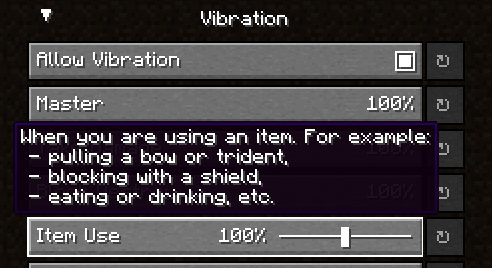
Controlify 支持手柄震动,这在 PC 版 Minecraft(包括 Windows 10 基岩版)中尚属首次。你可以配置每种震动源的强度,并为游戏中的众多方面设置复杂的震动模式(例如受到伤害时)。
径向菜单
为了节省手柄上的按键,你可以将一些较少使用的操作分配到径向菜单中。它可通过设置完全自定义,且使用直观。所有模组按键绑定均兼容此菜单。
陀螺仪支持
Controlify 内置对手柄陀螺仪的支持,允许你通过手柄在游戏内进行精细的操作。这可以与 拨杆式操控 (Flick Stick) 结合使用,从而在不妥协的前提下仅用手柄进行操作。
容器游标
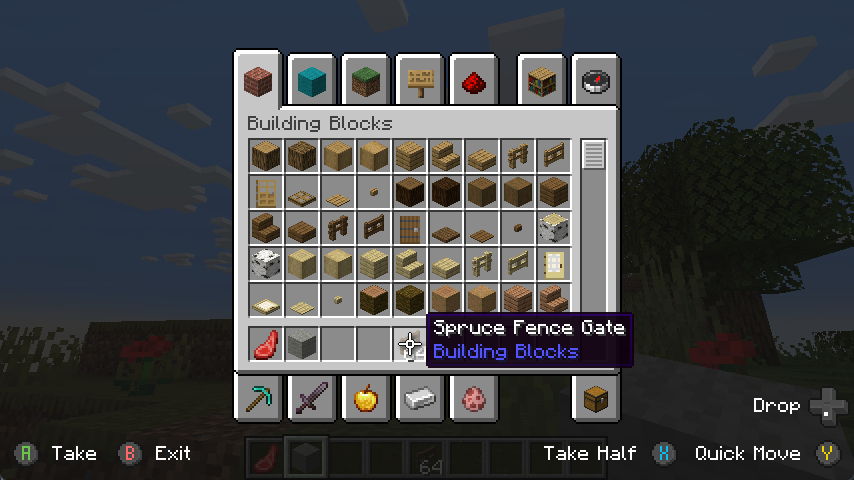
就像在基岩版中一样,你可以在物品栏中移动游标,并以对手柄友好的方式进行交互。控制性拥有专门的快速移动、丢弃等按钮。Controlify 还自带游标吸附功能,因此你无需在游标移动上过于精准。
手柄识别
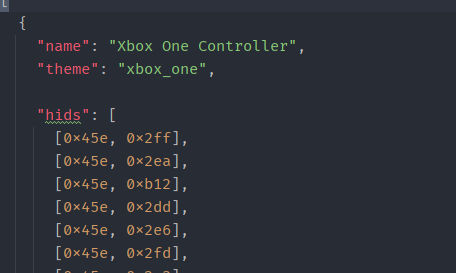
Controlify 能够自动识别你所用手柄的品牌和型号,并显示与该手柄相关的按键纹理。此功能也可通过资源包进行扩展,以不同风格更改按键纹理,并添加一些针对更小众手柄型号的标识。
操纵杆支持
你可以将任何操纵杆连接至该模组,并使用自己的名称和纹理对其进行映射,每个手柄支持无限数量的输入。
按键指南
游戏内有一个简单的叠加层,会根据玩家的状态和朝向显示可按下的按键。这对于尚未记住控制的玩家非常有用。
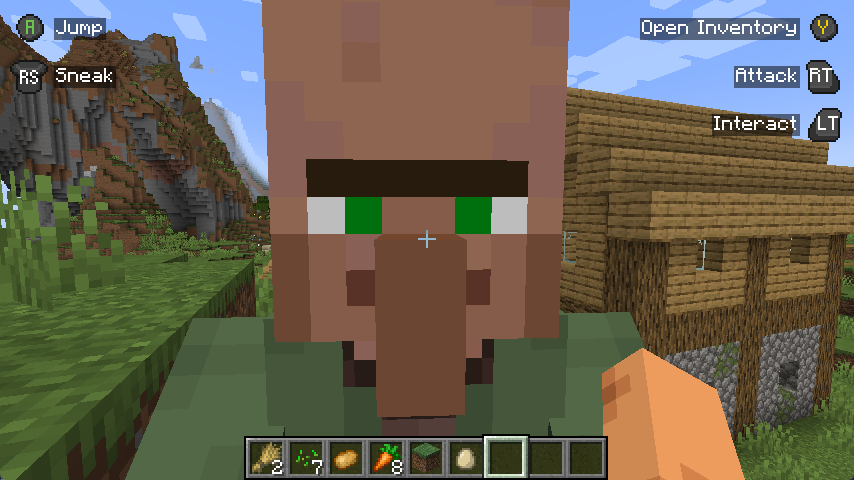
此外,某些 GUI 会在具有手柄快捷键的元素上显示手柄按键,以便你能像理应那样轻松地用手柄进行导航。
独立手柄容器
本模组基于这样一个事实构建:每个手柄都是完全独立的,拥有各自的配置、按键绑定等。这意味着未来添加对分屏游戏的支持将轻而易举。
专为模组兼容性打造
GUI 操作已被抽象为一个简单的 API,允许其他模组轻松为其自身的 GUI 添加支持,而无需在整个模组的代码库中进行繁琐的支持逻辑,从而避免第三方集成困难。
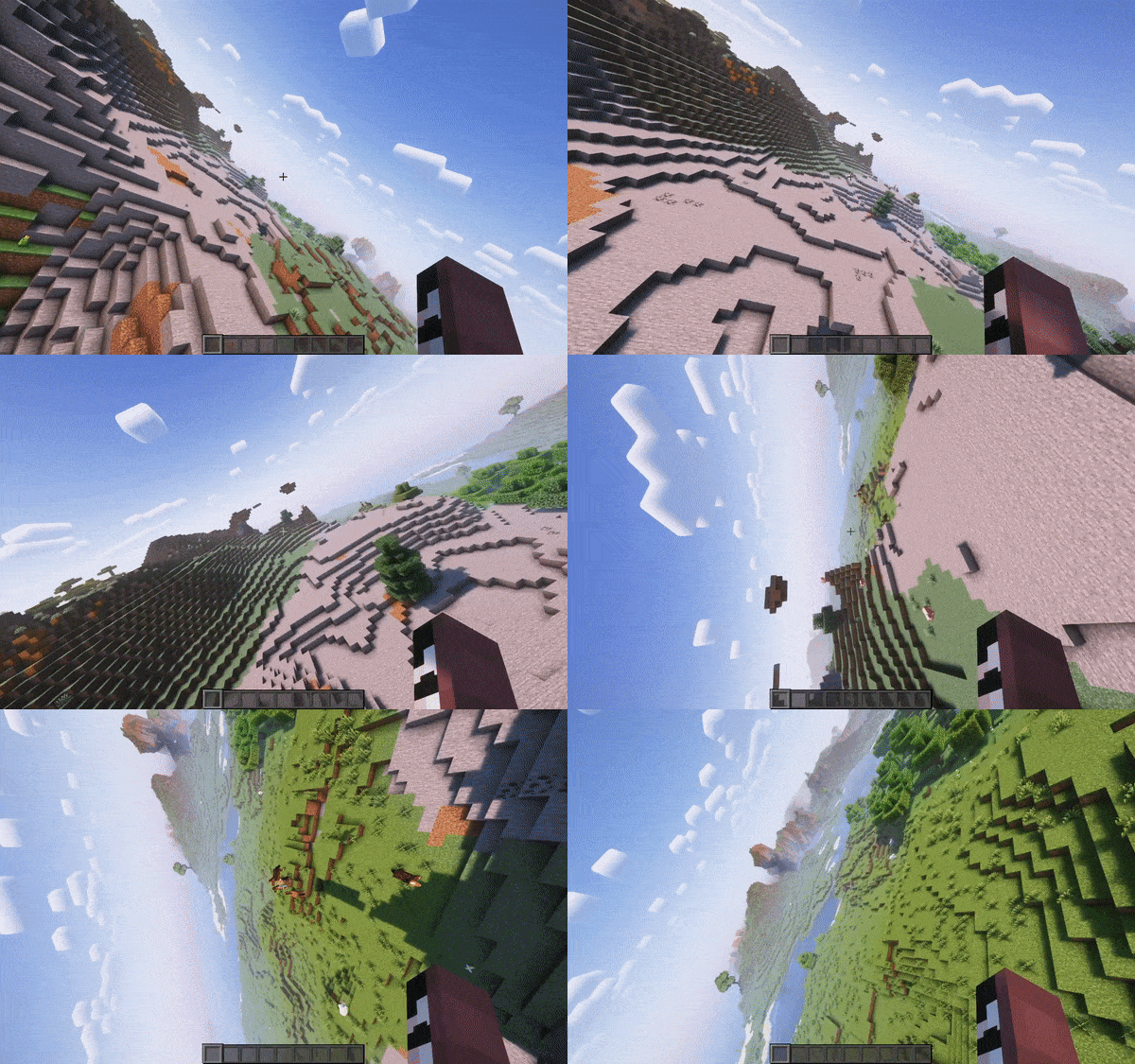
视频录制时使用 do-a-barrel-roll 配合 Thrustmaster HOTAS 飞行摇杆
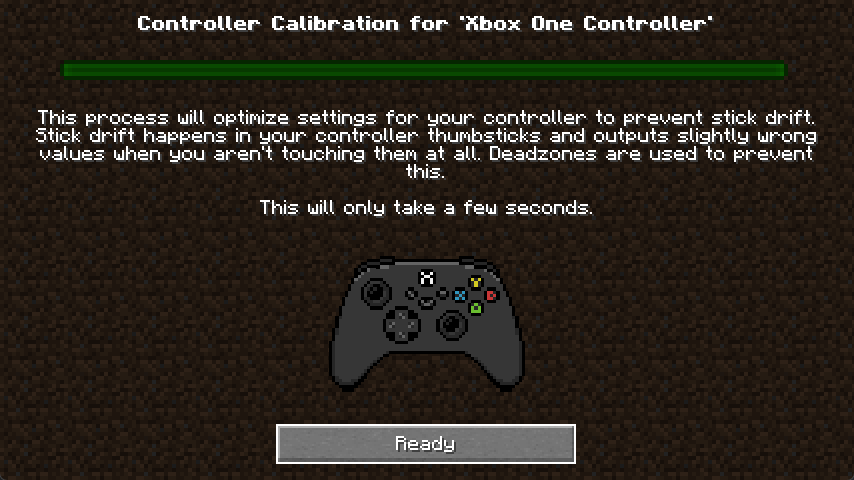
自动手柄死区校准
你的手柄死区值会自动校准,无需你为此操心。
向下移植?
本模组仅在 1.19.4 及更高版本提供,这是因为 Mojang 在 1.19.4 中引入了箭头键导航功能,该功能可以轻松移植到手柄;而在 1.19.4 之前的版本中,这是不可能的。
A mod that adds the best controller support for Minecraft: Java Edition.
SPLITSCREEN!
(Advertisement)
Controlify Splitscreen is a separate mod in development that adds splitscreen support to the game! JARs are currently only available on Patreon!
Wiki
Read up on the Controlify Wiki for more information on how to use Controlify, how to configure it, and how to develop for it.
What is Controlify?
Controlify is the best controller support mod for Minecraft: Java Edition. It exceeds the first-party Bedrock Edition controller support in every way possible. It is feature-complete, with support for vibration, gyroscope, HD haptics, and more.
Controlify supports all controllers, thanks to its usage of the SDL3 library, which is the most advanced cross-platform input library available.
Controlify is designed to be both user-friendly and feature-rich. It has sensible defaults, with default sensitivity matched to Bedrock Edition for easy transition, and a simple yet informative settings screen that allows you to tweak your experience to your liking.
Feature overview
- Vibration support; Controlify vibrates your controller upon events such as taking damage, breaking blocks, lightning strikes.
- Gyroscope support; Controlify can use the gyroscope in your controller for precise aiming.
- Vendor-specific input support; Controlify supports reading paddles, mute buttons (and their LEDs), touchpads, and more, on some controllers including Xbox, DualSense and Steam Deck.
- GUI operation: Controlify allows you to navigate all Minecraft GUIs with your controller, without needing a mouse or keyboard. This includes the inventory, out-of-game menus, and modded GUIs. It features cursor snapping in inventory screens, allowing you to use your controller without needing to be precise with your cursor movements.
- DualSense/DualShock support; Controlify does not require any additional software for PlayStation controllers, even on Windows.
- Controller identification; Controlify has bespoke button glyphs for many controller models, including Xbox, Playstation, Nintendo Switch, Steam Deck, and more.
- On-screen keyboard; Controlify includes a fully functional on-screen keyboard that allows you to type with your controller - truly no keyboard needed!
- Radial menu; Controlify features a configurable menu that allows you to bind less-used actions to a radial menu, saving up buttons.
- DualSense HD haptics support; Controlify allows for advanced vibration effects on DualSense controllers.
- DualSense adaptive triggers support; Controlify allows for advanced trigger effects on DualSense controllers.
- Data-driven design; Controlify allows resource packs to change default bindings, theme button glyphs, on-screen button guides, on-screen keyboard layouts, add more controller models, and more.
- Steam Deck support
- Mod compatibility; Controlify has led the efforts to make controller support work seamlessly with mods like Sodium, Iris, Simple Voice Chat, Do A Barrel Roll, and more.
- Cross-platform and multi-version; Controlify works on Fabric and NeoForge, and actively supports and updates for Minecraft versions 1.21.1 and above.
- Quick to update; Controlify is updated even for Minecraft snapshots, although snapshot builds are only available to patreon members.
- Joystick support; Controlify supports flight sticks, racing wheels, and other non-standard joysticks. Users of such devices have the option between mapping the joystick to a standard gamepad, or creating their own custom bindings and defaults and glyphs for the joystick, allowing for a fully-featured experience.
Who uses Controlify?
The following is actual feedback I have received from users of Controlify, and I'm very proud to have been able to help them enjoy Minecraft in a way they couldn't before:
- Couch gamers who want to sit back and relax playing their favourite edition of Minecraft.
- First-time modded players who have previously played Minecraft on a console and don't want to learn how to use a keyboard and mouse.
- People with accessibility requirements who cannot use a keyboard and mouse and/or requires an adaptive controller.
- Parents who want to expose their kids to modded Minecraft in an accessible manner.
- People who just prefer using a controller over a keyboard and mouse.
- People who want to play local multiplayer with their friends and family using the companion Splitscreen Mod
- Hopefully you!
Features
Controller vibration
Controlify supports controller vibration, which has not been seen before for PC versions of Minecraft, including Bedrock Windows 10 Edition. Configure the intensity of each vibration source, with complex vibration patterns for lots of aspects of the game (e.g. when you take damage).
Radial menu
To save up some buttons on your controller, dedicate some less-used actions to the radial menu. It is fully customizable through the settings and intuitive to use. Any modded keybind is compatible with this menu.
Gyro support
Controlify has built-in support for controller gyroscopes, allowing you to make fine movements in-game with your controller. This can be combined with flick stick to be able to use a controller without the compromise.
Container cursor
Just like in bedrock edition, you can move a cursor across your inventory, and interact with it in a controller-friendly way. With dedicated buttons for quick move, dropping etc. Controlify also comes with cursor snapping, so you don't need to be so precise with cursor movements.
Controller identification
Controlify has the ability to identify the make and model of your controller automatically, and displays relevant button textures for your controller. This is also extendable by resource packs, changing up the button textures in a different style and adding some of your own, more niche controller identifiers.
Joystick support
You can connect any joystick to the mod and map it with your own names and textures, with an unlimited amount of inputs per controller.
Button guide
There is a simple overlay in-game that displays the buttons you can press based on your player's state and look direction. This is useful for new players, who have not yet memorised the controls.
Also, some GUIs display controller buttons on elements that have a controller shortcut, to easily navigate with a controller like you should be able to.
Containerised Controllers
This mod is built around the fact that each controller is completely separate, with it's own configuration, bindings etc. This means it will be trivial to add support for split-screen play in the future.
Built for mod compatibility
GUI operation has been abstracted into a simple API, which allows other mods to easily add support for their own GUIs, without convoluted support throughout the whole mod's codebase, making it difficult for third parties to integrate.
Video recorded using do-a-barrel-roll with a Thrustmaster HOTAS flightstick
Automatic controller deadzone calibration
The deadzone values of your controller are automatically calibrated, meaning you don't have to worry about it.
Backports?
This mod is only and will only be available for 1.19.4 and above, this is because in 1.19.4, Mojang introduced arrow key navigation which was easily ported to controller, below 1.19.4, this is not possible.

下载 Controlify (Controller support)
需要联机服务器吗?
稳定流畅、一键部署,几分钟即可和朋友联机开服
最低仅需 8 元/月 即可畅快联机
下载 Controlify (Controller support)
需要联机服务器吗?
稳定流畅、一键部署,几分钟即可和朋友联机开服
最低仅需 8 元/月 即可畅快联机
下载 Controlify (Controller support)
需要联机服务器吗?
稳定流畅、一键部署,几分钟即可和朋友联机开服
最低仅需 8 元/月 即可畅快联机
下载 Controlify (Controller support)
需要联机服务器吗?
稳定流畅、一键部署,几分钟即可和朋友联机开服
最低仅需 8 元/月 即可畅快联机
下载 Controlify (Controller support)
需要联机服务器吗?
稳定流畅、一键部署,几分钟即可和朋友联机开服
最低仅需 8 元/月 即可畅快联机
下载 Controlify (Controller support)
需要联机服务器吗?
稳定流畅、一键部署,几分钟即可和朋友联机开服
最低仅需 8 元/月 即可畅快联机
下载 Controlify (Controller support)
需要联机服务器吗?
稳定流畅、一键部署,几分钟即可和朋友联机开服
最低仅需 8 元/月 即可畅快联机
下载 Controlify (Controller support)
需要联机服务器吗?
稳定流畅、一键部署,几分钟即可和朋友联机开服
最低仅需 8 元/月 即可畅快联机
下载 Controlify (Controller support)
需要联机服务器吗?
稳定流畅、一键部署,几分钟即可和朋友联机开服
最低仅需 8 元/月 即可畅快联机
下载 Controlify (Controller support)
需要联机服务器吗?
稳定流畅、一键部署,几分钟即可和朋友联机开服
最低仅需 8 元/月 即可畅快联机
Controlify 3.5.3
此版本支持以下目标:
- 26.1
- 26.2
- 26.3
通过在我的 Patreon 上捐赠,您将获得用于分屏支持和快照版本的 Controlify 构建包的访问权限
变更
- 修复虚拟鼠标光标出现卡顿问题
- 修复在玩家游戏模式对客户端未知的情况下渲染按钮指南时崩溃的问题
关于这个资源的讨论、问题反馈与使用心得
还没有讨论,来发第一帖吧
你是这个资源的作者?登录后可认领此资源。
相似资源
 模组

显示你正在注视的方块的信息。(适用于 Minecraft 1.16+ 的 Hwyla/Waila 分支)
 模组

查看物品与配方
 模组
在游戏画面角落显示附近世界地形、玩家、生物和实体的地图。可创建路径点,帮助你找到标记过的位置。
 模组
使用 JavaScript 编辑配方、添加自定义物品、编写世界事件!
 模组
添加区块认领和玩家组队功能,并与 Xaero's Minimap 和 World Map 集成
 模组
添加全屏世界地图,显示你在世界中已探索的区域。与 Xaero's Minimap 搭配使用效果极佳。
评论 0
登录后参与评分
还没有评论,来抢沙发吧