靠垫有点笨重,我们来让它们更方便一些吧?
放置靠垫
在放置靠垫时,为了将靠垫精确放置在想要的位置而不得不使用雪层会非常繁琐。别担心,我为你解决了这个问题!通过 Convenient Cushions,你可以将靠垫以 1/16 格为单位精确放置在任何 Y 轴高度上。这意味着你可以在无需摆弄那些方块的情况下,获得与雪层或其他任何方块相同的放置精度。
原版游戏提供了一种实现类似效果的方法。但这略有不同,因为该方法允许你将靠垫放置在 任意 Y 轴高度上。这意味着你的靠垫可能会稍微偏离像素对齐位置。Convenient Cushions 也解决了这个问题,它只允许将靠垫放置在像素对齐的 Y 轴高度上。
稳定的靠垫破坏机制
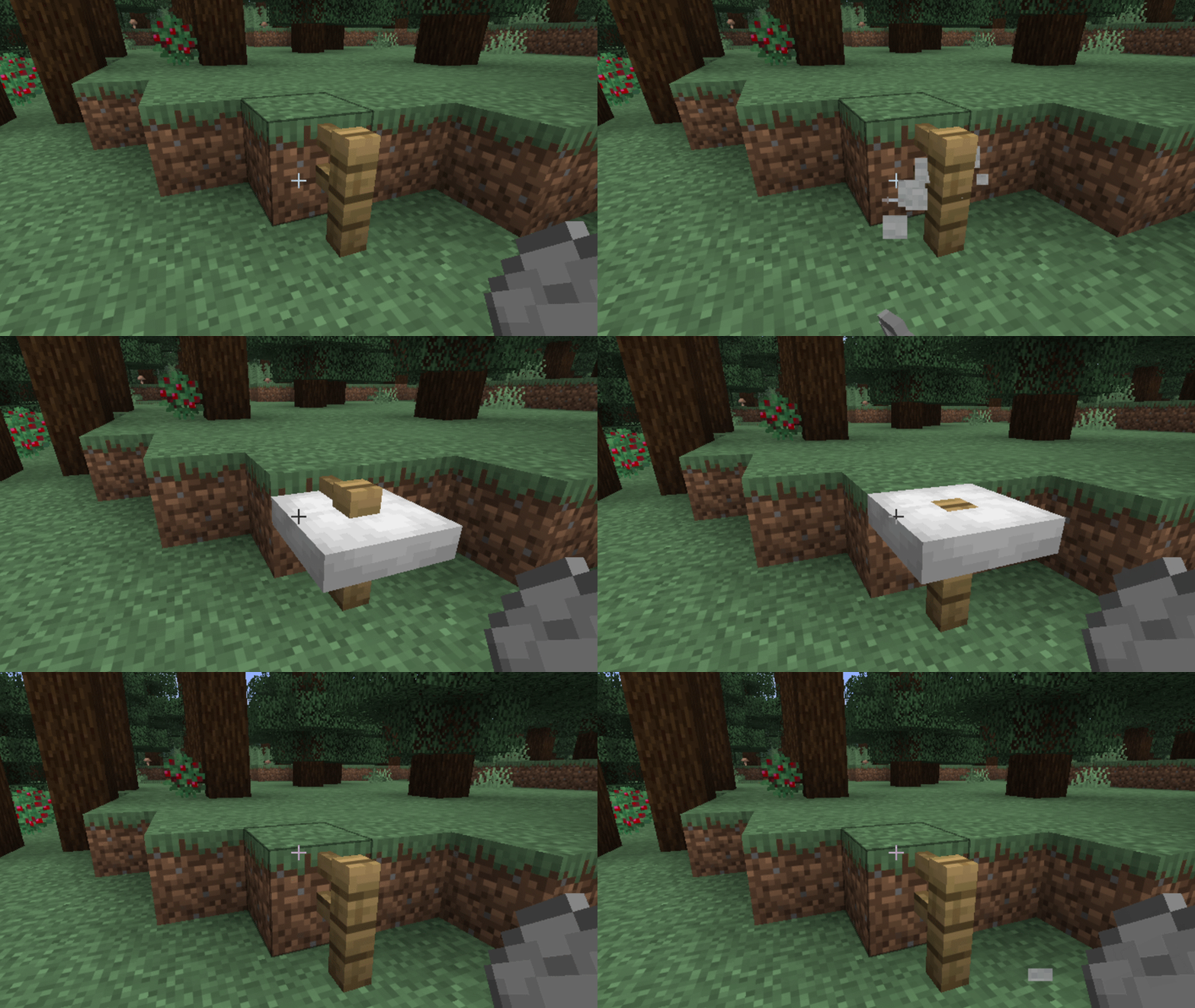
在某些情况下,仅改变靠垫的放置方式可能还不够。因此,你可能仍然需要使用其他方块来暂时支撑靠垫。你可能会注意到,有时当破坏支撑靠垫的方块时,在你有机会放置新方块之前,部分靠垫会随机被破坏。这是因为原版游戏每 5 秒检查一次每个靠垫,如果靠垫没有支撑就会将其破坏。这几乎无法预测。Convenient Cushions 改变了这一行为,要求靠垫在至少完全无支撑状态持续 2 秒(但最长可维持 7 秒)才会被破坏。
还不够方便?
请告诉我!欢迎在 我的 GitHub 上提交 Issue(但请先确认该问题尚未存在),或在 我的 Discord 服务器 中提问!我意识到这些改动并未解决靠垫的所有不便之处,因此我非常欢迎社区反馈。
等等,1.21.1?我以为靠垫是在 26.3 版本添加的?
是的,靠垫确实是在 26.3 版本中添加的。不过,我有一个适用于 1.21.1 的版本,它与 Vanilla Backport by BlackGear 添加的靠垫兼容!
Cushions are a tad clunky, shall we make them a bit more convenient?
Placing Cushions
When placing cushions, it can be quite tedious having to use snow layers to get cushions placed right where you want
them. Fortunately for you, I've got you covered! With Convenient Cushions, you can place cushions at any Y level to the
nearest 1/16th. This means you can get the same level of precision that snow layers or any other block can give you
while not having to fiddle around with those blocks.
Vanilla does provide a way to achieve similar behavior to this. However that is a bit different, since that allows you
to place cushions at literally any Y level. Meaning your cushion can be placed ever so slightly off from pixel
alignment. Convenient Cushions also solves this by only placing cushions at pixel aligned Y levels.
Consistent Cushion Breaking
In some cases, the change to how placing cushions works may not be enough. As such, you may still need to use other
blocks to support the cushion temporarily. You may have noticed that sometimes when breaking the block that holds the
cushion in place, some cushions will randomly break before you get a good chance to place down a new block in its place.
This is because vanilla checks every 5 seconds per cushion, and breaks it if it doesn't have support. It's nigh
impossible to predict this. Convenient Cushions changes this behavior, requiring that the cushion be unsupported for
at least a full 2 seconds (but may stay for up to 7 seconds) in order for it to break.
Not Convenient Enough?
Let me know! Feel free to open an issue on my GitHub (but please check
it has not been made before), or ask in my Discord server! I'm aware these changes
don't solve all the inconvenience with cushions, so I am open to community feedback.
Wait, 1.21.1? I thought cushions were added in 26.3?
Yes, cushions were added in 26.3. However, I have a 1.21.1 version that is compatible with the cushions added in
Vanilla Backport by BlackGear!


 模组

 模组

 模组
 模组

 模组
 模组
评论 0
登录后参与评分
还没有评论,来抢沙发吧