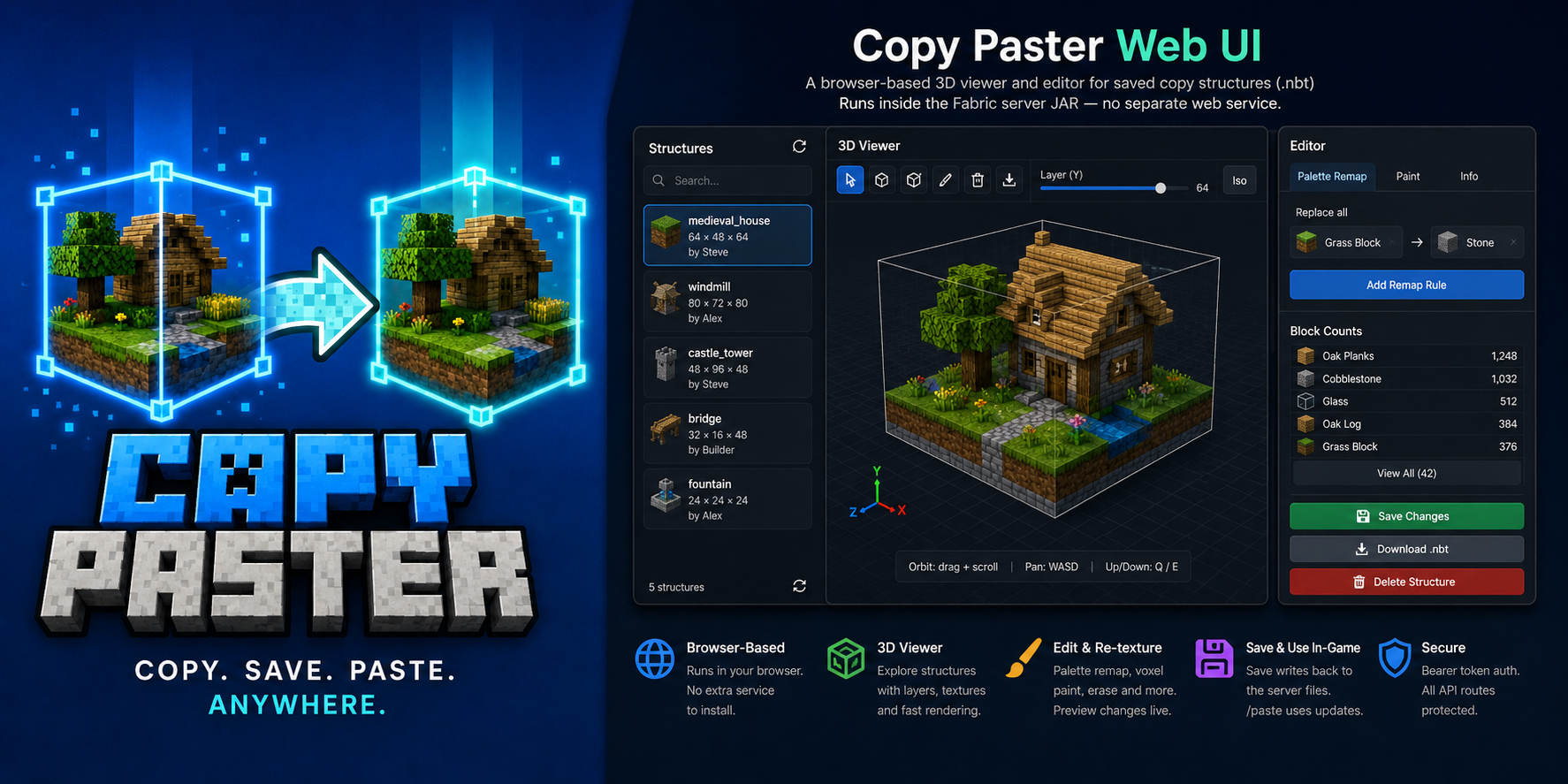
将长方体区域复制到文件中。将它们精确地粘贴回你指定的位置——以你的位置为锚点。
Copy Paster 是一款适用于 Fabric 客户端 + 服务器的模组,旨在让生存模式与创造模式的建造者无需退出游戏即可快速、直观地复制建筑。通过快捷键选择框选区域,在聊天栏中命名,然后稍后将其粘贴回来——粘贴位置基于你在复制时和粘贴时所站立的位置,因此偏移量保持直观易懂。
[ / ] 复制 — 两个角点,实时线框预览,在聊天栏中命名- 粘贴选项 — 绝对坐标、旋转、镜像、跳过空气块、覆盖确认
- 粘贴幽灵预览 — 当方块将被覆盖时显示青色框(支持旋转/镜像)
- 粘贴后编辑 —
/pasterotate、/pastemirror、/pastemove,支持级联撤销
- 撤销 —
/pasteundo,持久化快照存储在 copypaster/undos/ 下(重启后保留)
- LuckPerms — 为非 OP 玩家授予
copypaster.* 权限节点;原版操作员始终拥有全部权限
- Web UI(可选)— 浏览器端 3D 查看器/编辑器,支持纹理准确的预览、调色板重映射、体素绘制、导入/导出
.nbt
- 乌克兰语 (
uk_ua) — 完整的 UI 字符串 alongside 英文
源码:github.com/matrunchyk/copypaster · 更新日志 · 问题反馈
安装
| 位置 |
内容 |
| 专用服务器 |
将匹配的 copy_paster-<version>+<mc>.jar 放入 mods/ 目录,并安装 Fabric API |
| 每个需要复制的玩家 |
在客户端 mods/ 中放入相同的 JAR 文件(需匹配 MC 版本),并绑定 [ / ] 快捷键 |
选择你的 JAR 文件(服务器和所有参与复制的客户端必须匹配):
| Minecraft |
Java |
示例工件 |
| 1.21.11 |
21 |
copy_paster-3.5.1+1.21.11.jar |
| 26.2 |
25 |
copy_paster-3.5.1+26.2.jar |
| 26.3 |
25 |
copy_paster-3.5.1+26.3.jar |
需要 Fabric Loader 0.19.5+ 和 Fabric API。
仅服务器模式: /paste、/copylist、/copyinfo、/copyblocks、/copydelete、/copyweb 以及 Web UI 仍然可用。世界复制功能需要客户端模组和快捷键(或使用带坐标的 /copy 命令)。
可选: Mod Menu + Cloth Config 用于在游戏内配置客户端设置。
快速入门
1 · 保存一个区域
- 站在你希望作为此次复制锚点的位置。
- 按
[ 键选择角点 1,然后按 ] 键选择角点 2(终点的线框会跟随你的准星移动)。
或者运行 /copy x1 y1 z1 x2 y2 z2(无需客户端模组,但需要 copypaster.copy 权限)。
- 在聊天栏中输入结构名称(仅限
a–z、0–9、_、-,最多 64 个字符)。输入 cancel 可取消操作(超时由服务器配置决定,默认 60 秒)。
2 · 将其粘贴回去
- 站在与复制时相同的相对位置(或使用
at 参数,见命令部分)。
/paste <name> — 如果幽灵提示有覆盖风险,请运行建议的 … confirm 命令。- 注视建筑时使用
/pasteinfo,或运行 /pasteundolist,然后执行 /pasteundo <id>。
示例:
/paste house
/paste house at 100 64 -20
/paste house rotate 90 mirror left_right noair confirm
命令
| 命令 |
描述 |
/copyhelp |
命令摘要(复制、粘贴、撤销、Web UI) |
/copy x1 y1 z1 x2 y2 z2 |
通过坐标复制区域(需在聊天栏命名) |
/copyblocks <name> [page] |
方块类型购物清单(分页显示) |
/paste <name> |
在玩家相对锚点处粘贴 |
/paste <name> at <x> <y> <z> |
在世界坐标处粘贴(最小角点定位) |
/paste <name> rotate <90|180|270> |
放置前旋转 |
/paste <name> mirror <left_right|front_back> |
放置前镜像 |
/paste <name> noair |
结构中跳过空气方块 |
/paste <name> … confirm |
在覆盖警告后执行粘贴 |
/pasteundo [id] |
撤销最近一次粘贴或特定 ID 的撤销操作 |
/pasteinfo [distance] |
查看准星所指建筑的撤销 ID 及详情 |
/pasteundolist |
列出仍可撤销的粘贴记录 |
/pastecancel |
取消覆盖预览而不进行粘贴 |
/pasteselect <undo id> |
高亮显示某次粘贴;变换操作针对该目标 |
/pasterotate [90|180|270] |
旋转现有粘贴(支持级联撤销) |
/pastemirror x|z |
镜像现有粘贴 |
/pastemove <dx> <dy> <dz> |
微调现有粘贴位置 |
/pastemove at <x> <y> <z> |
将粘贴的最小角点移动到指定坐标 |
/copylist |
列出已保存的结构 |
/copyinfo <name> |
大小、维度、偏移量、元数据 |
/copydelete <name> |
删除 .nbt + .json 文件 |
/copyweb |
打印 Web UI 地址(当启用时) |
访问权限: 原版操作员 (operator) 始终拥有完整访问权限。配合 LuckPerms 使用时,非 OP 玩家需要 copypaster.* 权限节点(完整权限表请参阅 README)。
控制
| 输入 |
操作 |
[ |
设置角点 1(注视一个实心方块) |
] |
设置角点 2 并向服务器发送区域数据 |
| 聊天名称 |
在两个角点设置后保存结构 |
聊天中的 cancel |
取消命名会话 |
新安装时,键位默认绑定为 [ 和 ] —— 如需更改,请前往 选项 → 控制 → Copy Paster 进行重新绑定。
Web UI(可选)
用于查看和编辑已保存结构的浏览器 3D 视图/编辑器。在 config/copypaster-server.yml 中启用(web.enabled: true),重启后运行 /copyweb。功能包括:旋转 + WASD 平移、颜色/纹理模式、调色板重映射、体素绘画、导入/导出 .nbt。
限制与存储
|
|
| 最大体积 |
服务器配置中的 limits.maxVolume(默认 32 768) |
| 复制会话超时 |
limits.sessionTimeoutSeconds(默认 60) |
| 文件 |
服务器目录 copypaster/structures/ — <name>.nbt 和 <name>.json |
| 撤销 |
保存在 copypaster/undos/ 下,直到执行 /pasteundo;重启后仍保留 |
许可证
MIT — 版权所有 (c) 2026 Serhii Matrunchuk
Copy cuboid regions to files. Paste them back exactly where you mean to — anchored to your position.
Copy Paster is a Fabric client + server mod for survival and creative builders who want a fast, visual way to duplicate structures without leaving the game. Select a box with keybinds, name it in chat, then paste it later — position follows where you stand at copy time and paste time, so offsets stay intuitive.
[ / ] copy — two corners, live wireframe preview, name in chat- Paste options — absolute coords, rotation, mirror, skip air, overwrite confirm
- Paste ghost preview — cyan box when blocks would be overwritten (respects rotation/mirror)
- Post-paste edits —
/pasterotate, /pastemirror, /pastemove with cascaded undo
- Undo —
/pasteundo with persistent snapshots under copypaster/undos/ (survives restart)
- LuckPerms — grant
copypaster.* nodes to non-ops; vanilla operators always allowed
- Web UI (optional) — browser 3D viewer/editor with texture-accurate preview, palette remap, voxel paint, import/export
.nbt
- Ukrainian (
uk_ua) — full UI strings alongside English
Source: github.com/matrunchyk/copypaster · Changelog · Issues
Install
| Where |
What |
| Dedicated server |
Matching copy_paster-<version>+<mc>.jar in mods/ + Fabric API |
| Each player who copies |
Same JAR (same MC version) in client mods/ + bind [ / ] |
Pick your JAR (server and every copying client must match):
| Minecraft |
Java |
Example artifact |
| 1.21.11 |
21 |
copy_paster-3.5.1+1.21.11.jar |
| 26.2 |
25 |
copy_paster-3.5.1+26.2.jar |
| 26.3 |
25 |
copy_paster-3.5.1+26.3.jar |
Requires Fabric Loader 0.19.5+ and Fabric API.
Server-only mode: /paste, /copylist, /copyinfo, /copyblocks, /copydelete, /copyweb, and the web UI still work. World copy requires the client mod and keybinds (or /copy with coords).
Optional: Mod Menu + Cloth Config for in-game client settings.
Quick start
1 · Save a region
- Stand at the anchor point you want for this copy.
- Press
[ on corner 1, then ] on corner 2 (wireframe follows your crosshair for the end corner).
Or run /copy x1 y1 z1 x2 y2 z2 without the client mod (requires copypaster.copy).
- Type a structure name in chat (
a–z, 0–9, _, -, max 64 chars). Type cancel to abort (timeout from server config, default 60 s).
2 · Paste it back
- Stand in the same relative spot you used when copying (or use
at — see commands).
/paste <name> — if the ghost warns about overwrites, run the suggested … confirm command.- Use
/pasteinfo while looking at the build, or /pasteundolist, then /pasteundo <id>.
Examples:
/paste house
/paste house at 100 64 -20
/paste house rotate 90 mirror left_right noair confirm
Commands
| Command |
Description |
/copyhelp |
Command summary (copy, paste, undo, web UI) |
/copy x1 y1 z1 x2 y2 z2 |
Copy region via coordinates (chat naming) |
/copyblocks <name> [page] |
Block type shopping list (paginated) |
/paste <name> |
Paste at player-relative anchor |
/paste <name> at <x> <y> <z> |
Paste with min corner at world coordinates |
/paste <name> rotate <90|180|270> |
Rotate before placing |
/paste <name> mirror <left_right|front_back> |
Mirror before placing |
/paste <name> noair |
Skip air blocks in the structure |
/paste <name> … confirm |
Paste after overwrite warning |
/pasteundo [id] |
Undo latest paste or a specific undo id |
/pasteinfo [distance] |
Undo ID and details for paste at crosshair |
/pasteundolist |
List pastes still available for undo |
/pastecancel |
Dismiss overwrite preview without pasting |
/pasteselect <undo id> |
Highlight a paste; transforms target it |
/pasterotate [90|180|270] |
Rotate an existing paste (cascaded undo) |
/pastemirror x|z |
Mirror an existing paste |
/pastemove <dx> <dy> <dz> |
Nudge an existing paste |
/pastemove at <x> <y> <z> |
Move paste min corner to coordinates |
/copylist |
List saved structures |
/copyinfo <name> |
Size, dimension, offset, metadata |
/copydelete <name> |
Remove .nbt + .json |
/copyweb |
Print web UI URL (when enabled) |
Access: vanilla operator always has full access. With LuckPerms, non-ops need copypaster.* nodes (see README for the full permission table).
Controls
| Input |
Action |
[ |
Set corner 1 (look at a solid block) |
] |
Set corner 2 and send region to server |
| Chat name |
Save structure after corners are set |
cancel in chat |
Abort naming session |
Keybinds default to [ and ] on new installs — rebind under Options → Controls → Copy Paster if needed.
Web UI (optional)
Browser 3D viewer/editor for saved structures. Enable in config/copypaster-server.yml (web.enabled: true), restart, then run /copyweb. Features: orbit + WASD pan, Colors/Textures modes, palette remap, voxel paint, import/export .nbt.
Limits & storage
|
|
| Max volume |
limits.maxVolume in server config (default 32 768) |
| Copy session timeout |
limits.sessionTimeoutSeconds (default 60) |
| Files |
Server copypaster/structures/ — <name>.nbt + <name>.json |
| Undo |
Saved under copypaster/undos/ until /pasteundo; survives restart |
License
MIT — Copyright (c) 2026 Serhii Matrunchuk


 模组

 模组

 模组
 模组
 模组
 模组
评论 0
登录后参与评分
还没有评论,来抢沙发吧