
Craft & Find
Craft & Find 是一款轻量级的生活质量模组,专为喜欢原版 Minecraft 存储机制但希望大幅提升使用便捷性的玩家设计。
该模组添加了存储工作台(Storage Workbench)——一种特殊的合成站,能够将附近的存储容器连接至一个便捷的界面中。通过该界面,你可以浏览所有物品、定位特定物品,并利用周围的资源进行合成。
无需依赖项,也无需复杂的存储网络。将存储工作台放置在存储室附近即可直接使用。
功能特性
- 在一个界面中浏览附近存储中的物品
- 按名称或物品 ID 搜索物品
- 按名称或总数量对物品进行排序
- 直接在世界中定位特定物品
- 利用附近容器中的资源进行合成
- 与配方书集成,支持查询附近存储中的资源
- 支持箱子、 barrels、潜影盒及其他兼容的容器
- 简洁的界面设计,完美契合 Minecraft 原版风格
- 可配置的存储范围及视觉效果
将所有存储整合于一处
存储工作台会扫描周围兼容的容器,并收集其内容物的信息。
它不会将每个箱子视为独立的库存,而是为你提供来自附近存储的所有资源的合并列表,包括每种物品的总量。
即使是在大型存储室中,你也可以使用搜索栏或排序控件快速找到所需物品。
默认情况下,工作台会在16 格半径内进行搜索,此范围可在配置文件中修改。
物品在哪里?
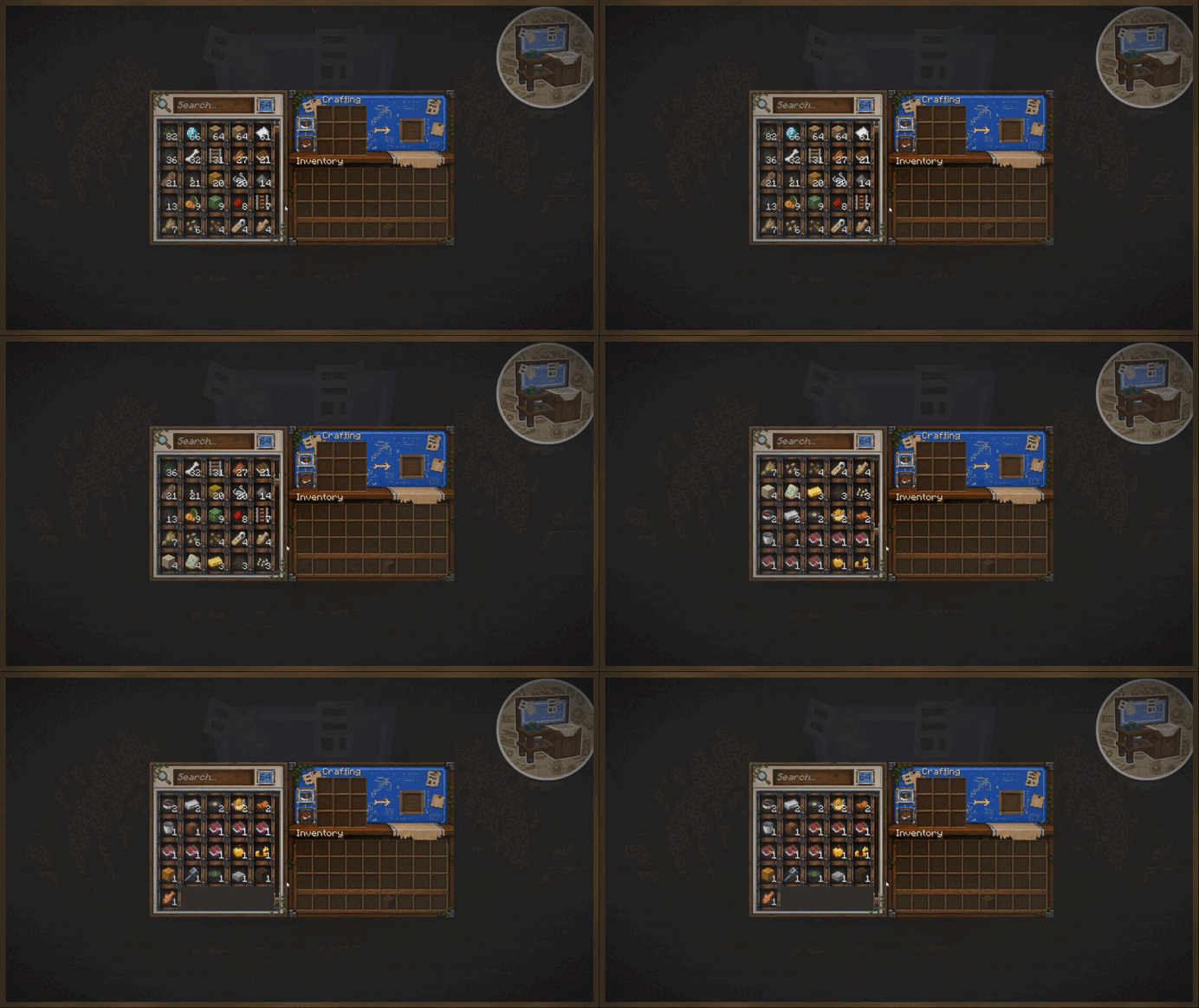
在列表中找到了目标物品,却记不起它存放在哪个箱子里?
只需点击该物品即可。
Craft & Find 会关闭界面,并高亮显示包含所选物品的容器。主存储位置还会在容器上方直接显示该物品。
当你的存储室变得足够大,以至于难以记住每个箱子的内容时,这一功能将变得尤为实用。
从存储中直接合成
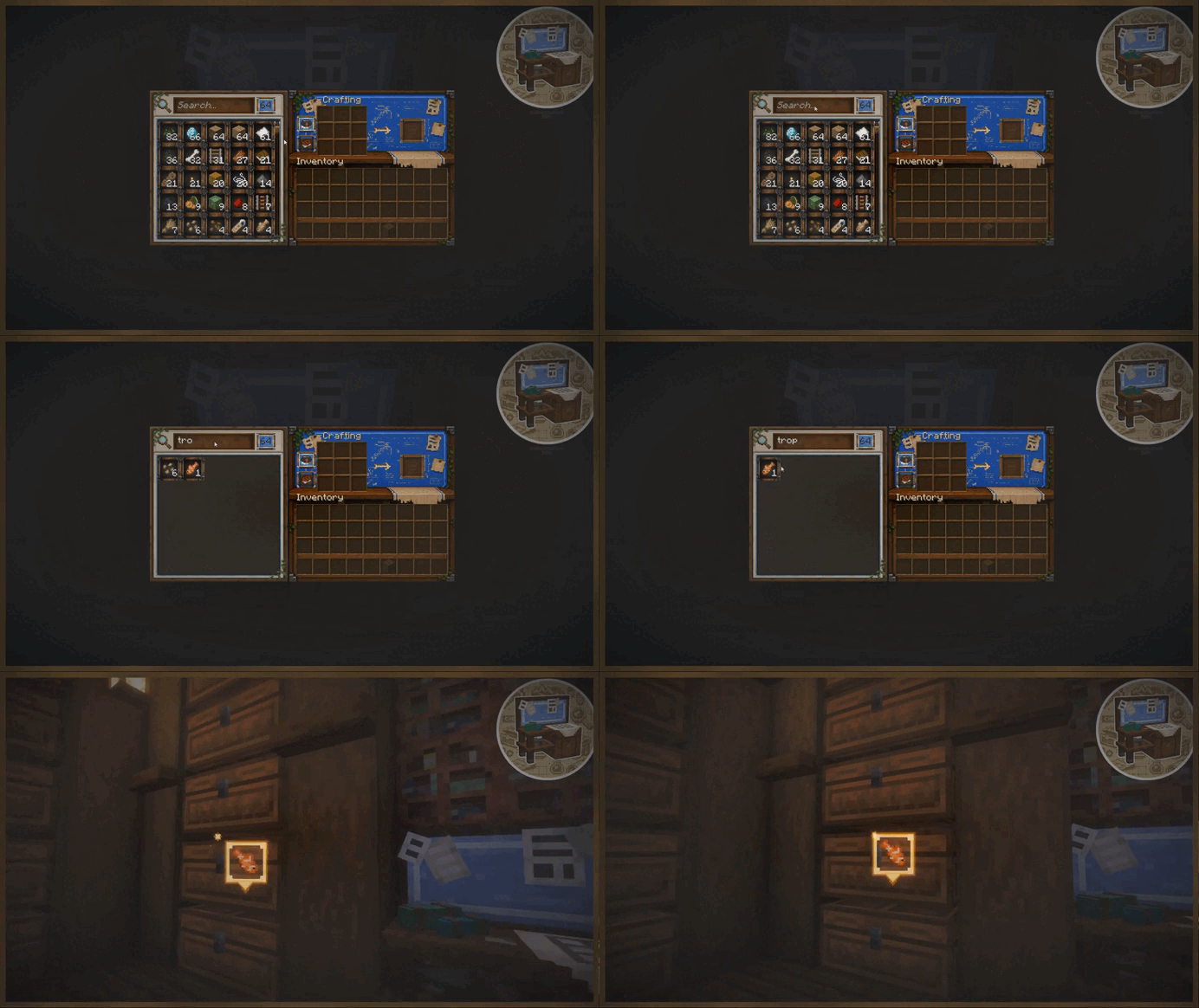
存储工作台还具备完整的合成站功能。
其配方书会同时检查你的背包以及附近容器中存储的资源。
如果所需的材料存在于你的存储室内,该配方就会显示为可制作状态。选择配方后,系统会自动将所需的材料从可用的存储中移动到合成栏中。
无需翻找多个箱子,把所有东西都移到背包里再开始合成。
界面设计
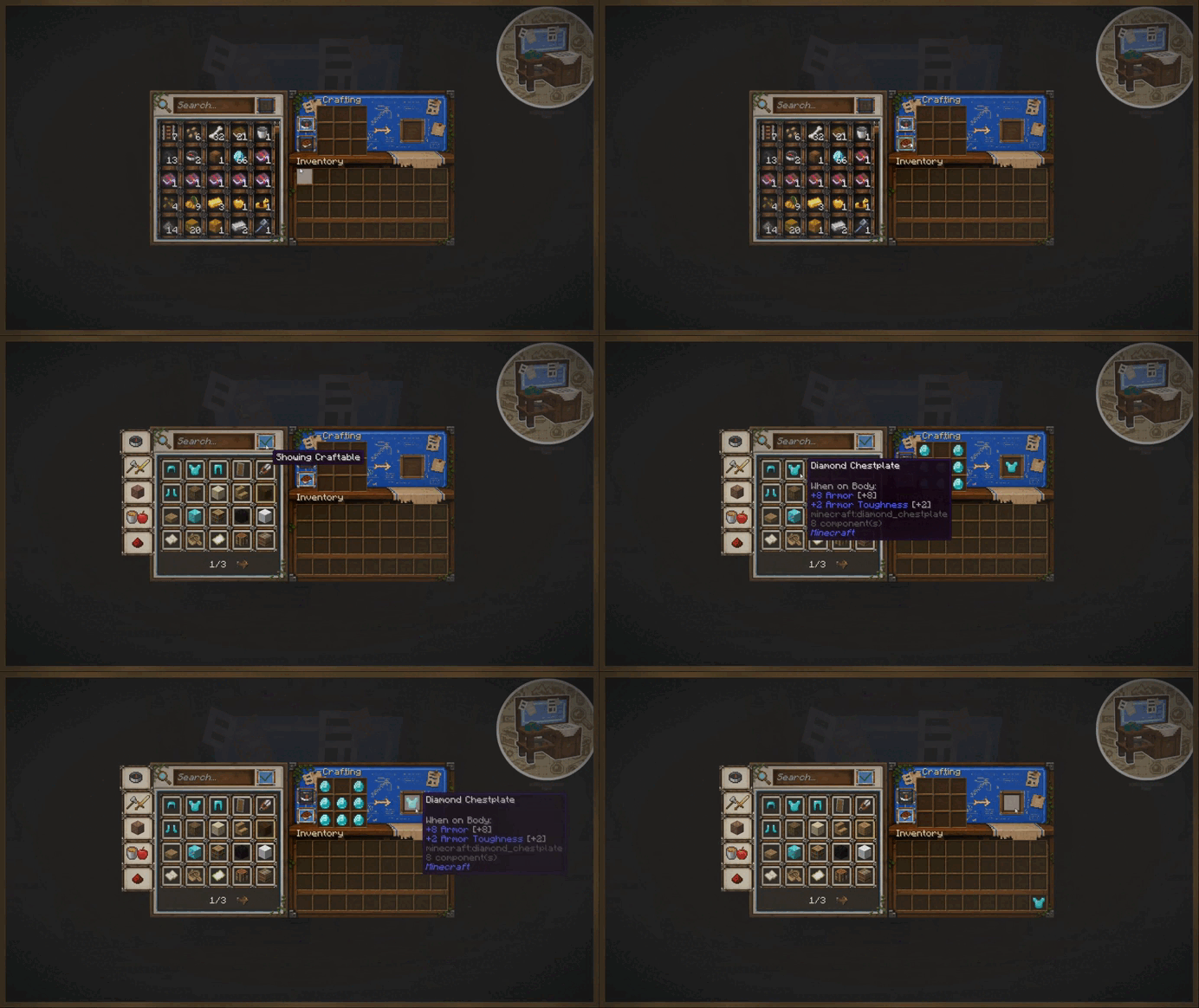
存储工作台拥有自己的专属界面,集成了以下功能:
- 存储浏览
- 搜索与排序
- 合成栏
- 配方书
- 存储导航
界面设计力求简洁、易读,并在视觉上贴近原版 Minecraft,使工作台感觉像是正常合成体验的自然延伸,而非一个复杂的独立存储系统。
配置选项
Craft & Find 包含一个简单的配置系统,允许你根据从小型存储室到大型仓库的不同场景调整工作台设置。
- 存储搜索半径 — 控制工作台搜索容器的距离,默认值:16 格
- 最大高亮容器数 — 控制可以高亮显示的匹配容器数量
- 容器扫描间隔 — 控制工作台检查新增或移除存储的频率
- 内容刷新间隔 — 控制刷新已存储内容的频率
此外,还有针对物品查找效果的客户端设置,允许你自定义或禁用高亮、粒子效果、声音、物品标记以及效果持续时间。
这意味着在保持功能不变的同时,每位玩家都可以根据自己的喜好调整视觉效果。
原版存储,更加便捷
Craft & Find 的设计初衷并非取代普通的 Minecraft 存储方式。
无需铺设线缆、安装存储磁盘、终端或构建单独的物流网络。
你依然使用普通容器来建造存储室 —— 存储工作台只是让这一切变得更加轻松易用。
开发进展
更新将会频繁发布,我们非常欢迎社区反馈。
如果你发现错误或有任何想法,请加入 Discord 服务器。
支持开发
如果你喜欢 Craft & Find 并希望支持其开发,可以通过以下方式提供帮助:
Craft & Find
Craft & Find is a lightweight quality-of-life mod for players who enjoy vanilla Minecraft storage but want to make it much easier to use.
The mod adds the Storage Workbench — a special crafting station that connects nearby storage into one convenient interface. From there, you can browse everything you have, locate specific items, and craft using resources stored around you.
No required dependencies and no complicated storage networks. Place a Storage Workbench near your storage room and it is ready to use.
Features
- Browse items from nearby storage in one interface
- Search items by name or item ID
- Sort items by name or total quantity
- Locate specific items directly in the world
- Craft using resources from nearby containers
- Recipe Book integration with nearby storage
- Support for chests, barrels, shulker boxes, and other compatible containers
- A clean interface designed to fit Minecraft's vanilla style
- Configurable storage range and visual effects
Your Entire Storage in One Place
The Storage Workbench scans compatible containers around it and gathers information about their contents.
Instead of treating every chest as a separate inventory, it gives you one combined list of resources from your nearby storage, including the total amount of each item.
Use the search bar or sorting controls to quickly find what you need, even in large storage rooms.
By default, the workbench searches within a 16-block radius, which can be changed in the configuration.
Where Is That Item?
Found the item in the list but cannot remember which chest it is stored in?
Simply click the item.
Craft & Find will close the interface and highlight the containers that contain the selected item. The primary storage location can also display the item itself above the container.
This becomes especially useful once your storage room grows large enough that remembering the contents of every chest is no longer practical.
Craft From Your Storage
The Storage Workbench also functions as a full crafting station.
Its Recipe Book checks both your inventory and resources stored in nearby containers.
If the required ingredients are somewhere in your storage room, the recipe can appear as craftable. Selecting a recipe can automatically move the required materials from available storage into the crafting grid.
No need to search several chests, move everything into your inventory, and only then start crafting.
Interface
The Storage Workbench has its own interface that brings together:
- Storage browsing
- Search and sorting
- The crafting grid
- The Recipe Book
- Storage navigation
The interface is designed to stay simple, readable, and visually close to vanilla Minecraft, making the workbench feel like a natural extension of normal crafting rather than a separate complex storage system.
Configuration
Craft & Find includes a simple configuration system, allowing you to adjust the workbench for anything from a small storage room to a large warehouse.
- Storage Search Radius — controls how far the workbench searches for containers, default: 16 blocks
- Maximum Highlighted Containers — controls how many matching containers can be highlighted
- Container Scan Interval — controls how often the workbench checks for added or removed storage
- Content Refresh Interval — controls how often stored contents are refreshed
There are also client-side settings for the item-finding effects, allowing you to customize or disable highlights, particles, sounds, the item marker, and effect duration.
This means the functionality can stay the same while each player adjusts the visual effects to their own preference.
Vanilla Storage, Just More Convenient
Craft & Find is not designed to replace normal Minecraft storage.
There are no cables, storage disks, terminals, or separate logistics networks to build.
You still build your storage room using ordinary containers — the Storage Workbench simply makes it much easier to use.
Development
Updates will be released frequently, and community feedback is highly appreciated.
If you find bugs or have ideas, please join the Discord server.
Support
If you enjoy Craft & Find and want to support development, you can do so here:

下载 Craft & Find
下载 Craft & Find
需要联机服务器吗?
稳定流畅、一键部署,几分钟即可和朋友联机开服
最低仅需 8 元/月 即可畅快联机
下载 Craft & Find
需要联机服务器吗?
稳定流畅、一键部署,几分钟即可和朋友联机开服
最低仅需 8 元/月 即可畅快联机
下载 Craft & Find
下载 Craft & Find
需要联机服务器吗?
稳定流畅、一键部署,几分钟即可和朋友联机开服
最低仅需 8 元/月 即可畅快联机
下载 Craft & Find
需要联机服务器吗?
稳定流畅、一键部署,几分钟即可和朋友联机开服
最低仅需 8 元/月 即可畅快联机
下载 Craft & Find
需要联机服务器吗?
稳定流畅、一键部署,几分钟即可和朋友联机开服
最低仅需 8 元/月 即可畅快联机
下载 Craft & Find
下载 Craft & Find
需要联机服务器吗?
稳定流畅、一键部署,几分钟即可和朋友联机开服
最低仅需 8 元/月 即可畅快联机
下载 Craft & Find
Craft & Find 1.2.2 — 微热修复更新日志
物品丢失修复
修复了在鼠标持有物品堆时点击已找到的物品可能导致该手持堆被删除的问题
当工作台关闭或背包已满时,该物品堆现在会返回你的背包或在附近掉落
关于这个资源的讨论、问题反馈与使用心得
还没有讨论,来发第一帖吧
你是这个资源的作者?登录后可认领此资源。
相似资源
 模组

可定制的鞘翅模组,支持装饰纹饰、旗帜图案等更多功能!
 模组

一个用于收集生物掉落物的多区块模组。
 模组

显示你正在注视的方块的信息。(适用于 Minecraft 1.16+ 的 Hwyla/Waila 分支)
 模组
在游戏画面角落显示附近世界地形、玩家、生物和实体的地图。可创建路径点,帮助你找到标记过的位置。
 模组
使用 JavaScript 编辑配方、添加自定义物品、编写世界事件!
 模组

查看物品与配方
评论 0
登录后参与评分
还没有评论,来抢沙发吧