
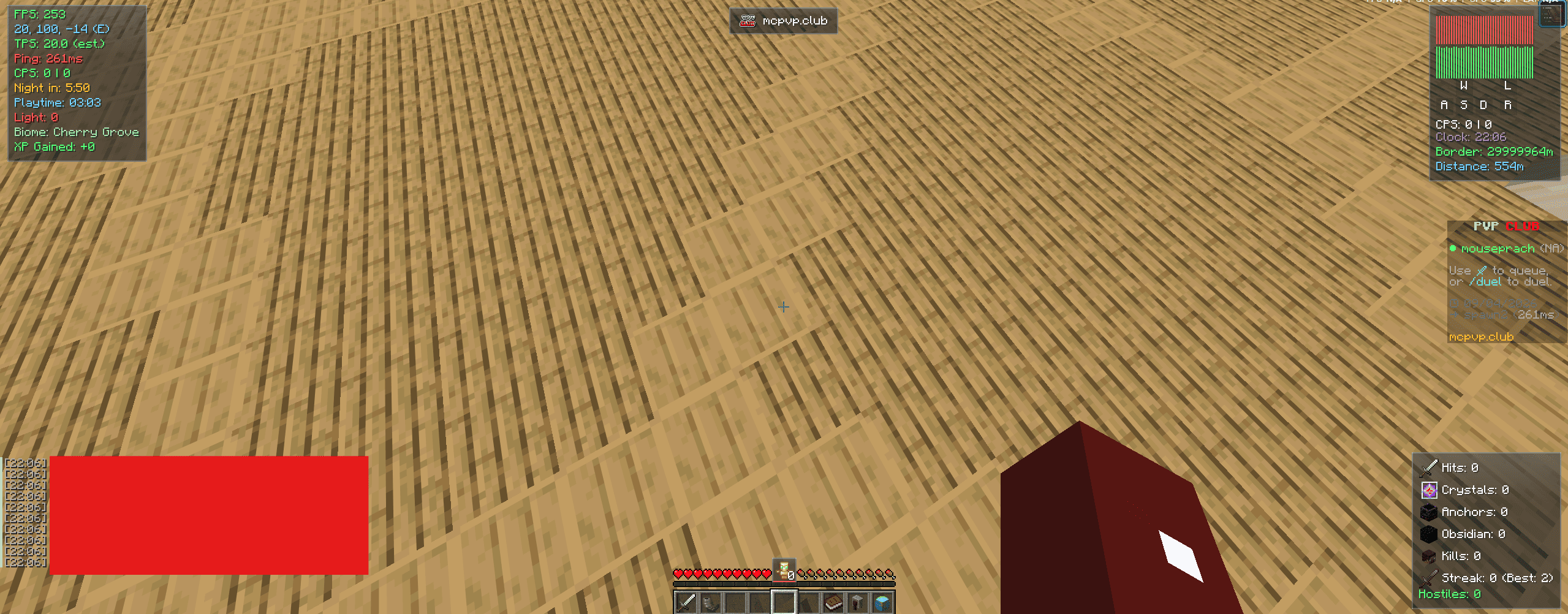


免责声明:这是一个合法的 Minecraft 客户端,不是旨在修改数据包或造成不公平游戏体验的作弊客户端。
功能列表
功能列表
- FPS、TPS(估算值)、Ping、Ping 图表、状态图表和 CPS 计数器
- 坐标、时钟(12/24小时制)、生物群系、光照等级、世界边界距离和游戏时长显示
- 护甲耐久度显示,带有低耐久度警告
- 统计 HUD — 来自下方 Stats 标签页追踪器的命中次数、末影水晶、重生锚、黑曜石和击杀数
- 敌对生物计数器、移动距离和经验获取量追踪器
- 战斗计时器,以及可选的低生命值和饥饿警告
- 图腾计数器,锚定在快捷栏正上方
- 击杀连击追踪器(当前连击 + 个人最佳)
- 按键显示
- 路点 HUD 卡片和指向最近路点的指南针式路点导航条
- 服务器横幅模块,显示当前服务器的图标/名称
- 可选的隐藏 Boss 血条和聊天时间戳
- 每个元素的位置可独立配置(左上 / 右上 / 左下 / 右下),大多数元素可通过专门的编辑 HUD 布局屏幕自由拖拽
- 可选的玻璃背景,外观更整洁
统计追踪
- 命中次数、末影水晶、重生锚、黑曜石和击杀数的持久化计数器,可在其独立的 Stats 标签页中查看
- 所有历史统计数据和个人最佳击杀连击均可独立重置
PvP 与战斗
- 隐藏水晶粒子 — 移除末影水晶爆炸粒子,以便在晶 PvP 中获得更清晰的视野
- 隐藏图腾粒子 — 移除不死图腾的爆发效果
- 命中标记 — 攻击命中时出现的小型准星脉冲(可选声音提示)
- 说 GG 快捷键 — 在聊天中快速发送 "gg",内置冷却时间以防止意外刷屏
- 纯视觉/音频且本地触发 — 不修改数据包或游戏逻辑,在任何服务器上均安全使用
路点 (Waypoints)
- 通过快捷键在任何位置放置路点,或者让客户端在你死亡时自动放置死亡标记
- 死亡标记会自动限制数量,防止文件无限增长;手动放置的路点不会被修剪
- 路点感知维度信息,并本地保存至
config/craftcloudclient_waypoints.json
生活便利 (Quality of Life)
- 按住缩放 — 类似望远镜的相机缩放功能(绑定快捷键),使用原版 FOV 设置(松开后自动恢复)
- 全局亮度切换 — 一键快捷开关原版的亮度/伽马滑块,会记住你之前的设置
- 自动冲刺 和 隐藏玩家 切换开关,各自拥有独立的快捷键
- Discord Rich Presence — 在游戏期间于你的 Discord 个人资料上显示当前服务器/状态
- 游戏内更新检查器 — 有新版本可用时会通过横幅通知你
性能优化
- FPS 提升 预设:限制渲染距离、减少实体渲染距离、快速图形、无实体阴影、无环境光遮蔽
- 减少粒子效果
- 禁用云
- 禁用雨
- 平滑 FPS 限制器
游戏内配置菜单
- 玻璃风格 UI,通过可配置的快捷键打开(默认为 右 Shift)
- 分为 HUD / PvP / 统计 / 路点 / 性能 / 快捷键 / 主题 / 配置文件 / 关于 等标签页
- 内置设置搜索栏,可按名称直接跳转到特定设置
- 每个标签页支持全部展开 / 全部折叠批量切换
- 配置配置文件 — 保存、加载并重命名完整的设置快照,以便无需重启即可瞬间切换不同配置方案
- 多种强调色主题(青色、紫罗兰、玫瑰、薄荷、琥珀),可即时重绘整个菜单和 HUD
- 旧版配置 UI 切换 — 如果你更喜欢经典外观,可以在新版卡片网格布局和旧版每设置一行列表之间切换 HUD 标签页
- 可选的主菜单和原版选项菜单的玻璃主题换肤
- 设置实时生效并自动保存至
config/craftcloudclient.json
? 要求
- Minecraft 1.21.9 - 26.2 , 1.8.9
- Fabric Loader 稳定版
- Fabric API 最新版
- 说明 1.8.9 为 Forge 版本,无需安装 Fabric API
ℹ️ 备注
- TPS 是客户端侧计算(原版不会通过网络发送真实的刻 timings);在单人/LAN 模式下读取为干净的 20.0。
- 所有 PvP、战斗、缩放和性能选项仅更改你自己的客户端所渲染的内容或如何应用原版设置 — 这里没有任何内容触及游戏逻辑、数据包或其他玩家,因此可在任何服务器上安全使用。
- Discord Rich Presence 会在会话期间自动运行,目前菜单中没有开关。
? 许可证
Apache 2.0
Disclaimer: This is a legitimate Minecraft client, not a cheat client not design to make change packet or unfair gameplay
List Feature
List Feature
- FPS, TPS (estimate), Ping, Ping Graph, Status Graph, and CPS counters
- Coordinates, Clock (12/24-hour), Biome, Light Level, World Border Distance, and Playtime displays
- Armor Durability display with a low-durability warning
- Stats HUD — hits, crystals, anchors, obsidian, and kills, pulled from the Stats tab tracker below
- Hostile Mob Counter, Distance Traveled, and XP Gained trackers
- Combat Timer, plus optional Low Health and Hunger warnings
- Totem Counter, anchored just above the hotbar
- Kill Streak tracker (current streak + personal best)
- Keystrokes display
- Waypoint HUD card and a compass-style Waypoint Navigator strip pointing toward your nearest waypoint
- Server Banner module showing the current server's icon/name
- Optional Hide Boss Bar and Chat Timestamps
- Each element's corner position is configurable independently (Top-Left / Top-Right / Bottom-Left / Bottom-Right), and most can be freely dragged via the dedicated Edit HUD Layout screen
- Optional glass background for a cleaner look
Stats Tracking
- Persistent counters for Hits, End Crystals, Respawn Anchors, Obsidian, and Kills, viewable in their own Stats tab
- Independent reset options for all-time stats and for your best Kill Streak
PvP & Combat
- Hide Crystal Particles — removes end crystal explosion particles for a clearer view during crystal PvP
- Hide Totem Particles — removes the totem-of-undying burst effect
- Hit Marker — a small crosshair pulse (with optional sound) when your attack connects
- Say GG keybind — sends a quick "gg" in chat, with a built-in cooldown to prevent accidental spam
- Purely visual/audio and locally-triggered — no packet or gameplay changes, safe on any server
Waypoints
- Drop a waypoint anywhere with a keybind, or let the client auto-drop one whenever you die
- Death markers are automatically capped so your file doesn't grow forever; manual waypoints are never trimmed
- Waypoints are per-dimension aware and saved locally to
config/craftcloudclient_waypoints.json
Quality of Life
- Hold-to-Zoom — a spyglass-style camera zoom on a keybind, using the vanilla FOV setting (restores automatically on release)
- Full-Bright toggle — a one-click shortcut for vanilla's own Brightness/Gamma slider, remembers your previous setting
- Auto Sprint and Hide Players toggles, each with their own keybind
- Discord Rich Presence — shows your current server/status on your Discord profile while playing
- In-game Update Checker — a banner lets you know when a new version is available
Performance
- FPS Boost preset: capped render distance, reduced entity distance, Fast graphics, no entity shadows, no ambient occlusion
- Reduce Particles
- Disable Clouds
- Disable Rain
- Smooth FPS Limiter
In-game config menu
- Glass-styled UI, opened with a configurable keybind (default: Right Shift)
- Organized into HUD / PvP / Stats / Waypoints / Performance / Keybinds / Theme / Profiles / About tabs
- Built-in settings search bar to jump straight to a setting by name
- Per-tab On All / Close All bulk toggles
- Config Profiles — save, load, and rename full setting snapshots, so you can swap between setups instantly with no restart
- Multiple accent color themes (Cyan, Violet, Rose, Mint, Amber) that retint the whole menu and HUD instantly
- Legacy Config UI toggle — switch the HUD tab between the newer card-grid layout and the original one-row-per-setting list, if you prefer the classic look
- Optional glass-themed reskin of the title screen and vanilla options menus
- Settings apply live and save automatically to
config/craftcloudclient.json
? Requirements
- Minecraft 1.21.9 - 26.2 , 1.8.9
- Fabric Loader Stable version
- Fabric API Latest
- Info 1.8.9 is forge no need to install fabric api
ℹ️ Notes
- TPS is a client-side (vanilla doesn't send real tick timings over the network); it reads a clean 20.0 on singleplayer/LAN.
- All PvP, combat, zoom, and performance options only change what your own client renders or how it applies vanilla settings — nothing here touches gameplay logic, packets, or other players, so it's safe to use on any server.
- Discord Rich Presence runs automatically for the session and currently has no in-menu toggle.
? License
Apache 2.0
版本游戏版本平台发布时间本站下载
测试版
1.1.4
CraftcloudClient 1.1.4
1.8.9 Forge 3 周前 ·
0
1.8.9
Forge
3 周前
0

下载 CraftcloudClient
正式版
1.1.6
CraftcloudClient 1.1.6
1.21.11 Fabric 1 个月前 ·
0
1.21.11
Fabric
1 个月前
0
下载 CraftcloudClient
正式版
1.1.5
CraftcloudClient 1.1.5
1.21.11 Fabric 2 个月前 ·
0
1.21.11
Fabric
2 个月前
0
下载 CraftcloudClient
正式版
1.1.4
CraftcloudClient 1.1.4
26.2 Fabric 2 个月前 ·
0
26.2
Fabric
2 个月前
0
下载 CraftcloudClient
正式版
1.1.4
CraftcloudClient 1.1.4
26.1.226.1.1 Fabric 2 个月前 ·
0
26.1.2
26.1.1
26.1
Fabric
2 个月前
0
下载 CraftcloudClient
正式版
1.1.4
CraftcloudClient 1.1.4
1.21.9 Fabric 2 个月前 ·
0
1.21.9
Fabric
2 个月前
0
下载 CraftcloudClient
正式版
1.1.4
CraftcloudClient 1.1.4
1.21.10 Fabric 2 个月前 ·
0
1.21.10
Fabric
2 个月前
0
下载 CraftcloudClient
开发版
1.1.4
CraftcloudClient 1.1.4
1.8.9 Forge 2 个月前 ·
0
1.8.9
Forge
2 个月前
0
下载 CraftcloudClient
正式版
1.1.4
CraftcloudClient 1.1.4
1.21.11 Fabric 2 个月前 ·
0
1.21.11
Fabric
2 个月前
0
下载 CraftcloudClient
正式版
1.1.3
CraftcloudClient 1.1.3
1.21.11 Fabric 2 个月前 ·
0
1.21.11
Fabric
2 个月前
0
下载 CraftcloudClient
1.1.4
测试版
2026-10-22
更好的用户界面

关于这个资源的讨论、问题反馈与使用心得
还没有讨论,来发第一帖吧
你是这个资源的作者?登录后可认领此资源。
相似资源
 模组

鞘翅纹饰Elytra Trims
KikuGie
可定制的鞘翅模组,支持装饰纹饰、旗帜图案等更多功能!
装饰装备
253
 模组

探险者指南针Explorer's Compass
Chaosyr
让你能够在世界中的任何位置定位结构。
冒险装备
95
 模组
Hodgepodge
mitchej123
一堆修复
玩法机制优化
78
 模组

群峦传说TerraFirmaCraft
eerussianguy
TerraFirmaCraft (TFC) 是一个全面转换模组,对生存模式进行了彻底的改造与重新设计。
冒险玩法机制
68
 模组

神化Apotheosis
Shadows-of-Fire
所有本应存在的事物
冒险装备
58
 模组

Cobblemon: Mega Showdown
YajatKaul
为 Cobblemon 添加 Mega 进化、Z 招式、太晶化、超极巨化/超巨大化、究极爆击与融合!
冒险装备
58
评论 0
登录后参与评分
还没有评论,来抢沙发吧