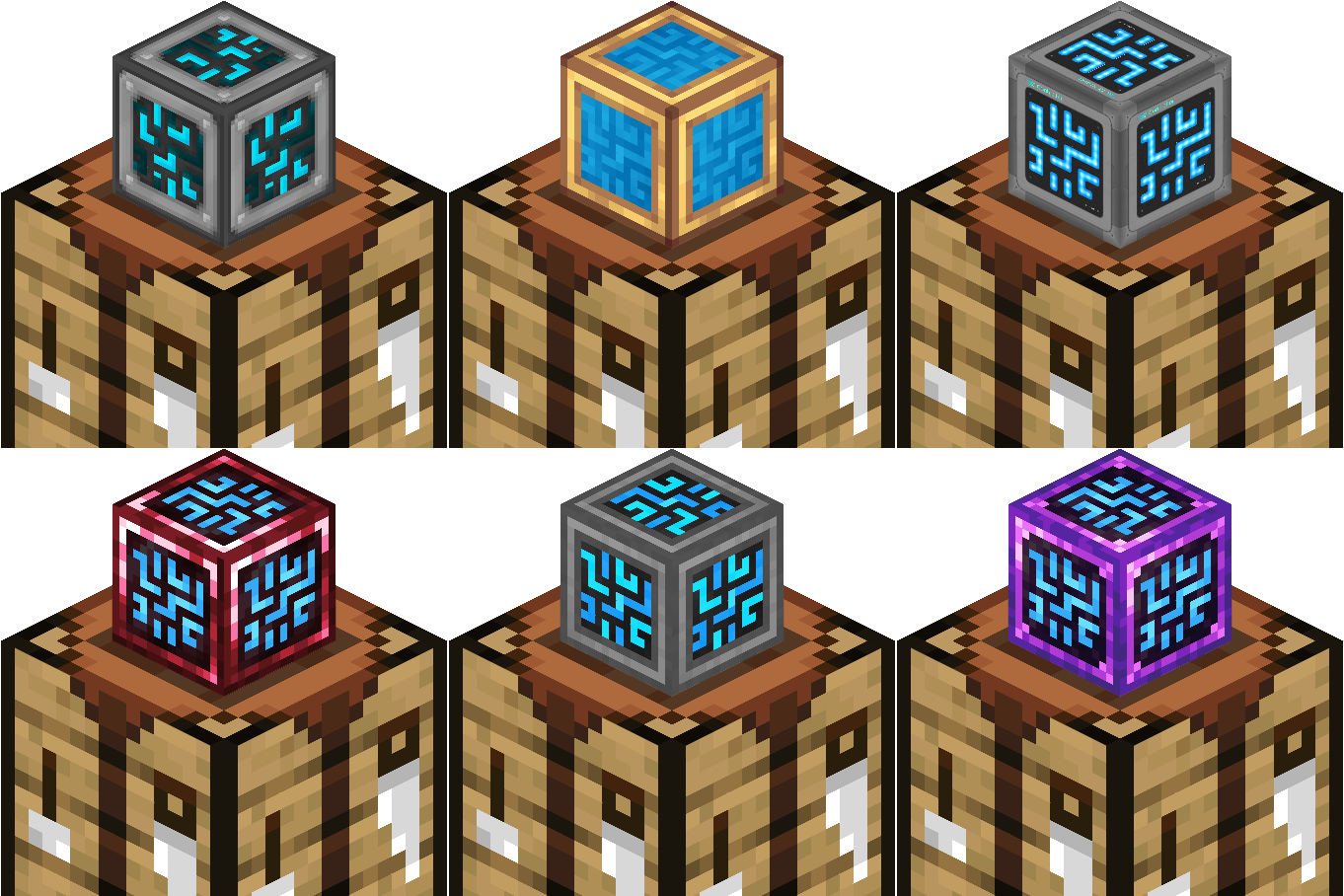
Craftmark 允许整合包作者根据合成方式为方块赋予不同的外观——用黄铜合成的机器看起来是黄铜材质,用钢合成的看起来是钢材质,正常合成的则保持默认外观。基于实例而非基于方块:两个桶可以并排摆放,却拥有不同的外观。
为什么整合包需要这个功能
你已经在模组间集成了配方——例如由 Create 模组的黄铜制成的存储控制器,或由 Thermal 模组的锭制成的熔炉。配方讲述了这一故事,但方块本身却无法体现这一点。资源包也无能为力:它会重新着色每一个副本,无论其获取方式如何。Craftmark 让外观跟随单个合成的物品:
- ? 在背包中 — 包括快捷栏、鼠标光标和配方书
- ✋ 在手握时 — 第一人称和第三人称视角
- ? 放置在世界中时 — 即时生效,无需重新登录
- ⛏️ 被破坏并拾起后 — 外观会永久保留
- ?️ 地面掉落物、物品展示框,甚至破碎粒子都会匹配
如引擎般构建
- 作者无需编写代码。一个变体 = 一行配方(KubeJS)+ 资源包中与原始纹理路径镜像的 PNG 文件。无需映射文件,无需注册方块。
- 适用于所有方块实体方块 — 桶、箱子、熔炉,以及实际上所有模组机器,均可自动工作。
- 无 Mixin。完全基于官方 NeoForge 钩子构建 — 包括 Sodium 系列渲染器所遵循的 model-data 路径。截至 1.2.0 版本,如果你同时运行 Create 模组,则会包含用于动能渲染的 mixin。如果你未安装 Create 模组,1.2.0 版本不会注入任何 mixin。26.x 构建版完全不包含任何 mixin。
- 附带可用示例 (
craftmark:brass 桶) — 一个配方脚本,两分钟内即可看到效果。
- 与原版物品无法堆叠的变体物品,以及诊断日志,精确显示你的整合包中有多少纹理已匹配成功。
依赖项:NeoForge,客户端和服务端均需安装 — 支持 1.21.1 或 26.1.2–26.2。数据可通过 KubeJs 或 CraftTweaker 等配方编辑器应用,作为任务奖励发放,或直接通过命令给予。
? 我应该下载哪个文件?
craftmark-1.5.0.jar — 适用于 Minecraft 1.21.1。完整功能集,包括对 Create 和 Create Aeronautics 的支持。craftmark-1.5.0+26.x.jar — 适用于 Minecraft 26.1.2 和 26.2(一个文件涵盖两者)。+26.x 名副其实:相同的 1.5.0 版本,仅为新版本重新构建 — 无需学习新功能。1.5.0 的所有功能均在此版本中,除了 Create 和 Create Aeronautics 的支持,待这些模组更新后会恢复支持。
将现有的 1.21.1 世界迁移到 26.x?你的方块没问题,但已放置在方块上的外观会被重置 — 请重新放置它们,或重新运行施加它们的命令或配方。
可选依赖项:
- Create (1.2.0) — 目前仅限 1.21.1
- Jade (1.4.0)
- Just Enough Items (1.4.0)
- Sable & Create Aeronautics (1.5.0) — 目前仅限 1.21.1
可选依赖项会添加新功能,但该模组在没有它们的情况下也能完美运行。
权限:
- 你可以将此整合包加入你的整合包中,无需许可。
- 你可以制作插件模组,只要将其列为依赖项即可,无需许可。
- 你绝对不可以将此模组的文件上传到其他网站。
? 作者文档
变体工作原理
首次启动时,Craftmark 会在你的 Minecraft 实例目录(位于 mods/、config/、saves/ 旁边)创建一个 craftmark_variants/ 文件夹,并预置一个可编辑的 brass 示例:
craftmark_variants/
└── brass/                                   ← 一个文件夹 = 一个变体 (ID: craftmark:brass)
    └── assets/minecraft/textures/block/
        ├── barrel_side.png
        ├── barrel_top.png
        ├── barrel_bottom.png
        └── barrel_top_open.png
在变体文件夹内,你使用与原始纹理完全相同的资源包布局。brass/assets/minecraft/textures/block/barrel_side.png 替换了原版精灵 minecraft:block/barrel_side。规则很简单:在你的变体文件夹下,将 PNG 文件放在原始文件所在的位置。
快速开始(2 分钟 — 无需 KubeJS,无需制作纹理)
brass 文件夹已经存在。开启作弊模式后,运行:
/give @p minecraft:barrel[craftmark:variant="craftmark:brass"]
放置它 — 黄铜桶。它在手中、背包、地面和物品展示框中都是黄铜材质;破坏它后,掉落物会保留其外观,且不会与普通桶堆叠。编辑 craftmark_variants/brass/ 中的 PNG 文件并按 F3+T 即可实时查看更改。
创建你自己的变体
- 在
craftmark_variants/ 中创建一个文件夹 — 使用小写字母、数字、_ . -:例如 ruby、steel、diamond… 其 ID 变为 craftmark:<文件夹名>。
- 放入纹理文件,其路径需与
assets/ 下的原始资源路径一一对应:
craftmark_variants/ruby/assets/refinedstorage/textures/block/controller.png
(覆盖 refinedstorage:block/controller)
- 按F3+T重新扫描 — 无需重启即可识别新文件夹。
- 使用以下 ID 标记物品:
/give @p refinedstorage:controller[craftmark:variant="craftmark:ruby"]
- 仅覆盖所需部分 — 跳过某个面则正常渲染。路径错误会静默保留原始纹理(绝不会显示为紫黑格)。
- 通过解压源 mod 的 jar 包至
assets/<ns>/textures/ 目录来查找原始路径;在你的文件夹中镜像复制完整路径。
- 方块类物品会自动复用方块纹理,平面物品贴图也采用相同方式镜像(
assets/<ns>/textures/item/…)。
当整个面无法贴图时:逐块覆盖功能 (1.1.0 新增)
大多数方块都能通过上述文件夹完美替换皮肤 — 只需镜像纹理路径即可完成。但少数方块对某一面使用了共享的通用纹理。一个典型的例子:某台机器的底部纹理是 somemod:block/bottom,而不是 somemod:block/<that-machine>/bottom。如果你按预期镜像路径,则不会生效 — 文件虽然会拼接成功,但该面实际上并未使用它,因此该面仍保持原版状态。
对于那些顽固的面,有一个可选的快捷方式 — 仅在某个面拒绝应用材质时使用。与其去查找纹理路径,不如直接指定方块和面:
craftmark_variants/<variant>/by_block/<block-namespace>/<block-path>/<face>.png
例如,要为 Refine Storage 存储监视器的顽固底面应用 brass 变体:
craftmark_variants/brass/by_block/refinedstorage/storage_monitor/bottom.png
<face> 可以是以下之一:
top.png — 顶面bottom.png — 底面front.png — 方块朝向的面(例如熔炉的燃烧面)back.png — 与正面相对的面left.png / right.png — 当你面向正面时,左侧/右侧的面side.png — 同时应用于所有四个水平面
四个水平面是相对于方块正面的,因此贴图会跟随方块的旋转而自动调整 — front.png 始终位于正面。指定面(例如 front.png)的优先级高于 side.png。
需要了解的知识:
- 仅作用于该单个方块。 它不会“渗漏”到其他共享相同贴图的方块上 — 甚至可以让两个共享同一张纹理的面拥有不同的皮肤。
- 无需排查路径。 你指定的是面而非底层精灵图,因此共享/通用纹理不再是猜谜游戏。
top/bottom 适用于所有方块。front/back/left/right 需要具有水平朝向属性的方块 — 原版方块以及通过 facing 或自定义 direction 属性进行旋转的模组(例如 Refined Storage)均适用;对于没有朝向属性(或垂直放置)的方块,请使用 side.png。- 它不覆盖非立方体面(内凹、异形等)— 这些部分仍使用上方的常规文件夹。
- F3+T 可实时重载,与常规文件夹的操作方式完全一致。
在配方中接入(KubeJS)
命令用于测试;在实际整合包中,你应该标记合成出的产出物,以便玩家获得皮肤。在 kubejs/server_scripts/ 目录下:
ServerEvents.recipes(event => {
    event.shapeless(
        Item.of('refinedstorage:controller', '[craftmark:variant="craftmark:ruby"]'),
        ['refinedstorage:controller', 'mymod:ruby']
    ).id('mypack:ruby_controller');
});
调试你的变体
每次资源(重新)加载时,会为每个找到的变体文件夹记录一行日志:
craftmark: variant craftmark:brass: 4 texture(s) stitched
如果计数低于预期,说明某个路径未匹配成功。F3+T 会重新运行扫描并读取新文件夹。
未来计划
内容更新已于 1.5.0 版本完结。Craftmark 现在也支持 26.1.2 和 26.2,此后将进入维护阶段:修复错误、进行小幅兼容性调整,并在 Create / Create Aeronautics 模组更新后,将对其的支持重新带回 26.x 版本。
如果您发现模组存在错误或有任何建议,请通过 此处的 CurseForge 评论区 或 Discord 服务器 联系我。提交错误报告时,请确保您使用的是该模组的最新版本,并提供重现该错误的步骤。
Craftmark lets modpack authors give blocks a different skin depending on how they were crafted — the same machine built from brass looks brass, built from steel looks steel, built normally looks normal. Per-instance, not per-block: two barrels can sit side by side wearing different skins.
Why packs want this
You've integrated recipes across mods — a storage controller crafted from Create's brass, a furnace built from Thermal's ingots. The recipes tell that story; the blocks don't. A resource pack can't help: it retextures every copy, however it was obtained. Craftmark makes the skin follow the individual crafted item:
- ? In the inventory — and the hotbar, the cursor, the recipe book
- ✋ In your hand — first and third person
- ? Placed in the world — instantly, no relog
- ⛏️ Broken and picked back up — the skin round-trips forever
- ?️ Ground drops, item frames, even breaking particles match
Built like an engine
- Zero code for authors. A variant = one recipe line (KubeJS) + PNGs in a resource pack that mirror the original texture paths. No mapping files, no block registration.
- Works on every block-entity block — barrels, chests, furnaces, and effectively every modded machine, automatically.
- Mixin-free. Built entirely on official NeoForge hooks — including the model-data path that Sodium-family renderers honor. As of 1.2.0, if you are also running the Create mod, mixins are present for kinetic rendering. If you don't have Create installed, 1.2.0 will not mix anything. The 26.x build ships no mixins at all.
- Ships with a working example (
craftmark:brass barrel) — one recipe script and you'll see it work in two minutes.
- Variant items that don't stack with their plain counterparts, and diagnostics logging that tells you exactly how many of your pack's textures matched.
Requires: NeoForge, installed on client and server — either 1.21.1 or 26.1.2–26.2. Data can be applied through recipes editors like KubeJs or CraftTweaker, given out as quest rewards, or just through commands.
? Which file do I want?
craftmark-1.5.0.jar — for Minecraft 1.21.1. The complete feature set, including Create and Create Aeronautics support.craftmark-1.5.0+26.x.jar — for Minecraft 26.1.2 and 26.2 (one file covers both). The +26.x means what it looks like: the same 1.5.0, rebuilt for the new versions — no new features to learn. Everything from 1.5.0 is here except Create and Create Aeronautics support, which come back once those mods update.
Moving an existing 1.21.1 world to 26.x? Your blocks are fine, but skins already stored on placed blocks are reset — re-place them, or re-run whatever command or recipe applied them.
Optional Dependencies:
- Create (1.2.0) — 1.21.1 only for now
- Jade (1.4.0)
- Just Enough Items (1.4.0)
- Sable & Create Aeronautics (1.5.0) — 1.21.1 only for now
Optional dependencies add new features, but the mod works perfectly fine without them.
Permissions:
- You can add this to your modpack without permission.
- You can make addon mods without permission, as long as they list Craftmark as a dependency.
- You absolutely cannot upload this mod's files to other websites
? Author Documentation
How variants work
On first launch, Craftmark creates a craftmark_variants/ folder in your Minecraft instance directory (next to mods/, config/, saves/) and seeds a ready-to-edit brass example:
craftmark_variants/
└── brass/                                   ← one folder = one variant (id: craftmark:brass)
    └── assets/minecraft/textures/block/
        ├── barrel_side.png
        ├── barrel_top.png
        ├── barrel_bottom.png
        └── barrel_top_open.png
Inside a variant folder you use the exact resource-pack layout of the original textures. brass/assets/minecraft/textures/block/barrel_side.png replaces the vanilla sprite minecraft:block/barrel_side. The rule is simply: put your PNG where the original lives, under your variant folder.
Quick start (2 minutes — no KubeJS, no textures to make)
The brass folder is already there. With cheats on, run:
/give @p minecraft:barrel[craftmark:variant="craftmark:brass"]
Place it — brass barrel. It's brass in your hand, inventory, on the ground, and in item frames; break it and the drop keeps its skin and won't stack with plain barrels. Edit the PNGs in craftmark_variants/brass/ and press F3+T to see changes live.
Make your own variant
- Create a folder in
craftmark_variants/ — lowercase letters, numbers, _ . -: ruby, steel, diamond… Its id becomes craftmark:<folder>.
- Drop in textures, mirroring each original's path under
assets/:
craftmark_variants/ruby/assets/refinedstorage/textures/block/controller.png
(overrides refinedstorage:block/controller)
- F3+T to rescan — new folders are picked up without a restart.
- Tag items with the id:
/give @p refinedstorage:controller[craftmark:variant="craftmark:ruby"]
- Override only what you want — skip a face and it renders normally. A wrong path silently keeps the original (never magenta).
- Find original paths by unzipping the source mod's jar under
assets/<ns>/textures/; mirror that whole path inside your folder.
- Block-shaped items reuse the block textures automatically, flat item sprites are mirrored the same way (
assets/<ns>/textures/item/…).
When a face won't skin: per-block overrides (new in 1.1.0)
Most blocks skin perfectly with the folder above — mirror the texture path and you're done. But a few blocks use a shared, generic texture for one face. A classic example: a machine whose bottom is somemod:block/bottom rather than somemod:block/<that-machine>/bottom. If you mirror the path you'd expect, nothing happens — the file stitches, but no face actually uses it, so that face stays vanilla.
For those stubborn faces there's an optional shortcut — reach for it only when a face refuses to skin. Instead of hunting for the texture path, you name the block and the face directly:
craftmark_variants/<variant>/by_block/<block-namespace>/<block-path>/<face>.png
For example, to skin the Refined Storage storage monitor's stubborn bottom under the brass variant:
craftmark_variants/brass/by_block/refinedstorage/storage_monitor/bottom.png
<face> is one of:
top.png — the upward facebottom.png — the downward facefront.png — the face the block faces (e.g. a furnace's lit face)back.png — the face opposite the frontleft.png / right.png — the left/right face as you look at the frontside.png — all four horizontal faces at once
The four horizontal faces are relative to the block's front, so the skin follows the block however it's rotated — front.png always lands on the front. A specific face (e.g. front.png) takes priority over side.png.
Good to know:
- Scoped to that one block. It never bleeds onto other blocks that share the texture — and it can even give two faces that share a single texture different skins.
- No path detective work. You name the face, not the underlying sprite, so shared/generic textures stop being a guessing game.
top/bottom work on every block. front/back/left/right need a block with a horizontal facing — vanilla blocks and mods that rotate via a facing or custom direction property (e.g. Refined Storage) both work; for blocks with no facing (or placed pointing up/down), use side.png.- It doesn't cover non-cube faces (insets, odd shapes) — those still use the normal folder above.
- F3+T reloads it live, exactly like the normal folder.
Wiring it into recipes (KubeJS)
Commands are for testing; in a real pack you tag the crafted output so players earn the skin. In kubejs/server_scripts/:
ServerEvents.recipes(event => {
    event.shapeless(
        Item.of('refinedstorage:controller', '[craftmark:variant="craftmark:ruby"]'),
        ['refinedstorage:controller', 'mymod:ruby']
    ).id('mypack:ruby_controller');
});
Debugging your variants
Every resource (re)load logs one line per variant folder found:
craftmark: variant craftmark:brass: 4 texture(s) stitched
Count lower than expected = a path didn't match. F3+T re-runs the scan and re-reads new folders.
Future Plans
Content updates wrapped up with 1.5.0. Craftmark now runs on 26.1.2 and 26.2 as well, and from here it's maintenance: bug fixes, small compatibility tweaks, and bringing Create / Create Aeronautics support back to 26.x once those mods update.
If you find a bug or have suggestions for the mod, let me know in the Curseforge comments here or the Discord server. For bug reports, make sure you are on the most recent version of the mod and give me steps so I can reproduce the bug.
```

 模组

 模组

 模组

 模组

 模组
 模组
评论 0
登录后参与评分
还没有评论,来抢沙发吧