
使用 16 种原版染料为 Create 的 Factory Gauges(工厂仪表)在配方模式下的连接线着色,以便在高度交叉的网络中一目了然地保持可读性。
客户端 + 服务端插件 — 在多人游戏中,需在两端安装;服务器存储颜色并将其同步给所有玩家。
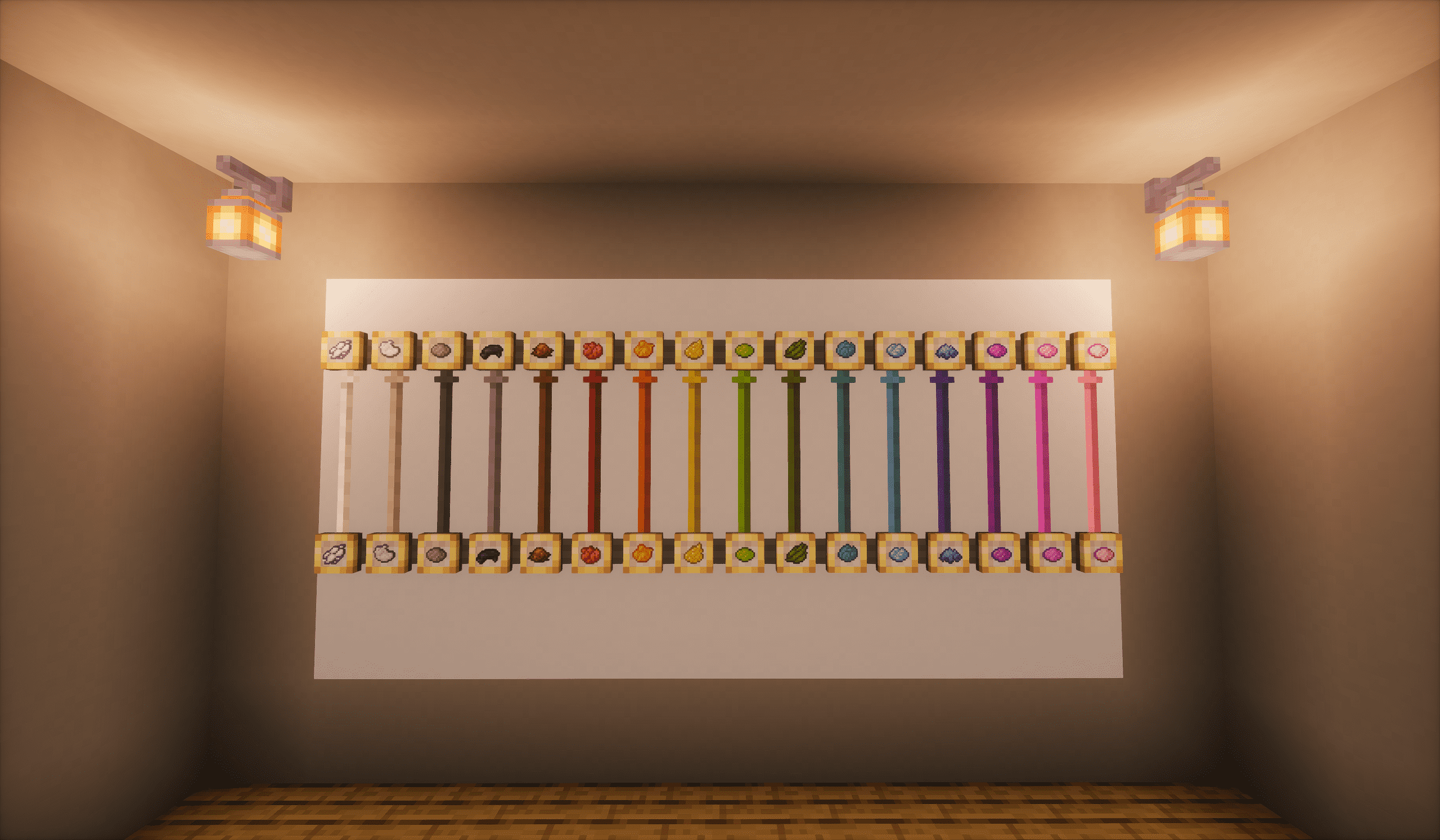
功能特性
- 右键染色:使用任意染料右键点击连线即可为其着色。线条绘制在仪表之间的墙壁上——请瞄准线条本身,而非仪表面板。默认情况下染料不会被消耗——即使在生存模式下也是如此——因此你可以随意反复重新着色(配置文件中可开启选项,使每次操作消耗一个染料)。
- 黑色染料 = 重置。恢复原版的默认状态颜色。
- 路径染色。按住 Shift 并右键点击某个仪表以开始路径,然后将准星扫过其他仪表:每个经过的仪表都会加入链条,并通过其自身的最短路径与前一个仪表相连——扫描动作决定了分支走向,因此染色的路径完全符合你追踪的路线。在构建过程中,每条待处理的连线都会显示一条悬浮的绿色光束。再次悬停最后一个仪表以撤销操作,右键点击最后一个仪表可将整条链条一次性染色,右键点击其他位置则取消操作。
- 触觉反馈。成功的染色操作会播放与 Create 中两个仪表建立链接时相同的音效,并产生一小团对应染料颜色的尘埃粒子效果。
- 智能继承。新建的连线会继承源仪表的输入颜色——但仅当所有输入连线共享同一种颜色时生效。混合或未着色的输入将保持原版颜色。
- 状态颜色保持不变。空闲状态的连线完全着色;活动状态的连线(进行中 / 已满足 / 失败 / 闪烁)保留其原版的状态核心颜色,并在两侧增加一层 1px 的染料边框。滚动纹理和补充物资闪烁等动画不受影响。
- 悬停提升。注视任何连线时,该连线会平滑地浮起于相邻连线之上(几微米的高度——仅改变遮挡顺序),从而在连线交叉或重叠时始终能区分哪条是哪条。
- 悬停锁定。一旦某条连线被悬停选中,只要准星仍在其上,它就会保持选中状态;即使在小范围鼠标移动穿过或重叠连线的情况下,高亮也不会跳跃到其他连线上。染色点击的目标正是屏幕上被提升的那条连线。
- 护目镜追踪。佩戴 Create 的工程师护目镜并悬停在已染色的连线上时,会高亮显示整个同色组,并变暗该工厂的其他连线,同时在 Create 的护目镜叠加层中添加汇总信息和各状态计数。高亮效果本身是客户端层面的叠加(插件仍需在两端安装以确保颜色保存和同步);可在配置中切换,并支持调整触发距离。
- 链接线永不染色。红石线和显示链接线的颜色承载状态语义,保持完全原版样式。
- Create: Factory Controller 集成(可选)。安装了 Factory Controller 1.2.1 或更高版本后,其虚拟物流线路可直接在 GUI 中进行染色——操作方式与世界中的拾取染料手势相同——且链接颜色在蓝图导出和导入后得以保留。仅物流(原料)线路可染色;数字线路和红石线路保持原版。
颜色按维度存储在世界存档中,面板搬迁后依然保留,并自动同步给每位玩家——在登录、维度切换和区块加载时生效。可选配置文件涵盖额外设置:染料消耗(默认关闭)、首次使用仪表时的提示、反馈效果以及悬停提升功能。无需设置,无命令——仅需原版染料机制。
依赖要求
本页面提供两个分支文件。请选择与你的游戏版本匹配的文件。
Minecraft 1.21.1 · NeoForge
- 文件:0.5.0 构建版(create-colored-connections-0.5.0.jar)
- 需要:NeoForge 21.1.x、Java 21,以及 Create 6.0.10 或更高版本(1.21.1 系列)
- 可选:Create: Factory Controller 1.2.1 或更高版本
Minecraft 1.20.1 · Forge
- 文件:1.20.1-0.5.0 构建版(create-colored-connections-1.20.1-0.5.0.jar)
- 需要:Forge 47.x、Java 17,以及适用于 1.20.1 的 Create 6.0.0 – 6.0.8 —— 6.0.8 是 1.20.1 的最新构建版;6.0.9 / 6.0.10 仅限 1.21.1
- 可选:Create: Factory Controller 1.2.1 或更高版本
- 同时使用 Factory Controller? 其线路可在控制器 GUI 中染色——但 Factory Controller 本身需要 Create 6.0.3 或更高版本。在 Create 6.0.0 - 6.0.2 上,其自身的 mixins 无法加载,因此请使用 6.0.3 或更高版本以获得两者兼容。
多人游戏需在客户端和服务端均安装。
关于两个分支
1.20.1 Forge 构建版是 1.21.1 NeoForge 原版的功能移植,功能对等:包括染色、路径染色、悬停提升、悬停锁定、状态颜色保留、颜色继承以及按维度的颜色存储与多人同步。颜色按维度保存在世界存档中,因此每个分支读取其创建的世界。唯一区别在于加载器、所需的 Create 构建版(1.21.1 上为 6.0.10+;1.20.1 上为 6.0.0 – 6.0.8,参见上方的 Factory Controller 说明)以及 Java 版本(21 对比 17)。
Colorize the recipe-mode connection lines of Create's Factory Gauges with the 16 vanilla dyes, so that heavily crossed networks stay readable at a glance.
Client + server addon — in multiplayer, install it on both sides; the server stores the colors and syncs them to everyone.
Features
- Right-click a link with any dye to color it. Lines are drawn on the wall between gauges — point at the line itself, not the gauge panel. By default the dye is never consumed — not even in survival mode — so recolor as often as you like (a config option can make dyeing cost one dye per action).
- Black dye = reset. Restores the vanilla status color.
- Path dyeing. Shift+right-click a gauge to start a path, then simply sweep your crosshair over further gauges: each one joins the chain, connected to the previous gauge along its own shortest route — the sweep decides the branch, so the dyed path is exactly the route you traced. While building, every pending link carries a floating green beam. Hover the last gauge again to undo it, right-click the last gauge to dye the whole chain in one action, right-click anywhere else to cancel.
- Tactile feedback. A successful dyeing plays the same sound Create uses when two gauges link, plus a small puff of dust in the applied dye's color.
- Smart inheritance. A newly created link inherits the source gauge's incoming color — but only when all incoming links share exactly one color. Mixed or uncolored inputs stay vanilla.
- Status colors stay intact. Idle lines are fully dyed; active lines (in progress / satisfied / failed / flashing) keep their vanilla status-colored core and gain a thin 1px dye border on each side. Animations like the scrolling texture and restock flashing are untouched.
- Hover lift. Looking at any link smoothly lifts the whole line above its neighbors (a few microns — only the occlusion order changes), so you can always tell which line is which where links cross or overlap.
- Sticky hover. Once a line is hovered it stays picked while the crosshair is on it; small mouse movements over crossing or overlapping lines no longer make the highlight jump between them. The dye click targets exactly the line that is lifted on screen.
- Goggles tracing. Wearing Create's Engineer's Goggles and hovering a dyed link highlights the whole same-colored group and dims that factory's other links, and adds a summary and per-state counts to Create's goggle overlay. The highlight itself is a client-side overlay (the addon still needs to be installed on both sides so colors save and sync); switchable in the config, with an adjustable trigger distance.
- Link lines are never dyed. Redstone and display link lines carry status semantics in their color and are left fully vanilla.
- Create: Factory Controller integration (optional). With Factory Controller 1.2.1 or newer installed, its virtual logistics wires become dyeable right inside the GUI — same pick-up-a-dye gesture as in the world — and link colors survive blueprint export and import. Only logistics (ingredient) wires are dyeable; number and redstone wires stay vanilla.
Colors are stored per dimension in the world save, survive panel relocation, and sync to every player automatically — on login, dimension change, and chunk load. An optional config file covers the extras: dye consumption (off by default), the one-time first-gauge hint, the feedback effects, and the hover lift. Nothing to set up, no commands — just vanilla dye mechanics.
Requirements
This page ships two branches. Pick the file that matches your game version.
Minecraft 1.21.1 · NeoForge
- File: the 0.5.0 build (create-colored-connections-0.5.0.jar)
- Requires: NeoForge 21.1.x, Java 21, and Create 6.0.10 or newer (the 1.21.1 line)
- Optional: Create: Factory Controller 1.2.1 or newer
Minecraft 1.20.1 · Forge
- File: the 1.20.1-0.5.0 build (create-colored-connections-1.20.1-0.5.0.jar)
- Requires: Forge 47.x, Java 17, and Create 6.0.0 – 6.0.8 for 1.20.1 — 6.0.8 is the newest 1.20.1 build; 6.0.9 / 6.0.10 are 1.21.1-only
- Optional: Create: Factory Controller 1.2.1 or newer
- Playing with Factory Controller too? Its wires become dyeable in the controller GUI — but Factory Controller itself needs Create 6.0.3 or newer. On Create 6.0.0 - 6.0.2 its own mixins fail to load, so use 6.0.3 or newer to get both.
Install on both client and server for multiplayer.
About the two branches
The 1.20.1 Forge build is a port of the 1.21.1 NeoForge original, at feature parity: dyeing, path dyeing, hover lift, sticky hover, status-color preservation, color inheritance, and per-dimension color storage with multiplayer sync. Colors live in the world save per dimension, so each branch reads the worlds it created. The only differences are the loader, the required Create build (6.0.10+ on 1.21.1; 6.0.0 – 6.0.8 on 1.20.1, see the Factory Controller note above), and the Java version (21 vs 17).

下载 Create: Colored Connections
下载 Create: Colored Connections
下载 Create: Colored Connections
下载 Create: Colored Connections
下载 Create: Colored Connections
下载 Create: Colored Connections
下载 Create: Colored Connections
下载 Create: Colored Connections
下载 Create: Colored Connections
1.20.1-0.5.1
- Create: 支持额外仪表盘。
关于这个资源的讨论、问题反馈与使用心得
还没有讨论,来发第一帖吧
你是这个资源的作者?登录后可认领此资源。
相似资源
 模组

可定制的鞘翅模组,支持装饰纹饰、旗帜图案等更多功能!
 模组

一个用于收集生物掉落物的多区块模组。
 模组
AE2:一款流行的自动化与存储模组
 模组

适用于 MC 1.18+ 的 Effekseer 加载器
 模组

新增 50+ 个独特生物群系,为你的世界增添新树木、花卉等更多元素!
 模组

基于 GTCEu 1.12.2 的现代 GregTech
评论 0
登录后参与评分
还没有评论,来抢沙发吧