

Create: Improved Display Link Experience

如果您在启动时遇到崩溃,请将您的 NeoForge 降级至 21.1.233。由于技术原因,我很遗憾目前无法完成并发布包含此问题修复的更新。对此造成的不便深表歉意。
项目描述目前尚未更新。在全面重写期间,请查看 Modrinth 更新日志 或 GitHub 更新日志 以了解最新添加内容的详情。
Create: Improved Display Link Experience (C: IDLX) 是一个小型的《Create》模组辅助插件,旨在美化显示链接(Display Link)的一些功能,尤其是被低估的“附加标签”(Attached Label)选项。
功能
附加标签占位符
《Create》模组当前处理带有附加标签的信息显示(我们称之为输入字符串)的方式是将两者简单拼接,中间用一个空格隔开——这是一种简单的方法,但在自定义方面却严重受限:
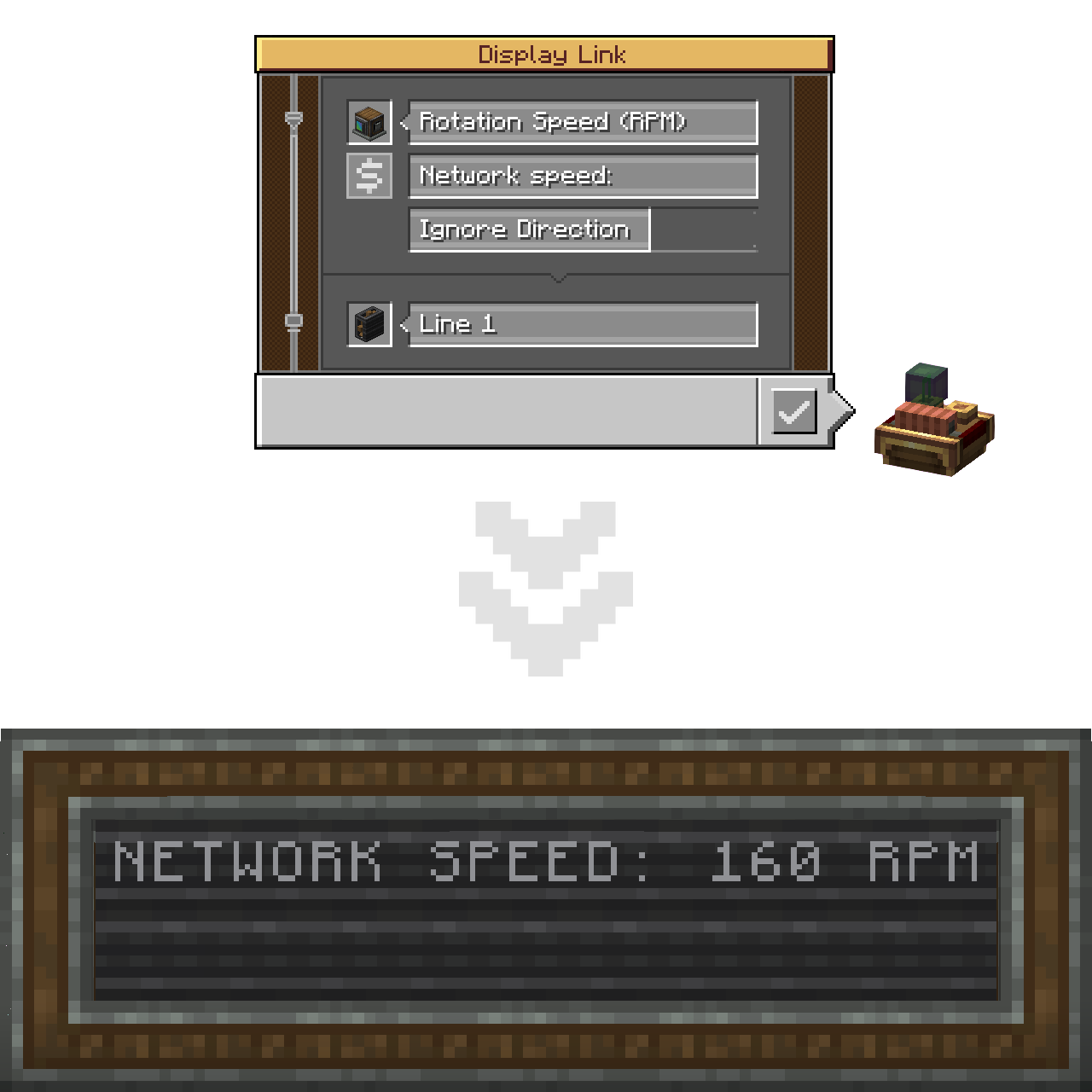
本插件通过引入 $ 和 {} 占位符打破了这一局限。
放置一个(或多个)占位符即标记了输入字符串应插入的位置。
简而言之,附加标签现在可以像格式化字符串一样工作!
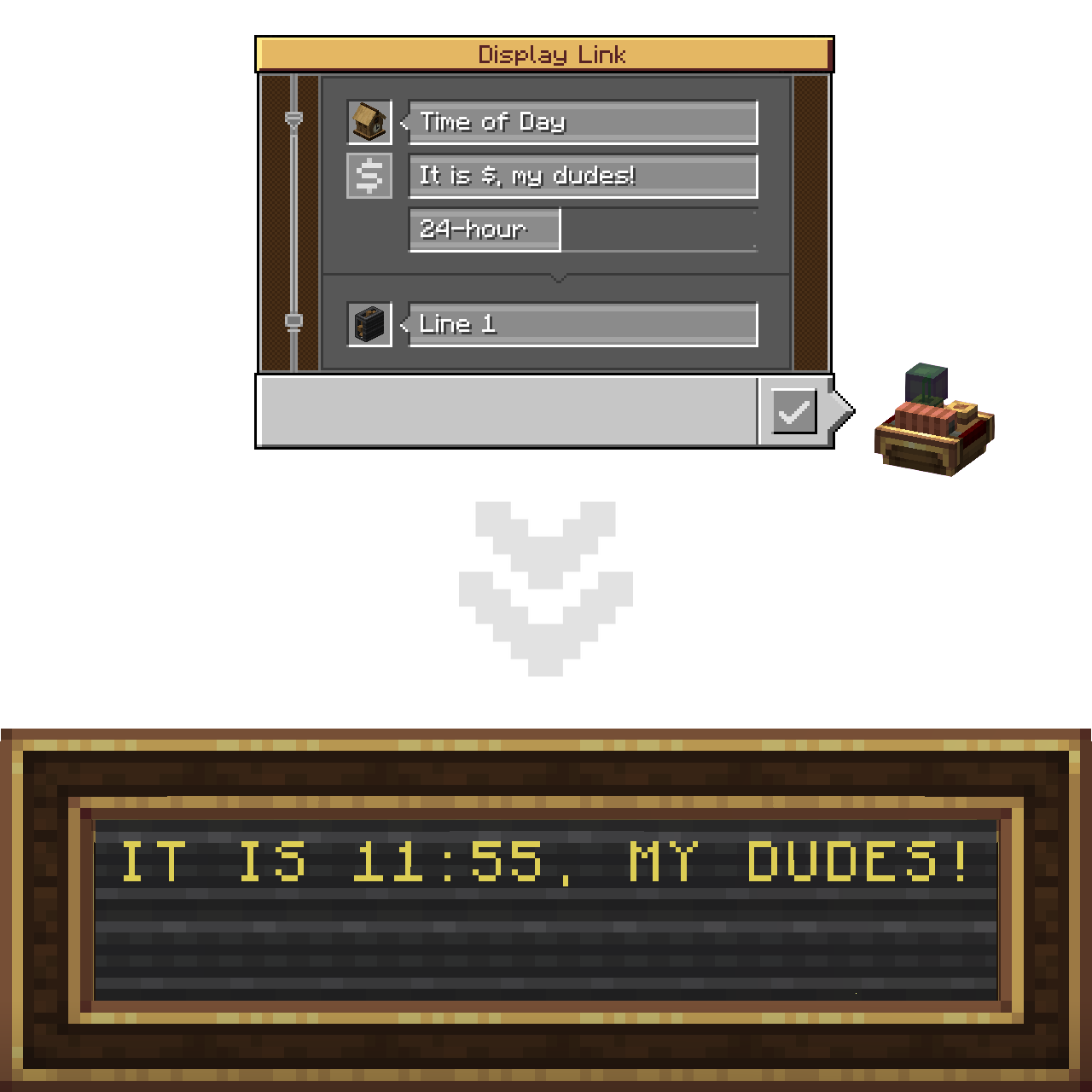
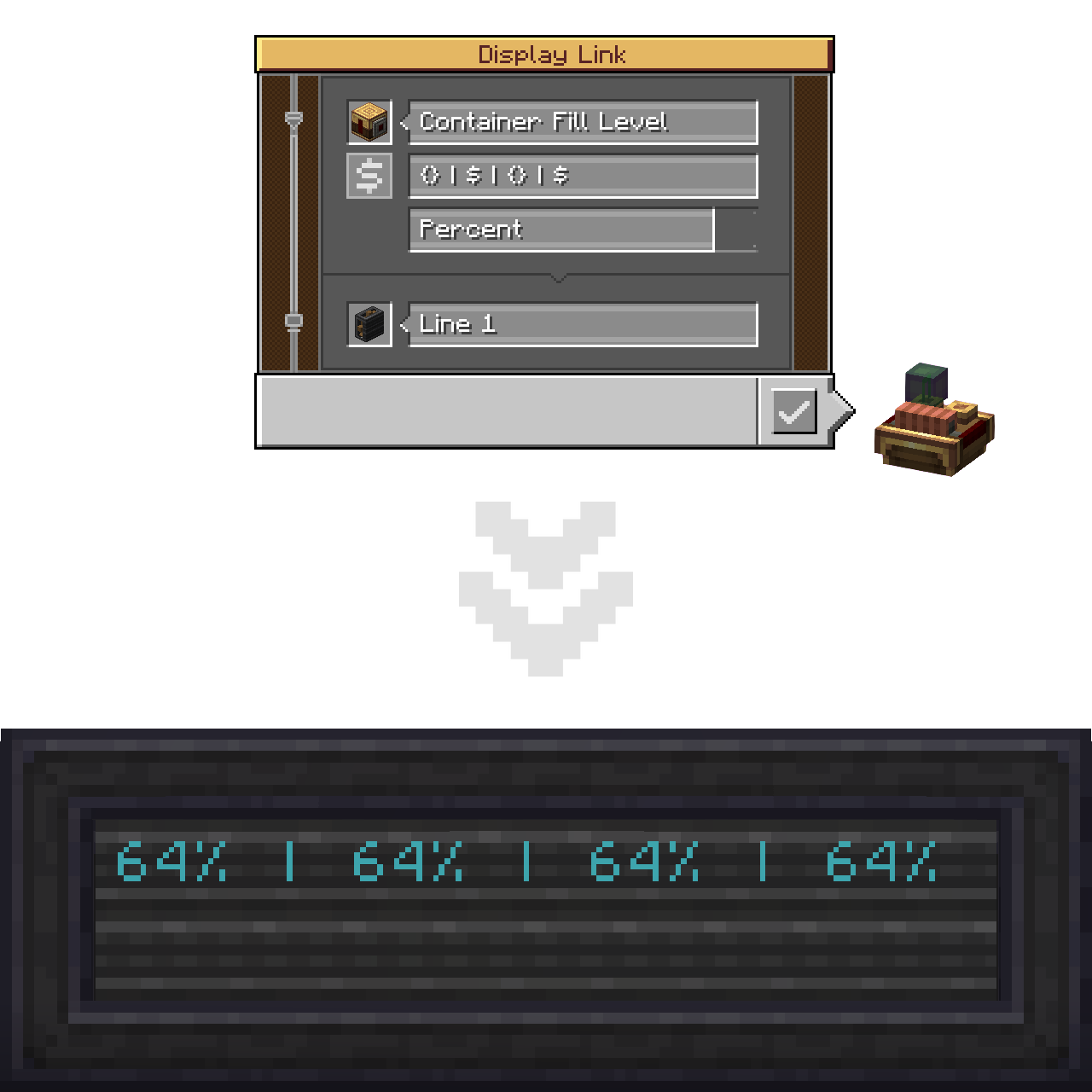
您可以在一个字符串中使用任意数量的占位符。混合使用这两种类型也不会导致任何问题!
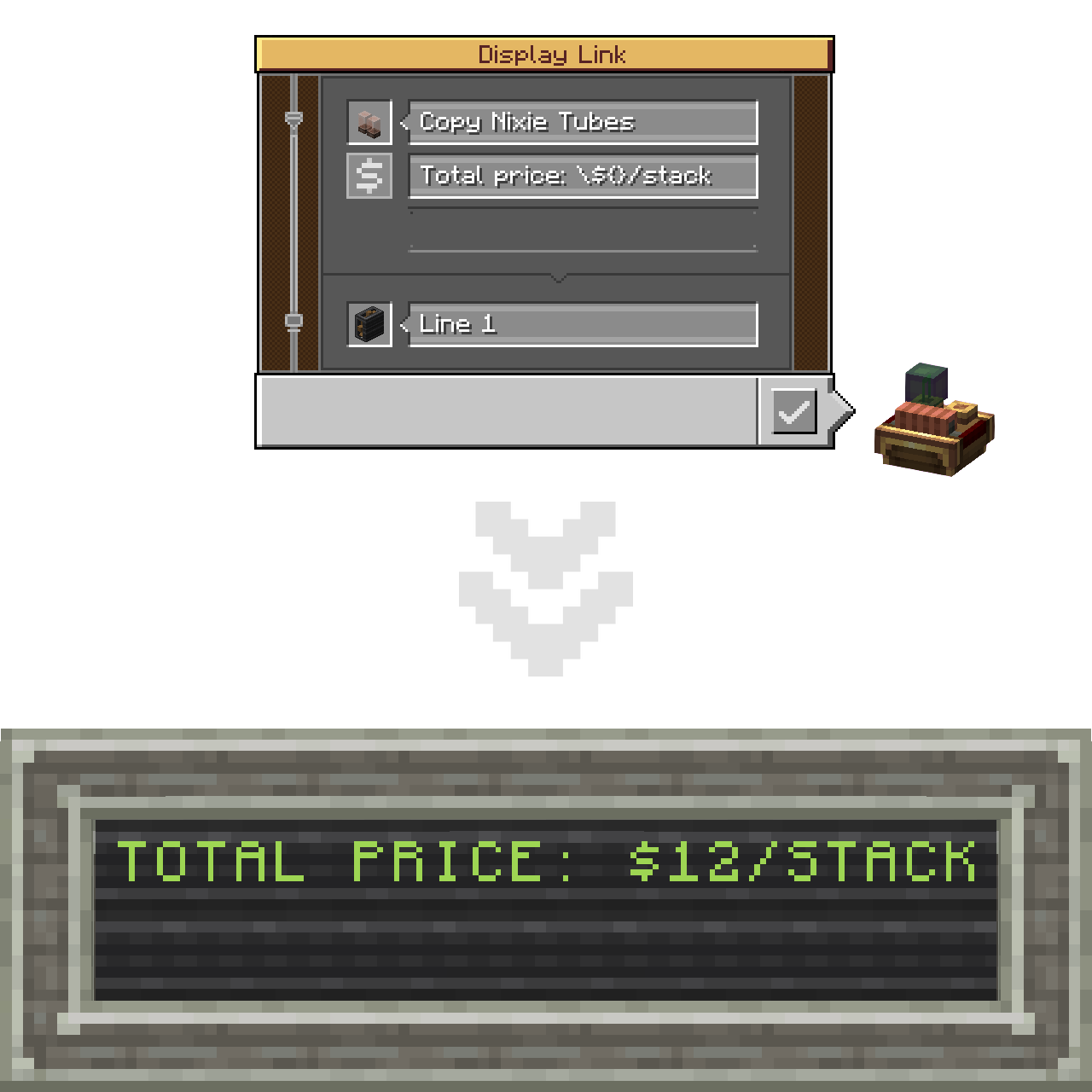
如果您需要字面量地插入 $ 字符(同样适用于 {}),而不使其成为占位符,请使用反斜杠进行转义。
如果标签中完全没有未转义的占位符,则将应用默认(基础《Create》模组的)拼接方式。
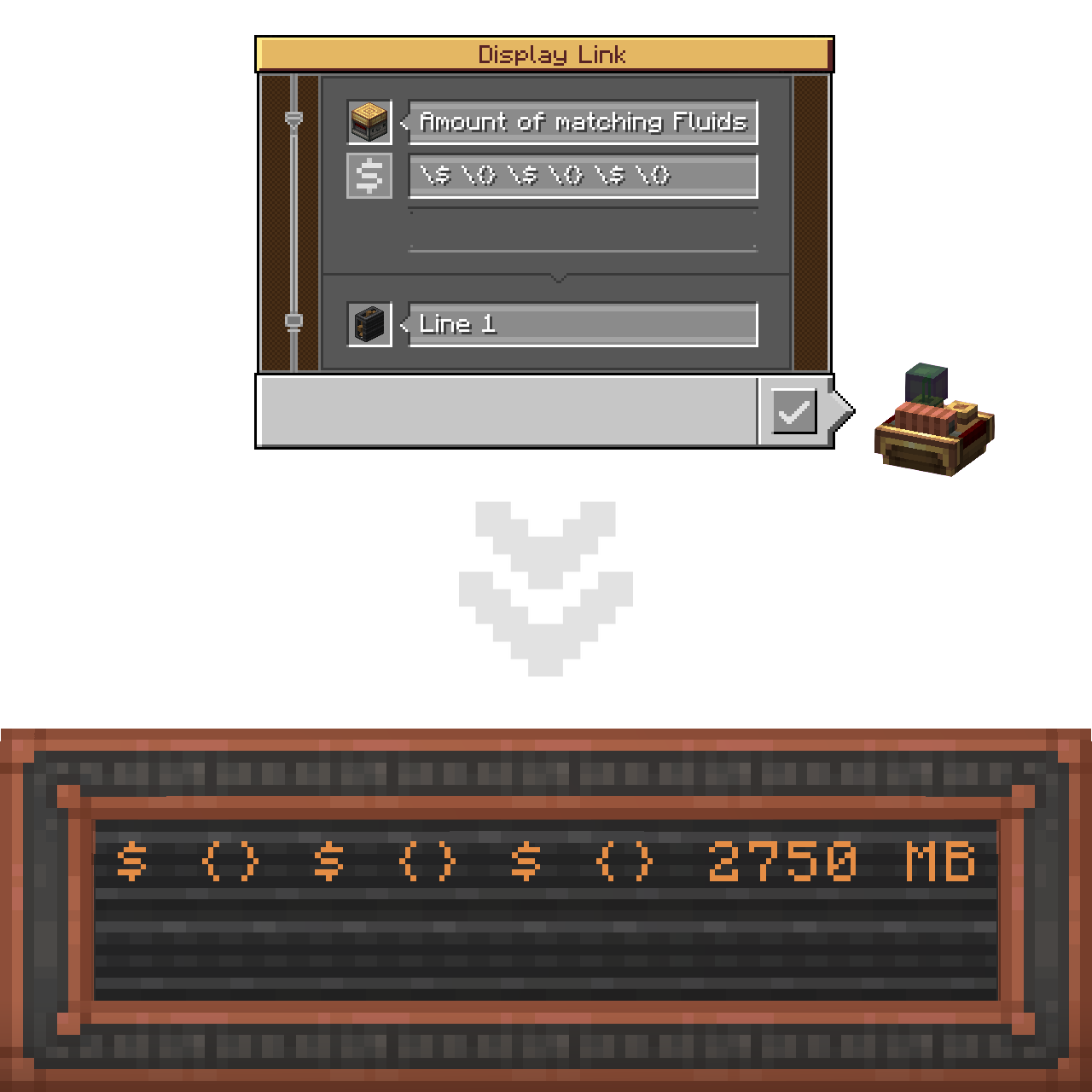
最后,新增了一个悬停按钮,用于显示包含上述所有内容的“占位符使用指南”工具提示。
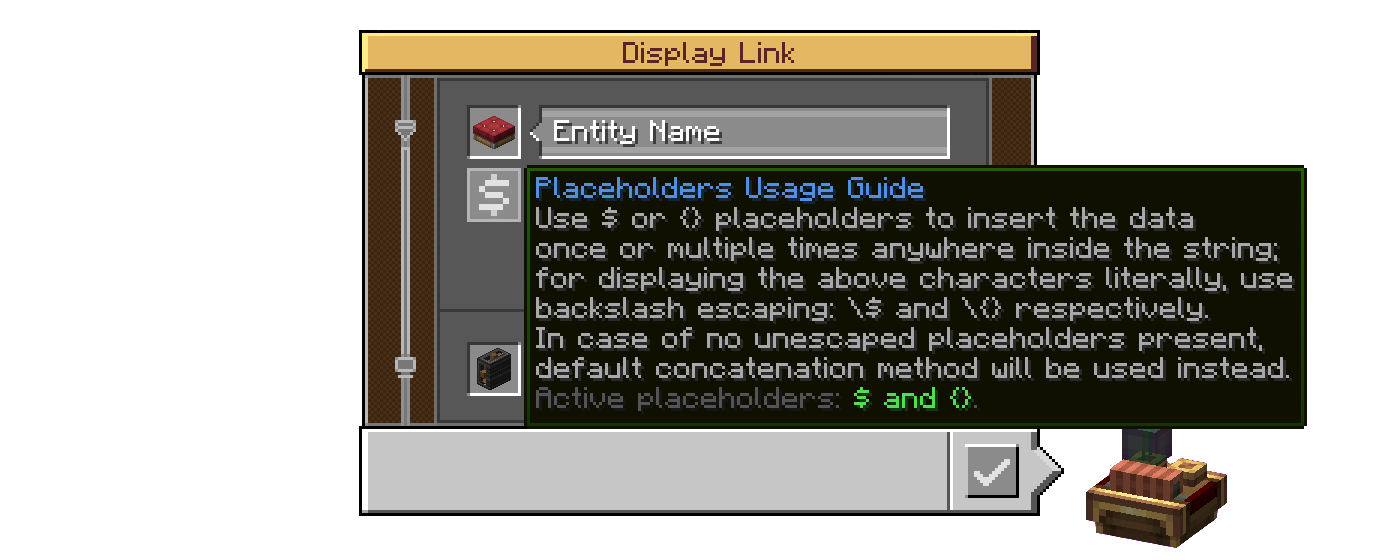
其最后一行显示了哪些占位符处于激活状态(在当前世界/服务器中可用,具体由模组的服务器配置指定)。
(如果上面的图片无法正常播放,这里是 .webp 版本)
配置
C: IDLX 拥有符合 Create 风格的配置文件,分别用于客户端(视觉效果)和服务器端(按世界)。
客户端设置
Enable Guide Buttons:关闭此选项将隐藏上述在显示链接界面中悬停时出现的按钮。- 自定义工具提示:
Enable (Active Placeholders / Progress Bar Support) Tooltip:这两个选项会在“占位符使用指南”工具提示中添加额外的字符串,从而改变文本内容,以反映它们在服务器设置中相应配置选项的状态。
服务器设置
Hide Escaping Of Disabled Placeholders:默认情况下,当禁用占位符被转义时,反斜杠会像放在普通字符之前一样保持可见;启用此项可使其隐藏,仿佛它已完成了其工作;Enable Crude Progress Bar Support:目前,如果与占位符一起使用,进度条字符会被错误地渲染(显得挤压在一起),因此默认完全禁用了对此显示格式的支持(见已知问题)。- 占位符可用性:
Enable (Dollar Sign / Curly Brackets) Placeholder:通过这两个选项,可以将占位符功能限制为仅一种选项——即美元符号或大括号——或者通过取消勾选两者来完全禁用该功能(影响“占位符使用指南”工具提示的最后一行);
已知问题
本质上,C: IDLX 提供了一个具有默认格式化选项的单栏显示部分, 而 Create 则分别为标签(默认格式化)和值(特定于其显示格式的格式化)提供了两个部分。 第一种方法的后果是,进度条字符被渲染为字面字符(非宽字符),因此看起来挤压在一起。 修复这个问题需要重写代码以生成一个部分数组。我开始着手于此,但在遇到诸多问题后没有时间完成, 并决定推迟到我有更多时间时再处理。目前,进度条的占位符支持置于配置项之后(默认关闭)。
如果有人有意帮助我解决此问题,我将非常感激您的贡献。
移植计划
计划将 C: IDLX 移植回 Forge 1.20.1。然而,我目前无法确切说明何时会发生。
致谢
模组开发
- @LIUKRAST 和 @salem-5 在 C: IDLX 开发的早期阶段提供了宝贵的 Mixin 建议;
- @realRobotix 帮助使我的模组配置始终通过 Catnip 打开(采用 Create 风格);
- GG_Gnom(Discord 上的
gg_gnom)负责测试该模组(据我所知,这是唯一一次对该模组进行测试的案例)。
页面装饰
- Devin's Badges 为本 README 中使用的多数徽章提供支持;
- @flikrheist 专门制作了 NeoForge 徽章;
- FOR THE BADGE 提供了“Available For: 1.21.1”和“License: MIT”徽章。
翻译
- @KEricMinecraft 负责简体中文 (
zh_cn) 翻译。
顺便一提,这是我的第一个 Minecraft 模组!
Create: Improved Display Link Experience
Please downgrade your NeoForge to 21.1.233 if you are experiencing crashes on startup. Due to technical reasons I, as of now, sadly cannot finish and release the update that includes a fix of said issue. Apologies for the inconvenience.
The project description is not up to date at the moment. While it's going through total rework, check out the Modrinth Changelog or the GitHub Changelog for details about latest additions.
Create: Improved Display Link Experience (C: IDLX) is a little Quality-of-Life add-on for Create mod aimed at sprucing up some of Display Link features, mainly the underrated Attached Label option.
Features
Placeholders for the Attached Label
The way Create mod currently handles displaying information (let's call one an input string) with the attached label is by simply concatenating both with a space in between - it's a simple way, but thus, in terms of customization, a severely limiting one:
This add-on pushes the boundaries apart by introducing the $ and {} placeholders.
Placing one (or more) marks the place where the input string should be inserted.
In short, the Attached Label can now act like a formatted string!
You can utilize as many placeholders as you want in one string. Mixing both types of them doesn't cause any issues as well!
If you need to insert a $ character literally (same applies to {}), without it turning into a placeholder, use backslash-escaping on it.
In case of no unescaped placeholders present in the label altogether, default (base Create's) concatenation will be applied.
Lastly, there's a new hover-on button that displays a Placeholders Usage Guide tooltip containing all the abovementioned.
Its last string displays which placeholders are active (available to use in this world/server, which is specified by the server config of the mod).
(A .webp version if the one above doesn't play properly)
Config
C: IDLX has a proper Create-styled config for both the client (visuals) and the server (per-world).
Client settings
Enable Guide Buttons: toggling that off will hide the abovementioned hover-on button in the Display Link interface.- Tooltip Customization:
Enable (Active Placeholders / Progress Bar Support) Tooltip: those two add their additional strings into the Placeholders Usage Guide tooltip, that change the text, reflecting the states of their respective config options in Server settings.
Server settings
Hide Escaping Of Disabled Placeholders: by default, when a disabled placeholder is escaped, the backslash stays visible as if placed before a regular character; enable to make it get hidden like if it did its job;Enable Crude Progress Bar Support: currently the progress bar characters are being rendered incorrectly (appear squashed together) if used with placeholders, so the support for this display format is disabled altogether by default (see Known Issues).- Placeholders Availability:
Enable (Dollar Sign / Curly Brackets) Placeholder: with those two it is possible to limit the placeholder functionality to only one option - the Dollar Sign or the Curly Brackets respectively - or disable the feature altogether by ticking both as off (affects the last string of the Placeholders Usage Guide tooltip);
Known Issues
Essentially C: IDLX provides a single flap display section with default formatting options, unlike Create that makes two for the label (default formatting) and the value (formatting specific to its display format) respectively. The consequence of the first method is that the progress bar characters are being rendered as literal characters (non-wide), and thus appear squashed together. Fixing that would involve rewriting the code to instead generate an array of sections. I started working on it but didn't have time to finish after running into numerous issues, and decided to postpone it for when I get more time on my hands. Currently, placeholders support for the progress bar is put behind config (off by default).
If anybody has the will to help me with this issue, I would appreciate the contribution very much.
Porting Plans
C: IDLX is planned to be backported to Forge 1.20.1. However I currently can not say exactly when that will happen.
Credits
Mod Development
- @LIUKRAST and @salem-5 for valuable Mixin advices at the early stage of C: IDLX development;
- @realRobotix for help with making my mod config always open through Catnip (be Create-styled);
- GG_Gnom (
gg_gnomon Discord) for testing the mod (literally the only case of testing this mod I know).
Mod Page Decoration
- Devin's Badges for most badges used in this README;
- @flikrheist for the NeoForge badge specifically;
- FOR THE BADGE for the "Available For: 1.21.1" and "License: MIT" badges.
Translation
- @KEricMinecraft for Chinese Simplified (
zh_cn).
My first Minecraft mod, by the way!

下载 Create: Improved Display Link Experience
下载 Create: Improved Display Link Experience
下载 Create: Improved Display Link Experience
下载 Create: Improved Display Link Experience
下载 Create: Improved Display Link Experience
下载 Create: Improved Display Link Experience
下载 Create: Improved Display Link Experience
下载 Create: Improved Display Link Experience
下载 Create: Improved Display Link Experience
下载 Create: Improved Display Link Experience
1.5 - 2026-05-26 (26.05.2026)
新增
- 在显示链接界面中添加了可视化设置:
- 居中文字:
显示的文本将在板上居中对齐; - 使用省略号标记截断:
当显示的文本无法完全容纳在板上并被截断时,其最后一个可见字符将被替换为省略号(…);
- 居中文字:
目前,这些选项仅适用于单行显示源,并且仅针对显示板作为目标显示设备(对这两种源和目标的支持扩展正在开发中)。
改进
- 大规模改进——确切地说是彻底重构了翻牌显示部分组件的核心架构,从而使所有翻牌循环动画现在看起来符合预期。
修复
关于这个资源的讨论、问题反馈与使用心得
还没有讨论,来发第一帖吧
你是这个资源的作者?登录后可认领此资源。
相似资源
 模组

可定制的鞘翅模组,支持装饰纹饰、旗帜图案等更多功能!
 模组

一个用于收集生物掉落物的多区块模组。
 模组

显示你正在注视的方块的信息。(适用于 Minecraft 1.16+ 的 Hwyla/Waila 分支)
 模组
使用 JavaScript 编辑配方、添加自定义物品、编写世界事件!
 模组

查看物品与配方
 模组
在游戏画面角落显示附近世界地形、玩家、生物和实体的地图。可创建路径点,帮助你找到标记过的位置。
评论 0
登录后参与评分
还没有评论,来抢沙发吧