此模组为原本庞大的 Create: Aeronautics 设置提供了紧凑的解决方案。
当前版本(v0.9)新增内容:
- 倾斜螺旋桨轴承 (Tilting Propeller Bearing)
- 倾斜万向节轴承 (Tilting Swivel Bearing)
- 万向螺旋桨轴承 (Gimbal Propeller Bearing)
- 联动操纵杆 (Linked Joystick)
- 双向节流阀拉杆 (Bidirectional Throttle Lever)
- 高级传动轴 (Advanced Transmission)
- 音乐唱片 - Soar V2
使用参考请参见以下内容(如果内容足够多,将迁移至 Wiki):
倾斜螺旋桨轴承 (Tilting Propeller Bearing)
这是一个可以配置红石频率来向四个基本方向(东、南、西、北)倾斜的螺旋桨。非常适合移动飞行装置,而无需其他类型的水平推力。
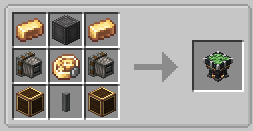
倾斜螺旋桨轴承合成配方
通过 SHIFT+右键点击倾斜螺旋桨轴承可访问频率配置。您还可以修改最大倾斜角度和倾斜速度。
倾斜螺旋桨轴承 GUI 频率配置
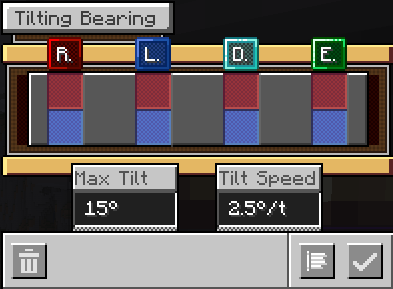
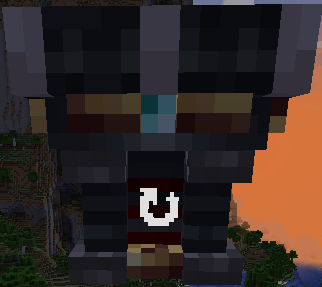
要确定某个频率会使倾斜螺旋桨轴承朝哪个方向倾斜,请检查方块纹理中的轴向标识符(红石、青金石、钻石、绿宝石)。
在此示例中,如果我们激活钻石频率,倾斜将朝向摄像机方向发生
您还可以通过服务器模组配置文件配置倾斜螺旋桨轴承的一些方面。
倾斜万向节轴承 (Tilting Swivel Bearing)
这是一个可以配置红石频率来向四个基本方向倾斜的万向节轴承。
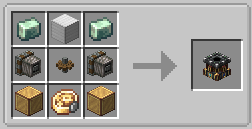
倾斜万向节轴承合成配方
频率配置通过 SHIFT+右键点击访问。
倾斜方向的管理方式与倾斜螺旋桨轴承相同。
具有两种模式以适应不同的使用场景:固定模式 (Fixed) 和炮塔模式 (Turret)。
万向螺旋桨轴承 (Gimbal Propeller Bearing)
这是倾斜螺旋桨轴承的升级版。它增加了一个集成陀螺仪,用于保持飞行装置的平稳。
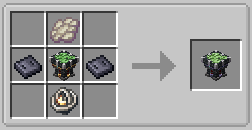
万向螺旋桨轴承合成配方
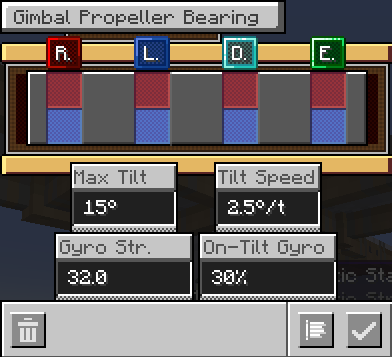
根据您的喜好配置其陀螺仪强度。较重的装置需要更大的强度才能像较轻的装置那样稳定地保持水平。
您还可以配置当螺旋桨倾斜时应用多少陀螺仪强度(倾斜时陀螺仪 / On-Tilt Gyro)。
万向螺旋桨轴承 GUI
我试图赋予这个陀螺仪一种独特的感觉,使其与其他模组中的陀螺仪有所不同(您仍然需要平衡您的质心!)。
我包含了相当多的服务器配置选项,以便您可以自定义其行为,但我发现默认设置感觉响应最灵敏且最自然。
联动操纵杆 (Linked Joystick)
右键点击以建立链接。在链接状态下,按下 TAB 键(可在控制设置中配置)来控制操纵杆。还有两个额外的输入,默认为 W 和 S(同样可配置)。如果不按 TAB 键,您也可以正常与其他物品交互并保持链接状态。
联动操纵杆控制覆盖层
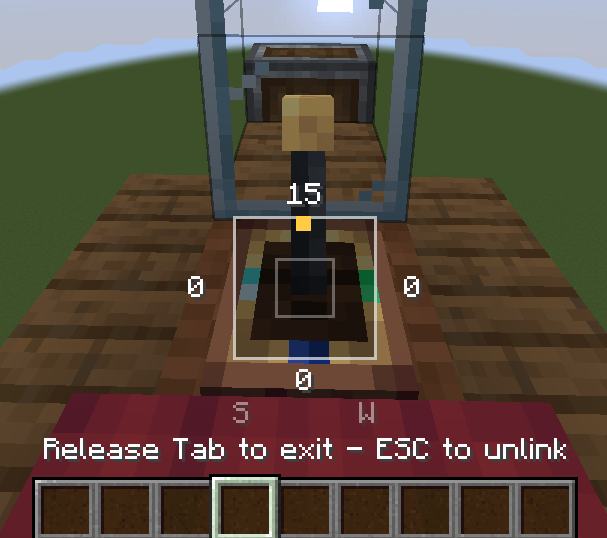
不要离得太远!否则您将断开链接。也有死区和锁定配置。
双向节流阀拉杆 (Bidirectional Throttle Lever)
一个可以向两个方向移动的节流阀拉杆。根据拉动方向输出红石信号,它还集成了链接功能,并在其 GUI 中具有返回中立位置的功能。
双向节流阀拉杆用法
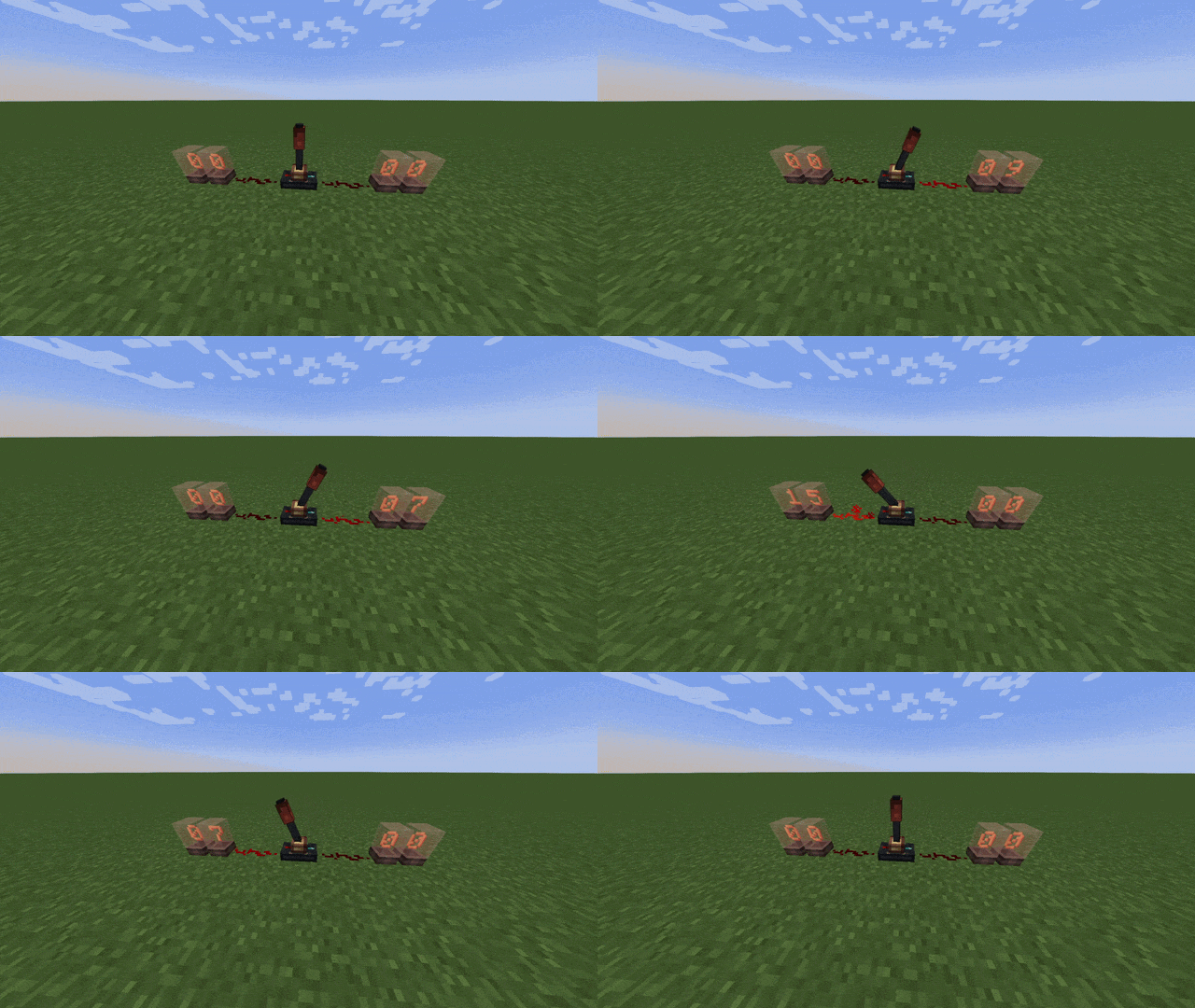
无论拉动方向如何,它还会向下方的方块输出当前的红石等级。
高级传动轴 (Advanced Transmission)
一种能够控制两个旋转方向并在它们之间进行平滑过渡的传动轴。因此,您可以在同一个方块内以可配置的速度加速、刹车和反转。
高级传动轴 GUI

适合“自动”车辆(技术上也可以制作“手动”车辆)。
杂项
特别感谢 Create Propulsion: Simulated 团队将其模组开源为 MIT 协议。这帮助我在开发过程中解决了一些问题。
本模组由 BirdSys 开发。
This mod adds compact solutions for otherwise bulky Create: Aeronautics setups
Current release (v0.9) adds:
- Tilting Propeller Bearing
- Tilting Swivel Bearing
- Gimbal Propeller Bearing
- Linked Joystick
- Bidirectional Throttle Lever
- Advanced Transmission
- Music Disc - Soar V2
For usage reference refer to the following (Will be migrated to a wiki if content gets large enough):
Tilting Propeller Bearing
This block is a Propeller that can be tilted towards any of the 4 cardinal directions by configuring a redstone frequency in it. Great for moving flying contraptions without requiring other kinds of horizontal thrust.
Tilting Propeller Bearing Crafting Recipe
Frequency configuration is accesed by SHIFT+Right Clicking the Tilting Propeller Bearing. You can also modify the maximum tilting of the Tilting Propeller Bearing and the Tilting Speed.
Tilting Propeller Bearing GUI Frequency Config
To determine in which direction a frequency will tilt the Tilting Propeller Bearing towards, inspect the block texture for the axi identifiers (Redstone, Lapis, Diamond, Emerald).
In this example, if we activate the Diamond frequency, the tilt will occur towards the camera
You can also configure some aspects of the Tilting Propeller Bearing via server mod configs.
Tilting Swivel Bearing
This block is a Swivel Bearing that can be tilted towards any of the 4 cardinal directions by configuring a redstone frequency in it.
Tilting Swivel Bearing Crafting Recipe
Frequency configuration is accesed by SHIFT+Right Clicking.
Tilting direction is managed like the Tilting Propeller Bearing.
Has 2 modes for different use cases: Fixed and Turret
Gimbal Propeller Bearing
An upgrade to the Tilting Propeller Bearing. Adds an integrated Gyroscope to level out your flying contraptions.
Gimbal Propeller Bearing Crafting Recipe
Configure it's Gyro Strength at your liking, heavier contraptions require more strength to level them out as stiffly as lighter ones.
You can also configure how much of the Gyro Strength is applied when the propeller is tilted (On-Tilt Gyro)
Gimbal Propeller Bearing GUI
I've tried to give this gyroscope a unique feel, different from the gyroscopes in other mods (You still have to level out your Center of Mass!).
I've included quite a few server configurations so you can customize its behavior, but I've found that the default setting feels the most responsive and natural.
Linked Joystick
Right click to link. While linked press TAB (Configurable under Controls) to control the Joystick, there is also two additional inputs, by default W and S (Configurable too). If not pressing TAB, you can interact with other stuff just fine and keep being linked.
Linked Joystick Control Overlay
Don't get too far! You'll unlink if you do so. There is a Deadzone and Latch config too.
Bidirectional Throttle Lever
A Throttle Lever that can go in two directions. Outputs redstone depending on the side it is pulled into, it also has integrated links and a back to neutral function on its GUI.
Bidirectional Throttle Lever Usage
It also outputs the current redstone level to the block below, regardless of the pulled direction.
Advanced Transmission
A transmission with the capabilities to control both rotational directions with an easing between them. So you can accelerate, brake and reverse with configurable speeds all in the same block.
Advanced Transmission GUI
Ideal for 'Automatic' vehicles ('Manual' vehicles are technically possible too)
Misc.
- Music Disc - Soar V2 (Sold by Wandering Traders)
Special Thanks to the Create Propulsion: Simulated team for making their mod MIT. Helped me figure out some things along the way.
A mod developed by BirdSys.


 模组

 模组
 模组
 模组
 模组

 模组

评论 0
登录后参与评分
还没有评论,来抢沙发吧