
自定义耐久度
一个 Fabric 模组,允许更改所有物品的耐久度。
概述
使用命令更改任何物品的耐久度!
应在集成服务器和专用服务器上运行。
需要 FAPI
客户端需求:✅ 服务端需求:✅
在 GitHub 报告任何问题
尚未测试模组物品,我主要针对原版进行优化,因为这是我想要的……它可能?应该?能与模组物品配合工作?
命令
一系列命令,帮助您通过 ID 或标签设置物品的耐久度,或使用通配符进行批量设置
-
/cd armorMultiplier [True or False]- 是否使用原版盔甲乘数(详见下文)
-
/cd clear [可选物品 ID 或标签]:- 将所有配置的物品恢复为默认的原版耐久度
- 不带可选参数时,清除所有已配置的耐久度。
- 带可选参数时,清除指定的物品或标签。
-
/cd list- 列出所有物品、标签及其新的耐久度。
-
/cd set item [物品 ID 或标签] [耐久度]- 将物品(或标签)设置为指定耐久度
-
/cd set wildcard [包含通配符的字符串] [耐久度]- 使用通配符将物品添加到临时上下文(详见下文)
-
/cd context list- 列出当前上下文中的所有物品。
-
/cd context clear [可选物品 ID]- 清除当前上下文中的所有物品。
-
/cd context set item [物品 ID 或标签] [耐久度]- 将当前上下文中的物品设置为指定耐久度。
-
/cd context set all [耐久度]- 将当前上下文中的所有物品设置为指定耐久度。
-
/cd context filter [TOOL / WEAPON / ARMOUR / OTHER]- 根据给定输入过滤当前上下文列表中的物品 (保留您输入的类别,请参见下方示例)
-
/cd context confirm- 将当前上下文中的所有物品配置应用到主配置文件。
-
/cd context cancel- 取消当前上下文。
一些示例:
将钻石镐的耐久度设置为 5000:
/cd set item diamond_pickaxe 5000
将所有钻石工具的耐久度设置为 5000:
/cd set item #cd:tools/diamond 5000
尝试使用通配符将所有 Minecraft 钻石工具设置为 5000 的示例:
cd set wildcard minecraft:*diamond* 5000
这会将匹配到的物品放入您的临时上下文中,这会匹配所有钻石工具和钻石盔甲,但您可能不想要盔甲,因此您需要执行以下任一操作:
- 点击工具过滤按钮
Keep all: [TOOL] [WEAPON] [ARMOUR] [OTHER] - 运行
/cd context filter TOOL以保留所有工具并过滤掉盔甲 - 或者手动移除所有盔甲物品。
上下文
/cd set wildcard 不会立即将匹配到的所有物品放入您的主配置中,
为了避免添加通配符本不该包含的内容,它会将其放入一个临时配置中,您可以在决定
将其应用到主配置之前移除或编辑条目,可以通过 /cd context confirm 或在运行 /cd set wildcard 命令后显示的按钮(或在 /cd context list 命令中显示)来实现。
✖ 盔甲乘数
盔甲乘数选项允许您使用一个基础原版值来乘以您输入的耐久度,例如,如果您为靴子输入 5,它将乘以 13,那么结果就是 65? (这是原版的运作方式,也是为什么头盔、胸甲、护腿和靴子不共享相同耐久度的原因)
默认乘数:
- 头盔: 11
- 胸甲: 16
- 护腿: 15
- 靴子: 13
? 有用的标签
我添加了一些标签,以帮助处理一些更常见的物品:
#cd:toolswoodstoneirongolddiamondnetherite
#cd:armorleatherchainmailirongolddiamondnetherite
您可以这样使用它们,例如:
- 对于木制工具:
/cd set item #cd:tools/wood [durability] - 对于皮革盔甲:
/cd set item #cd:armor/leather [durability]
Custom Durability
A Fabric Mod that allows for changing the durabilities of all items.
Overview
Change any item's durability with a Command!
Should work on Integrated Servers and Dedicated Servers.
Requires FAPI
Need on Client: ✅ Need on Server: ✅
Report any Issues on GitHub
Haven't tested modded items, I'm mainly just targetting this mod for Vanilla, since it's what I wanted... it probably? should? work with modded items?
Commands
A bunch of commands to help you set the durability of an item using its ID or Tag, or bulk setting by using wildcards
-
/cd armorMultiplier [True or False]- whether to use the vanilla armor multipliers for armor (more on this below)
-
/cd clear [Optional Item ID or Tag]:- sets all configured items back to their default vanilla durabilities
- without the optional argument, clears all configured durabilities.
- with the optional argument, clears that specified item or tag.
-
/cd list- lists all items, tags and their new durabilities.
-
/cd set item [Item ID or Tag] [Durability]- sets an item (or tag) to a durability
-
/cd set wildcard [String with Wildcards] [Durability]- adds items using wildcards to a temporary context (more on this below)
-
/cd context list- lists all items in your current context.
-
/cd context clear [Optional Item ID]- clears all items in your current context.
-
/cd context set item [Item ID or Tag] [Durability]- sets an item in your current context to a durability.
-
/cd context set all [Durability]- sets all items in your current context to a durability.
-
/cd context filter [TOOL / WEAPON / ARMOUR / OTHER]- filters items in your current context list based off of the given input (KEEPS the thing you inputted, look at example below)
-
/cd context confirm- applies all the item configurations in your current context into your main config.
-
/cd context cancel- cancels the current context.
Some Examples:
Setting a diamond pickaxe's durability to 5000:
/cd set item diamond_pickaxe 5000
Setting all diamond tools durability to 5000:
/cd set item #cd:tools/diamond 5000
An example attempt of setting all minecraft diamond tools to 5000 using wildcards:
cd set wildcard minecraft:*diamond* 5000
This then puts it into your temporary context, which would match with all diamond tools, and diamond armor, which you don't want, you'd then have to either:
- click the tool filtering button
Keep all: [TOOL] [WEAPON] [ARMOUR] [OTHER] - run
/cd context filter TOOLto keep all tools and filter out armour - or just manually remove all the armour items.
Context
/cd set wildcard doesn't immediately put all the items it matches into your main config,
in order to not add things the wildcard wasn't supposed to get, it puts it in a temporary config that you can remove or edit the entries until you decide to
apply it to the main config, either through /cd context confirm or by clicking the button shown after running /cd set wildcard command (or shown in the /cd context list command).
✖ Armor Multiplier
The Armor Multiplier option is so that you can use a base vanilla value that will multiply your inputted durability, so if you put 5 for boot armor, it would get multiplied by 13, so you'd get what, 65? (this is how vanilla does it, and is why helmets, chestplates, leggings and boots don't share the same durability)
Default Multipliers:
- Helmet: 11
- Chestplate: 16
- Leggings: 15
- Boots: 13
? Helpful Tags
I added some tags that should help with some of the more common items:
#cd:toolswoodstoneirongolddiamondnetherite
#cd:armorleatherchainmailirongolddiamondnetherite
You'd use these by for example doing:
- For Wooden Tools:
/cd set item #cd:tools/wood [durability] - For Leather Armor:
/cd set item #cd:armor/leather [durability]

下载 CustomDurability
下载 CustomDurability
需要联机服务器吗?
稳定流畅、一键部署,几分钟即可和朋友联机开服
最低仅需 8 元/月 即可畅快联机
下载 CustomDurability
需要联机服务器吗?
稳定流畅、一键部署,几分钟即可和朋友联机开服
最低仅需 8 元/月 即可畅快联机
下载 CustomDurability
下载 CustomDurability
需要联机服务器吗?
稳定流畅、一键部署,几分钟即可和朋友联机开服
最低仅需 8 元/月 即可畅快联机
下载 CustomDurability
需要联机服务器吗?
稳定流畅、一键部署,几分钟即可和朋友联机开服
最低仅需 8 元/月 即可畅快联机
下载 CustomDurability
下载 CustomDurability
概览:
- 添加了通配符(
*) - 添加了
/cd context命令 /cd set设置物品的方式已更改/cd list现在包含用于删除或编辑的可视化按钮。- 物品命令建议现在仅包含可损坏的物品 (如果某些物品不符合我对“可损坏”物品的检查逻辑,可能会导致问题,如果发现某些物品未显示,请告诉我!)
- 现在开发旧版 Minecraft 版本应该更容易了,代码库现已基于 stonecutter!
命令变更、更新与改进!
更新了 /cd list,现在显示您可以点击以编辑或删除条目的文本!
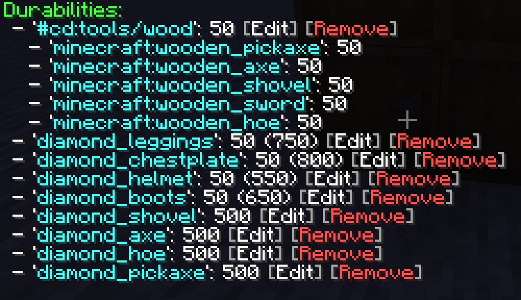
- 点击
[Edit]将自动输入命令/cd set item <item_name> <previous_durability> - 点击
[Remove]将自动运行命令/cd clear <item_name>
- 每次您点击删除(或运行删除命令)时,它会再次列出所有物品,因此请确保您始终滚动到底部。(我对这种行为感觉有些不确定,如果您认为这样不好,请告诉我!)
- 如果启用了护甲乘数配置,还会显示护甲的实际耐久度。
- 此外,只要可能,还会显示物品标签的所有内容。
更新了 /cd set <item_name> <durability>
现在您必须指定以下之一:
item,用于指定实际的 Minecraft 物品或标签。wildcard,您现在可以尝试使用通配符批量添加内容!(我想说的是我实现了自己的通配符解析器,在我的所有测试中它都运行完美,但如果看起来不配合,请告诉我!)
item 示例:
/cd set item minecraft:diamond_pickaxe 100/cd set item #cd:tools/diamond 100
wildcard 示例:
/cd set wildcard minecraft:*diamond* 100/cd set wildcard minecraft:*wooden* 100/cd set wildcard minecraft:diamond* 100/cd set wildcard minecraft:*diamond 100
- 1 和 2 的作用是添加任何以
minecraft:开头且 ID 中包含diamond或wooden的物品! - 3 添加任何以
minecraft:diamond开头并以任意字符结尾的内容,因此minecraft:diamond_pickaxe将匹配。 - 4 添加任何以
minecraft:开头并以diamond结尾的内容,因此minecraft:pickaxe_diamond将匹配,尽管这不是一个真实的物品。
上下文
当您运行 /cd set wildcard <string> <durability> 时,它不会立即将匹配的物品添加到您的配置中,而是将它们添加到临时上下文中,您可以先清理任何不需要的匹配项。
假设您运行 /cd set wildcard minecraft:*diamond* 100,这会将所有钻石护甲和钻石工具添加到您的上下文中,因此您可以有选择地删除或编辑要添加到配置中的项目!
这也引入了 /cd context 命令,该命令基本上具有与 /cd 内部完全相同的命令,即 list、clear、set,除了三个独特的命令:confirm、cancel 和 filter
-
confirm会将您当前上下文中的所有物品添加到您的配置中。 -
cancel将清除上下文。 -
filter将根据 4 个输入TOOL(工具)、WEAPON(武器)、ARMOUR(护甲)、OTHER(其他)过滤您当前上下文中的所有物品。- 确保您的上下文中有一些内容,然后运行例如:
/cd context filter TOOL,这将仅保留上下文中的工具。
- 确保您的上下文中有一些内容,然后运行例如:
-
set还增加了all命令,可将上下文列表中的所有耐久度设置为给定的耐久度
关于这个资源的讨论、问题反馈与使用心得
还没有讨论,来发第一帖吧
你是这个资源的作者?登录后可认领此资源。
相似资源
 模组

可定制的鞘翅模组,支持装饰纹饰、旗帜图案等更多功能!
 模组

显示你正在注视的方块的信息。(适用于 Minecraft 1.16+ 的 Hwyla/Waila 分支)
 模组

查看物品与配方
 模组
在游戏画面角落显示附近世界地形、玩家、生物和实体的地图。可创建路径点,帮助你找到标记过的位置。
 模组
使用 JavaScript 编辑配方、添加自定义物品、编写世界事件!
 模组
添加区块认领和玩家组队功能,并与 Xaero's Minimap 和 World Map 集成
评论 0
登录后参与评分
还没有评论,来抢沙发吧