
寻找 1.20 之前的 Fabric 版本?点击此处
概述
免责声明:所有信息均针对 1.21.1 版本。旧版本可能与本页提供的内容有所不同。
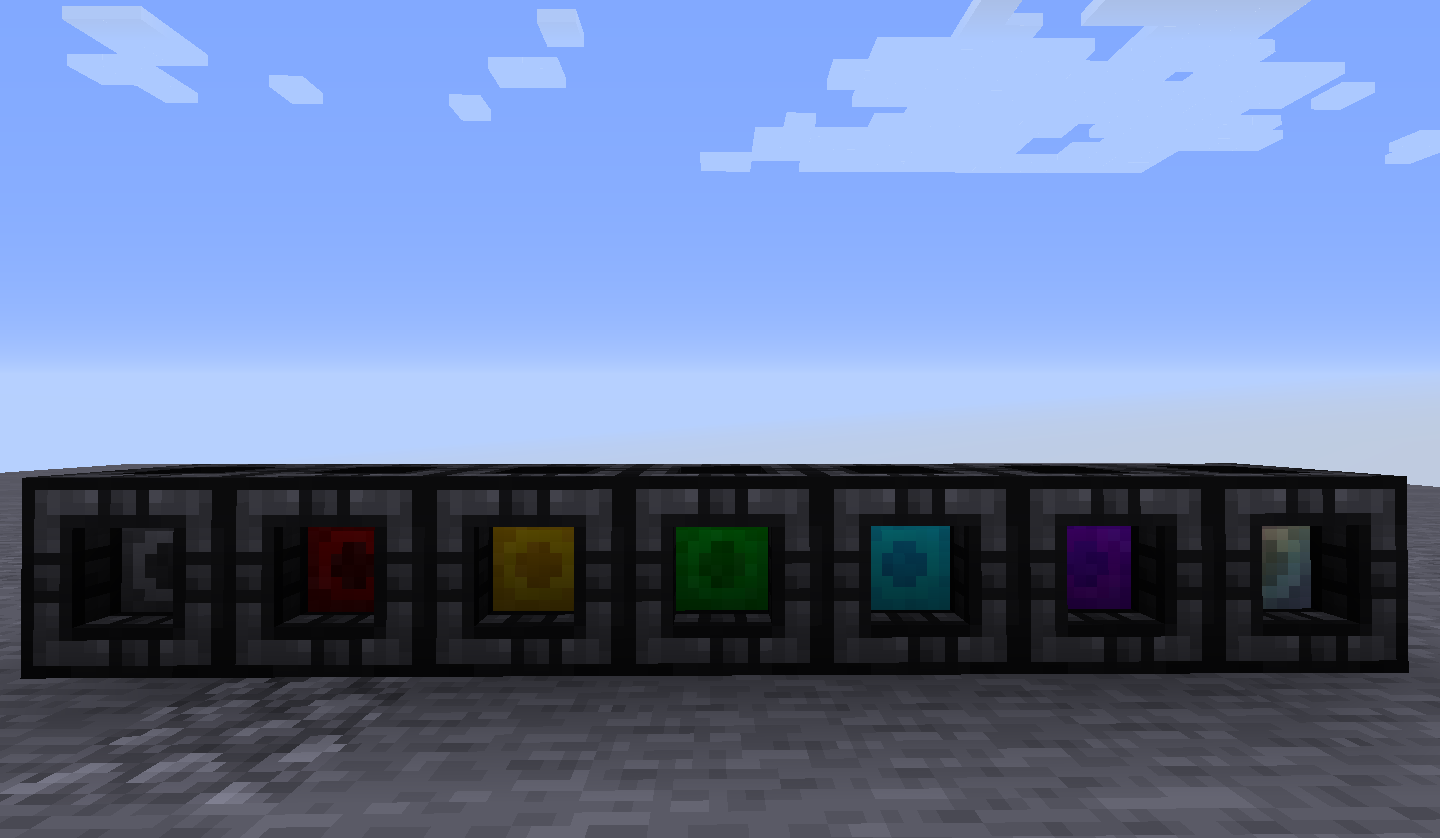
本模组添加了 7 种新型容器,它们既可作为存储设备,也可作为背包,功能远不止于此。为了简洁起见,下文将统称这些容器为 danks。
这些并非普通的存储容器,因为每个插槽都能容纳远超普通堆叠数量的物品,且容量随等级提升而增加。
每个等级的堆叠上限均可配置,具体数值已在工具提示中列出。不同颜色用于直观区分等级,默认设置如下:
1级(黑色):9 个插槽,256 件物品
2级(红色):18 个插槽,1024 件物品
3级(金色):27 个插槽,4096 件物品
4级(绿色):36 个插槽,16384 件物品
5级(青色):45 个插槽,65536 件物品
6级(紫色):54 个插槽,262144 件物品
7级(彩虹色):81 个插槽,2,147,483,647(32位整数上限)件物品
初始状态下有两种模式:建造模式(Construction)和背包模式(Bag)。手持 dank 时切换 usetype 按键可在两者间切换。
此外,还有一种名为 Dock(底座)的方块,可用于存放 danks 并使其与漏斗及其他存储系统交互。
Dock(底座):
Dock 具备 IItemHandler 能力,因此可以通过任何形式的项目传输系统进行插入/提取,并且兼容 Simple Storage Network 以及 RS/AE2。自 1.11 版本起,这一特性同样适用于其物品形态。
可以使用任何工具开采,但使用镐开采速度更快,且使用扳手可以瞬间拾取。
(注:本模组不使用任何特定的扳手,而是选择支持数据包(标签:items:forge:wrenches),因为已有超过 20 个模组添加了各自的扳手,这只会导致 JEI/物品栏杂乱无章。)
背包模式:
在背包模式下,dank 表现得像一个背包。
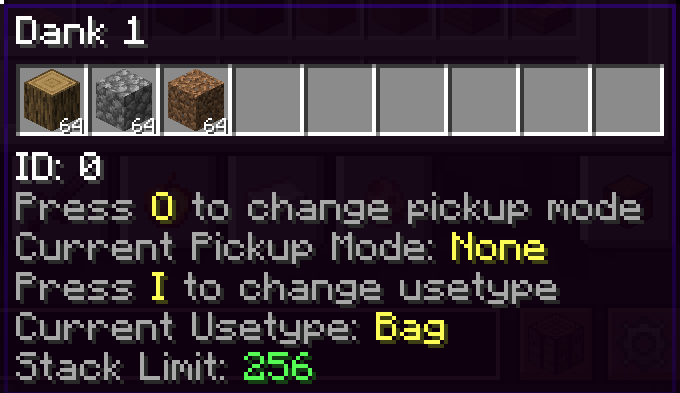
悬停查看工具提示时按住潜行键,可显示内部物品(受限于 10 个以避免遮挡屏幕)以及当前分配的快捷键。
GUI(图形用户界面)
右键点击即可打开界面,与传统背包模组类似,但内置了一些按钮。
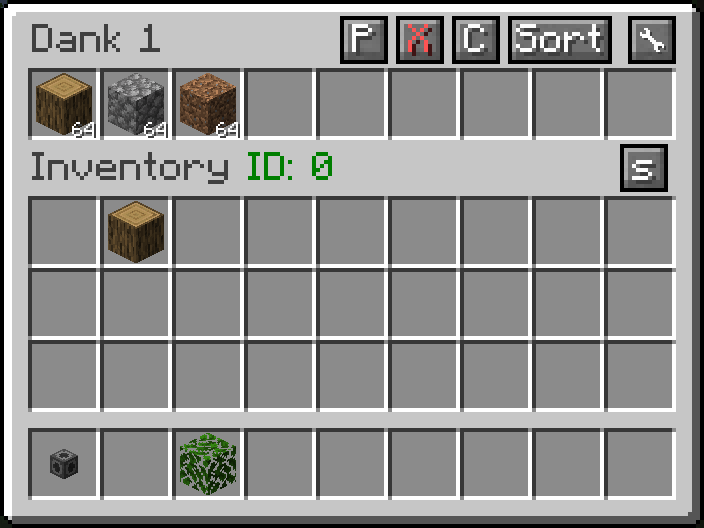
拾取(Pickup)- 从 GUI 更改 dank 的拾取模式
排序(Sort)- 按数量从大到小对物品进行排序。
警告:请勿使用其他模组的自动排序功能(如 Inventory Tweaks),因为它们无法与本模组的插槽正常工作,甚至可能导致物品丢失。建议在配置文件中将这些插槽列入黑名单。
其余两个按钮仅出现在便携形态中。
接下来是“标签”(Tag)按钮。
回想一下,当模组刚出现时,模组会添加自己的材料和物品供玩家制作。
随着整合包越来越大,许多常见材料开始重叠,导致整合包中出现 5 种以上的铜锭,浪费了库存空间。
为解决这一问题,Forge 引入了矿石词典(Ore Dictionary),允许预定义的材料组(如铜锭和矿石)在合成等操作中被视为相同。
后来,在 1.13 版本中,原版加入了一个扩展版本,涵盖了物品、方块、流体和实体类型。
标签按钮允许将模组数据包中定义的白名单物品标签转换为等效物品。
当通过 Shift 点击或其他方式收集符合条件的物品时,它会自动转换为已存在的等效物品,非常适合即时统一化。当然,如果没有适合统一化的标签,或者存在漏洞风险(例如 forge:skulls),创建新的数据包非常简单,或者你可以给我提建议,我会将其添加到默认列表中。
一些条件:
1) 只有已经包含在内的物品才符合拾取和丢弃的条件,因此不在 dank 内的物品永远不会被拾取或丢弃。
2) 只有当某个插槽达到最大容量时,多余物品才会被丢弃。
3) 不,在方块形态下不会丢弃任何物品,这是为了防止误操作变成垃圾桶。
NBT 数据:你可能会注意到 NBT 文本及其旁边的数字,这表示当前存储在 dank 中的数据量。当这个数字过大(超过 200 万)时,玩家可能会被专用服务器踢出且无法重新加入(这在原版中被称为“书籍封禁”)。这种情况可能发生在有人决定将一个背包嵌套在另一个背包,再嵌套进另一个……之中时。
有一个配置选项仅使用共享标签(默认禁用),这将阻止向客户端发送物品的完整 NBT 数据,但这有一个副作用。
启用此设置后,进入创造模式会删除物品的全部内容,这就是为什么默认设置为关闭的原因。请谨慎存储。
将任何物品添加到标签 dankstorage:blacklisted_items 后,该物品将无法通过手动操作或拾取存入 dank 储物盒中,系统会显示红色提示文本提醒用户。
建造模式:
现在才是真正的乐趣所在。真的开始吧。
在建造模式下,dank 储物盒无法被放置到地面上,并且会获得附魔光效以表明其处于建造模式。
在建造模式下,dank 储物盒会有一个选中的槽位。潜行 + 鼠标滚轮可以切换选中的槽位(跳过空槽位),同时 Pickblock(按 F7 键)功能也有效。
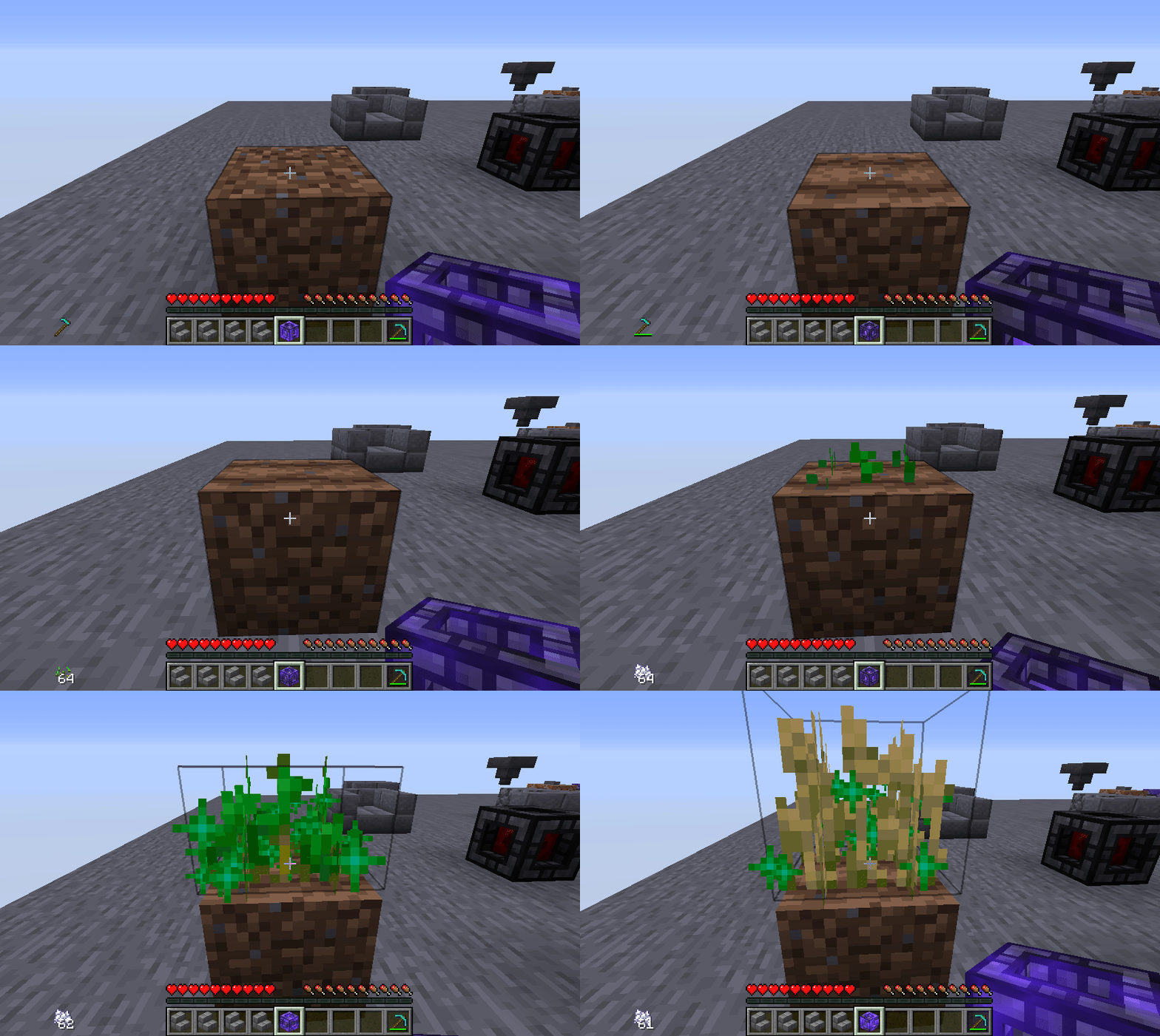
当 dank 处于此状态时,右键点击将尝试使用当前选中的物品,无论是方块、雪球还是剪刀。甚至药水以及大多数食物也可以通过这种方式消耗。
注意,目前并非所有物品都能正常工作,可能还存在一些隐藏的 Bug,但这些情况并不常见。以下是一些它能实现的效果示例。
其他说明
(仅适用于 1.15 和早期 1.16 版本)2.3+ 版本需要 MixinBootstrap,请将其放入 mods 文件夹
从 1.8 版本开始,槽位可以被锁定。锁定槽位会使其背景变为红色,并防止通过管道或手动提取其中的最后一个物品,这在设置过滤器时非常有用。
目前不影响输入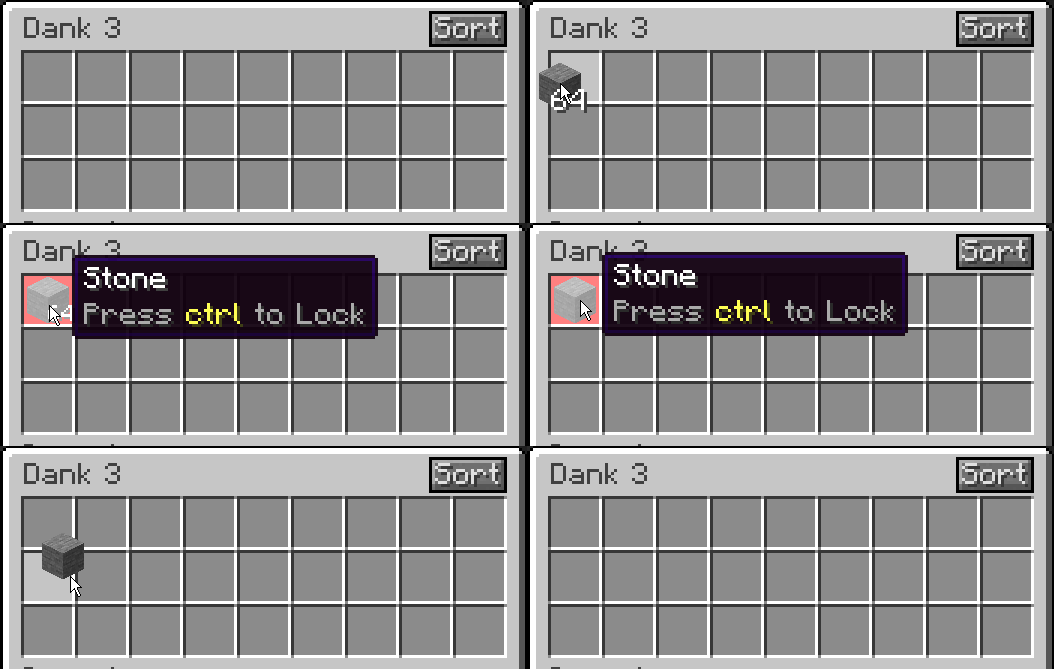
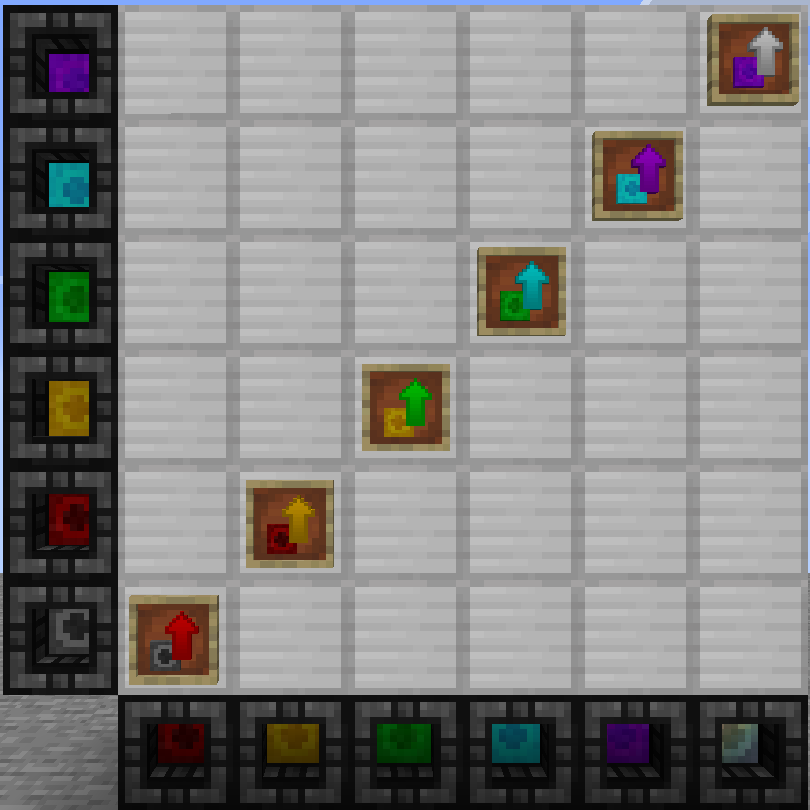
从 1.12 版本开始(指模组版本,而非 Minecraft 版本),存在升级道具,可用于升级固定的 dank,而无需将其破坏。
需要定制模组吗?费用合理。只是想聊聊?或者遇到问题需要进一步讨论?加入 Discord
想要支持本模组及其他模组?请捐赠到我的 Patreon
注意:本模组在任何情况下、任何形式上均不基于其他可能与此模组存在相似之处的模组;未从中获取任何代码、纹理或模型,任何声称相反情况的人要么是误解,要么是在撒谎。
任何与此相关的进一步评论或指责都将被删除,请勿无理取闹。
Looking for Fabric versions older than 1.20? click here
Overview
Disclaimer: all info pertains to the 1.21.1 version. Older versions may differ from what's provided on this page
This mod adds 7 new containers that function as both storage, and backpacks and so much more. These will be called danks from now on for the sake of brevity.
These aren't your typical storage containers because each slot can hold much more than a normal stack and gets larger with each tier.
Each tier can have it's stacksize configured which are fully configurable and listed on the tooltip. Colors provide a visual means of determining the tier at a glance, below are the defaults.
1(black): 9 slots, 256 items
2(red): 18 slots, 1024 items
3(gold): 27 slots, 4096 items
4(green): 36 slots, 16384 items
5(cyan): 45 slots, 65536 items
6(purple): 54 slots, 262144 items
7(rainbow): 81 slots, 2,147,483,647 (32-bit integer limit) items
To start off with, there are 2 modes: Construction and Bag. They can be switched between by toggling the usetype keybind with a dank in hand.
In addition, there is also a block called a Dock that can be used to hold danks and allow them to interact with hoppers and other storage systems
Dock:
They have the IItemHandler capability so they can be inserted/extracted with any form of item transport, and is compatible with Simple Storage Network and RS/AE2. as of 1.11, this also holds true for the item form as well.
They can be harvested with anything, but break faster with a pickaxe and can be picked up instantly with a wrench
(Note: this mod does not use any wrenches and opts for datapack support (tag: items:forge:wrenches) because there's already 20 different mods that add their own wrenches and it only adds to JEI/inventory clutter).
Bag Mode:
In bag mode, the dank acts like a backpack.
Sneaking while hovering the tooltip will show contained items (limited to 10 since it crowds the screen) and the currently assigned keybinds.
GUI
Right clicking it will open it just like any traditional backpack mod but it comes with a few buttons built in.
Pickup - Change the pickup mode of the dank from the GUI
Sort - sorts the items in order from largest to smallest number.
WARNING: Do NOT use any other mod's autosorter(such as Inventory Tweaks) as it will not work properly with the the slots and may even delete items. It would be a good idea to blacklist these slots in the config file.
The other 2 buttons are only found on the portable form
Next, the Tag button.
Once upon a time, when mods first came into existence, mods would add their own materials and items to craft with.
With the rise of larger and larger modpacks, many of the more common materials would start to overlap leading to modpacks having 5+ different copper ingots which is a waste of inventory space.
To combat this, Forge added the oredictionary which allowed sets of predefined materials such as copper ingots and ore to be treated as the same in crafting, etc.
Later, in 1.13, vanilla added an expanded version of this that included items, blocks, fluids, and entity_types.
The tag button allows whitelisted item tags that are defined in the mod's datapack to be eligible for conversion.
When an eligible item is collected through either shiftclicking or other means, it will convert into the already present item, great for on the go unification. Of course if there isn't a tag that makes sense for unification or one that would allow for exploits (cough forge:skulls), creating a new datapack is trivial, or just send me a suggestion and I'll add it to the defaults.
Some conditions:
1) only the items that are already contained will be eligible for pickup and voiding, so anything not in the dank will never be picked up, or voided
2) The items will only be voided when a slot has reached it's max capacity.
3) No, in block form nothing will be voided, this is to prevent accidental trashcans.
NBT: You may notice the NBT text and the number beside it, this is the amount of data currently in the dank storage, when this number gets too large (2 milllion+), the player may get kicked from a dedicated server and unable to rejoin (This is known in vanilla as a book ban). This can happen for example if someone decides to nest a backpack in a backpack in a backpack in a...
There is a config option to only use the share tag (disabled by default) which will stop the full nbt of the items being sent to the client, however this comes with a catch.
Going into creative mode will delete the entire contents of the item while this setting is enabled which is why it defaults to false. Store responsibly.
Adding any item to the tag dankstorage:blacklisted_items will prevent it from being stored in the dank either manually or via pickup, the user will be alerted with a red tooltip stating this.
Construction Mode:
Now this is where the fun really begins.
While in construction mode, the dank can no longer be placed down and will gain the enchantment glow to show that it's in construction mode.
While in construction mode, the dank storage has a selected slot, sneak - mousewheel will change the selected slot (skipping over empty ones), pickblock functionality also works as well
Right-clicking while the dank is in this state will attempt to use the currently selected item whether it be a block, a snowball, or even shears. Even potions and most food items can be consumed this way.
Note, this does not currently work with everything and there is likely some bugs lurking, but these are fairly uncommon. Here's a sample of what it can do.
Other Tidbits
(Only for 1.15 and early 1.16) 2.3+ requires MixinBootstrap, drop in mods folder
as of 1.8 slots can be locked. Locking a slot will give it a red background and prevent the last item from being extracted by pipes or by hand, useful for setting up filters.
Currently does not affect input
as of 1.12 (the mod version, not the mc version) there are upgrade items which can be used to upgrade a stationary dank without having to break it
Need a custom mod for a reasonable fee? Just want to chat? Have an issue needing additional discussion? Join the Discord
Want to help support this mod and others? donate to my Patreon
Notice: this is in no way, shape, or form based on another mod that may have similarities to this one; no code, textures, or models were taken from it and anyone who claims otherwise is either mistaken or lying.
Any further comments or accusations relating to this will be removed, don't be a jerk.
下载 Dank Storage
需要联机服务器吗?
稳定流畅、一键部署,几分钟即可和朋友联机开服
最低仅需 8 元/月 即可畅快联机
下载 Dank Storage
需要联机服务器吗?
稳定流畅、一键部署,几分钟即可和朋友联机开服
最低仅需 8 元/月 即可畅快联机
下载 Dank Storage
需要联机服务器吗?
稳定流畅、一键部署,几分钟即可和朋友联机开服
最低仅需 8 元/月 即可畅快联机
下载 Dank Storage
需要联机服务器吗?
稳定流畅、一键部署,几分钟即可和朋友联机开服
最低仅需 8 元/月 即可畅快联机
下载 Dank Storage
需要联机服务器吗?
稳定流畅、一键部署,几分钟即可和朋友联机开服
最低仅需 8 元/月 即可畅快联机
下载 Dank Storage
需要联机服务器吗?
稳定流畅、一键部署,几分钟即可和朋友联机开服
最低仅需 8 元/月 即可畅快联机
下载 Dank Storage
需要联机服务器吗?
稳定流畅、一键部署,几分钟即可和朋友联机开服
最低仅需 8 元/月 即可畅快联机
下载 Dank Storage
需要联机服务器吗?
稳定流畅、一键部署,几分钟即可和朋友联机开服
最低仅需 8 元/月 即可畅快联机
下载 Dank Storage
需要联机服务器吗?
稳定流畅、一键部署,几分钟即可和朋友联机开服
最低仅需 8 元/月 即可畅快联机
下载 Dank Storage
需要联机服务器吗?
稳定流畅、一键部署,几分钟即可和朋友联机开服
最低仅需 8 元/月 即可畅快联机
* 修复物品组件未从 dock 复制的问题。
关于这个资源的讨论、问题反馈与使用心得
还没有讨论,来发第一帖吧
你是这个资源的作者?登录后可认领此资源。
相似资源
 模组

一个用于收集生物掉落物的多区块模组。
 模组
AE2:一款流行的自动化与存储模组
 模组

基于 GTCEu 1.12.2 的现代 GregTech
 模组

让你能够在世界中的任何位置定位结构。
 模组
高科技机械、强大的能量生成、炫酷的小工具以及更多内容。现已登陆 Modrinth!
 模组

更聪明地交易,随处存储,并用奇妙的原版增强机制打造更好的体验。
评论 0
登录后参与评分
还没有评论,来抢沙发吧