
注意:这是适用于 1.20 以下版本的 Fabric 项目,如果您正在寻找 Forge 版本,请点击此处。1.20 及更新版本的 Fabric 版本已移至 Forge 页面。
概述
免责声明:所有信息均基于 1.16(或当时相关的 Minecraft 版本),功能可能因 Minecraft 版本不同而有所差异。
此模组添加了 7 种新型容器,它们既可以作为存储设备,也可以作为背包等用途。为了简洁起见,下文将统称为“danks”。
此外,还有一个名为 Dock 的方块,可用于放置 dank 并使其与漏斗及其他存储系统进行交互。
这些并非普通的存储容器,因为每个槽位可容纳的物品数量远超普通堆叠,且随着等级提升容量还会增加。
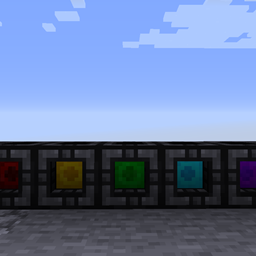
~~每个等级的堆叠上限均可配置~~ 具体数值待定,并将显示在工具提示中。颜色提供了一种直观判断等级的方法,以下是默认设置。
1级(黑色):9 个槽位,256 个物品
2级(红色):18 个槽位,1024 个物品
3级(金色):27 个槽位,4096 个物品
4级(绿色):36 个槽位,16384 个物品
5级(青色):45 个槽位,65536 个物品
6级(紫色):54 个槽位,262144 个物品
7级(彩虹色):81 个槽位,Integer.MAX_VALUE 个物品
首先有两种模式:Construction(建造/结构)模式和 Bag(背包)模式。手持 dank 时切换 usetype 键绑定即可在这两种模式之间切换。
Dock:
所有 dank 都可以放置在 Dock 中,并以类似箱子的方式进行交互。
它们会暴露容器/库存接口,因此可以使用大多数物品传输方式插入或提取物品,并且兼容 Simple Storage Network 和 RS/AE2。
Dock 可以用任何工具采集,但使用镐开采速度更快,并且使用扳手可以瞬间拾取。
空手按住 Shift 右键点击 Dock 会移除其中插入的 dank,但不会破坏 Dock 本身。
(注意:本模组不使用任何特定的扳手,而是选择支持数据包(标签:items:forge:wrenches),因为已经有 20 多种模组添加了各自的扳手,这只会增加 JEI/库存的杂乱程度。)
Bag 模式:
在 Bag 模式下,dank 表现得像一个背包。
当鼠标悬停在工具提示上并按住 Shift 时,将显示内部包含的物品(限制为 10 个,以免屏幕拥挤)以及当前分配的键绑定。
右键点击它将像传统的背包模组一样打开界面,但它自带了一些内置按钮。
首先是 Sort(排序)按钮,箱子中也存在该按钮,它会将物品按数量从大到小进行排序。
警告:请勿使用其他模组的自动整理器(如 Inventory Tweaks),因为它们无法与此模组的槽位正常工作,甚至可能导致物品删除。建议在配置文件中将这些槽位加入黑名单。
另外两个按钮仅存在于便携形式中。
接下来是 Tag(标签)按钮。
很久以前,当模组刚刚兴起时,模组会添加自己的材料和物品以供合成。
随着整合包越来越大,许多常见材料开始重叠,导致整合包中出现 5 种以上的铜锭,这浪费了库存空间。
为了解决这个问题,Forge 添加了 Oredictionary(矿物词典),允许预定义的材料组(如铜锭和矿石)在合成等方面被视为相同。
后来,在 1.13 版本中,原版添加了一个扩展版本,其中包括物品、方块、流体和实体类型。
Tag 按钮允许模组数据集中定义的白名单物品标签参与转换。
当通过 Shift 点击或其他手段收集符合条件的物品时,它将被转换为已存在的同类物品,非常适合即时统一化。当然,如果没有适合统一化的标签,或者存在漏洞利用风险的标签(咳 forge:skulls),创建新的数据包非常简单,或者您可以发送建议给我,我会将其添加到默认设置中。
最后是 Pickup(拾取)按钮。
按下自动拾取键绑定(默认为 p)后,它将自动拾取任何掉落的物品直到背包满为止,溢出的物品将进入玩家背包或下一个 dank。出于理智原因,此功能在 dank 的 GUI 界面中不起作用。
一些条件说明:
1) 只有已经包含在 dank 中的物品才有资格被拾取和销毁,因此不在 dank 中的物品永远不会被拾取或销毁。
2) 只有当某个槽位达到其最大容量时,物品才会被销毁。
3) 不,在方块形式下不会销毁任何物品,这是为了防止意外变成垃圾桶。
NBT:您可能会注意到 NBT 文本及其旁边的数字,这表示当前 dank 存储中的数据量。当这个数字变得太大(超过 200 万+)时,玩家可能会被专用服务器踢出且无法重新加入(这在原版中被称为“书籍禁令”)。例如,如果有人决定在一个背包里嵌套另一个背包,再嵌套一个……就会发生这种情况。
有一个配置选项可以仅使用共享标签(默认禁用),这将阻止向客户端发送物品的完整 NBT 数据,但这有一个副作用。
启用此设置后,进入创造模式将删除物品的所有内容,这就是为什么它默认为 false 的原因。请负责任地存储。
将任何物品添加到标签 dankstorage:blacklisted_items 中,将防止其被手动或通过自动拾取存储在 dank 中,用户将会收到红色工具提示警告。
Construction 模式:
现在,真正的乐趣才刚刚开始。
在施工模式下,Dank 无法被放置,并且会获得附魔光效以表明其处于施工模式。
在施工模式下,Dank 存储会选中一个槽位,潜行 + 鼠标滚轮可以切换选中的槽位(跳过空槽位),拾取物品功能也同样有效。
当 Dank 处于此状态时,右键点击将尝试使用当前选中的物品,无论是方块、雪球还是剪刀。甚至药水和其他大多数食物也可以通过这种方式消耗。
请注意,目前这并非对所有物品都有效,且可能存在一些隐藏的 Bug,但这些情况相当少见。以下是一些它能做到的示例。
其他细节
自 1.6 版本起(请勿实际使用 1.6 或 1.7,它们会导致崩溃),插槽可以被锁定。锁定插槽会使其背景变为红色,并防止管道或手动操作从该插槽中提取最后一个物品,这在设置过滤器时非常有用。
目前不影响输入
自 1.12 版本起(指模组版本,而非 Minecraft 版本),存在升级道具,可用于升级固定式 Dank,而无需将其破坏。
需要定制模组?费用合理!只想聊聊?有复杂问题需要进一步讨论?欢迎加入 Discord:
想要支持本模组及其他模组?请点击下方链接捐赠我的 Patreon
点击上面的图片,选择一个计划,并使用代码tfarecnim享受首月25% OFF优惠!
Note: This is the Fabric project for versions older than 1.20, if you're looking for Forge, click here. Fabric versions for 1.20 and newer have moved to the Forge page.
Overview
Disclaimer: all info pertains to the 1.16 (or whatever mc version is relevant at the time), features may differ between mc versions
This mod adds 7 new containers that function as both storage, and backpacks and so much more. These will be called danks from now on for the sake of brevity.
In addition, there is also a block called a Dock that can be used to hold danks and allow them to interact with hoppers and other storage systems
These aren't your typical storage containers because each slot can hold much more than a normal stack and gets larger with each tier.
~~Each tier can have it's stacksize configured~~ pending and listed on the tooltip. Colors provide a visual means of determining the tier at a glance, below are the defaults.
1(black): 9 slots, 256 items
2(red): 18 slots, 1024 items
3(gold): 27 slots, 4096 items
4(green): 36 slots, 16384 items
5(cyan): 45 slots, 65536 items
6(purple): 54 slots, 262144 items
7(rainbow): 81 slots, Integer.MAX_VALUE items
To start off with, there are 2 modes: Construction and Bag. They can be switched between by toggling the usetype keybind with a dank in hand.
Dock:
All danks can be placed in a dock and interacted with similar to chests.
They expose Conatiner/inventory so they can be inserted/extracted with most forms of item transport, and is compatible with Simple Storage Network and RS/AE2.
The dock can be harvested with anything, but breaks faster with a pickaxe and can be picked up instantly with a wrench.
Sneak right-clicking the dock with an empty hand will remove any inserted dank, but not break the dock.
(Note: this mod does not use any wrenches and opts for datapack support (tag: items:forge:wrenches) because there's already 20 different mods that add their own wrenches and it only adds to JEI/inventory clutter).
Bag Mode:
In bag mode, the dank acts like a backpack.
Sneaking while hovering the tooltip will show contained items (limited to 10 since it crowds the screen) and the currently assigned keybind.
Right clicking it will open it just like any traditional backpack mod but it comes with a few buttons built in.
First, there's the Sort button, this is also on chests, it sorts the items in order from largest to smallest number.
WARNING: Do NOT use any other mod's autosorter(such as Inventory Tweaks) as it will not work properly with the the slots and may even delete items. It would be a good idea to blacklist these slots in the config file.
The other 2 buttons are only found on the portable form
Next, the Tag button.
Once upon a time, when mods first came into existence, mods would add their own materials and items to craft with.
With the rise of larger and larger modpacks, many of the more common materials would start to overlap leading to modpacks having 5+ different copper ingots which is a waste of inventory space.
To combat this, Forge added the oredictionary which allowed sets of predefined materials such as copper ingots and ore to be treated as the same in crafting, etc.
Later, in 1.13, vanilla added an expanded version of this that included items, blocks, fluids, and entity_types.
The tag button allows whitelisted item tags that are defined in the mod's datapack to be eligible for conversion.
When an eligible item is collected through either shiftclicking or other means, it will convert into the already present item, great for on the go unification. Of course if there isn't a tag that makes sense for unification or one that would allow for exploits (cough forge:skulls), creating a new datapack is trivial, or just send me a suggestion and I'll add it to the defaults.
Last, the Pickup Button
When the autopickup keybind (default p) is pressed, it will automatically pick up any dropped items until it is full, and overflow will go to the player inventory or the next dank, this feature does not function while in the gui of a dank for sanity reasons.
Some conditions:
1) only the items that are already contained will be eligible for pickup and voiding, so anything not in the dank will never be picked up, or voided
2) The items will only be voided when a slot has reached it's max capacity.
3) No, in block form nothing will be voided, this is to prevent accidental trashcans.
NBT: You may notice the NBT text and the number beside it, this is the amount of data currently in the dank storage, when this number gets too large (2 milllion+), the player may get kicked from a dedicated server and unable to rejoin (This is known in vanilla as a book ban). This can happen for example if someone decides to nest a backpack in a backpack in a backpack in a...
There is a config option to only use the share tag (disabled by default) which will stop the full nbt of the items being sent to the client, however this comes with a catch.
Going into creative mode will delete the entire contents of the item while this setting is enabled which is why it defaults to false. Store responsibly.
Adding any item to the tag dankstorage:blacklisted_items will prevent it from being stored in the dank either manually or via pickup, the user will be alerted with a red tooltip stating this.
Construction Mode:
Now this is where the fun really begins.
While in construction mode, the dank can no longer be placed down and will gain the enchantment glow to show that it's in construction mode.
While in construction mode, the dank storage has a selected slot, sneak - mousewheel will change the selected slot (skipping over empty ones), pickblock functionality also works as well
Right-clicking while the dank is in this state will attempt to use the currently selected item whether it be a block, a snowball, or even shears. Even potions and most food items can be consumed this way.
Note, this does not currently work with everything and there is likely some bugs lurking, but these are fairly uncommon. Here's a sample of what it can do.
Other Tidbits
as of 1.6 (don't actually use 1.6 or 1.7 they will crash) slots can be locked. Locking a slot will give it a red background and prevent the last item from being extracted by pipes or by hand, useful for setting up filters.
Currently does not affect input
as of 1.12 (the mod version, not the mc version) there are upgrade items which can be used to upgrade a stationary dank without having to break it
Need a custom mod for a reasonable fee? Just want to chat? Have a complex issue needing additional discussion? Come join the Discord:
Want to help support this mod and others? donate to my Patreon in the link below
Click on the picture above, select a plan, and use code tfarecnim for 25% OFF your first month!
下载 Dank Storage Fabric
需要联机服务器吗?
稳定流畅、一键部署,几分钟即可和朋友联机开服
最低仅需 8 元/月 即可畅快联机
下载 Dank Storage Fabric
需要联机服务器吗?
稳定流畅、一键部署,几分钟即可和朋友联机开服
最低仅需 8 元/月 即可畅快联机
下载 Dank Storage Fabric
需要联机服务器吗?
稳定流畅、一键部署,几分钟即可和朋友联机开服
最低仅需 8 元/月 即可畅快联机
下载 Dank Storage Fabric
需要联机服务器吗?
稳定流畅、一键部署,几分钟即可和朋友联机开服
最低仅需 8 元/月 即可畅快联机
下载 Dank Storage Fabric
需要联机服务器吗?
稳定流畅、一键部署,几分钟即可和朋友联机开服
最低仅需 8 元/月 即可畅快联机
下载 Dank Storage Fabric
需要联机服务器吗?
稳定流畅、一键部署,几分钟即可和朋友联机开服
最低仅需 8 元/月 即可畅快联机
下载 Dank Storage Fabric
需要联机服务器吗?
稳定流畅、一键部署,几分钟即可和朋友联机开服
最低仅需 8 元/月 即可畅快联机
下载 Dank Storage Fabric
需要联机服务器吗?
稳定流畅、一键部署,几分钟即可和朋友联机开服
最低仅需 8 元/月 即可畅快联机
下载 Dank Storage Fabric
需要联机服务器吗?
稳定流畅、一键部署,几分钟即可和朋友联机开服
最低仅需 8 元/月 即可畅快联机
下载 Dank Storage Fabric
需要联机服务器吗?
稳定流畅、一键部署,几分钟即可和朋友联机开服
最低仅需 8 元/月 即可畅快联机
* 修复了捆绑物品在 danks 中可堆叠导致重复利用漏洞的问题
关于这个资源的讨论、问题反馈与使用心得
还没有讨论,来发第一帖吧
你是这个资源的作者?登录后可认领此资源。
相似资源
 模组
AE2:一款流行的自动化与存储模组
 模组

基于 GTCEu 1.12.2 的现代 GregTech
 模组
高科技机械、强大的能量生成、炫酷的小工具以及更多内容。现已登陆 Modrinth!
 模组

更聪明地交易,随处存储,并用奇妙的原版增强机制打造更好的体验。
 模组
自动附魔,搭配 Create
 模组

一款适用于 Fabric/(Neo)Forge 的模组,添加了各种各样的便利性功能(QoL),包括容器搜索、精确库存管理、酷炫的视觉效果等等!
评论 0
登录后参与评分
还没有评论,来抢沙发吧