中文介绍:GitHub | MC 百科
前言
本数据包遵循 GNU LESSER GENERAL PUBLIC LICENSE 开源协议。
本数据包为开发者提供了一些实用的功能(以及部分对话内容),兼容所有 Minecraft 版本(除无法安装数据包的版本外)。
然而,由于该数据包涉及的命令数量庞大,较低版本的客户端可能无法使用全部功能。下文将不逐一说明各功能的适用版本。
请同时安装资源包以使用本地化内容(v3.2+)。否则,数据包语言将默认使用 zh_cn。
本数据包的模组版本通过 Modrinth 打包发布,内容与数据包版本完全一致,但不一定是最新版本。建议尽量使用数据包版本。
本数据包提供了一个 dfl:dfl_enable 函数,用于将玩家 dfl_enable 在 dfl_scoreboard 记分板中的分数设置为 1,方便依赖此数据包的其他数据包或模组检测其是否已加载。
示例:
#数据包加载时执行:
scoreboard objectives add dfl_scoreboard dummy
scoreboard players set dfl_enable dfl_scoreboard 0
#如果未加载:
function dfl:dfl_enable
execute unless score dfl_enable dfl_scoreboard matches 1
#如果已加载:
function dfl:dfl_enable
execute if score dfl_enable dfl_scoreboard matches 1
注意:某些函数附带“前置函数”。在执行这些函数之前,必须先执行一次其前置函数。
部分函数用法后附有 {xx:"xx"}。这些函数属于宏函数。使用时,需通过 {<参数名>:"<内容>"} 传递参数(用法中的参数为作者在开发期间测试的推荐参数,或作者用于测试的参数)。参数名(如 num)在文中以 {num} 形式表示。参数格式可参考函数用法说明,特殊格式将另行解释。
如果遇到任何问题,请点击 这里 提交反馈。
功能说明
开始
本类别中的功能建议在数据包加载(重载)时执行。
禁用特殊伤害
功能用法:/function dfl:start/disable_special_damage
将重生点固定为 0 0
功能用法:/function dfl:start/set_world_spawn
- 将世界重生点设置为 0 0 0;
- 将重生点半径设置为 0;
- 此时,玩家将被固定在坐标 0 0 的最高方块处重生。
启用死亡排行榜
功能用法:/function dfl:start/show/enable_death_scoreboard
- 创建一个名为 death 的计分板项目;
- 死亡人数将显示在屏幕右侧;
- 玩家死亡人数按从高到低排序;
- 注意:首次启用时,死亡排行榜不会显示,只有在任何玩家死亡后才会显示。
显示玩家生命值
功能用法:/function dfl:start/show/display_health_below_name
- 创建一个名为 health 的计分板项目;
- 玩家的生命值将显示在玩家 ID 下方;
- 如果距离稍远则不会显示(仅显示玩家 ID);
- 注意:首次启用时,生命值将显示为 0,只有在数值更新后(例如受伤)才会显示。
显示玩家经验等级
功能用法:/function dfl:start/show/display_level_in_tab
- 创建一个名为 level 的计分板项目;
- 每位玩家的体验等级将显示在 Tab 栏(玩家列表栏)中;
- 注意:首次启用时,经验等级将显示为 0,只有在数值更新后(例如升级)才会显示。
显示玩家生命条
功能用法:/function dfl:start/show/display_health_in_tab
- 创建一个名为 health 的计分板项目;
- 每位玩家的生命条将显示在 Tab 栏(玩家列表栏)中。
- 效果如下:

快速创建新队伍
功能用法:/function dfl:start/create_teams {team_blue:"blue",team_red:"red",prefix_blue:"blue",prefix_red:"red"}
- 创建两个名为 {team_blue} 和 {team_red} 的队伍;
- 颜色分别为蓝色和红色;
- 禁用同队玩家之间的友军伤害;
- 玩家只能与非同队实体发生碰撞;
- 玩家名称前缀分别为 {prefix_blue}_ 和 {prefix_red}_。
Tick
本类别中的函数建议每个 Tick 执行一次。
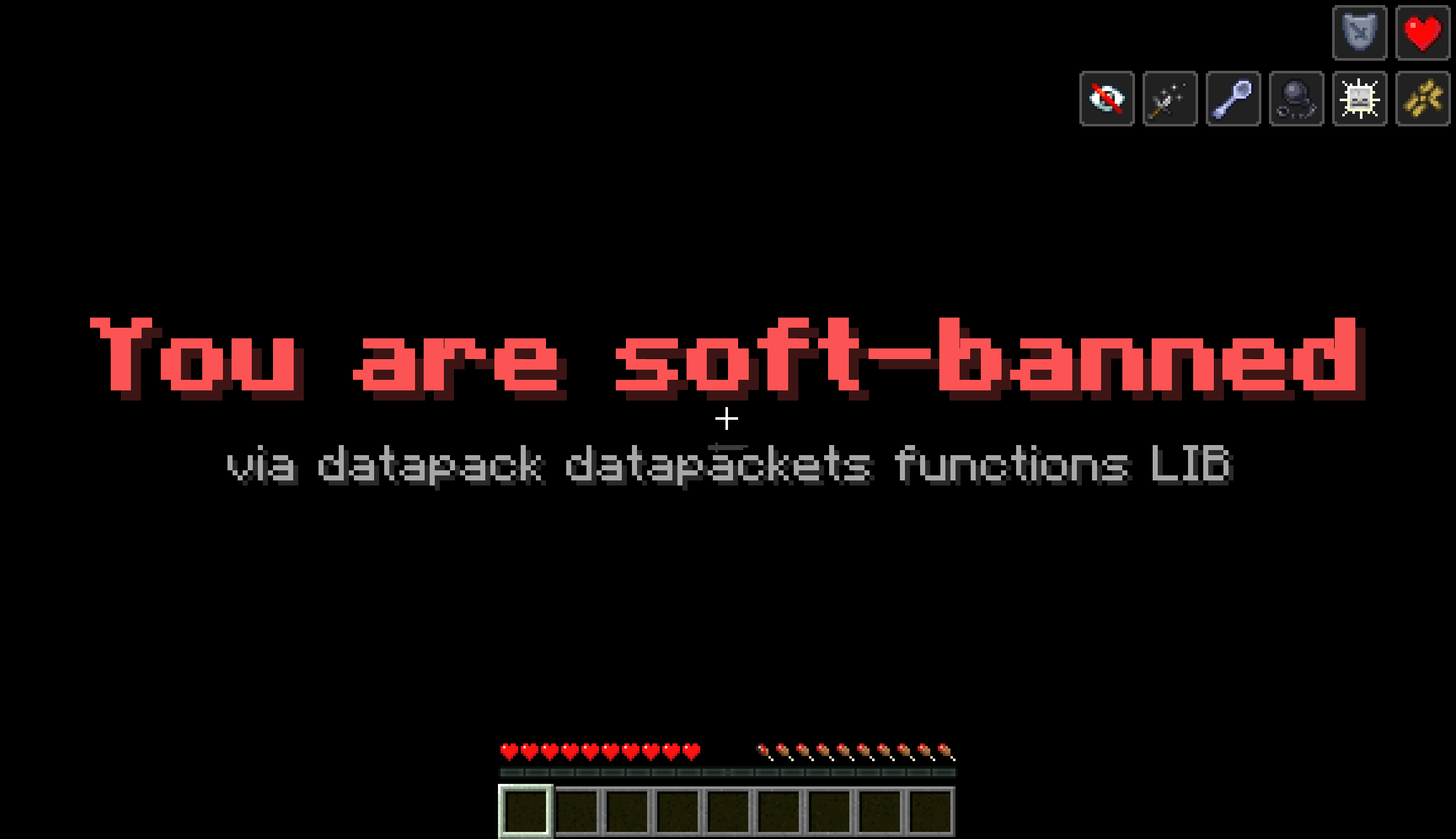
软封禁玩家
功能用法:/function dfl:tick/soft_ban_player {title:"Ban Reason",subtitle:"Note"}
- 注意:此函数的执行者必须是将被封禁的玩家,你可以使用
/execute 命令;
- 通过持续将玩家传送至坐标 0 0 0、将游戏模式设置为冒险模式,并持续给予玩家负面增益效果来实现软封禁;
- 必须在每个 Tick 执行一次;
- 标题为 {title},副标题为 {subtitle};
- 示例:
/execute as @a[tag=ban] run function dfl:tick/soft_ban_player {title:"Ban Reason",subtitle:"Note"}。
效果如下:

信标鞘翅起飞
函数用法:/function dfl:tick/beacon_fly
- 当信标下方有铁块、金块、绿宝石块、钻石块或下界合金块时,玩家将被向上传送(观察者不会被传送);
- 高度依次为 20、40、60、80 和 100 格;
- 相同类型的方块可以堆叠以增加高度(最高可达 400 格,使用四个下界合金块)。如果方块类型不同,将使用最靠近信标的方块。
一键负面状态效果
函数用法:/function dfl:tick/apply_debuffs
向函数执行者添加以下负面状态效果:
- 缓慢
- 挖掘疲劳
- 恶心
- 黑暗
- 饥饿
- 虚弱
- 中毒
- 霉运
- 试炼印记
铁块电梯
函数用法:/function dfl:tick/iron_block_elevator
- 当站在上下两个铁块之间时,将玩家向上传送;
- 最大传送距离为 6 格,即两个铁块之间的最大距离为 5 格;
- 不会传送观察者;
- 会传送生物和非生物实体。
实体过多时清理
函数用法:/function dfl:tick/kill_excess_entities {num:"1000"}
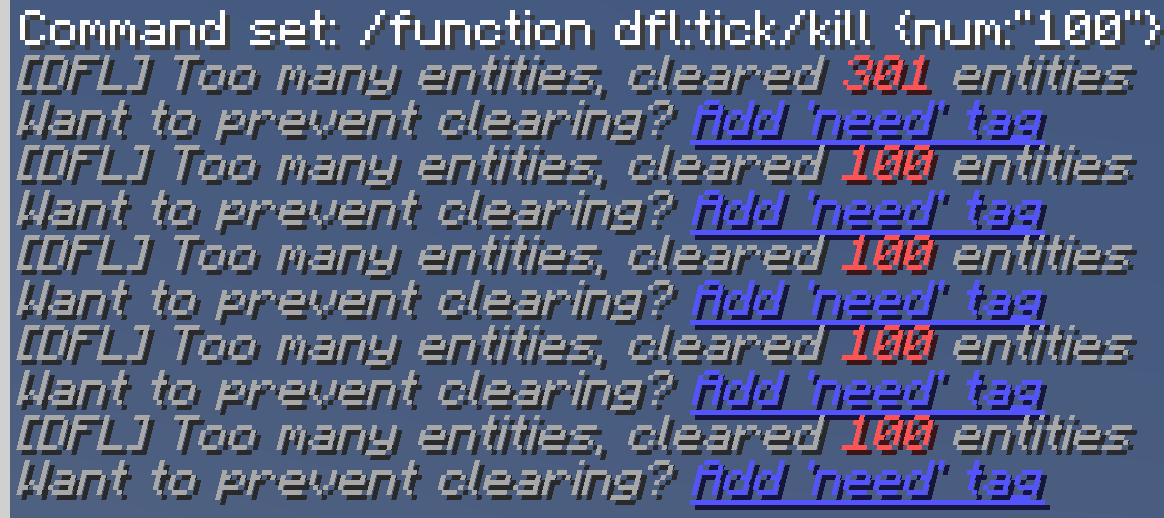
- 当非玩家实体数量大于 {num} 时,清除所有非玩家实体;
- 不会清除带有
need 标签的实体;
- 带有
need 标签的实体不计入此处实体数量统计;
- 创建一个名为
dfl_scoreboard 的分项板项目。
- 执行后,聊天栏中将显示提示,效果如下:
实体密度过高时清理
函数用法:/function dfl:tick/kill_by_density {num:"50"}
前置函数:/function dfl:lib/get_entity_density
- 当 10 格范围内的实体数量大于 {num} 时,清除这些实体;
- 不会杀死玩家;
- 不会杀死村民;
- 不会杀死带有
need 标签的实体;
- 不会在聊天栏留下痕迹。
Minecraft 太难了
函数用法:/function dfl:tick/mith
- 开启死亡后保留物品;
- 给予执行者夜视效果;
- 给予执行者发光效果;
- 移除执行者的黑暗效果。
显示实体数量
函数用法:/function dfl:tick/display_entity_count
前置函数:/function dfl:lib/get_entity_count
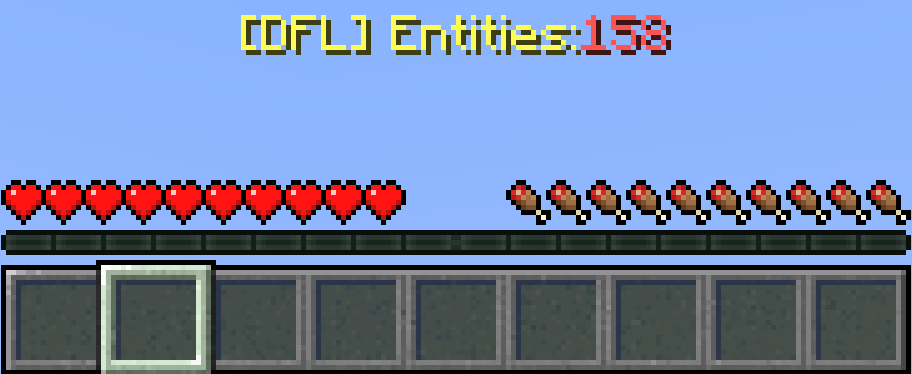
- 在玩家的行动栏(快捷栏上方)显示实体的实时数量。
- 效果如下:
禁用玩家友军伤害和碰撞
函数用法:/function dfl:tick/disable_friendly_fire
- 添加一个名为
dfl 的队伍并将所有玩家加入该队伍;
- 注意:由于同一实体不能加入多个队伍,如果您想使用玩家队伍功能,请勿启用此函数;
- 禁用队伍内的友军伤害;
- 禁用队伍内的碰撞;
- 如果此函数不是每个 Tick 都运行,请确保在每位新玩家加入后运行一次此函数。
TNT 实体密度过高时清理
函数用法:/function dfl:tick/kill_tnt_by_density {num:"200"}
- 当 TNT 周围五格内的 TNT 实体数量大于 {num} 时,清除这些 TNT 实体;
- 创建一个名为
dfl_tntdensity 的分项板项目。
无权限玩家自杀
函数用法:/function dfl:tick/trigger_suicide
- 创建一个名为
kill 的分项板项目;
- 输入
/trigger kill 即可自杀(此命令不需要任何权限)。
大范围替换方块
函数用法:/function dfl:tick/change_block {new:"glass",old:"stone",num:"30"}
- 以命令执行者为中心,在一个边长为 {num}*2+1 的立方体内,将 {old} 替换为 {new};
- 将游戏规则
maxBlockModification 设置为 2147483647。
永远白天 + 永远晴朗
函数用法:/function dfl:tick/always_sunny
- 关闭昼夜循环;
- 关闭天气变化;
- 将时间设置为白天;
- 将天气设置为晴朗。
清除单个物品并执行命令
函数用法:/function dfl:tick/clear_and_execute_single {namespace:"minecraft",name:"stone",run:"tp ~ 100 ~"}
- 从所有玩家处清除一个 {namespace}:{name} 并执行 {run};
- 注意:
run 参数中的命令前后不应有多余空格,且命令前不应有斜杠。
清除指定物品并多次执行命令
函数用法:/function dfl:tick/clear_and_execute_multiple {namespace:"minecraft",name:"sand",run:"give @s anvil"}
- 清除函数执行者的所有 {namespace}:{name} 并执行相应数量的 {run} (在同一 Tick 内);
- 注意:
run 参数中的命令前后不应有多余空格,且命令前不应有斜杠。
保持拥有特定数量物品
函数用法:/function dfl:tick/maintain_item_count {namespace:"minecraft",name:"slime_block",num:"64"}
- 使命令执行者恰好拥有指定数量的 {namespace}:{name}。
自救平台
函数用法:/function dfl:tick/create_rescue_platform
前置函数:/function dfl:lib/get_game_time
- 创建一个名为
dfl_slime_marker_temp 的记分板项目,用于存储粘液平台生成的时间;
- 在玩家下方生成一个带有
dfl_slime 标签的 3x3 粘液平台,并在生成后移除该标签。粘液平台只能覆盖空气方块;
<slime_time's dfl_scoreboard scoreboard item> 刻之后,粘液平台位置的粘液块将被清除;- 当未分配时,
slime_time 的 dfl_scoreboard 记分板项目将设置为 200,即 10 秒;
- 平台生成时,位于玩家位置 2 格范围内的粘液块掉落物将被清除。
将物品转换为经验值
函数用法:/function dfl:tick/convert_items_to_xp {namespace:"minecraft",name:"tnt",xp:"1"}
- 将函数执行者身上的每个
{namespace}:{name} 物品转换为 {xp} 点经验值。
tpa(传送请求)
函数用法:/function dfl:tick/teleport_request
前置函数:/function dfl:lib/generate_player_id
-
创建名为 tpa 和 tpa_enable 的记分板项目;
-
输入 /trigger tpa set <玩家在游戏内记分板 dfl_playerid 中的 ID,可通过按 Tab 键查看> 以传送至对应的玩家;
-
输入 /trigger tpa_enable 以允许其他玩家传送至自身,此设置不可撤销(若未执行此命令,则所有其他玩家均无法传送至该玩家)。如果在此命令中使用 set 来设置其他值,将不会产生任何效果(其他玩家将不会被允许传送至自身)。你仍可通过 set 再次将其设置为 1,以允许其他玩家传送至自身;
-
如果目标玩家不存在或未允许其他玩家传送至自身,则待对应玩家 ID 可传送后,该玩家将被传送至对应的目标玩家。在此期间,tpa 对象仍可随意更改。
自动熔炼
功能用法:/function dfl:tick/smelt_item {input_namespace:"minecraft",input:"raw_iron",fuel_namespace:"minecraft",fuel:"coal_block",output:"iron_ingot",amount:"9"}
- 消耗一个 {fuel_namespace}:{fuel} 和多个 {input_namespace}:{input};
- 将对应数量的 {output} 给予函数执行者,作为对 {input_namespace}:{input} 的处理结果;
- {input} 不能包含
:,{output} 可以;
- 熔炼物品会消耗 1 点经验值。如果玩家没有经验值,则该物品不会被熔炼;
- {amount} 表示一个 {fuel_namespace}:{fuel} 能够熔炼的物品数量。
使用燃料进行自动熔炼
函数用法:/function dfl:tick/coal_smelt {input_namespace:"minecraft",input:"raw_iron",output:"iron_ingot"}
- 消耗
{input_namespace}:{input},并向函数执行者提供相应数量的 {output};
- 烧炼物品会消耗 1 点经验值。如果玩家没有经验值,则不会进行烧炼;
- 如果背包中同时存在三种支持的燃料,这些燃料将同时被消耗;
- 消耗一个煤块后,可同时烧炼 9 个物品,并扣除 9 点经验值。
Timer(计时器)
本类别中的函数建议在一段时间后再执行。(你可以使用 /schedule 命令)
清理掉落物
函数用法:/function dfl:timer/clear_items
- 创建一个名为
dfl_scoreboard 的记分板项目;
- 清除所有掉落物,并通过
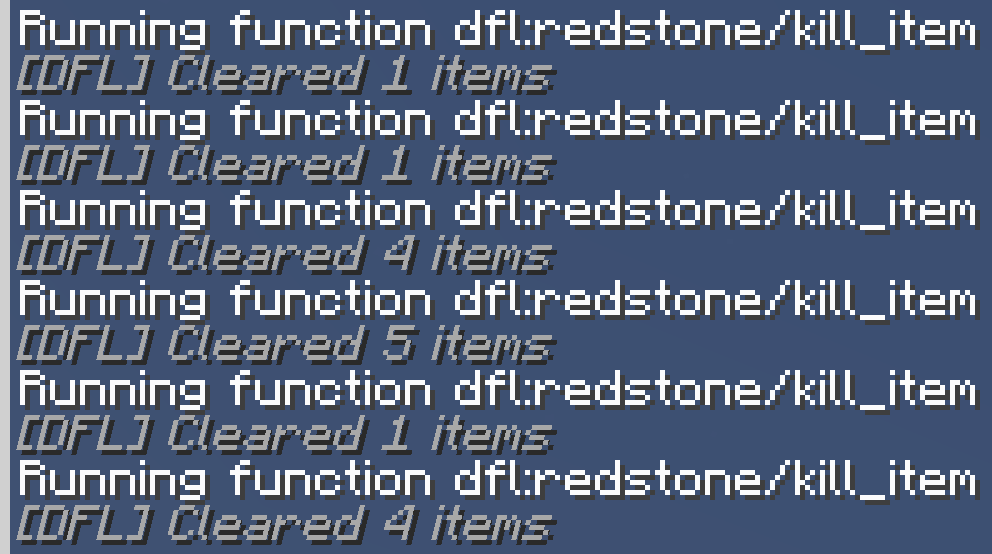
/tellraw 输出已清除的掉落物数量;
- 不会清除带有
need 标签的掉落物。
- 效果如下:
显示实体数量信息
函数用法:/function dfl:timer/display_entity_info
前置函数:
/function dfl:lib/get_entity_count
/function dfl:lib/get_item_count
/function dfl:lib/non_player_entities
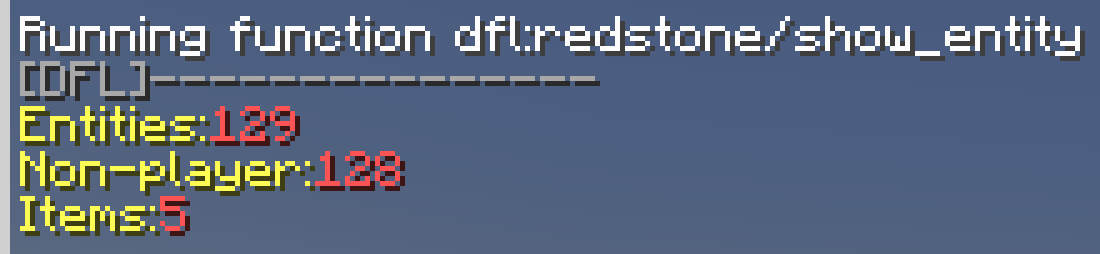
此函数的效果如下:
Lib(库)
本类别中的函数单独执行时无效或不属于上述分类。
强制死亡掉落
函数用法:/function dfl:lib/force_death_drops
- 关闭“死亡后保留物品”选项。
- 杀死函数执行者。
- 重新开启“死亡后保留物品”选项。
获取实体数量
函数用法:/function dfl:lib/get_entity_count
- 创建一个名为
dfl_scoreboard 的记分板项目;
- 将实体数量写入对应实体的
dfl_scoreboard 记分板项目中。
获取实体密度
函数用法:/function dfl:lib/get_entity_density
- 创建一个名为
dfl_density 的记分板项目;
- 将所有实体周围 10 格内的实体数量写入该实体的记分板项目中。
获取掉落物数量
函数用法:/function dfl:lib/get_item_count
- 创建一个名为
dfl_scoreboard 的记分板项目;
- 将掉落物数量写入对应物品的
dfl_scoreboard 记分板项目中。
获取非玩家实体数量
函数用法:/function dfl:lib/non_player_entities
- 创建一个名为
dfl_scoreboard 的记分板项目;
- 将非玩家实体数量写入
other_entity 对应的 dfl_scoreboard 记分板项目中。
获取游戏天数
函数用法:/function dfl:lib/get_game_day
- 创建一个名为
dfl_scoreboard 的记分板项目;
- 将游戏天数写入
dfl_scoreboard 记分板项目的 day 条目中;
- 游戏天数——指在昼夜循环期间经过的游戏天数,计算方法是将昼夜循环时间(24000 tick)除以 24000 并取整数商。
获取一天中的具体时间
函数用法:/function dfl:lib/get_day_time
- 创建一个名为
dfl_scoreboard 的计分板项目;
- 将一天中的时间写入
dfl_scoreboard 计分板的 daytime 项目中;
- 一天中的时间:自当天日出以来经过的游戏刻数,计算方法是将昼夜循环时间(24000)除以 24000 后取余数。
用玻璃包围玩家
函数用法:/function dfl:lib/create_glass_box
- 在命令执行者处生成一个 5x5 的空心玻璃立方体。
获取游戏时间
函数用法:/function dfl:lib/get_game_time
- 创建一个名为
dfl_scoreboard 的计分板项目;
- 将游戏时间写入
dfl_scoreboard 计分板的 gametime 项目中;
- 游戏时间:世界中经过的游戏刻总数。
获取玩家数量
函数用法:/function dfl:lib/get_player_count
- 创建一个名为
dfl_scoreboard 的计分板项目;
- 将玩家数量写入
dfl_scoreboard 计分板的 players 项目中。
修改最大生命值
函数用法:/function dfl:lib/change_max_health {num:"100"}
生成 UID
函数用法:/function dfl:lib/generate_player_id
- 创建名为
dfl_playerid 和 dfl_scoreboard 的计分板项目;
- 将 UID 使用进度存储在
dfl_scoreboard 计分板的 playerid_temp 项目中;
- 为所有玩家设置一个唯一且不可变的 UID,存储在
dfl_playerid 计分板中;
- UID 是一个大于等于 1 的数字。最早进入服务器的玩家拥有最小的数字,依此类推;
- 如果执行函数时服务器中有多个玩家,这些玩家的 UID 生成顺序是随机的。
检测物品数量
函数用法:/function dfl:lib/count_items {namespace:"minecraft",name:"stone"}
- 创建一个名为
dfl_{namespace}.{name}_count 的计分板项目;
- 将所有玩家拥有的
{namespace}:{name} 物品数量分别写入他们各自的计分板项目中。
获取实体位置
函数用法:/function dfl:lib/get_pos
- 分别创建名为
dfl_entity_pos_x、dfl_entity_pos_y 和 dfl_entity_pos_z 的计分板项目。
- 读取命令执行者的
Pos NBT 列表,并更新命令执行者在这些计分板项目中的分数。
- 使用
/execute as @a run function dfl:lib/get_pos 将所有玩家的位置写入这些计分板项目中。
对话框说明
GNU GPL 许可证文本
对话框用法:/dialog show dfl:gpl
- 此对话框包含 GNU GPL v3.0 许可证的原始文本。
GNU LGPL 许可证文本
对话框用法:/dialog show dfl:lgpl
- 此对话框包含 GNU LGPL v3.0 许可证的原始文本。
中文介绍:GitHub | MC 百科
Preface
This datapack is licensed under the GNU LESSER GENERAL PUBLIC LICENSE.
This datapack provides developers with some practical functions (and some dialogs), compatible with all versions of Minecraft (except for versions that cannot install datapacks).
However, due to the large number of commands involved in the datapack, lower versions may not be able to use all functions. The applicable versions of all functions will not be specified below.
Please install the resource pack at the same time to use localized content (v3.2+). Otherwise, the datapack language will default to zh_cn.
The mod version of this datapack is packaged through Modrinth, and the content is exactly the same as the datapack version, but it is not necessarily the latest version. Please try to use the datapack version.
This datapack provides a dfl:dfl_enable function, which sets the score of the player dfl_enable in the dfl_scoreboard scoreboard item to 1, which is convenient for datapacks or mods that depend on this datapack to detect whether this datapack is loaded.
Example:
#Execute when the datapack is loaded:
scoreboard objectives add dfl_scoreboard dummy
scoreboard players set dfl_enable dfl_scoreboard 0
#If not loaded:
function dfl:dfl_enable
execute unless score dfl_enable dfl_scoreboard matches 1
#If loaded:
function dfl:dfl_enable
execute if score dfl_enable dfl_scoreboard matches 1
Note: Some functions have "prerequisite functions" attached to their usage. These functions must be executed once before executing them.
Some function usages are followed by {xx:"xx"}. These functions are macro functions. When using them, you need to pass parameters through {<parameter name>:"<content>"} (the parameters in the usage are the recommended parameters tested by the author during development, or the parameters used by the author for testing). The parameter name (such as num) is expressed as: {num} in the text. The parameter format can refer to the function usage, and special formats will be explained.
If you encounter any problems, please click here to give feedback.
Function Description
Start
Functions in this category are recommended to be executed when the datapack is loaded (reloaded).
Disable Special Damage
Function usage: /function dfl:start/disable_special_damage
- Fall damage;
- Fire damage;
- Freeze damage;
- Drowning damage.
Fix the respawn point to 0 0
Function usage: /function dfl:start/set_world_spawn
- Set the world respawn point to 0 0 0;
- Set the respawn point radius to 0;
- At this time, the player will be fixed to respawn on the highest block at coordinate 0 0.
Enable death leaderboard
Function usage: /function dfl:start/show/enable_death_scoreboard
- Create a scoreboard item named death;
- The number of deaths will be displayed on the right side of the screen;
- The number of player deaths is sorted from high to low;
- Note: The death leaderboard will not be displayed when it is first enabled, and it will be displayed only after any player dies.
Display player health
Function usage: /function dfl:start/show/display_health_below_name
- Create a scoreboard item named health;
- The player's health will be displayed below the player's ID;
- It will not be displayed if the distance is slightly far (only the player's ID is displayed);
- Note: When it is first enabled, the health will be displayed as 0, and it will be displayed only after the value is updated (such as being injured).
Display player experience level
Function usage: /function dfl:start/show/display_level_in_tab
- Create a scoreboard item named level;
- The experience level of each player will be displayed in the Tab bar (player list bar);
- Note: When it is first enabled, the experience level will be displayed as 0, and it will be displayed only after the value is updated (such as leveling up).
Display player health bar
Function usage: /function dfl:start/show/display_health_in_tab
- Create a scoreboard item named health;
- The health bar of each player will be displayed in the Tab bar (player list bar).
- The effect is as follows:
Quickly create a new team
Function usage: /function dfl:start/create_teams {team_blue:"blue",team_red:"red",prefix_blue:"blue",prefix_red:"red"}
- Create two teams named {team_blue} and {team_red};
- The colors are blue and red respectively;
- Disable friendly fire for players in the same team;
- Players can only collide with entities not on the same team;
- The player name prefixes are {prefix_blue}_ and {prefix_red}_ respectively.
Tick
Functions in this category are recommended to be executed every Tick.
Soft ban player
Function usage: /function dfl:tick/soft_ban_player {title:"Ban Reason",subtitle:"Note"}
- Note: The executor of this function must be the player to be banned, you can use the
/execute command;
- Realize a soft ban by continuously tp the player to 0 0 0, setting the mode to adventure, and continuously giving the player negative buffs;
- Must be executed every Tick;
- Title is {title}, subtitle is {subtitle};
- Example:
/execute as @a[tag=ban] run function dfl:tick/soft_ban_player {title:"Ban Reason",subtitle:"Note"}.
The effect is as follows:
Beacon elytra take-off
Function usage: /function dfl:tick/beacon_fly
- When there are iron blocks, gold blocks, emerald blocks, diamond blocks or netherite blocks under the beacon, the player will be teleported upwards (spectators will not be teleported);
- The heights are 20, 40, 60, 80, and 100 blocks in order;
- The same blocks can be stacked to increase the height (the highest is 400 blocks, using four netherite blocks). If the blocks are different, the block closest to the beacon will be used.
One-click negative Buff
Function usage: /function dfl:tick/apply_debuffs
Give the function executor the following Debuffs:
- slowness
- mining_fatigue
- nausea
- darkness
- hunger
- weakness
- poison
- unluck
- trial_omen
Iron block elevator
Function usage: /function dfl:tick/iron_block_elevator
- Teleport the player upwards when standing between two iron blocks, one above the other;
- The maximum teleportation distance is 6 blocks, that is, the maximum distance between two iron blocks is 5 blocks;
- Will not teleport spectators;
- Will teleport creatures and non-creature entities.
Clear entities if there are too many
Function usage: /function dfl:tick/kill_excess_entities {num:"1000"}
- Clear all non-player entities when the number of non-player entities is greater than {num};
- Will not clear entities with the need tag;
- Entities with the need tag will not be counted in the number of entities here;
- Create a scoreboard item named dfl_scoreboard.
- After execution, a prompt will be displayed in the chat bar, the effect is as follows:
Clear entities if the entity density is too high
Function usage: /function dfl:tick/kill_by_density {num:"50"}
Prerequisite function: /function dfl:lib/get_entity_density
- Make all entities clear these entities when the number of entities within 10 blocks is greater than {num};
- Will not kill players;
- Will not kill villagers;
- Will not kill entities with the need tag;
- Will not leave traces in the chat bar.
Minecraft is too hard
Function usage: /function dfl:tick/mith
- Enable keep inventory on death;
- Give the executor night vision;
- Give the executor glowing;
- Remove the executor's darkness effect.
Display the number of entities
Function usage: /function dfl:tick/display_entity_count
Prerequisite function: /function dfl:lib/get_entity_count
- Display the real-time number of entities in the player's action bar (above the shortcut bar).
- The effect is as follows:
Disable player friendly fire and collision
Function usage: /function dfl:tick/disable_friendly_fire
- Add a team named dfl and add all players to this team;
- Note: Since the same entity cannot join multiple teams, please do not enable this function if you want to use the player team function;
- Disable team friendly fire;
- Disable collision within the team;
- If this function is not run every Tick, please make sure to run this function once after each new player joins.
Clear TNT if the TNT entity density is too high
Function usage: /function dfl:tick/kill_tnt_by_density {num:"200"}
- Clear these TNT entities when the number of TNT entities within five blocks of the TNT is greater than {num};
- Create a scoreboard item named dfl_tntdensity.
Suicide for players without permission
Function usage: /function dfl:tick/trigger_suicide
- Create a scoreboard item named kill;
- Enter
/trigger kill to commit suicide (this command does not require any permission).
Replace blocks in a large area
Function usage: /function dfl:tick/change_block {new:"glass",old:"stone",num:"30"}
- Replace {old} with {new} in a cube with a side length of {num}*2+1 centered on the command executor;
- Change the game rule max_block_modifications to 2147483647.
Always day + always sunny
Function usage: /function dfl:tick/always_sunny
- Turn off the day-night cycle;
- Turn off weather changes;
- Set the time to day;
- Set the weather to clear.
Clear a single item and execute a command
Function usage: /function dfl:tick/clear_and_execute_single {namespace:"minecraft",name:"stone",run:"tp ~ 100 ~"}
- Clear one {namespace}:{name} from all players and execute {run};
- Note: There should be no extra spaces at the beginning and end of the command in the run parameter, and there should be no slash before the command.
Clear specified items and execute commands multiple times
Function usage: /function dfl:tick/clear_and_execute_multiple {namespace:"minecraft",name:"sand",run:"give @s anvil"}
- Clear all {namespace}:{name} of the function executor and execute the corresponding number of {run} (within the same tick);
- Note: There should be no extra spaces at the beginning and end of the command in the run parameter, and there should be no slash before the command.
Keep having an item
Function usage: /function dfl:tick/maintain_item_count {namespace:"minecraft",name:"slime_block",num:"64"}
- Let the command executor have exactly the specified number of {namespace}:{name}.
Self-rescue platform
Function usage: /function dfl:tick/create_rescue_platform
Prerequisite function: /function dfl:lib/get_game_time
- Create a scoreboard item named dfl_slime_marker_temp to store the time when the slime platform is generated;
- Generate a 3*3 slime platform under the player with the dfl_slime tag and remove the tag. The slime platform can only cover air blocks;
- The slime blocks at the slime platform position will be cleared after
<slime_time's dfl_scoreboard scoreboard item> ticks;
- The dfl_scoreboard scoreboard item of slime_time will be set to 200 when it is not assigned, which is 10s;
- The slime block drops within 2 blocks of the player's position when the platform is generated will be cleared.
Convert items to experience
Function usage: /function dfl:tick/convert_items_to_xp {namespace:"minecraft",name:"tnt",xp:"1"}
- Convert each {namespace}:{name} on the function executor into {xp} experience points.
tpa
Function usage: /function dfl:tick/teleport_request
Prerequisite function: /function dfl:lib/generate_player_id
- Create scoreboard items named tpa and tpa_enable;
- Enter
/trigger tpa set <player's id in the dfl_playerid scoreboard, which can be viewed through Tab> to teleport to the corresponding player;
- Enter
/trigger tpa_enable to allow other players to teleport to themselves, which cannot be revoked (if this command is not executed, all other players cannot teleport to this player). If set is used in this command to set other values, there will be no effect (other players will not be allowed to teleport to themselves). You can still set it to 1 again through set to allow other players to teleport to themselves;
- If the player to be teleported does not exist or has not allowed other players to teleport to themselves, they will be teleported to the corresponding player after the corresponding player id can be teleported. During this period, the tpa object can still be changed at will.
Auto-smelting
Function usage: /function dfl:tick/smelt_item {input_namespace:"minecraft",input:"raw_iron",fuel_namespace:"minecraft",fuel:"coal_block",output:"iron_ingot",amount:"9"}
- Consume one {fuel_namespace}:{fuel} and multiple {input_namespace}:{input};
- Give the function executor the corresponding amount of {output} for {input_namespace}:{input};
- {input} cannot contain
:, {output} can;
- Smelting an item consumes 1 experience point. If the player has no experience, the item will not be smelted;
- {amount} indicates the number of items that one {fuel_namespace}:{fuel} can smelt.
Auto-smelting using fuel
Function usage: /function dfl:tick/coal_smelt {input_namespace:"minecraft",input:"raw_iron",output:"iron_ingot"}
- Consume {input_namespace}:{input} and give the function executor the corresponding amount of {output};
- Smelting an item consumes 1 experience point. If the player has no experience, the item will not be smelted;
- If the backpack has three supported fuels at the same time, these fuels will be consumed at the same time;
- After consuming a coal block, 9 items can be smelted at the same time, and 9 experience points will be deducted.
Timer
Functions in this category are recommended to be executed after a period of time. (You can use the /schedule command)
Clean up dropped items
Function usage: /function dfl:timer/clear_items
- Create a scoreboard item named dfl_scoreboard;
- Clear all dropped items and output the number of cleared dropped items through
/tellraw;
- Will not clear dropped items with the need tag.
- The effect is as follows:
Display entity quantity information
Function usage: /function dfl:timer/display_entity_info
Prerequisite functions:
/function dfl:lib/get_entity_count
/function dfl:lib/get_item_count
/function dfl:lib/non_player_entities
The effect of this function is as follows:
Lib
Functions in this category have no effect when executed alone or do not fit into the above categories.
Force death drop
Function usage: /function dfl:lib/force_death_drops
- Turn off keep inventory on death.
- Kill the function executor.
- Turn on keep inventory on death.
Get the number of entities
Function usage: /function dfl:lib/get_entity_count
- Create a scoreboard item named dfl_scoreboard;
- Write the number of entities to the dfl_scoreboard scoreboard item of entity.
Get entity density
Function usage: /function dfl:lib/get_entity_density
- Create a scoreboard item named dfl_density;
- Write the number of entities within 10 blocks of all entities to the scoreboard item of this entity.
Get the number of dropped items
Function usage: /function dfl:lib/get_item_count
- Create a scoreboard item named dfl_scoreboard;
- Write the number of dropped items to the dfl_scoreboard scoreboard item of item.
Get the number of non-player entities
Function usage: /function dfl:lib/non_player_entities
- Create a scoreboard item named dfl_scoreboard;
- Write the number of non-player entities to the dfl_scoreboard scoreboard item of other_entity.
Get the number of game days
Function usage: /function dfl:lib/get_game_day
- Create a scoreboard item named dfl_scoreboard;
- Write the number of game days to the dfl_scoreboard scoreboard item of day;
- Game days - the number of game days that have passed during the day-night cycle, which is the result of dividing the day-night cycle time by 24000 and taking the integer quotient.
Get the time of day
Function usage: /function dfl:lib/get_day_time
- Create a scoreboard item named dfl_scoreboard;
- Write the time of day to the dfl_scoreboard scoreboard item of daytime;
- Time of day - the number of game ticks that have passed since sunrise on that day, which is the result of dividing the day-night cycle time by 24000 and taking the remainder.
Surround the player with glass
Function usage: /function dfl:lib/create_glass_box
- Generate a 5*5 hollow glass cube at the command executor.
Get game time
Function usage: /function dfl:lib/get_game_time
- Create a scoreboard item named dfl_scoreboard;
- Write the game time to the dfl_scoreboard scoreboard item of gametime;
- Game time - the total number of game ticks that have passed in the world.
Get the number of players
Function usage: /function dfl:lib/get_player_count
- Create a scoreboard item named dfl_scoreboard;
- Write the number of players to the dfl_scoreboard scoreboard item of players.
Modify maximum health
Function usage: /function dfl:lib/change_max_health {num:"100"}
- Set the maximum health of all players to {num}.
Generate UID
Function usage: /function dfl:lib/generate_player_id
- Create scoreboard items named dfl_playerid and dfl_scoreboard;
- Store the UID usage progress in the dfl_scoreboard scoreboard item of playerid_temp;
- Set a unique and immutable UID for all players in the dfl_playerid scoreboard;
- The UID is a number of 1 and above. The player who enters the server earliest has the smallest number, and so on;
- If there is more than one player in the server when the function is executed, the UID generation order of these players is random.
Detect the number of items
Function usage: /function dfl:lib/count_items {namespace:"minecraft",name:"stone"}
- Create a scoreboard item named dfl_{namespace}.{name}_count;
- Write the number of {namespace}:{name} of all players to their respective scoreboard items.
Get entity position
Function usage: /function dfl:lib/get_pos
- Create scoreboard items named
dfl_entity_pos_x, dfl_entity_pos_y and dfl_entity_pos_z respectively.
- Read the
Pos NBT list of the command executor and update the command executor's scores in these scoreboard items.
- Use
/execute as @a run function dfl:lib/get_pos to write all players' positions into these scoreboard items.
Dialog Description
GNU GPL License Text
Dialog usage: /dialog show dfl:gpl
- This dialog contains the original text of the GNU GPL v3.0 license.
GNU LGPL License Text
Dialog usage: /dialog show dfl:lgpl
- This dialog contains the original text of the GNU LGPL v3.0 license.


 模组
 模组

 模组
 模组

 模组

 模组
评论 0
登录后参与评分
还没有评论,来抢沙发吧