Delivery Rocket Mod
Delivery Rocket Mod 添加了可放置的投递火箭,用于在同一维度内的坐标之间移动物品组。向火箭装载货物和燃料,选择目标位置,然后发射。火箭起飞,在地形上方飞行,在接近目的地时转为垂直姿态,并在着陆后自行放置回地面。
该模组还包含一个用于实用自动化的着陆台(Landing Pad)方块。着陆台可以接收火箭、卸载已着陆的货物、补充燃料、装载待发出的货物,并使用红石信号派遣已准备好的火箭。
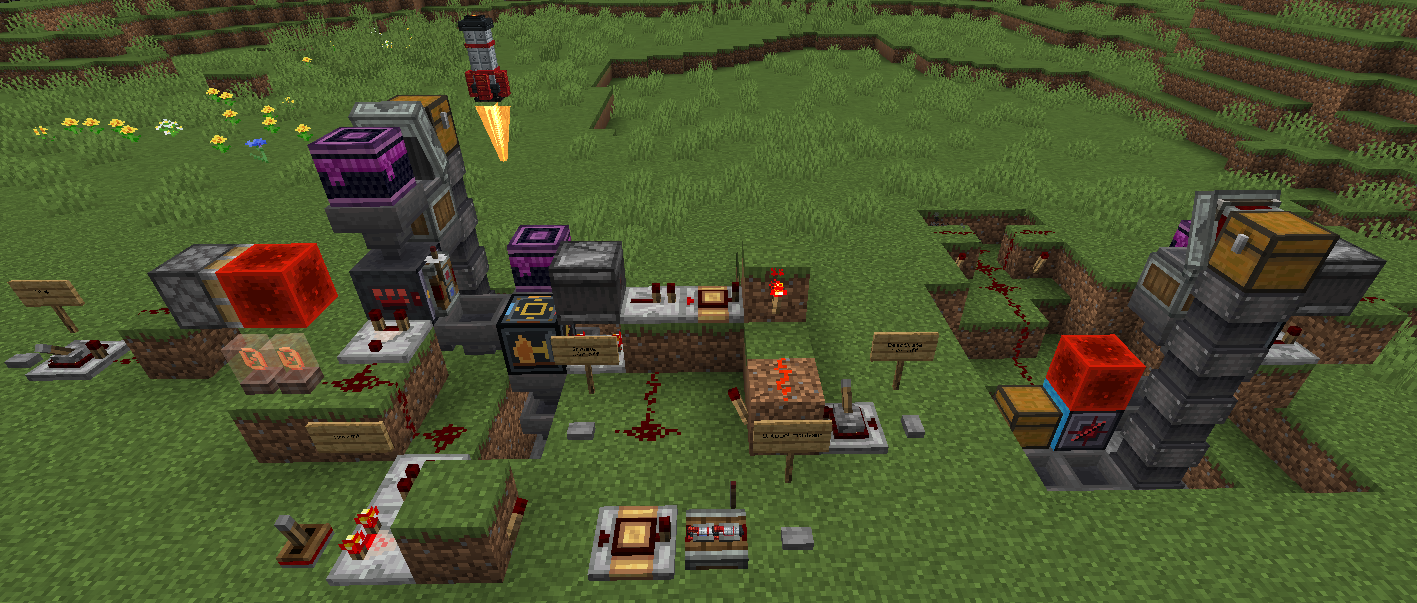
功能特性
- 可放置的火箭方块与物品
- 火箭拥有独立库存,包含一个货物槽和一个燃料槽
- 可从火箭界面输入目标 X/Y/Z 坐标
- “使用我的位置”按钮,可快速将目标设为玩家当前位置
- 飞行过程中消耗燃料
- 支持普通熔炉燃料、红石粉尘和红石块作为火箭燃料
- 平滑的地形感知飞行路径
- 垂直着陆方式
- 已着陆的火箭会记住其上次发射的位置作为保存的返回目标
- 支持对具有保存目标的火箭进行红石发射
- 着陆台(Landing Pad)方块,用于自动化火箭的装载、卸载和派遣
- 自定义火箭模型、火箭纹理、着陆台纹理、模组图标以及飞行中的推进器火焰
火箭基本用法
- 放置一枚火箭。
- 打开火箭界面。
- 将你想要运送的物品组放入货物槽。
- 将燃料放入燃料槽。
- 输入目标 X/Y/Z 坐标,或点击“使用我的位置”。
- 点击发射。
- 到达目的地后,从已着陆的火箭中收集货物,或将其发送回其保存的返回目标。
着陆台用法
在你希望火箭着陆的位置放置一个着陆台。瞄准该着陆台或在附近着陆的火箭将尝试直接停在着陆台正上方。
着陆台内部有三个插槽:
- 发出(Send):等待装入火箭的待发货物
- 燃料(Fuel):等待装入火箭的燃料
- 到达(Arrivals):从已着陆火箭中卸载的货物
当火箭位于着陆台上时,着陆台会自动将燃料移入火箭的燃料槽。如果火箭刚刚着陆,着陆台会先将火箭中的货物卸载至“到达”槽。待“到达”槽清空后,着陆台可将“发出”槽中的货物装入火箭。
着陆台自动化
着陆台使用专用面以确保自动化逻辑清晰可预测:
- 正面:插入待发货物至“发出”槽
- 右侧面:插入燃料至“燃料”槽
- 左侧面:从“燃料”槽提取燃料;同时,着陆台也会将燃料推送至相邻的箱子
- 底面:从“到达”槽提取已到达的货物;同时,着陆台也会将货物推送至下方的容器
- 背面:红石派遣输入接口
- 顶面:仅用于火箭对接
通过红石信号激活背面,可派遣位于着陆台上的火箭前往其保存的目标。火箭必须拥有燃料和保存的目标才能发射。
比较器可用于读取着陆台库存的填充程度。
注意事项
- 火箭只能在同一个维度内移动。
- 火箭在发射前必须装有有效的燃料。
- 如果火箭在飞行途中燃油耗尽,它将在当前位置着陆。
- 每枚火箭目前仅携带一组货物和一组燃料。
- 着陆台旨在配合漏斗/箱子实现简单且物品流向清晰的自动化。
要求
- Minecraft 1.21.1
- Java 21 或更高版本
- Fabric Loader 0.18.4 或更高版本
- Fabric API
物品 ID
- 火箭:
deliveryrocketmod:rocket
- 着陆台:
deliveryrocketmod:landing_pad

Delivery Rocket Mod
Delivery Rocket Mod adds placeable delivery rockets for moving item stacks between coordinates in the same world dimension. Load a rocket with cargo and fuel, choose a target position, and launch it. The rocket takes off, flies above terrain, turns upright as it approaches its destination, and places itself back down when it lands.
The mod also includes a Landing Pad block for practical automation. A pad can receive rockets, unload landed cargo, refill fuel, load outgoing cargo, and dispatch a ready rocket using redstone.

Features
- Placeable rocket block and item
- Rocket inventory with one cargo slot and one fuel slot
- Coordinate targeting from the rocket screen
- "Use My Pos" button for quickly targeting the player's current position
- Fuel consumption during flight
- Supports normal furnace fuels, redstone dust, and redstone blocks as rocket fuel
- Smooth terrain-aware flight path
- Upright landing approach
- Landed rockets remember their previous launch position as their saved return target
- Redstone launch support for rockets with a saved target
- Landing Pad block for automated rocket loading, unloading, and dispatch
- Custom rocket model, rocket texture, landing pad texture, mod icon, and in-flight thruster flame
Basic Rocket Use
- Place a rocket.
- Open the rocket.
- Put the item stack you want to deliver in the cargo slot.
- Put fuel in the fuel slot.
- Enter the target X/Y/Z coordinates, or press "Use My Pos".
- Press Launch.
- At the destination, collect the cargo from the landed rocket or send it back to its saved return target.
Landing Pad Use
Place a Landing Pad where you want rockets to land. Rockets targeting the pad or landing near it will try to appear directly on top of the pad.
The Landing Pad has three internal slots:
- Send: outgoing cargo waiting to be loaded into a rocket
- Fuel: fuel waiting to be loaded into a rocket
- Arrivals: cargo unloaded from a landed rocket
When a rocket is on top of the pad, the pad automatically moves fuel into the rocket's fuel slot. If the rocket has just landed, the pad unloads the rocket's cargo into Arrivals first. After arrivals are clear, the pad can load Send cargo into the rocket.
Landing Pad Automation
The pad uses dedicated sides so automation stays predictable:
- Front face: insert outgoing cargo into Send
- Right face: insert fuel into Fuel
- Left face: extract fuel from Fuel; the pad also pushes fuel into an adjacent chest on this side
- Bottom face: extract arrived cargo from Arrivals; the pad also pushes arrivals into a container below
- Back face: redstone dispatch input
- Top face: rocket docking only
Power the back face with redstone to dispatch the rocket on top of the pad to its saved target. A rocket must have fuel and a saved target before it can launch.
Comparators can read the Landing Pad inventory fullness.
Notes
- Rockets travel within the same dimension.
- A rocket must have valid fuel before launch.
- If a rocket runs out of fuel mid-flight, it lands where it is.
- Each rocket currently carries one cargo stack and one fuel stack.
- The Landing Pad is intended for simple hopper/chest automation with clear item flow.
Requirements
- Minecraft 1.21.1
- Java 21 or newer
- Fabric Loader 0.18.4 or newer
- Fabric API
Item IDs
- Rocket:
deliveryrocketmod:rocket
- Landing Pad:
deliveryrocketmod:landing_pad
评论 0
登录后参与评分
还没有评论,来抢沙发吧