
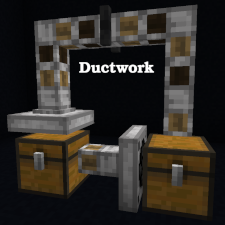
Ductwork
基于管道隐喻的物品分发网络模组
Ductwork 需要 Cooldown Coordinator 和 Cloth Config!
Ductwork 功能特性
本模组提供了三个方块,它们共同实现了一个略微超集的功能集合,涵盖了 Minecraft 漏斗(Item Hopper)的功能,从而提供更大的灵活性和改善的游戏性能。Ductwork 的物品移动网络通常比漏斗版本更节省空间和资源。Ductwork 模组的另一个核心目标是提供类似于漏斗的稳定物品移动体验,适用于分拣系统和其他复杂机器,即使漏斗和 Ductwork 方块混合使用也能正常工作。
Ductwork 方块
管道 (Duct)
管道是 Ductwork 网络的主力方块。管道可以从最多五个相邻的方块接收物品,并将物品输送到其朝向的方块中。管道无法被锁定,也不会从其他方块提取物品,因此对游戏资源的占用极小。
阻尼器 (Damper)
阻尼器是一种特殊的管道,它仅接受来自后方方块的物品,并将物品输送到前方方块中。与基础管道不同,阻尼器可以通过红石信号锁定,并在锁定时阻碍物品流动。玩家也可以通过空手右键点击临时锁定或解锁阻尼器,直到相邻方块的状态再次改变为止。
收集器 (Collector)
收集器方块像漏斗一样从其背后的库存或空间中吸取物品,但与漏斗不同的是,它可以朝向任意方向放置。与其他管道方块一样,收集器会将其库存中的物品输送到其前方的方块中。
如何使用 Ductwork 方块
Ductwork 方块的放置方式与 Minecraft 漏斗非常相似。指向 Ductwork 方块应该输送物品的目标方块,然后放置该 Ductwork 方块。放置后,Ductwork 方块将“朝向”你所指的那个方块的一侧。这决定了 Ductwork 方块移动物品的方向(即其“朝向”)。
这需要一些练习,尤其是对于收集器方块!通常,放置 Ductwork 方块最简单的方法是从管道的末端开始(即物品输出的位置),然后逆向工作至起点(即物品输入或收集的位置)。
Ductwork 方块可以在不破坏的情况下重新调整朝向。更多详情请参阅 Wiki。
受限模式 (Limited Ductworks mode)
如果你希望 Ductwork 方块仅限于执行通常由漏斗完成的操作,则有一个配置选项可以实现这一点。请参阅配置文件(如果在服务器上)或模组菜单页面(如果使用客户端内置服务器)。这使得 Ductwork 成为服务器管理员的理想选择,他们既想要纯粹的 Minecraft 技术体验,又希望获得 Ductwork 管道带来的性能提升。
更多信息与示例
请参阅 Ductwork Wiki 以获取更多文档!
Ductwork
Simple duct-metaphor item distribution network mod
Ductwork requires Cooldown Coordinator and Cloth Config!
Features of Ductwork
This mod provides three blocks which together implement a slight superset of the features of the Minecraft Item Hopper enabling greater flexibility and improved game performance. Ductwork item movement networks are often more space and resource efficient than Hopper versions. Another core goal of the Ductwork mod is to deliver stable item movement similar to that of Hoppers and suitable for use in sorting systems and other complex machines, even in cases where Hoppers and Ductwork blocks are intermingled.
Ductwork Blocks
Duct
The Duct is the workhorse of a Ductwork network. Ducts accept items from up to five adjacent blocks, and deliver items to the block they are facing. Ducts cannot be locked and do not extract items from other blocks, so they make minimal use of game resources.
Damper
A Damper is a specialized Duct which accepts items from the block behind it and delivers items to the block in front of it. Unlike the basic Duct, a Damper can be locked via Redstone and will obstruct item movement while it remains locked. Dampers can also be temporarily locked or unlocked by the player (shift-right-click on them with an empty hand), until the next time an adjacent block changes state.
Collector
Collector blocks suck items from the inventory or space behind them like a Hopper, but unlike a Hopper they can be oriented in any direction. Collectors deliver items from their inventory into the block in front of them just like other Duct blocks.
How to use Ductwork Blocks
Placement of Ductwork blocks works a lot like placement of Minecraft Item Hoppers. Point at the block the Ductwork block should deliver items to and place the Ductwork block. The Ductwork block will be "facing" the side of the block you were pointing at. This determines in which direction the Ductwork block will move items (the direction it is "facing").
This can take some practice, particularly with Collector blocks! Often, the easiest way to place Ductwork blocks is to start at the end of the duct (where it is delivering items) and work backward to the beginning (where it is receiving or collecting items).
Ductwork blocks can be reoriented without breaking and re-placing them. See the wiki for more details.
Limited Ductworks mode
If you want Ductwork blocks to be limited to doing things you can generally do with Item Hoppers, there is a configuration option for this. See the configuration file (if on a server) or the Mod Menu page (if using the client's integrated server). This makes Ductwork a great option for server admins who want a pure Minecraft technical experience but also want the performance improvements of Ductwork's Ducts.
For more Information and Examples
See the Ductwork wiki for further documentation!

下载 Ductwork
下载 Ductwork
需要联机服务器吗?
稳定流畅、一键部署,几分钟即可和朋友联机开服
最低仅需 8 元/月 即可畅快联机
下载 Ductwork
需要联机服务器吗?
稳定流畅、一键部署,几分钟即可和朋友联机开服
最低仅需 8 元/月 即可畅快联机
下载 Ductwork
需要联机服务器吗?
稳定流畅、一键部署,几分钟即可和朋友联机开服
最低仅需 8 元/月 即可畅快联机
下载 Ductwork
下载 Ductwork
需要联机服务器吗?
稳定流畅、一键部署,几分钟即可和朋友联机开服
最低仅需 8 元/月 即可畅快联机
下载 Ductwork
需要联机服务器吗?
稳定流畅、一键部署,几分钟即可和朋友联机开服
最低仅需 8 元/月 即可畅快联机
下载 Ductwork
需要联机服务器吗?
稳定流畅、一键部署,几分钟即可和朋友联机开服
最低仅需 8 元/月 即可畅快联机
下载 Ductwork
需要联机服务器吗?
稳定流畅、一键部署,几分钟即可和朋友联机开服
最低仅需 8 元/月 即可畅快联机
下载 Ductwork
- 更新至 Minecraft 26.2
请务必同时下载 Cooldown Coordinator 0.10.0+ 和 Cloth Config。
关于这个资源的讨论、问题反馈与使用心得
还没有讨论,来发第一帖吧
你是这个资源的作者?登录后可认领此资源。
相似资源
 模组

显示你正在注视的方块的信息。(适用于 Minecraft 1.16+ 的 Hwyla/Waila 分支)
 模组

查看物品与配方
 模组
在游戏画面角落显示附近世界地形、玩家、生物和实体的地图。可创建路径点,帮助你找到标记过的位置。
 模组
使用 JavaScript 编辑配方、添加自定义物品、编写世界事件!
 模组
添加区块认领和玩家组队功能,并与 Xaero's Minimap 和 World Map 集成
 模组
添加全屏世界地图,显示你在世界中已探索的区域。与 Xaero's Minimap 搭配使用效果极佳。
评论 0
登录后参与评分
还没有评论,来抢沙发吧