
DurabilityInfo 2.0
DurabilityInfo 是一款完全客户端的 Minecraft 模组,可在不改变物品行为的前提下,显示清晰且可自定义的物品耐久度信息。
通过详细的工具提示、可配置的 HUD(抬头显示)、警告、通知以及物品栏覆盖层,追踪你的工具、武器、盔甲和手持物品的耐久度。
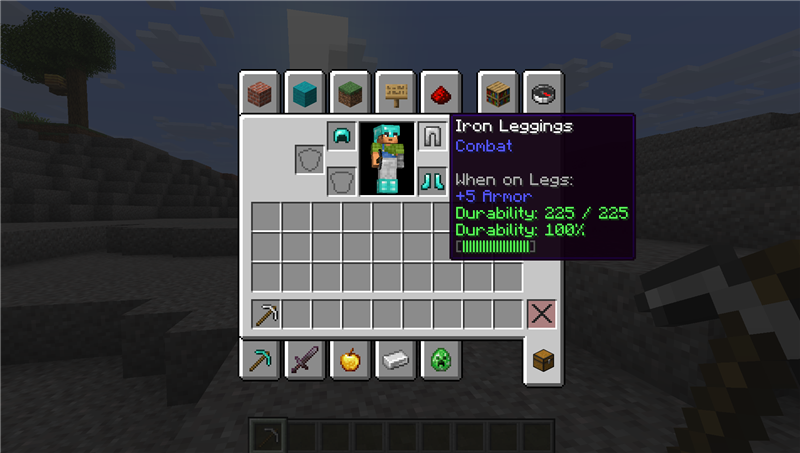
工具提示样式
选择耐久度信息在受损物品上的显示方式:
- 紧凑
- Vanilla+
- 详细
- 仅条形图
- 自定义
- 关闭
自定义模式允许你独立控制以下选项:
- 剩余耐久度
- 最大耐久度
- 百分比
- 文本耐久度条
- 使用已损坏量而非剩余耐久度
- 不可破坏物品标签
- 完全修复物品的可见性
- 条形图宽度和耐久度颜色
可自定义的设备 HUD
显示以下装备的耐久度:
- 头盔
- 胸甲
- 护腿
- 靴子
- 主手
- 副手
可用的显示模式包括:
- 迷你条形图
- 百分比
- 剩余值
- 剩余值 / 最大值
- 合并显示
HUD 支持垂直、水平和紧凑网格布局,可配置缩放和间距、物品排序、对齐方式、背景透明度、屏幕锚点、偏移量以及可见性过滤器。
内置的 HUD 编辑器允许你拖动预览、调整其缩放比例、吸附到屏幕参考线、使用键盘微调,并通过应用、取消和完成控件安全地恢复之前的更改。
智能可见性
选择 HUD 出现的时间:
- 始终显示
- 仅受损时
- 低于阈值时
- 最近有变化时
- 智能模式
HUD 也可以在以下情况下隐藏:
- 处于创造模式或旁观者模式时
- 查看调试屏幕时
- 使用菜单或容器时
- Minecraft 的主 HUD 被隐藏时
此外还提供仅限手持物品和仅限盔甲的显示过滤器。
多级耐久度警报
盔甲和手持物品可以使用独立的警告级别:
- 警告
- 低
- 危急
- 最后机会
每个警报级别都可以单独配置或禁用。
可用的警报通道包括:
- 警告声音
- 动作栏消息
- 聊天消息
- HUD 闪烁
警报仅在耐久度向下穿过阈值时触发。修复或更换物品会重置其警报状态。
伤害与修复通知
可选的通知功能会在追踪的物品损失耐久度或被修复时显示。
通知特性:
- 合并快速重复的变化
- 最多保留三个可见条目
- 显示受影响的物品图标
- 支持盔甲、双手以及整个快捷栏
- 切换世界、维度或玩家时安全清除
快捷栏与物品栏覆盖层
直接在快捷栏和物品栏槽位中添加耐久度信息。
可用的覆盖层样式:
- 百分比
- 剩余值
- 迷你条形图
- 彩色边框
- 关闭
可配置覆盖层缩放、文本阴影、边框粗细、耐久度阈值以及完全修复物品的可见性。
除非明确选择替换,否则原版耐久度条将保持启用状态。
预设
使用包含的预设之一快速配置模组:
- 极简
- Vanilla+
- 采矿
- 战斗
- 详细
保存前会预览预设更改。编辑任何单个受控选项会自动将配置切换为自定义模式。
原生配置界面
DurabilityInfo 拥有自己的设置界面,无需依赖 Cloth Config 或其他配置库。
主设置页面包含最常用的选项,而高级设置则组织为以下类别:
- 工具提示
- HUD
- 警告
- 指示器
- 弹窗
- 预设
在 Fabric 上,Mod Menu 为可选组件,并提供便捷的“Configure”按钮。
安全且纯客户端
DurabilityInfo:
- 不改变物品耐久度
- 不会阻止物品损坏
- 不修改物品栏
- 不发送网络数据包
- 不需要在服务器上安装
- 不改变属性或游戏规则
- 渲染期间不进行配置文件访问
配置存储位置:
.minecraft/config/durabilityinfo.json
现有的 DurabilityInfo 1.x 配置会自动迁移至新的 2.0 格式。
支持版本
Minecraft 26.1.2
- Fabric
- Forge
- NeoForge
Minecraft 26.2
- Fabric
- Forge
- NeoForge
请使用同时匹配你的 Minecraft 版本和模组加载器的文件。
可选集成
- Fabric 上的 Mod Menu
无需强制性的配置屏幕依赖项。
许可证
DurabilityInfo 采用 MIT 许可证发布。
源代码:
DurabilityInfo 2.0
DurabilityInfo is a fully client-side Minecraft mod that shows clear, customizable durability information without changing item behavior.
Track the durability of your tools, weapons, armor, and held items through detailed tooltips, a configurable HUD, warnings, notifications, and inventory overlays.
Tooltip Styles
Choose how durability information appears on damageable items:
- Compact
- Vanilla+
- Detailed
- Bar Only
- Custom
- Off
Custom mode lets you independently control:
- Remaining durability
- Maximum durability
- Percentage
- Text durability bar
- Damage used instead of durability remaining
- Unbreakable item labels
- Fully repaired item visibility
- Bar width and durability colors
Customizable Equipment HUD
Display the durability of:
- Helmet
- Chestplate
- Leggings
- Boots
- Main hand
- Offhand
Available display modes include:
- Mini Bar
- Percentage
- Remaining
- Remaining / Maximum
- Combined
The HUD supports vertical, horizontal, and compact-grid layouts, configurable scale and spacing, item ordering, alignment, background opacity, screen anchors, offsets, and visibility filters.
A built-in HUD editor lets you drag the preview, adjust its scale, snap it to screen guides, use keyboard nudging, and safely restore previous changes with Apply, Cancel, and Done controls.
Smart Visibility
Choose when the HUD should appear:
- Always
- Damaged Only
- Below Threshold
- Recently Changed
- Smart
The HUD can also be hidden while:
- Playing in Creative or Spectator mode
- Viewing the debug screen
- Using menus or containers
- Minecraft's main HUD is hidden
Held-only and armor-only display filters are also available.
Multi-Level Durability Alerts
Armor and held items can use independent warning levels:
- Warning
- Low
- Critical
- Last Chance
Each alert level can be configured or disabled separately.
Available alert channels include:
- Warning sound
- Action-bar message
- Chat message
- HUD flash
Alerts activate only when durability crosses downward through a threshold. Repairing or replacing the item resets its alert state.
Damage and Repair Notifications
Optional notifications show when tracked items lose durability or are repaired.
Notifications:
- Merge rapid repeated changes
- Retain a maximum of three visible entries
- Show the affected item icon
- Support armor, both hands, and the entire hotbar
- Clear safely when changing worlds, dimensions, or players
Hotbar and Inventory Overlays
Add durability information directly to hotbar and inventory slots.
Available overlay styles:
- Percentage
- Remaining
- Mini Bar
- Colored Border
- Off
Overlay scale, text shadow, border thickness, durability threshold, and fully repaired item visibility are configurable.
Vanilla durability bars remain enabled unless replacement is explicitly selected.
Presets
Quickly configure the mod using one of the included presets:
- Minimal
- Vanilla+
- Mining
- Combat
- Detailed
Preset changes are previewed before they are saved. Editing an individual controlled option automatically switches the configuration to Custom.
Native Configuration Screen
DurabilityInfo includes its own settings interface and does not require Cloth Config or another configuration library.
The main settings page contains the most commonly used options, while advanced settings are organized into:
- Tooltip
- HUD
- Warnings
- Indicators
- Popups
- Presets
On Fabric, Mod Menu is optional and provides a convenient Configure button.
Safe and Client-Side
DurabilityInfo:
- Does not change item durability
- Does not prevent items from breaking
- Does not modify inventories
- Does not send network packets
- Does not require installation on the server
- Does not change attributes or gameplay rules
- Performs no configuration file access during rendering
Configuration is stored at:
.minecraft/config/durabilityinfo.json
Existing DurabilityInfo 1.x configurations are automatically migrated to the new 2.0 format.
Supported Versions
Minecraft 26.1.2
- Fabric
- Forge
- NeoForge
Minecraft 26.2
- Fabric
- Forge
- NeoForge
Use the file matching both your Minecraft version and mod loader.
Optional Integration
- Mod Menu on Fabric
No mandatory configuration-screen dependency is required.
License
DurabilityInfo is available under the MIT License.
Source code:

下载 DurabilityInfo
下载 DurabilityInfo
需要联机服务器吗?
稳定流畅、一键部署,几分钟即可和朋友联机开服
最低仅需 8 元/月 即可畅快联机
下载 DurabilityInfo
下载 DurabilityInfo
下载 DurabilityInfo
下载 DurabilityInfo
下载 DurabilityInfo
下载 DurabilityInfo
需要联机服务器吗?
稳定流畅、一键部署,几分钟即可和朋友联机开服
最低仅需 8 元/月 即可畅快联机
下载 DurabilityInfo
下载 DurabilityInfo
暂无更新日志
关于这个资源的讨论、问题反馈与使用心得
还没有讨论,来发第一帖吧
你是这个资源的作者?登录后可认领此资源。
相似资源
 模组

可定制的鞘翅模组,支持装饰纹饰、旗帜图案等更多功能!
 模组

显示你正在注视的方块的信息。(适用于 Minecraft 1.16+ 的 Hwyla/Waila 分支)
 模组
使用 JavaScript 编辑配方、添加自定义物品、编写世界事件!
 模组

查看物品与配方
 模组
在游戏画面角落显示附近世界地形、玩家、生物和实体的地图。可创建路径点,帮助你找到标记过的位置。
 模组
AE2:一款流行的自动化与存储模组
评论 0
登录后参与评分
还没有评论,来抢沙发吧