EaseGUI 是一个客户端模组,为 Minecraft 的屏幕和界面添加了流畅、动态的动画效果!
动画元素
背景模糊 • Minecraft Logo • 按钮 • 文本标签 • 可滚动列表 • 容器
Fabric 要求
自定义选项
该模组为每个元素类别提供了自定义选项。你可以为所有屏幕全局配置动画,或针对特定菜单进行微调,以符合你的个人喜好。
配置参数说明
- 动画 [开/关] — 切换所选元素类别的动画显示。
- 持续时间 — 控制动画的持续时间(毫秒)。
- 偏移量 [X/Y] — 设置元素相对于其最终布局位置的起始位置。
- 初始缩放 [X/Y] — 控制元素在动画开始时的缩放比例。
- 初始透明度 — 调整元素的起始不透明度(透明度)。
- 级联延迟 — 同类型连续元素之间的动画时间间隔(创造出美观的交错入场效果)。
- 级联顺序 — 交错序列的方向。
- 枢轴点 — 用于缩放变换的锚点(例如:从中心、左上角等位置进行缩放)。
- 缓动(插值) — 定义动画加速度曲线和整体感觉的数学曲线。
默认情况下,会应用一种简洁且简化的全局动画预设。然而,你可以为每个屏幕创建独特的过渡效果,或在不需要时完全禁用它们。
兼容性与已知问题
? 资源包:完全兼容
该模组与任何自定义资源包完全兼容。
提示: 如果你的资源包包含自定义的主菜单 Logo,并且你希望使用它而不是 EaseGUI 的动画版本,只需在模组配置中将 “Logo 类型” 设置为 “完整文本” 即可。
? 高度侵入式的 UI 模组
主要的兼容性风险来自那些大幅修改原版界面、完全重写其基础渲染逻辑或硬编码刚性元素位置的模组。
如果在使用特定屏幕时遇到渲染问题,你可以在配置菜单中轻松调整或完全禁用该单个屏幕的动画,同时保持游戏其他部分的平滑过渡效果。
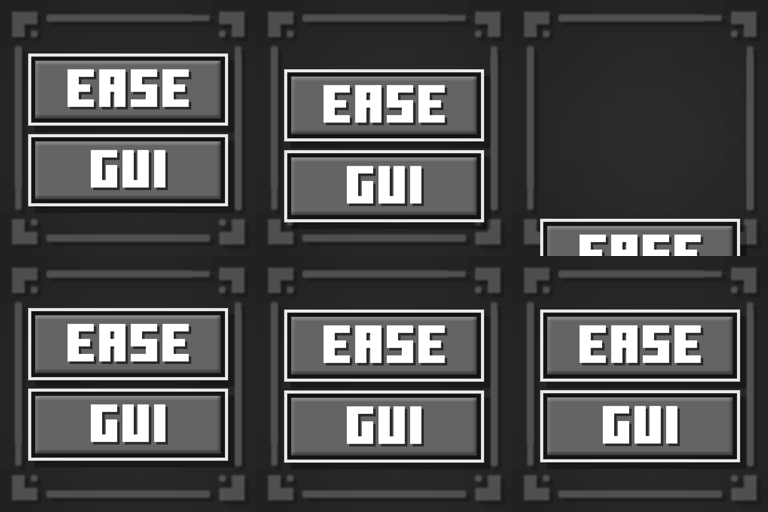
EaseGUI is a client-side mod that adds smooth, dynamic entry animations to Minecraft screens and interfaces!
Animated Elements
Background Blur • Minecraft Logo • Buttons • Text Labels • Scrollable Lists • Containers
Fabric Requirements
Customization
The mod offers customization options for every element category. You can configure animations globally for all screens or fine-tune them individually for specific menus to suit your taste.
Configuration parameters explained
- Animation [ON/OFF] — Toggles animations for the selected element category.
- Duration — Controls how long the animation lasts (in milliseconds).
- Offset [X/Y] — Sets the starting position of the element relative to its final layout position.
- Initial Scale [X/Y] — Controls the scale of the element at the beginning of the animation.
- Initial Alpha — Adjusts the starting opacity (transparency) of the element.
- Cascade Delay — The time delay between animating consecutive elements of the same type (creates a beautiful staggered entry effect).
- Cascade Order — The direction of the staggered sequence.
- Pivot Point — The anchor point used for scaling transformations (e.g., scaling from the center, top-left, etc.).
- Easing (Interpolation) — The mathematical curve that defines the acceleration profile and overall feel of the animation.
By default, a clean and simplified global animation preset is applied. However, you can craft unique transitions for each screen or disable them entirely where they aren't needed.
Compatibility & Known Issues
🟩 Resource Packs: Full Compatibility
The mod is fully compatible with any custom resource packs.
Tip: If your resource pack includes a custom Main Menu logo and you prefer to use it instead of the animated EaseGUI version, simply change the "Logo Type" setting to "Whole Text" in the mod configuration.
🟨 Highly Intrusive UI Mods
The main compatibility risks come from mods that heavily overhaul vanilla interfaces, completely rewrite their base rendering logic, or hard-code rigid element positions.
If you encounter rendering issues with a specific screen, you can easily tweak or completely disable the animation for that individual screen in the config menu while keeping smooth transitions across the rest of the game.
评论 0
登录后参与评分
还没有评论,来抢沙发吧