以下是英文 README 的简体中文翻译。
Easy LLM Voice
Easy LLM Voice 是一个 Fabric 模组,通过 WebSocket 将 Minecraft 的 Simple Voice Chat mod 与外部 AI 智能体连接起来。
使用此模组,AI 智能体可以通过 Simple Voice Chat mod 在游戏中进行语音对话和收听。
通过使用下方的仓库,你可以实现并开发能够与玩家一起游玩 Minecraft 并进行语音对话的 AI 智能体。
有关该模组的详细使用说明,请参阅该仓库。
\- Easy LLM Voice Agent:
使用 Easy LLM Voice Agent 时,请同时安装以下模组。
- Easy LLM:
- Simple Voice Chat:
功能特性
- 将来自 Simple Voice Chat mod 的音频发送至外部程序
- 在 Minecraft 内播放从外部程序接收到的音频
- 将音频与 Minecraft 内的游戏玩家关联,基于 Simple Voice Chat mod 的距离衰减和听觉范围共享语音
- 通过 GUI 管理多个 AI 智能体的端点(endpoint)
需求
- Minecraft
1.21
- Java
21
- Fabric Loader
0.16.9 或更高版本
- Fabric API
- Simple Voice Chat mod
- 外部程序
在本 README 中,“外部程序”指由 AI 智能体侧实现的 WebSocket 服务器,例如使用 Python 编写。Easy LLM Voice Agent 作为示例程序提供。
安装
将以下文件放入服务器端的 mods 文件夹中:
如果你希望通过 GUI 配置连接目的地,请在用于配置的 Minecraft 客户端上也安装 easy-llm-voice-fabric-1.0.0+mc1.21.jar。
连接模型
在此模组中,Minecraft 充当 WebSocket 客户端。
因此,你需要在外部程序中启动一个 WebSocket 服务器,然后通过模组 GUI 注册其 host(主机)和 port(端口)。
GUI 字段说明:
player name:要与语音关联的游戏内 Minecraft 玩家名称host:外部程序的主机名或 IP 地址port:外部程序的端口号
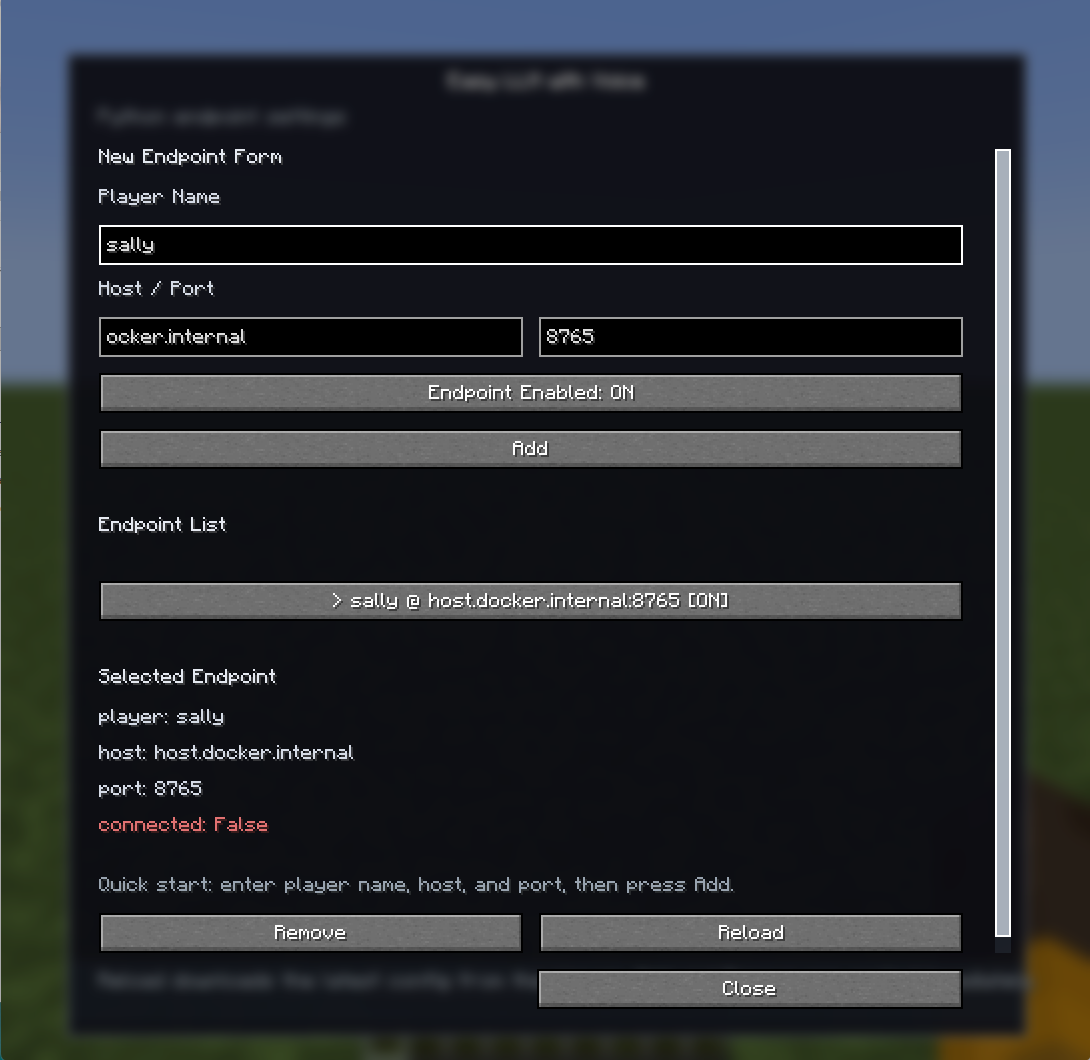
使用方法
- 在 Minecraft 服务器上安装此模组及其所需的依赖项。
- 启动外部程序。
- 加入 Minecraft 并按下 "v" 键打开 GUI。(如果按键绑定与 Simple Voice Chat mod 冲突,请在设置中更改按键绑定。)
- 输入
player name、host 和 port,然后添加连接目的地。
- 添加连接目的地后,从列表中选择它,并在详细信息面板中确认显示
connected: True。如果显示未更新,请重新打开 GUI 或点击 Reload(重载)。
连接成功后,外部程序可以接收目标玩家可听到的音频,并从目标玩家的位置播放音频。
注意事项
- 此模组本身不运行 AI 智能体、语音识别或语音合成。
- 请在外部程序侧准备 LLM(大语言模型)、语音识别、语音合成、Mineflayer 以及任何其他所需组件。
- Simple Voice Chat mod 的服务器设置和 UDP 端口设置必须单独配置。
- 在服务器端和使用 GUI 的客户端上安装相同版本的
Easy LLM Voice。
许可证
保留所有权利。
严禁未经授权的复制和再分发。
致谢
- Simple Voice Chat by Max Henkel / henkelmax
官方网站:
Modrinth:
Easy LLM Voice (JP)
Easy LLM Voice 是一个 Fabric MOD,用于通过 WebSocket 将 Minecraft 的 Simple Voice Chat mod 与外部 AI 智能体连接。
使用该 MOD,AI 智能体可以通过 Simple Voice Chat mod 在游戏中进行对话。
通过使用以下仓库,你可以实现并开发能够一边对话一边与玩家一起玩 Minecraft 的 AI 智能体。
该 MOD 的详细使用方法也包含在内,请参考。
\- Easy LLM Voice Agent:
使用 Easy LLM Voice Agent 时,请同时安装以下 MOD。
- Easy LLM:
- Simple Voice Chat:
主要功能
- 将 Simple Voice Chat mod 的音频发送至外部程序
- 在 Minecraft 内播放从外部程序发送来的音频
- 将音频与 Minecraft 内的玩家关联,基于 Simple Voice Chat mod 的距离衰减和听觉范围进行语音共享
- 通过 GUI 管理多个 AI 智能体的 endpoint
运行环境
- Minecraft
1.21
- Java
21
- Fabric Loader
0.16.9 及以上
- Fabric API
- Simple Voice Chat mod
- 外部程序
此处的外部程序是指由 AI 智能体侧使用 Python 等语言实现的 WebSocket 服务器。Easy LLM Voice Agent 作为示例程序提供。
安装方法
请将以下内容放入服务器端的 mods 文件夹中。
如果希望通过 GUI 设置连接目的地,请在进行设置的 Minecraft 客户端上也放入 easy-llm-voice-fabric-1.0.0+mc1.21.jar。
连接思路
在此模组中,Minecraft 将作为 WebSocket 客户端运行。
因此,需要在外部程序端启动 WebSocket 服务器,并在模组的图形用户界面(GUI)中注册其 host(主机地址)和 port(端口号)。
GUI 中的设置项:
player name: 绑定语音的 Minecraft 玩家名称host: 外部程序的主机名或 IP 地址port: 外部程序的端口号
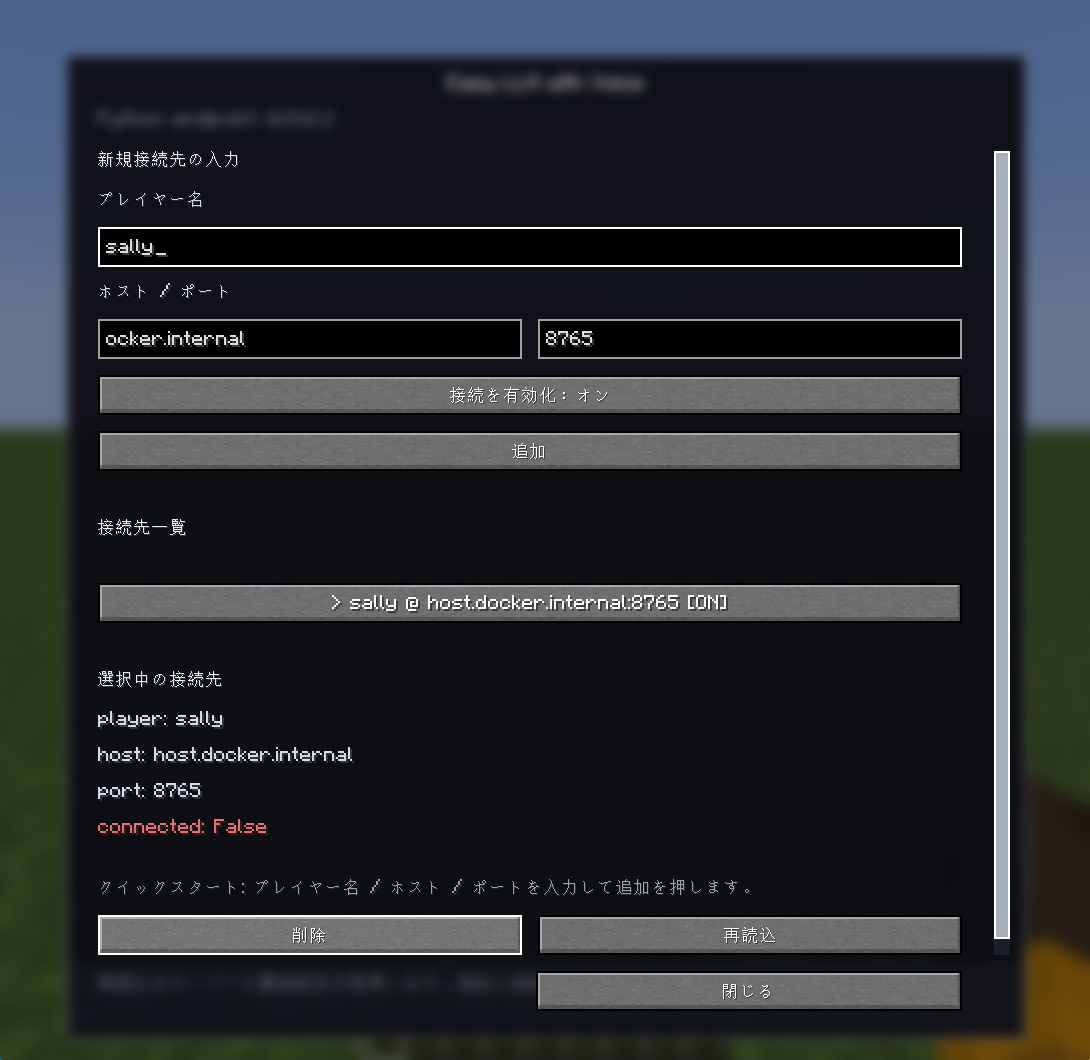
使用方法
- 在 Minecraft 服务器上安装本模组及依赖模组。
- 启动外部程序。
- 进入 Minecraft,按
v 键打开 GUI。(如果与 Simple Voice Chat mod 的按键冲突,请在设置中修改按键绑定。)
- 输入
player name、host 和 port 以添加连接目标。
- 添加连接目标后,从列表中选择该目标,并确认详情栏中的
connected: True。如果显示未更新,请重新打开 GUI 或点击 再读入。
连接成功后,外部程序将接收可被目标玩家听到的语音,并从目标玩家的位置播放声音。
注意事项
- 仅凭此模组无法执行 AI 代理、语音识别或语音合成功能。
- LLM、语音识别、语音合成以及 Mineflayer 等需由外部程序自行准备。
- 还需要单独配置 Simple Voice Chat mod 的服务器设置和 UDP 端口设置。
- 服务器和用于 GUI 的客户端均需安装相同版本的
Easy LLM Voice。
许可证
保留所有权利。
严禁未经授权的复制和分发。
致谢
- Simple Voice Chat by Max Henkel / henkelmax
官方网站:
Modrinth:
Below is the Japanese README.
Easy LLM Voice
Easy LLM Voice is a Fabric mod that connects Minecraft's Simple Voice Chat mod with external AI agents over WebSocket.
With this mod, AI agents can speak and listen in-game through the Simple Voice Chat mod.
By using the repository below, you can implement and develop AI agents that play Minecraft together with players while having voice conversations.
For detailed usage instructions for this mod, please also refer to that repository.
\- Easy LLM Voice Agent:
When using Easy LLM Voice Agent, please install the following mods as well.
- Easy LLM:
- Simple Voice Chat:
Features
- Sends audio from the Simple Voice Chat mod to an external program
- Plays audio received from an external program inside Minecraft
- Associates audio with an in-game Minecraft player, allowing voice to be shared based on the Simple Voice Chat mod's distance attenuation and audible range
- Manages endpoints for multiple AI agents from the GUI
Requirements
- Minecraft
1.21
- Java
21
- Fabric Loader
0.16.9 or later
- Fabric API
- Simple Voice Chat mod
- External program
In this README, "external program" refers to a WebSocket server implemented on the AI agent side, for example in Python. Easy LLM Voice Agent is provided as a sample program.
Installation
Place the following files in the server-side mods folder:
If you want to configure connection destinations from the GUI, also install easy-llm-voice-fabric-1.0.0+mc1.21.jar on the Minecraft client used for configuration.
Connection Model
In this mod, Minecraft acts as a WebSocket client.
Therefore, you need to start a WebSocket server in the external program, then register its host and port from the mod GUI.
GUI fields:
player name: The in-game Minecraft player name to associate with the voicehost: The hostname or IP address of the external programport: The port number of the external program
Usage
- Install this mod and its required dependencies on the Minecraft server.
- Start the external program.
- Join Minecraft and press "v" key to open the GUI.(If the key binding conflicts with Simple Voice Chat mod, please change the key binding in the settings.)
- Enter
player name, host, and port, then add the connection destination.
- After adding the connection destination, select it from the list and confirm that
connected: True is shown in the details panel. If the display does not update, reopen the GUI or click Reload.
Once connected, the external program can receive audio that the target player can hear and play audio from the target player's position.
Notes
- This mod does not run an AI agent, speech recognition, or speech synthesis by itself.
- Prepare LLMs, speech recognition, speech synthesis, Mineflayer, and any other required components on the external program side.
- The server settings and UDP port settings for the Simple Voice Chat mod must be configured separately.
- Install the same version of
Easy LLM Voice on both the server and the client that uses the GUI.
License
All Rights Reserved.
Unauthorized reproduction and redistribution are strictly prohibited.
Credits
- Simple Voice Chat by Max Henkel / henkelmax
Official site:
Modrinth:
Easy LLM Voice (JP)
Easy LLM Voice は、Minecraft の Simple Voice Chat mod と外部 AI エージェントを WebSocket で接続するための Fabric MOD です。
この MOD を利用することで、AI エージェントが、Simple Voice Chat mod を通してゲーム内で会話できるようにします。
以下のリポジトリを利用することで、Minecraft を会話しながら一緒に遊べる AI エージェントを実装・開発できます。
この MOD の詳細な使用方法も記述されているため、参照してください。
\- Easy LLM Voice Agent:
Easy LLM Voice Agent を利用する場合は、以下の MOD もあわせて導入してください。
- Easy LLM:
- Simple Voice Chat:
主な機能
- Simple Voice Chat mod の音声を外部プログラムへ送信
- 外部プログラムから送られた音声を Minecraft 内で再生
- 音声を Minecraft 内のプレイヤーに紐づけ、Simple Voice Chat mod の距離減衰や聞こえる範囲に基づいた音声共有
- 複数の AI エージェント用 endpoint を GUI から管理
動作環境
- Minecraft
1.21
- Java
21
- Fabric Loader
0.16.9 以上
- Fabric API
- Simple Voice Chat mod
- 外部プログラム
ここでの外部プログラムとは、Python などで実装した AI エージェント側の WebSocket サーバーを指します。 Easy LLM Voice Agentがサンプルプログラムとなります。
導入方法
サーバー側の mods フォルダに以下を入れてください。
GUI から接続先を設定する場合は、設定を行う Minecraft クライアント側にも easy-llm-voice-fabric-1.0.0+mc1.21.jar を入れてください。
接続の考え方
この MOD では、Minecraft 側が WebSocket クライアントとして動作します。
そのため、外部プログラム側で WebSocket サーバーを起動し、MOD の GUI からその host と port を登録します。
GUI で設定する項目:
player name: 音声を紐づける Minecraft 内のプレイヤー名host: 外部プログラムのホスト名または IP アドレスport: 外部プログラムのポート番号
使い方
- Minecraft サーバーに MOD と依存 MOD を導入します。
- 外部プログラムを起動します。
- Minecraft に入り、
v キーを押して GUI を開きます。(simple voice chat mod とキーがバッティングしている場合は設定からキーバインドを変更してください)
player name、host、port を入力して接続先を追加します。- 接続先を追加したあと、一覧から接続先を選択し、詳細欄の
connected: True を確認します。 表示が更新されない場合は、GUI を開き直すか 再読込 を押してください。
接続後、外部プログラムは対象プレイヤーが聞こえる音声を受け取り、対象プレイヤーの位置から音声を再生できます。
注意
- この MOD だけでは AI エージェント、音声認識、音声合成は実行されません。
- LLM、音声認識、音声合成、Mineflayer などは外部プログラム側で用意してください。
- Simple Voice Chat mod のサーバー設定や UDP ポート設定も別途必要です。
- サーバーと GUI を使うクライアントには、同じバージョンの
Easy LLM Voice を入れてください。
License
All Rights Reserved.
Unauthorized reproduction and redistribution are strictly prohibited.
Credits
- Simple Voice Chat by Max Henkel / henkelmax
Official site:
Modrinth:


 模组

 模组
 模组
 模组

 模组
 模组

评论 0
登录后参与评分
还没有评论,来抢沙发吧