
适用于 1.19+ 版本的下载:
? 简介:
Easy Magic 允许附魔台在关闭界面后仍保留其物品栏内容。
? 功能详情:
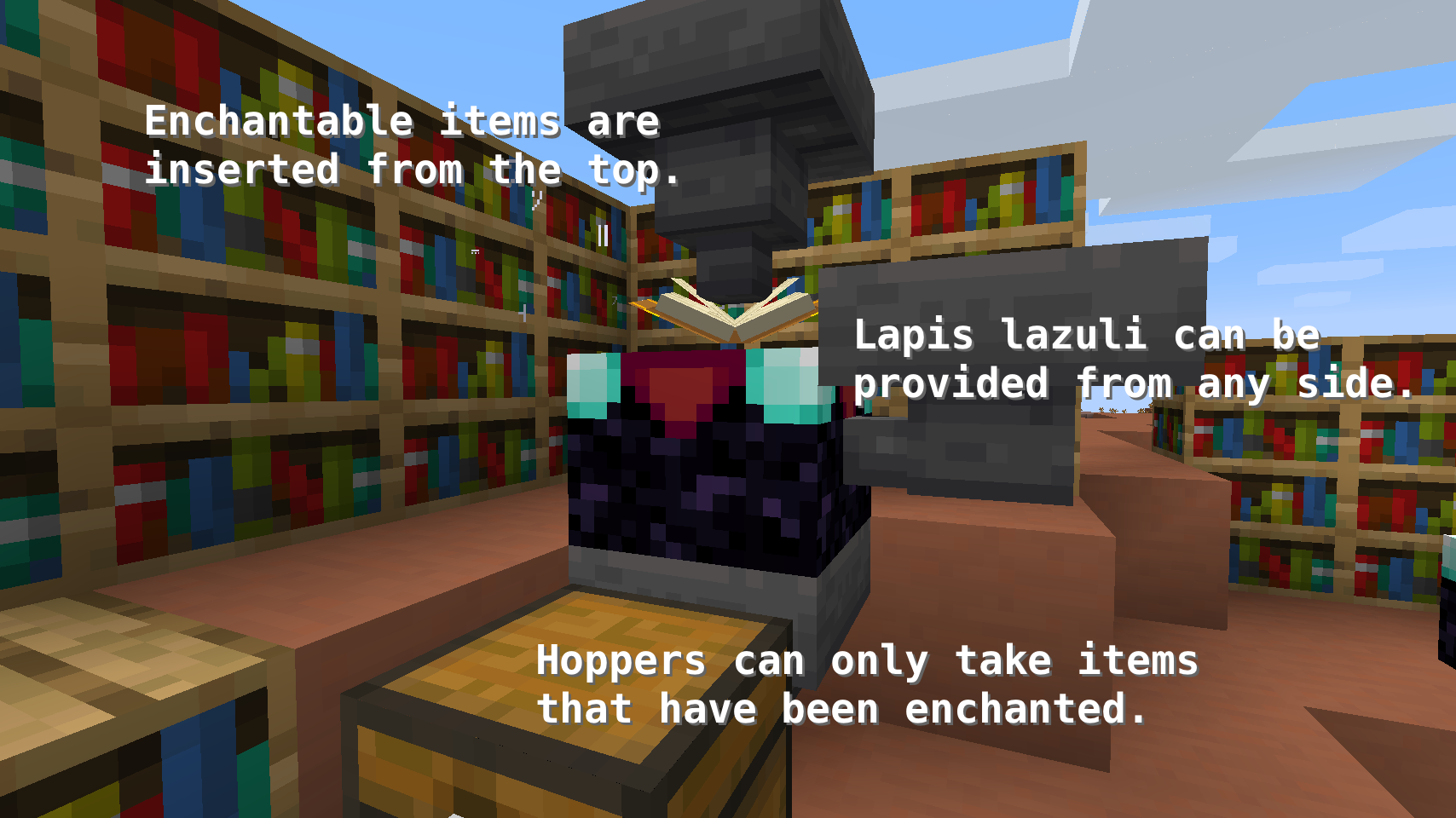
附魔表现在拥有独立的物品栏,这意味着放入其两个槽位中的任何物品都会保留在这些槽位中。此外,为了实现基本的自动化操作,漏斗(Hoppers)可以按以下方式向附魔台输入和输出物品。
- 顶部:用于输入可附魔的物品
- 侧面:用于输入青金石
- 底部:输出已附魔的物品
并且比较器(Comparators)也能正常工作!根据放置在附魔台中的青金石数量,它会输出强度为 0、1、2 或 3 的信号。超过 3 个物品时信号强度不再增加。
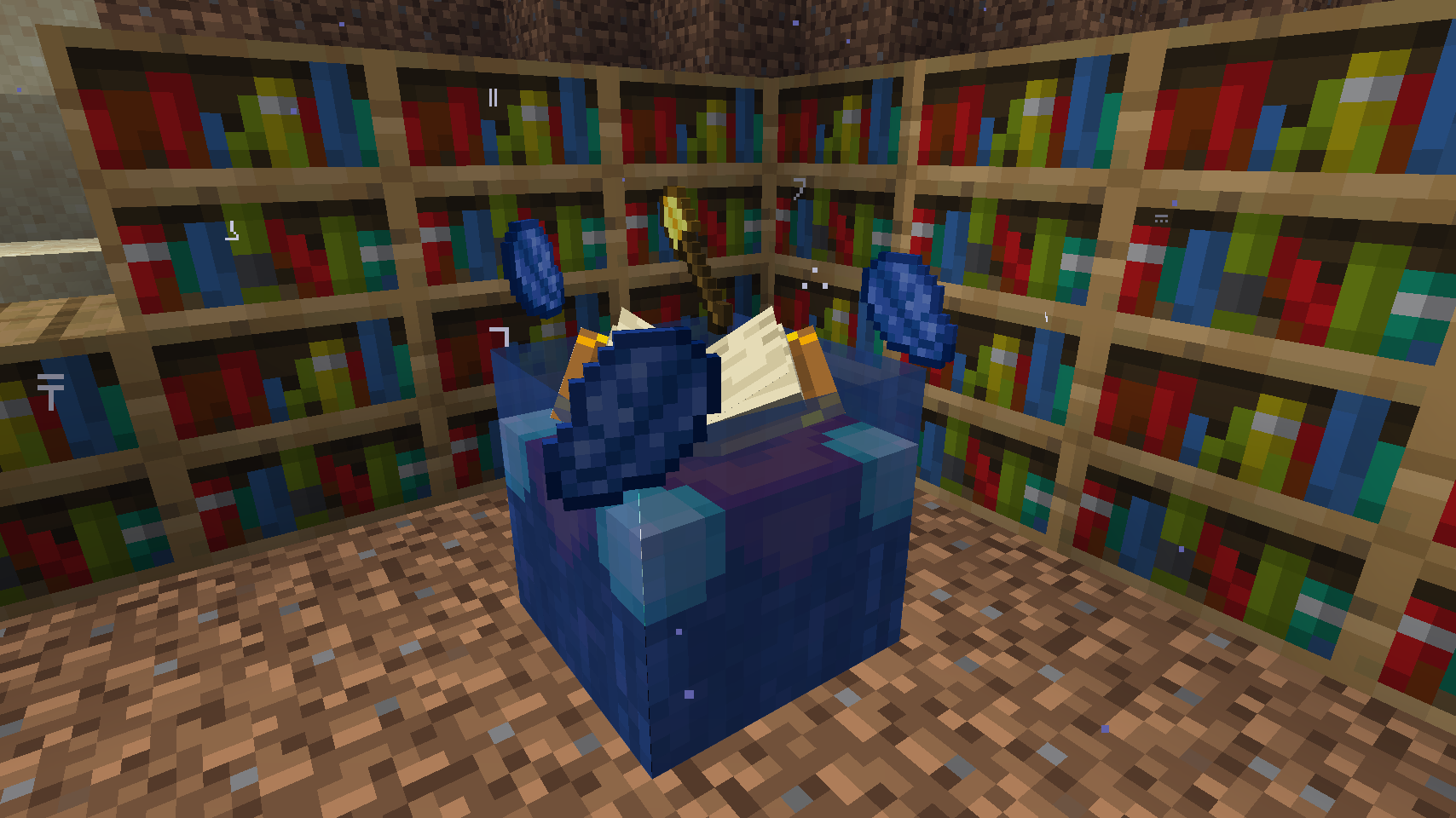
为了充分利用新的物品栏功能,附魔台将在世界中渲染其内部物品。共有三种不同的渲染模式可供选择。
重随机化附魔(Rerolling Enchantments)变得极其简单。就像过去一样,只需从槽位中取出你的可附魔物品并重新放回即可。而认为此能力过于强大的玩家可以在配置选项中启用一项设置,将每次重随机化锁定在消耗一定数量的青金石和/或经验等级上。
附魔提示框不仅会显示单个随机附魔效果,还会显示附魔过程的完整结果。此功能默认禁用。
书架不再需要与附魔台之间保持空气方块才能计入当前的附魔功率。相反,任何没有碰撞箱的方块(如水、火把或草)都可以放置在中间。此外,获得最高等级附魔所需的书架数量也可以进行配置。
? 截图:
 |
 |
|
| 提示框中可以显示所有、一个或不显示任何附魔效果 | 渲染附魔台内容的“华丽悬浮”选项 | |
 |
 |
|
| 渲染附魔台内容的“悬浮”选项 | 渲染附魔台内容的“扁平”选项 | |
 |
 |
|
| 在水下使用书架进行附魔依然有效 | 使用漏斗进行批量附魔的半自动化装置 | |
 |
||
| 当启用重随机化成本时,点击书本支付重随机化费用 | ||
? 常见问题解答:
问:我该如何配置这个模组?
答:目前尚不支持在游戏内直接编辑配置文件。相反,当身处世界中时,请运行 /config showfile <modid> 命令,并根据模组的类型选择 CLIENT(客户端)或 SERVER(服务器),然后点击聊天栏中出现的文件名(以 .toml 结尾),即可在外部编辑器中手动编辑该配置文件。保存文件后,配置文件将在几秒后自动在游戏内重新加载,无需重启游戏。
问:我刚安装了 Easy Magic,但它不起作用!
答:已附魔台不会获得新的功能。你需要手动破坏并重新放置方块。移除模组后,将附魔台恢复为原版状态也是如此。
问:重骰附魔太强大了,不可能免费使用!
答:服务器配置文件中有一个选项,可以设置重骰附魔需要消耗一定代价才能解锁。你还可以在那里选择每次重骰需要消耗多少青金石和/或经验等级。
? 鸣谢:
Easy Magic 的开发得到了以下人员的帮助与启发:
Download for 1.19+:
? About:
Easy Magic enables enchanting tables to retain their inventory contents even after closing the interface.
? Contents:
Enchanting tables now have an Inventory, meaning any items placed in their two slots will stay in those slots. Additionally, to enable some basic automation, Hoppers can be used to input and output items in the following ways.
- Top: Input for enchantable items
- Sides: Input for lapis lazuli
- Bottom: Output for enchanted items
And Comparators work, too! They will output a signal strength of 0, 1, 2, or 3 depending on the amount of lapis lazuli items placed in the table. More than 3 items don't make a difference.
To put the new inventory capability to good use, enchanting tables will Render Their Contents in the world. There are three different rendering modes to choose from.
Rerolling Enchantments has become extremely easy. Just like back in the day all that's required is to take your enchantable item from its slot and to place it back in. And those who believe this ability to be too powerful can enable a config option locking each reroll behind a set cost of lapis lazuli and/or enchantment levels.
Enchanting tooltips will show not just a single random enchantment, instead they show the Complete Outcome of the enchanting process. This feature is disabled by default.
Bookshelves no longer require Air Blocks between themselves and the enchanting table to count towards the current enchanting power. Instead, any block without a collision box, such as water, torches, or grass can be placed in between. Also the Number Of Bookshelves required for maximum level enchantments can be configured.
? Media:
|
|
|
| All, one or no enchantments can be shown on the tooltip | Render Enchanting Table Contents "Fancy Floating" option | |
|
|
|
| Render Enchanting Table Contents "Floating" option | Render Enchanting Table Contents "Flat" option | |
|
|
|
| Enchanting with bookshelves works underwater | A semi-automated setup for bulk enchanting using hoppers | |
|
||
| Click the book to pay for a reroll when rerolling costs are enabled | ||
? FAQ:
Q: How do I configure this mod?
A: Editing configs directly in-game has not yet been implemented. Instead when in a world run the /config showfile <modid> command by choosing either CLIENT or SERVER (depending on the mod), then click the file name (ending with .toml) that appears in chat to be able to manually edit the config file in a separate editor. After saving the file, the config will automatically reload in-game after a couple of seconds, so no game restart required.
Q: I just installed Easy Magic and it's not working!
A: No new capabilities will be added to existing enchanting tables. You will need to manually break and replace the block. Same goes for converting enchanting tables back to vanilla after removing the mod.
Q: Rerolling enchantments is way to powerful to be possible for free!
A: The server config has an option to lock rerolling behind a certain cost. There you can also choose how many lapis lazuli and/or experience levels you want a reroll to cost.
? Credits:
Developing Easy Magic was helped and inspired by:
- Vazkii for the floating inventory contents rendering code taken from their Botania mod
- Draylar for the idea of locking enchantment rerolls behind a certain cost from their Reroll mod

下载 Easy Magic [Legacy Fabric]
需要联机服务器吗?
稳定流畅、一键部署,几分钟即可和朋友联机开服
最低仅需 8 元/月 即可畅快联机
下载 Easy Magic [Legacy Fabric]
需要联机服务器吗?
稳定流畅、一键部署,几分钟即可和朋友联机开服
最低仅需 8 元/月 即可畅快联机
下载 Easy Magic [Legacy Fabric]
需要联机服务器吗?
稳定流畅、一键部署,几分钟即可和朋友联机开服
最低仅需 8 元/月 即可畅快联机
下载 Easy Magic [Legacy Fabric]
需要联机服务器吗?
稳定流畅、一键部署,几分钟即可和朋友联机开服
最低仅需 8 元/月 即可畅快联机
下载 Easy Magic [Legacy Fabric]
需要联机服务器吗?
稳定流畅、一键部署,几分钟即可和朋友联机开服
最低仅需 8 元/月 即可畅快联机
下载 Easy Magic [Legacy Fabric]
需要联机服务器吗?
稳定流畅、一键部署,几分钟即可和朋友联机开服
最低仅需 8 元/月 即可畅快联机
下载 Easy Magic [Legacy Fabric]
需要联机服务器吗?
稳定流畅、一键部署,几分钟即可和朋友联机开服
最低仅需 8 元/月 即可畅快联机
下载 Easy Magic [Legacy Fabric]
需要联机服务器吗?
稳定流畅、一键部署,几分钟即可和朋友联机开服
最低仅需 8 元/月 即可畅快联机
更新日志
本项目的所有重要更改都将记录在此文件中。
格式基于 Keep a Changelog 规范。
[v3.3.0-1.18.2] - 2022-03-03
- 编译适配 Minecraft 1.18.2
[v3.2.1-1.18.1] - 2021-12-25
已修复
- 修复了因 Forge Config API Port 尚未加载而导致的罕见启动崩溃问题
[v3.2.0-1.18.1] - 2021-12-15
新增
- 新增了若干配置选项,允许以消耗为代价重骰附魔
更改
- 将配置项名称转换为下划线格式
[v3.1.0-1.18.1] - 2021-12-12
- 编译适配 Minecraft 1.18.1
[v3.0.0-1.18] - 2021-12-01
- 移植至 Minecraft 1.18
关于这个资源的讨论、问题反馈与使用心得
还没有讨论,来发第一帖吧
你是这个资源的作者?登录后可认领此资源。
相似资源
 模组

可定制的鞘翅模组,支持装饰纹饰、旗帜图案等更多功能!
 模组

显示你正在注视的方块的信息。(适用于 Minecraft 1.16+ 的 Hwyla/Waila 分支)
 模组
在游戏画面角落显示附近世界地形、玩家、生物和实体的地图。可创建路径点,帮助你找到标记过的位置。
 模组

查看物品与配方
 模组
使用 JavaScript 编辑配方、添加自定义物品、编写世界事件!
 模组
AE2:一款流行的自动化与存储模组
评论 0
登录后参与评分
还没有评论,来抢沙发吧