Easy Mod Sync
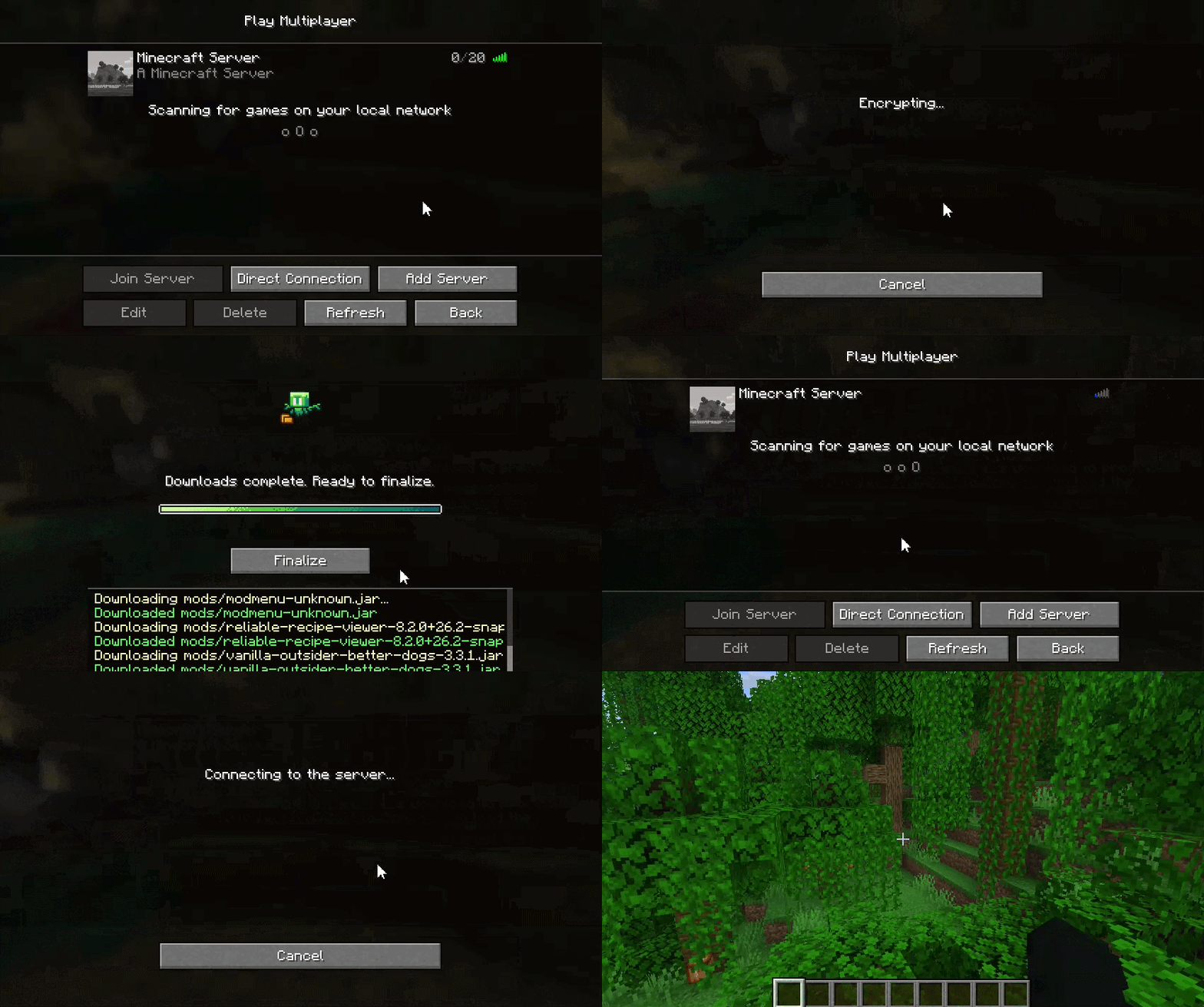
Easy Mod Sync 是一款 Fabric 模组,旨在将指定文件和目录从 Minecraft 服务器或其他客户端同步至连接的客户端。它确保玩家在加入前拥有服务器所需的配置文件、模组、资源包或其他资产。
功能
- 增量同步: 该模组会计算服务器跟踪文件的 MD5 哈希值,并将其与客户端本地文件进行对比。客户端仅下载缺失或与服务器版本不一致的文件。
- 传输方式:
- MINECRAFT(默认)(较慢): 使用标准的 Minecraft 自定义数据包将文件分块传输。适用于配置文件或少量模组。
- EXTERNAL(较快): 启动一个轻量级的内部 HTTP 服务器来处理文件传输。此方法针对较大文件(如大型资源包或数百个模组)进行了优化,以防止阻塞主服务器线程。
- 安全性与加密:
- 使用
EXTERNAL 传输方式时,文件负载会使用 AES-GCM 进行加密,并为每个客户端连接生成一次性会话 ID。
- 服务器实施严格的白名单机制,客户端只能请求已添加到同步注册表中的文件。内置了目录遍历防护功能。
- 客户端界面与隔离:
- 连接的玩家会看到一个提示,详细说明相关风险,并可选择接受下载或断开连接。
- 文件首先下载到临时目录(
config/easymodsync/temp/)。只有在传输 100% 完成且无错误,并且玩家点击“确认”后,文件才会被移动到活跃的游戏目录中。
- 进度屏幕上有一个可滚动的事件日志,用于查看实时的文件传输情况。玩家可以随时使用退出按钮安全地中止传输。
命令
EasyModSync 包含用于管理文件同步注册表(config/easymodsync/file_tree.json)的游戏中命令。这些命令需要操作员(OP)等级 3 或以上权限才能执行。
-
/easymodsync add_files <path>
将特定文件或整个目录(递归)添加到同步列表。路径必须是相对于服务器根目录的相对路径。
示例: /easymodsync add_files config/mypack/
-
/easymodsync remove_files <path>
从同步列表中移除特定文件或目录中的所有文件。
示例: /easymodsync remove_files config/old_settings.json
(注意:命令参数支持对本地服务器文件和当前跟踪文件的动态 Tab 补全,以减少因递归检查服务器完整目录树可能带来的延迟。因此,在输入文件夹名称后,请按空格键再按退格键以获取该文件夹内文件和目录的最新列表)
配置
该模组的配置文件存储在 config/easymodsync.json 中,可以直接编辑,或通过 Mod Menu / Cloth Config 进行修改。
| 选项 |
类型 |
默认值 |
描述 |
offerAdditionalFiles |
Boolean |
true |
控制服务器是否提示加入的玩家下载已跟踪的文件。 |
fileTransferMethod |
Enum |
MINECRAFT |
确定用于发送文件的协议。选项包括 MINECRAFT(基于数据包)或 EXTERNAL(基于 HTTP)。 |
externalPort |
Integer |
25652 |
如果选择 EXTERNAL 传输方式,内置 HTTP 服务器所使用的端口。此端口必须对连接客户端可访问(即需要在服务器或提供文件的客户端上开放此端口)。 |
依赖项
- Fabric Loader
- Fabric API
- Cloth Config API
Easy Mod Sync
Easy Mod Sync is a Fabric mod designed to synchronize specified files and directories from a Minecraft server or another client to connecting clients. It ensures that players have the necessary configs, mods, resource packs, or other assets required by the server before joining.
Features
- Delta Synchronization: The mod calculates MD5 hashes of the server's tracked files and compares them against the client's local files. The client only downloads files that are missing or differ from the server's version.
- Transfer Methods:
- MINECRAFT (Default)(Slow): Transfers files using standard Minecraft custom payload packets, split into chunks. Suitable for configs or a handful of mods.
- EXTERNAL (Fast): Spawns a lightweight, internal HTTP server to handle file transfers. This method is optimized for larger files (such as big resource packs or hundreds of mods) to prevent stalling the main server thread.
- Security & Encryption:
- When using the
EXTERNAL transfer method, file payloads are encrypted using AES-GCM with single-use Session IDs generated per client connection.
- The server enforces strict whitelisting, clients can only request files explicitly added to the sync registry. Directory traversal protections are built-in.
- Client Interface & Isolation:
- Connecting players are presented with a prompt detailing the risks, giving them the option to accept the download or disconnect.
- Files are initially downloaded to a temporary directory (
config/easymodsync/temp/). They are only moved to the active game directory when the transfer is 100% complete without errors and the player clicks "Finalize".
- There's a scrollable event log on the progress screen to see live file transfers. Players can safely abort the transfer at any time using the Exit button.
Commands
EasyModSync includes in-game commands to manage the file sync registry (config/easymodsync/file_tree.json). These commands require Operator (OP) level 3 or higher.
-
/easymodsync add_files <path>
Adds a specific file or recursively adds a directory to the sync list. The path must be relative to the server's root directory.
Example: /easymodsync add_files config/mypack/
-
/easymodsync remove_files <path>
Removes a specific file or all files within a directory from the sync list.
Example: /easymodsync remove_files config/old_settings.json
(Note: Command arguments support dynamic tab-completion for both local server files and currently tracked files to reduce lag that might come from recursively checking the full directory tree of the server. Due to this after typing a folder's name press space and then backspace to get an updated list of files and directories within the folder)
Configuration
The mod's config is stored in config/easymodsync.json and can be edited directly or via Mod Menu/Cloth Config.
| Option |
Type |
Default |
Description |
offerAdditionalFiles |
Boolean |
true |
Toggles whether the server will prompt joining clients to download tracked files. |
fileTransferMethod |
Enum |
MINECRAFT |
Determines the protocol used to send files. Options are MINECRAFT (packet-based) or EXTERNAL (HTTP-based). |
externalPort |
Integer |
25652 |
The port utilized by the built-in HTTP server if the EXTERNAL transfer method is selected. This port must be accessible to connecting clients (i.e the port needs to be open on the server or the client offering the files). |
Requirements
- Fabric Loader
- Fabric API
- Cloth Config API


 模组

 模组

 模组
 模组
 模组
 模组
评论 0
登录后参与评分
还没有评论,来抢沙发吧