
许多模组让破坏方块变得更容易,但很少有模组专注于放置方块。即使是最老练的玩家,也常常一次只放置一个方块。本模组通过提供镜子、阵列、建造模式和方块随机化工具等工具,让建筑变得更加轻松。
- 一次性放置和破坏多个方块
- 实时镜像方块
- 使用随机化袋放置随机方块
- 撤销与重做
- 完全支持生存模式
建造模式
按住 ALT 键打开径向菜单并选择一种建造模式。手持方块时,右键点击以选择起始位置。瞄准其他位置,然后再次右键点击即可生成形状。
建造模式可用于放置方块、破坏方块以及与特定方块进行交互。当手持工具时,右键点击将与形状内的所有方块进行交互。例如:用斧头去皮原木、用铲子踩踏路径、用锄头耕地以及用水桶放置液体。
可用的建造模式:
- 禁用
- 单个
- 直线
- 墙壁
- 地板
- 立方体
- 对角线
- 对角墙
- 斜坡地板
- 圆形
- 圆柱体
- 球体
在径向菜单的右侧,你可以找到每种建造模式的附加选项。在左侧,你可以找到用于撤销/重做、替换选项、打开修饰符设置和配置屏幕的按钮。
更多视频
建造修饰符
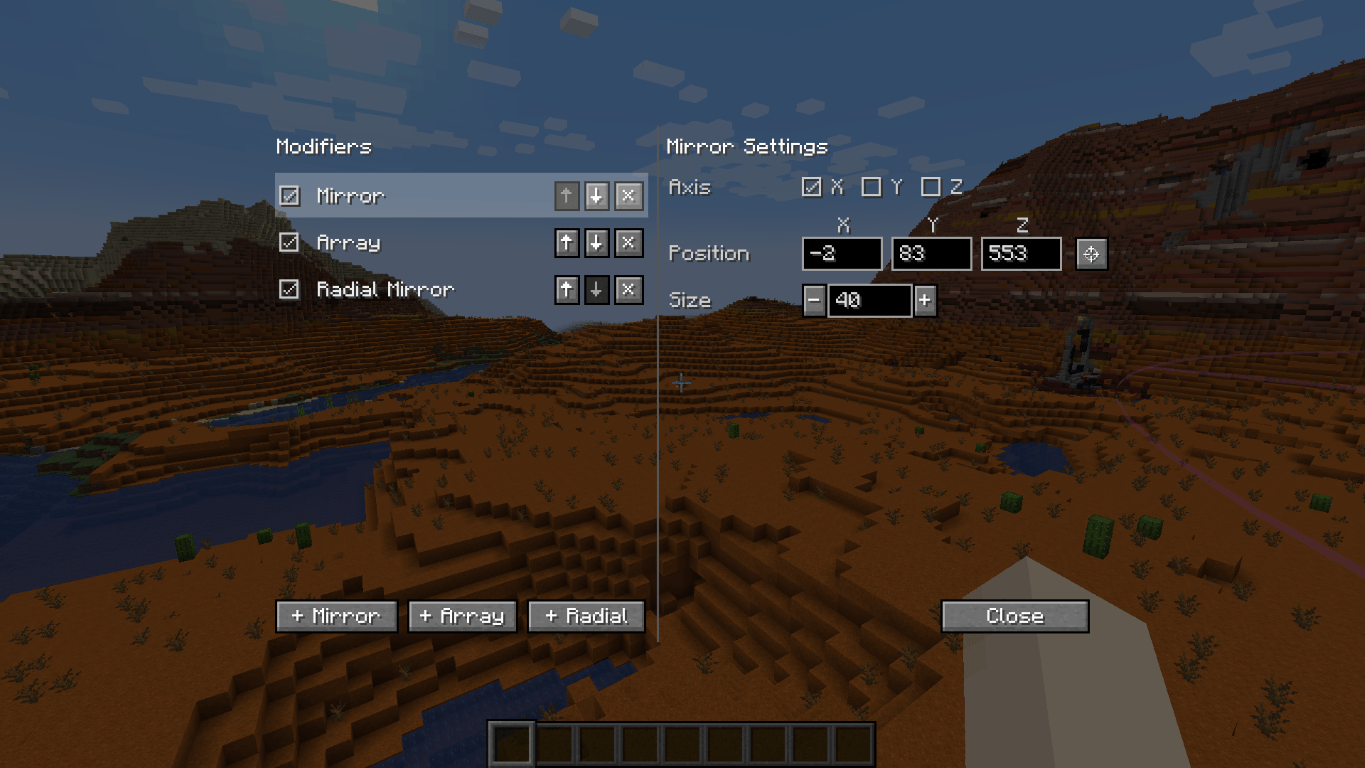
修饰符可以为你放置的每个方块额外放置一些方块。你可以在修饰符设置中启用任意数量的修饰符。通过径向菜单中的按钮打开修饰符设置,或使用按键绑定(默认为小键盘加号 NUMPAD+)。
- 镜像。在特定大小的位置放置一面镜子。在一侧放置的每个方块都会被镜像到另一侧。
- 阵列。沿特定方向将放置的方块复制特定次数。对于隧道和墙壁等重复性建筑非常有用。
- 径向镜像。围绕中心点将区域划分为切片。每个切片都会复制你的方块放置操作。
随机化工具
此物品允许你放置随机方块。在手握状态下 Shift+右键点击可配置该工具。
- 可与建造模式和建造修饰符配合使用。
- 在生成形状的过程中,你可以打开随机化工具并更改其设置。你可以实时预览这些设置!
- 将空槽位的比例设置为非零值,会在你的形状中产生空气间隙。
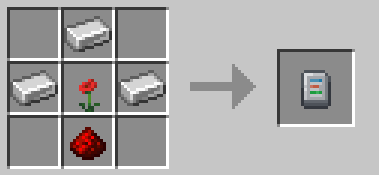
合成配方:3 个铁锭,1 组红石粉,1 朵任意花朵。
替换选项
使用径向菜单左侧的按钮来切换替换选项。
- 仅替换空气:你只能在原本是空气的位置放置方块。可替换物如矮草和蕨类仍然可以被替换。
- 替换方块和空气:你可以替换方块和空气。
- 仅替换方块:你只能替换方块,不能替换空气。
- 按副手过滤:你只能替换与副手中方块匹配的方块。
撤销与重做
按 CTRL+Z 撤销,按 CTRL+Y 重做放置方块的操作。
生存模式友好
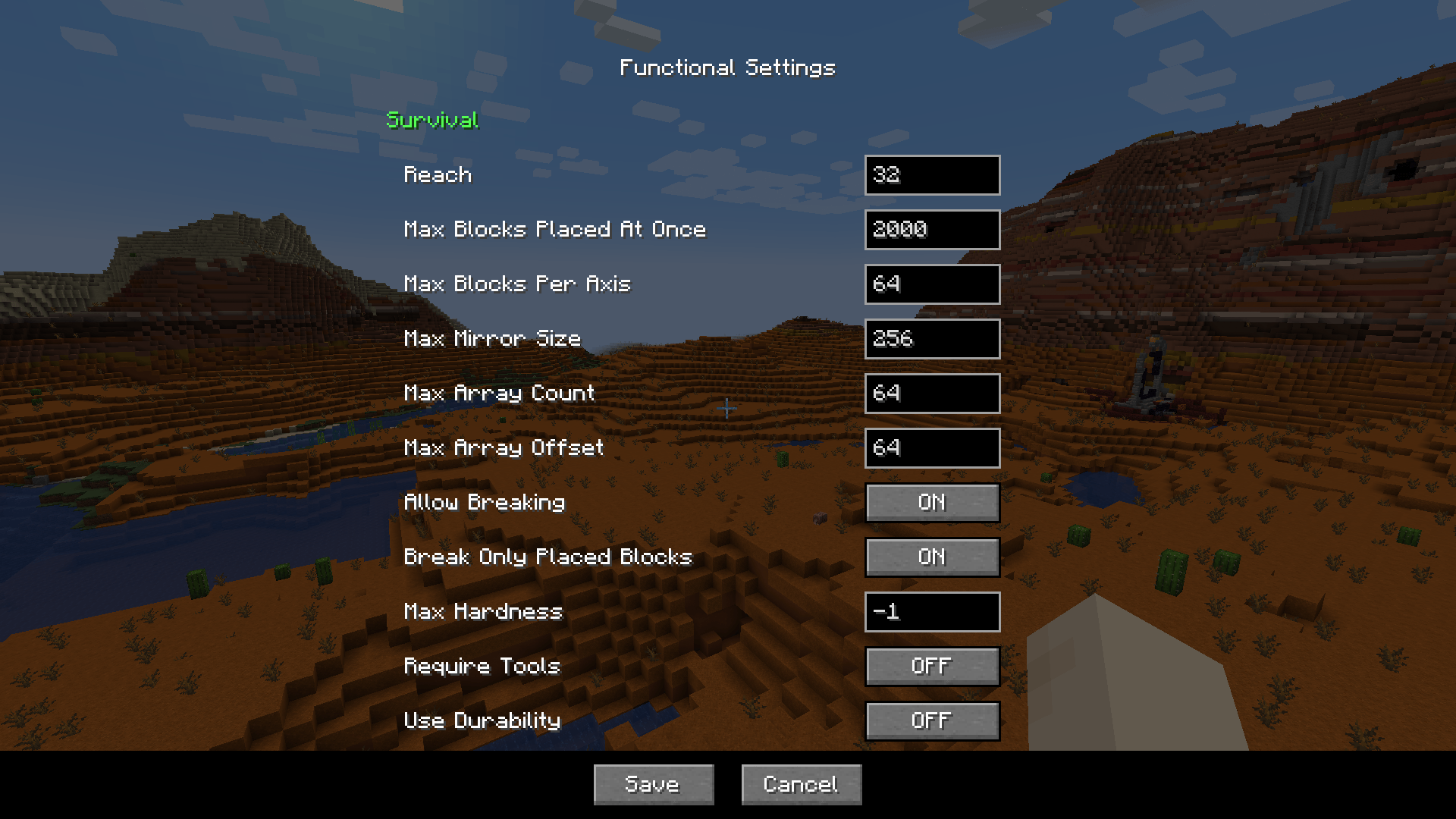
完全支持在生存模式下玩此模组。所有操作都会从你的物品栏中消耗相应数量的方块。该模组完全可配置,因此你可以找到适合你的平衡设置。
以下是一些你可以配置的内容示例:
- 你可以放置方块的远近距离
- 单次最多可以放置的方块数量
- 镜像和阵列的最大尺寸
- 是否可以一次性破坏并替换多个方块,包括是否需要工具、是否应消耗耐久度等。默认情况下,你可以破坏并替换在同一游戏会话中放置的方块。
功能设置可以在径向菜单中找到。在服务器上,只有管理员才能编辑功能设置。
常见问题
"我可以把这个模组添加到我的整合包中吗?"
当然可以!
"这个模组有基岩版版本吗?"
是的,ExterLeo 制作了适用于基岩版的版本。
"这是一个仅客户端的模组吗?"
不是,它需要在服务器和客户端都安装。服务器端负责批量放置方块。如果没有服务器端,客户端就需要逐个发送所有方块,这会导致大多数服务器过载。
"我是否允许制作自己的模组版本?"
是的,只要您遵守 LGPL-3.0 许可证(通常这意味着:链接到本页面、以 LGPL-3.0 许可证授权您的修改、公开代码并说明重大更改)。
模组亮点
模组亮点
致谢
非常感谢 Grimmauld 将其移植到 1.16,Dashos 修复了与“假玩家”相关的崩溃问题,以及 manapart 将其移植到 1.19!
灵感源自 AlgorithmX2 的 Chisels & Bits
受 Tschipp 开发的 Linear 启发的构建模式
Many mods make it easier to break blocks, but not many focus on placing them. Even the most experienced players still often place blocks one by one. This mod makes building easier by providing tools like mirrors, arrays, build modes and a block randomizer.
- Place and break multiple blocks at once
- Mirror blocks in realtime
- Place random blocks using the Randomizer Bag
- Undo and redo
- Fully supported in survival mode
Build Modes
Hold ALT to open the radial menu and select a build mode. With a block in hand, right-click to pick the starting position. Aim somewhere else, then right-click again to build the shape.
Build modes can be used to place blocks, break blocks, and interact with certain blocks. When holding a tool, right-clicking will interact with all the blocks in the shape. For example, stripping logs with an axe, pathing with a shovel, tilling with a hoe, and placing liquids with a bucket.
Available build modes:
- Disabled
- Single
- Line
- Wall
- Floor
- Cube
- Diagonal Line
- Diagonal Wall
- Slope Floor
- Circle
- Cylinder
- Sphere
On the right side of the radial menu you can find additional options for each build mode. On the left side you can find buttons for undo/redo, replace options, opening the modifier settings and config screens.
More videos
Build Modifiers
Modifiers can place additional blocks for each block you placed. You can enable any number of modifiers in the modifier settings. Open the modifier settings with the button in the radial menu, or use the keybind (default NUMPAD+).
- Mirror. Place a mirror at a position of a certain size. Each block placed on one side gets mirrored to the other side.
- Array. Copies the block you placed in a certain direction a certain number of times. Useful for repeated builds like tunnels and walls.
- Radial Mirror. Divides an area in slices around a central point. Each slice copies your block placements.
Randomizer Tool
This item allows you to place random blocks. Configure the tool by shift-rightclicking when in hand.
- Use it in combination with build modes and build modifiers.
- While placing a shape, you can open the randomizer tool and change its settings. You can preview those settings in realtime!
- Setting the ratio of an empty slot will cause air gaps to appear in your shape.
Crafting recipe: 3 iron ingots, 1 redstone dust, 1 any flower.
Replace Options
Use the button to the left of the radial menu to cycle through replace options.
- Replace Only Air: You can only place blocks where there was air. Replaceables such as short grass and ferns can still be replaced.
- Replace Blocks And Air: You can replace blocks and air.
- Replace Only Blocks: You can only replace blocks, not air.
- Filter By Offhand: You can only replace blocks that match the block in your offhand.
Undo and Redo
Press CTRL+Z to undo and CTRL+Y to redo placing blocks.
Survival-friendly
Playing this mod in survival mode is fully supported. All actions consume the right number of blocks from your inventory. It is fully configurable, so you can find settings that feel balanced for you.
Here's a small sample of what you can configure:
- How far away you can place blocks
- The maximum number of blocks placed at once
- The maximum size of the mirror and array
- Whether you can break and replace multiple blocks at once, including if tools are required, if they should use durability, etc. By default, you can break and replace blocks that you placed in the same play session.
The functional settings can be found in the radial menu. On a server, you can only edit functional settings if you are an admin.
FAQ
"Can I add this mod to my modpack?"
Yes, certainly!
"Is this mod available for bedrock edition?"
Yes, ExterLeo made a version that works in Bedrock Edition.
"Is this a client-side only mod?"
No, it needs to be installed on both server and client. The server part places the blocks in bulk. If there was no server part, the client would need to send all the blocks individually, which will overload most servers.
"Am I allowed to make my own version of this mod?"
Yes, as long as you comply with the LGPL-3.0 license (usually this means: link to this page, license your modification under LGPL-3.0, make the code visible and state significant changes).
Mod Spotlights
Mod Spotlights
Credits
Many thanks to Grimmauld for porting to 1.16, Dashos for fixing 'fake player' related crashes and manapart for porting to 1.19!
Radial Menu inspired by Chisels & Bits by AlgorithmX2
Build Modes inspired by Linear by Tschipp

下载 Effortless Building
下载 Effortless Building
下载 Effortless Building
下载 Effortless Building
下载 Effortless Building
下载 Effortless Building
下载 Effortless Building
下载 Effortless Building
下载 Effortless Building
下载 Effortless Building
暂无更新日志
关于这个资源的讨论、问题反馈与使用心得
还没有讨论,来发第一帖吧
你是这个资源的作者?登录后可认领此资源。
相似资源
 模组

可定制的鞘翅模组,支持装饰纹饰、旗帜图案等更多功能!
 模组

一个用于收集生物掉落物的多区块模组。
 模组

显示你正在注视的方块的信息。(适用于 Minecraft 1.16+ 的 Hwyla/Waila 分支)
 模组
使用 JavaScript 编辑配方、添加自定义物品、编写世界事件!
 模组

查看物品与配方
 模组
在游戏画面角落显示附近世界地形、玩家、生物和实体的地图。可创建路径点,帮助你找到标记过的位置。
评论 0
登录后参与评分
还没有评论,来抢沙发吧