
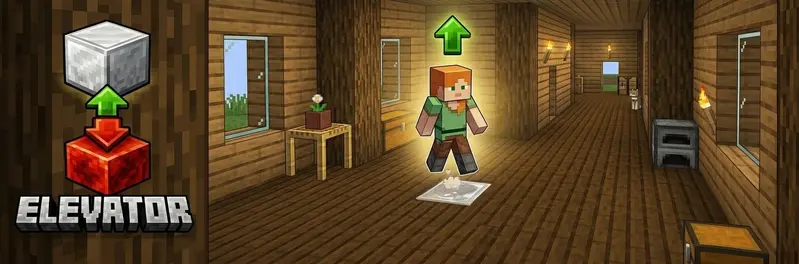
Elevator
适用于 Fabric 的简易电梯模组。
跳跃 → 上升;潜行 → 下降
功能
| 功能 | 描述 |
|---|---|
| 电梯上升 | 站在电梯方块上并跳跃 → 传送到上方的方块 |
| 电梯下降 | 站在电梯方块上并潜行 → 传送到下方的方块 |
| 红石底座 | 电梯方块必须放置在红石块之上 |
| 多种方块类型 | 可配置多种电梯方块,但仅限在同一种方块类型之间进行传送 |
| 地毯隐藏 | 在电梯方块上方放置地毯——依然有效! |
| 粒子效果 | 可配置的传送视觉粒子效果 |
| 音效 | 可配置的传送实体音效 |
| 冷却时间 | 可配置的两次传送之间的间隔 |
| 安全检查 | 仅在目标位置有足够的头部空间时才执行传送 |
| Mod Menu 支持 | 安装 Mod Menu 时可选的客户端配置界面 |
使用方法
- 在地面上放置一个红石块。
- 将已配置的电梯方块(默认:铁块)放在红石块上方。
- 每层楼重复此操作。
- 仅能在由相同方块类型构成的电梯平台之间旅行。
- 每个电梯方块上方至少保留2个空格。
- 站在电梯方块上:
- 跳跃 → 上升
- 潜行 → 下降
提示:在电梯方块上方放置地毯即可将其隐藏!
配置
配置文件会在首次启动 Minecraft 时自动生成:
config/elevator.json
{
  "elevatorBlocks": ["minecraft:iron_block", "minecraft:gold_block", "minecraft:sea_lantern"],
  "maxElevatorHeight": 50,
  "particlesEnabled": true,
  "particleType": "minecraft:portal",
  "soundEnabled": true,
  "soundEvent": "minecraft:entity.enderman.teleport",
  "cooldownTicks": 20,
  "safetyEnabled": true
}
在客户端安装 Mod Menu + Cloth Config 后,你将获得完整的游戏内配置界面。
| 选项 | 描述 |
|---|---|
elevatorBlocks |
允许的电梯方块 ID 列表 |
maxElevatorHeight |
搜索下一个电梯方块的最大距离(以方块为单位) |
particlesEnabled |
传送时显示粒子效果 |
particleType |
启用粒子效果时使用的 Minecraft 粒子 ID |
soundEnabled |
传送时播放音效 |
soundEvent |
启用音效时使用的 Minecraft 音效事件 ID |
cooldownTicks |
两次传送之间的刻数(20 = 1 秒) |
safetyEnabled |
如果头部空间被阻挡则跳过传送 |
命令
| 命令 | 描述 | 权限 |
|---|---|---|
/elevator info |
显示已配置的电梯方块,并提醒玩家仅能在匹配方块类型之间旅行 | 所有玩家 |
/elevator reload |
重新加载配置文件 | OP |
?️ 测试服务器
欢迎加入我的 Minecraft 服务器来测试我的模组:play.swordfishbe.eu
Elevator
A simple elevator mod for Fabric.
Jump → go up. Sneak → go down
Features
| Feature | Description |
|---|---|
| Elevator up | Stand on the elevator block and jump → teleport to the block above |
| Elevator down | Stand on the elevator block and sneak → teleport to the block below |
| Redstone base | The elevator block must be placed on top of a redstone block |
| Multiple block types | Configure multiple elevator blocks while keeping travel within the same block type |
| Carpet hiding | Place a carpet on top of the elevator block — it still works! |
| Particles | Configurable visual particle effect on teleport |
| Sound | Configurable entity sound on teleport |
| Cooldown | Configurable cooldown between teleports |
| Safety check | Only teleport if the destination has enough headroom |
| Mod Menu support | Optional client config screen when Mod Menu is installed |
How to use
- Place a redstone block on the floor.
- Place one of the configured elevator blocks (default: iron block) on top of the redstone block.
- Repeat on each floor.
- Travel only works between elevator platforms made from the same block type.
- Leave at least 2 free blocks of space above each elevator block.
- Stand on the elevator block and:
- Jump → go up
- Sneak → go down
Tip: hide the elevator block by placing a carpet on top of it!
Configuration
The config file is created automatically on first Minecraft start:
config/elevator.json
{
  "elevatorBlocks": ["minecraft:iron_block", "minecraft:gold_block", "minecraft:sea_lantern"],
  "maxElevatorHeight": 50,
  "particlesEnabled": true,
  "particleType": "minecraft:portal",
  "soundEnabled": true,
  "soundEvent": "minecraft:entity.enderman.teleport",
  "cooldownTicks": 20,
  "safetyEnabled": true
}
With Mod Menu + Cloth Config installed on the client, you get a full in-game config screen.
| Option | Description |
|---|---|
elevatorBlocks |
List of allowed elevator block IDs |
maxElevatorHeight |
Maximum distance (in blocks) to search for the next elevator block |
particlesEnabled |
Show particles on teleport |
particleType |
Minecraft particle ID used when particles are enabled |
soundEnabled |
Play sound on teleport |
soundEvent |
Minecraft sound event ID used when sound is enabled |
cooldownTicks |
Ticks between teleports (20 = 1 second) |
safetyEnabled |
Skip destination if headroom is blocked |
Commands
| Command | Description | Permission |
|---|---|---|
/elevator info |
Shows the configured elevator blocks and reminds that travel only works between matching block types | Everyone |
/elevator reload |
Reload the config file | OP |
?️ Test Server
Feel free to join my Minecraft server to test my mods: play.swordfishbe.eu

下载 Elevator
下载 Elevator
下载 Elevator
下载 Elevator
下载 Elevator
下载 Elevator
下载 Elevator
下载 Elevator
下载 Elevator
下载 Elevator
- 防止了由于电梯搜索距离过大导致的服务器卡顿。
- 修复了配置迁移问题,并解决了电梯方块在 Mod Menu 中重新出现的问题。
- 修复了声音 ID 处理及线程安全的配置更新。
关于这个资源的讨论、问题反馈与使用心得
还没有讨论,来发第一帖吧
你是这个资源的作者?登录后可认领此资源。
相似资源
 模组

一个用于收集生物掉落物的多区块模组。
 模组
在游戏画面角落显示附近世界地形、玩家、生物和实体的地图。可创建路径点,帮助你找到标记过的位置。
 模组
AE2:一款流行的自动化与存储模组
 模组

基于 GTCEu 1.12.2 的现代 GregTech
 模组
添加全屏世界地图,显示你在世界中已探索的区域。与 Xaero's Minimap 搭配使用效果极佳。
 模组

让你能够在世界中的任何位置定位结构。
评论 0
登录后参与评分
还没有评论,来抢沙发吧