Elite Holograms
Elite Holograms 是一款轻量级的 Minecraft 模组,用于通过游戏内命令创建、管理和自定义悬浮文本(全息图)。非常适合用于服务器信息、排行榜、路标、商店、实时统计、规则以及装饰性文本。
适用于单人世界、整合包和多人服务器。它仅在服务器端运行,因此玩家在服务器上加入时只需使用原版客户端即可看到所有内容。无需外部占位符 API,没有繁琐的配置。直接放入并开始构建即可。
灵感来源于 Advanced Holograms。支持 Forge (1.19.2, 1.20.1)、Fabric (1.20.1) 和 NeoForge (1.21.1, 26.1, 26.2)。Fabric 版本需要 Fabric API。
有关完整的设置和命令详情,请参阅 Wiki。
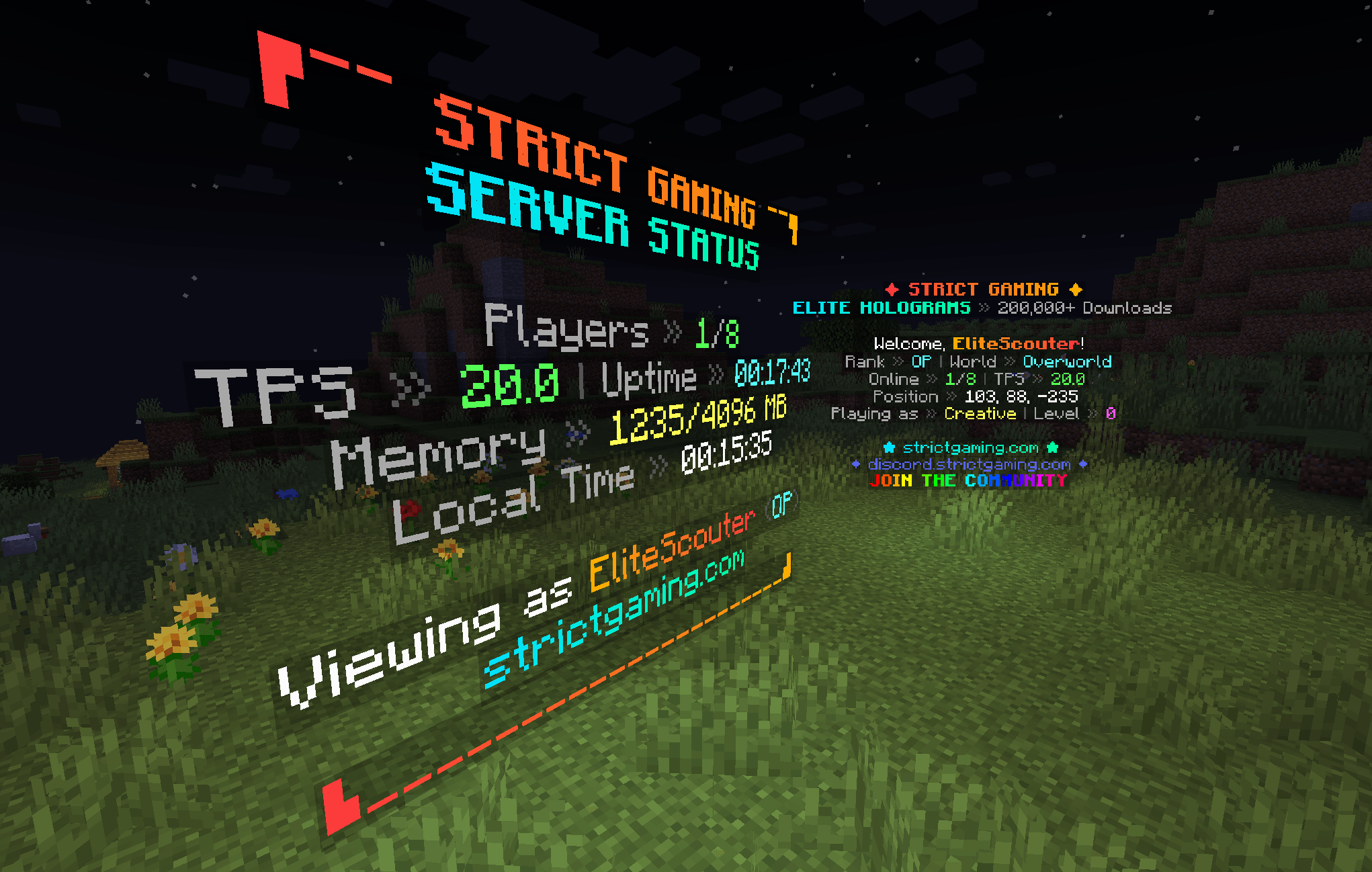
为什么选择 Elite Holograms?
- 全平台兼容: 支持单人世界、整合包和多人服务器。
- 仅服务器端: 在服务器上,玩家即使使用原版客户端也能看到所有内容。
- 对整合包友好: 可无缝放入任何 Forge、Fabric 或 NeoForge 整合包中,无需进行客户端设置。
- 几乎无依赖: 内置占位符系统,无需 PlaceholderAPI。只有 Fabric 版本需要额外依赖,即 Fabric API。
- 持久化保存: 全息图会在关机时安全同步保存,重启后依然存在。
- 开箱即用的美观效果: 每行都支持 MiniMessage 渐变、十六进制颜色和彩虹效果。
- 专为服务器设计: 运行在独立的管理器线程上,具有优雅关闭机制和极低的开销。
1.3.0 更新内容
- 可点击的全息显示:
/eh click <id> set <command...> 使玩家在右键点击时,全息显示执行一条命令;console <command...> 则以管理员权限运行命令,用于创建玩家自身无法执行的传送点和装备包。%player% 会被替换为点击者的名字。原本需要告示牌和压力板的功能现在可以用全息显示实现。它同时适用于固定朝向和面向玩家的全息显示,且无需客户端模组支持。console 受限于管理员权限,因此不能用来发放 OP 指令。Forge 1.19.2 不可用。
/eh display <id> scale <0.1-10>: 调整固定全息显示的文本大小。行间距会随缩放比例增大,因此放大后的全息显示永远不会重叠自身的各行文字。/eh display <id> brightness <0-15|auto>: 无论周围光照等级如何,始终照亮文本。设置为 15 可使全息显示在夜间清晰可见,无需在世界中放置任何方块,这对大多数人来说正是背光功能的目的。/eh display <id> billboard <fixed|vertical|horizontal|center>: 控制固定全息显示的旋转方式。其中 vertical 最实用:文本会水平跟随玩家移动但从不倾斜,因此从任何方向观看都保持可读,即使有人从头顶飞过也不会“躺平”。- 修复:记分板全息显示重启后丢失样式: 排行榜现在存储在独立文件中,而 Forge 1.20.1 和 Fabric 版本此前从未在此文件中写入背景设置,导致重新自定义样式的排行榜在重启后恢复为默认值。现在,排行榜会像其他全息显示一样保留其背景、缩放、亮度、广告牌模式和点击命令。
- 崩溃安全的保存机制: 每次保存都会写入完整文件并以原子操作替换旧文件,将上一版本作为备份保留。崩溃或断电不再可能导致全息显示文件缺失或写入不完整,损坏的文件会自动从备份中恢复。
- 后台不会擅自删除内容: 如果某个维度未加载(例如移除了添加该内容的模组),其中的全息显示或记分板会在文件中原样保留,待该维度再次加载时恢复。此前它们会在下一次保存时被擦除。
/eh reload 加载手动编辑的内容: 此前它会先保存内存中的数据,从而覆盖掉本应加载的手动编辑内容。- 删除最后一个记分板后确实生效: 此前它会在下次重启后重新出现。
- 控制台与命令方块支持: 如文档所述,
/eh addline、setline、insertline、removeline、delete 和 info 现在可在 Forge 和 Fabric 上通过控制台和命令方块使用。
1.2.1 更新内容
-
/eh background <id> ...: 重新设计固定全息文字背后的面板样式。原版将其绘制为不透明度 25% 的黑色;现在可以使用 colour <名称或 #RRGGBB> 更改其颜色,使用 opacity <0-100> 设置其不透明度,使用 none 完全移除它以实现无边框的悬浮文字效果,使用 reset 恢复原版外观。
-
Forge 1.19.2 命令一致性修复: /eh backlight、/eh settheme、/eh list 和 /eh movevertical 在该版本中被重复注册了两次,后注册的生效,因此尽管已包含这些命令,但多个命令仍会提示“未知命令”。现在所有 23 个子命令均统一针对单一注册表进行解析。
-
修复:fixed 和 facing 被吞没进全息文本中: /eh create shop fixed Welcome 生成的全息显示为 "fixed Welcome"。现在,这两个关键字在每一个 create 命令中都能被正确识别。
1.2.0 更新内容
- 全新 Fabric 1.20.1 版本: Elite Holograms 现已支持 Fabric,功能集与 Forge 1.20.1 版本完全一致:全息文本、固定方向全息、物品全息、动画线条、计分板排行榜、主题、背光、占位符以及所有命令。它需要 Fabric API,仅服务端运行,并读取相同的全息配置格式,因此世界可以在 Forge 和 Fabric 版本之间无缝切换而无需转换任何内容。权限通过 LuckPerms 或 FTB Ranks 工作,回退到 OP 等级 2。
- 全新 NeoForge 26.2 版本: 在 Minecraft 26.2 上实现完整的功能一致性,基于 NeoForge 26.2.0.57 和 Java 25 构建。
- 固定方向全息(Fixed Holograms): 全息文本现在可以锚定到一个固定的旋转角度,而不是始终面向玩家。固定全息看起来就像挂在墙上的告示牌,对所有人显示相同的视角,非常适合贴在建筑表面的场景。在任何创建命令中添加
fixed(例如 /eh create fixed <id> <text>),使用 /eh setrotation <id> <yaw> [pitch] 调整朝向,或使用 /eh convert <id> fixed 将现有全息转换为固定模式。默认情况下仍保持面向玩家,且不会改变你已构建的任何内容。需要 Minecraft 1.20.1 或更高版本,因此在 Forge 1.19.2 版本中不可用。
- 居中背光: 以前,靠近方块边缘的全息其光照会明显偏向一侧,因为光方块只能占据完整的方块单元。现在,当需要时,光柱会扩展到相邻的方块单元,使发光效果在文本上居中。
- 修复:全息文本行可能互相显示对方的文字: 不同的全息实体类型分配了重叠的网络 ID,导致客户端将一个行的文字错误地应用到另一行上。
1.1.0 新增内容
- 背光(Backlights):
/eh backlight <id> <on|off|toggle> [height 1-10] 在全息后方升起一列亮度为 minecraft:light 的光方块,确保夜间可读。背光会跟随全息移动,重启后保留,且绝不会覆盖玩家的建筑(仅照亮空气和水方块)。
- 计分板主题(Scoreboard Themes): 使用命名主题重新设计排行榜外观。内置
default、ocean、blood、mono、gold 和 rainbow 主题,均可在 config/eliteholograms/scoreboard_themes.json 中进行编辑。添加自定义主题以匹配你的服务器品牌。
/eh settheme <id> <theme>: 即时更换现有计分板的皮肤,无需重新创建。两个参数均支持自动补全。- 更智能的自动补全:
<objective> 参数现在会建议服务器上注册的所有目标,而 [theme] 则建议可用的主题名称。
- 热重载(Live reload):
/eh reload 可从磁盘刷新计分板主题,无需重启服务器。
- NeoForge 26.1 版本: 在 Minecraft 26.1 上实现完整的功能一致性,基于 Java 25 构建。
主要功能
- MiniMessage & 渐变: 全面支持 Kyori MiniMessage,可在每一行上使用渐变、十六进制颜色、彩虹色和丰富格式(也兼容传统的
& 代码)。
- 持久化全息: 在关闭时同步保存,重启后依然保留。
- 多行管理: 添加、插入、设置和移除单行文本。
- 物品全息:
/eh createitem 在标题上方生成一个悬浮物品,非常适合商店和展示柜。
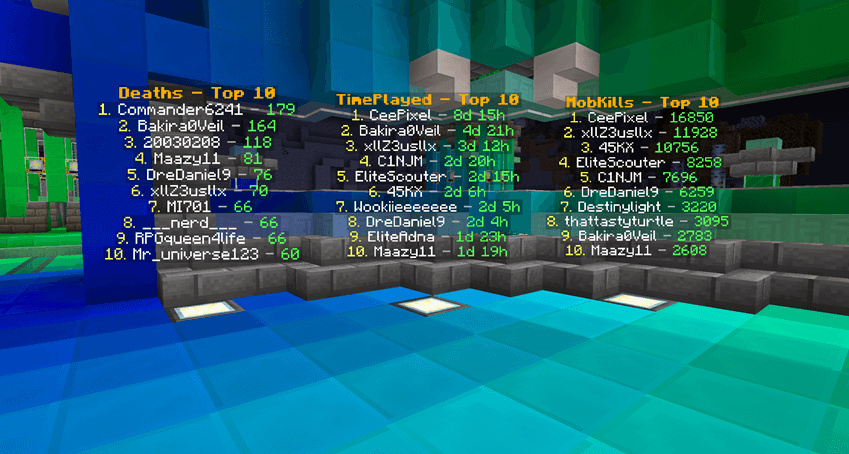
- 计分板排行榜: 显示任意目标的前几名玩家,支持自定义行数、刷新间隔和主题。包含在线和离线玩家;时间和数字类型的目标会自动格式化。
- 动画线条: 按计时器旋转文本,用于倒计时、提示和公告。
- 背光: 夜间照亮全息,且不干扰周围建筑。
- 固定方向全息: 将全息锚定到固定旋转角度,使其像墙上的告示牌一样阅读(1.20.1+)。
- 可点击全息: 当玩家右键点击全息时执行命令,可作为玩家身份或提升为控制台身份执行(1.20.1+)。
- 显示控制: 缩放固定全息的文字,以任意亮度照明而不放置任何方块,重绘其背后的面板,并选择其面向玩家的方式。
- 位置控制: 在你所在位置创建,传送至任意全息,并使用
/eh movevertical 垂直微调位置。
- 内置占位符: 实时获取服务器和玩家统计数据,无需外部 API。
- 高级权限: 集成 LuckPerms 和 FTB Ranks,支持 OP 等级 2 回退及细粒度节点权限。
- 全局自动补全: Brigadier 提供 ID、目标、主题等的建议。
- 附近发现:
/eh near 列出你周围的全息。
- 跨平台: 支持 Forge 1.19.2、Forge 1.20.1、Fabric 1.20.1(需要 Fabric API)、NeoForge 1.21.1、NeoForge 26.1 和 NeoForge 26.2,适用于单人游戏、整合包或服务器。
命令参考
每个创建命令在子命令后立即接受可选的 fixed 或 facing 关键字。省略该关键字将获得面向玩家的全息,这是默认行为。
创建 (Creating)
/eh create <id> <text...>:在你所在位置创建一个全息/eh createat <id> <x> <y> <z> [text...]:在指定坐标创建一个全息/eh createitem <id> <item> <text|line|line>:创建一个顶部带有悬浮物品的全息/eh createscoreboard <id> <objective> [topCount] [interval] [theme]:根据计分板目标创建一个排行榜
行 (Lines)
/eh addline, /eh setline, /eh insertline, /eh removeline:管理单行文本/eh animateline <id> <line#> <interval> <frame1|frame2|...>:按计时器动画播放某一行
外观 (Appearance)
/eh settheme <id> <theme>: 重新设计现有记分板全息图的样式/eh backlight <id> <on|off|toggle> [height 1-10]: 切换全息图后方光柱的开关状态/eh convert <id> fixed|face: 在全息图的固定朝向与面向玩家之间切换/eh setrotation <id> <yaw> [pitch]: 调整固定全息图的朝向(偏航角 0 为南,90 为西,180 为北,270 为东)/eh background <id> <colour|opacity|none|reset>: 重新设计固定全息图文本背后面板的样式/eh display <id> <scale|brightness|billboard|reset>: 调整固定全息图的缩放、亮度或显示模式
交互
/eh click <id> set <command...>: 以点击者的身份执行命令/eh click <id> console <command...>: 以管理员权限执行该命令(需要管理员权限)/eh click <id> none: 使全息图不可点击
位置
/eh movehere <id>: 将全息图移动到你所在的位置/eh movevertical <id> <up|down> <amount>: 将其向上或向下微调,例如 up 1.5/eh teleport <id>: 传送至全息图位置
浏览与管理
/eh list, /eh near [page], /eh info <id>: 浏览和检查全息图/eh delete <id>: 删除一个全息图/eh reload: 从存储中重新加载全息图和主题
占位符
无需外部 API。占位符会实时更新,包括针对每个查看者的玩家数值。
服务器范围: %players%, %maxplayers%, %tps%, %uptime%, %memory%, %server_time%
玩家专属: %player%, %player_rank%, %player_health%, %player_level%, %player_world%, %player_coords%, %player_gamemode%
示例:
/eh create welcome <gradient:#00FFA3:#00B7FF>Welcome %player%!</gradient>
/eh addline welcome &7Your rank: &e%player_rank%
/eh addline welcome &7Online: &a%players%&7/&a%maxplayers%  TPS: &a%tps%
权限
Elite Holograms 会自动检测 LuckPerms 和 FTB Ranks,如果两者均未安装,则回退到 OP 等级 2。控制台和命令方块始终拥有完全访问权限。
细粒度的节点允许你精确分配所需权限,而无需将任何人设为操作员:
eliteholograms.create, eliteholograms.delete, eliteholograms.edit, eliteholograms.list, eliteholograms.info, eliteholograms.near, eliteholograms.teleport, eliteholograms.backlight, eliteholograms.admin
有关组设置和示例,请参阅 Permissions Guide。
安装
- 下载与你的加载器和 Minecraft 版本匹配的构建文件(Forge 1.19.2 / 1.20.1, Fabric 1.20.1, NeoForge 1.21.1 / 26.1 / 26.2)。
- 将 JAR 文件放入你的
mods 文件夹。单人游戏实例、整合包或服务器的操作方式相同。
- 仅限 Fabric: 还需安装 Fabric API。如果没有它,Fabric 版将无法加载。Forge 和 NeoForge 版不需要额外依赖。
- (可选)在服务器上安装 LuckPerms 或 FTB Ranks 以实现细粒度权限控制。
- 启动游戏或重启服务器,然后运行
/eh create 开始使用。
适用于 Forge 1.19.2 / 1.20.1, Fabric 1.20.1, 以及 NeoForge 1.21.1 / 26.1 / 26.2。
Elite Holograms
Elite Holograms is a lightweight Minecraft mod for creating, managing, and customizing floating text (holograms) right from in-game commands. Perfect for server info, leaderboards, waypoints, shops, live stats, rules, and decorative text.
Works in single-player worlds, modpacks, and on multiplayer servers. It runs server-side, so on a server your players join with a vanilla client and still see everything. No external placeholder API, no fuss. Just drop it in and start building.
Inspired by Advanced Holograms. Supports Forge (1.19.2, 1.20.1), Fabric (1.20.1) and NeoForge (1.21.1, 26.1, 26.2). The Fabric edition requires Fabric API.
For full setup and command details, see the Wiki.
Why Elite Holograms?
- Plays everywhere: single-player worlds, modpacks, and multiplayer servers all supported.
- Server-side only: on a server, players join with a vanilla client and still see everything.
- Modpack-friendly: drop it into any Forge, Fabric, or NeoForge pack with no client-side setup.
- Almost no dependencies: the placeholder system is built in, no PlaceholderAPI needed. Only the Fabric edition needs anything alongside it, and that is just Fabric API.
- Persistent: holograms survive restarts with safe, synchronous saves on shutdown.
- Beautiful out of the box: MiniMessage gradients, hex colors, and rainbows on every line.
- Built for servers: runs on its own manager thread with graceful shutdown and minimal overhead.
What's New in 1.3.0
- Clickable holograms:
/eh click <id> set <command...> makes a hologram run a command when a player right-clicks it, and console <command...> runs it elevated for warps and kits players cannot run themselves. %player% is replaced with the clicker's name. Anything that used to be a sign and a pressure plate can now be a hologram. It works on fixed and player-facing holograms and needs no client mod, and console is gated on the admin permission so it cannot be used to hand out operator commands. Not available on Forge 1.19.2.
/eh display <id> scale <0.1-10>: resize a fixed hologram's text. Line spacing grows with the scale, so a scaled-up hologram never overlaps its own lines./eh display <id> brightness <0-15|auto>: light the text regardless of the surrounding light level. 15 makes a hologram readable at night without placing a single block in the world, which for most people is what backlights were for./eh display <id> billboard <fixed|vertical|horizontal|center>: control how a fixed hologram turns. vertical is the one to know: the text follows the player horizontally but never tilts, so it stays readable from any direction without lying on its back when someone flies overhead.- Fixed: scoreboard holograms lost their styling on restart: leaderboards are stored in their own file, and the Forge 1.20.1 and Fabric editions never wrote background settings there, so a restyled board reverted to the default on restart. Boards now keep their background, scale, brightness, billboard and click command like any other hologram.
- Crash-safe saves: every save writes a complete file and swaps it in atomically, keeping the previous version as a backup. A crash or power cut can no longer leave a missing or half-written hologram file, and a damaged one is restored from its backup automatically
- Nothing is deleted behind your back: a hologram or scoreboard in a dimension that isn't loaded (say, after removing the mod that adds it) is kept in the file untouched and comes back when the dimension does. It used to be erased by the next save
/eh reload loads your hand edits: it used to save what was in memory first, overwriting the very edit it was meant to load- Deleting your last scoreboard now sticks: it used to come back on the next restart
- Console and command blocks:
/eh addline, setline, insertline, removeline, delete and info now work from the console and command blocks on Forge and Fabric, as documented
What's New in 1.2.1
/eh background <id> ...: restyle the panel behind a fixed hologram's text. Vanilla draws it as 25% opaque black; now colour <name or #RRGGBB> recolours it, opacity <0-100> sets how solid it is, none removes it entirely for floating text with no box, and reset restores the vanilla look.- Forge 1.19.2 command parity:
/eh backlight, /eh settheme, /eh list and /eh movevertical were being registered twice on that edition, and whichever registration ran last won, so several commands reported "Unknown command" despite shipping. All 23 subcommands now resolve against a single registry.
- Fixed:
fixed and facing were swallowed into hologram text: /eh create shop fixed Welcome produced a hologram reading "fixed Welcome". Both keywords are now recognised on every create command.
What's New in 1.2.0
- New Fabric 1.20.1 edition: Elite Holograms now runs on Fabric with the same feature set as the Forge 1.20.1 edition: holograms, fixed holograms, item holograms, animated lines, scoreboard leaderboards, themes, backlights, placeholders, and every command. It requires Fabric API, is server-side only, and reads the same hologram config format, so a world can move between the Forge and Fabric editions without converting anything. Permissions work through LuckPerms or FTB Ranks, falling back to OP level 2.
- New NeoForge 26.2 edition: full feature parity on Minecraft 26.2, built against NeoForge 26.2.0.57 and Java 25.
- Fixed Holograms: holograms can now be anchored to a rotation instead of always turning to face the viewer. A fixed hologram reads like a sign hung on a wall and looks the same to everyone, which is what you want for anything mounted flat against a build. Add
fixed to any create command (/eh create fixed <id> <text>), aim it with /eh setrotation <id> <yaw> [pitch], or switch an existing hologram over with /eh convert <id> fixed. Player-facing stays the default and nothing you already built changes. Requires Minecraft 1.20.1 or newer, so it is not available on the Forge 1.19.2 edition.
- Centred backlights: a hologram sitting near a block edge used to be lit noticeably off to one side, because light blocks can only occupy whole block cells. The light column now widens onto the neighbouring cell when needed, keeping the glow centred on the text.
- Fixed: hologram lines could show each other's text: different hologram entity types were handing out overlapping network IDs, which made the client apply one line's text to another.
What's New in 1.1.0
- Backlights:
/eh backlight <id> <on|off|toggle> [height 1-10] raises a column of full-bright minecraft:light blocks behind a hologram so it stays readable at night. Backlights follow the hologram when it moves, persist across restarts, and never overwrite player builds (only air and water cells are lit).
- Scoreboard Themes: restyle leaderboards with named themes. Ships with
default, ocean, blood, mono, gold, and rainbow, all editable in config/eliteholograms/scoreboard_themes.json. Add your own to match your server brand.
/eh settheme <id> <theme>: re-skin an existing scoreboard instantly, no need to recreate it. Both arguments tab-complete.- Smarter tab completion: the
<objective> argument now suggests every objective registered on the server, and [theme] suggests available theme names.
- Live reload:
/eh reload refreshes scoreboard themes from disk without a server restart.
- NeoForge 26.1 edition: full feature parity on Minecraft 26.1, built on Java 25.
Key Features
- MiniMessage & Gradients: full Kyori MiniMessage support for gradients, hex colors, rainbows, and rich formatting on every line (legacy
& codes work too).
- Persistent Holograms: survive restarts with synchronous saves on shutdown.
- Multi-Line Management: add, insert, set, and remove individual lines.
- Item Holograms:
/eh createitem spawns a floating item above the caption, ideal for shops and showcases.
- Scoreboard Leaderboards: display the top players from any objective with custom row counts, refresh intervals, and themes. Online and offline players included; time and number objectives are auto-formatted.
- Animated Lines: rotate text on a timer for countdowns, tips, and announcements.
- Backlights: light up holograms at night without touching the surrounding build.
- Fixed Holograms: anchor a hologram to a rotation so it reads like a wall sign (1.20.1+).
- Clickable Holograms: run a command when a player right-clicks a hologram, as the player or elevated as the console (1.20.1+).
- Display Control: scale a fixed hologram's text, light it to any brightness with no blocks placed, recolour the panel behind it, and choose how it turns towards the viewer.
- Position Control: create at your location, teleport to any hologram, and nudge vertically with
/eh movevertical.
- Built-in Placeholders: real-time server and player stats with no external API.
- Advanced Permissions: integrates with LuckPerms and FTB Ranks, with OP level 2 fallback and granular nodes.
- Tab Completion Everywhere: Brigadier suggestions for IDs, objectives, themes, and more.
- Nearby Discovery:
/eh near lists holograms around you.
- Cross-Platform: Forge 1.19.2, Forge 1.20.1, Fabric 1.20.1 (needs Fabric API), NeoForge 1.21.1, NeoForge 26.1, and NeoForge 26.2, in single-player, modpacks, or servers.
Command Reference
Every create command takes an optional fixed or facing keyword immediately after the subcommand. Leave it out and you get a player-facing hologram, which is the default.
Creating
/eh create <id> <text...>: create a hologram at your location/eh createat <id> <x> <y> <z> [text...]: create one at explicit coordinates/eh createitem <id> <item> <text|line|line>: create one with a floating item on top/eh createscoreboard <id> <objective> [topCount] [interval] [theme]: create a leaderboard from a scoreboard objective
Lines
/eh addline, /eh setline, /eh insertline, /eh removeline: manage individual lines/eh animateline <id> <line#> <interval> <frame1|frame2|...>: animate a line on a timer
Appearance
/eh settheme <id> <theme>: restyle an existing scoreboard hologram/eh backlight <id> <on|off|toggle> [height 1-10]: toggle a light column behind a hologram/eh convert <id> fixed|face: switch a hologram between fixed and player-facing/eh setrotation <id> <yaw> [pitch]: aim a fixed hologram (yaw 0 south, 90 west, 180 north, 270 east)/eh background <id> <colour|opacity|none|reset>: restyle the panel behind a fixed hologram's text/eh display <id> <scale|brightness|billboard|reset>: resize, light, or change how a fixed hologram turns
Interaction
/eh click <id> set <command...>: run a command as the clicking player/eh click <id> console <command...>: run it elevated (needs the admin permission)/eh click <id> none: stop the hologram being clickable
Position
/eh movehere <id>: move a hologram to you/eh movevertical <id> <up|down> <amount>: nudge it up or down, e.g. up 1.5/eh teleport <id>: teleport to a hologram
Browsing and admin
/eh list, /eh near [page], /eh info <id>: browse and inspect holograms/eh delete <id>: remove a hologram/eh reload: reload holograms and themes from storage
Placeholders
No external API needed. Placeholders update in real time, including per-viewer player values.
Server-wide: %players%, %maxplayers%, %tps%, %uptime%, %memory%, %server_time%
Player-specific: %player%, %player_rank%, %player_health%, %player_level%, %player_world%, %player_coords%, %player_gamemode%
Example:
/eh create welcome <gradient:#00FFA3:#00B7FF>Welcome %player%!</gradient>
/eh addline welcome &7Your rank: &e%player_rank%
/eh addline welcome &7Online: &a%players%&7/&a%maxplayers%  TPS: &a%tps%
Permissions
Elite Holograms auto-detects LuckPerms and FTB Ranks, and falls back to OP level 2 when neither is present. Console and command blocks always have full access.
Granular nodes let you hand out exactly what you want without making anyone an operator:
eliteholograms.create, eliteholograms.delete, eliteholograms.edit, eliteholograms.list, eliteholograms.info, eliteholograms.near, eliteholograms.teleport, eliteholograms.backlight, eliteholograms.admin
See the Permissions Guide for group setups and examples.
Installation
- Download the build matching your loader and Minecraft version (Forge 1.19.2 / 1.20.1, Fabric 1.20.1, NeoForge 1.21.1 / 26.1 / 26.2).
- Drop the JAR into your
mods folder. Your single-player instance, modpack, or server all work the same way.
- Fabric only: also install Fabric API. The Fabric edition will not load without it. The Forge and NeoForge editions need nothing extra.
- (Optional) Install LuckPerms or FTB Ranks for granular permissions on a server.
- Launch the game or restart the server, then run
/eh create to get started.
Built for Forge 1.19.2 / 1.20.1, Fabric 1.20.1, and NeoForge 1.21.1 / 26.1 / 26.2.


 模组

 模组

 模组
 模组

 模组
 模组
评论 0
登录后参与评分
还没有评论,来抢沙发吧