



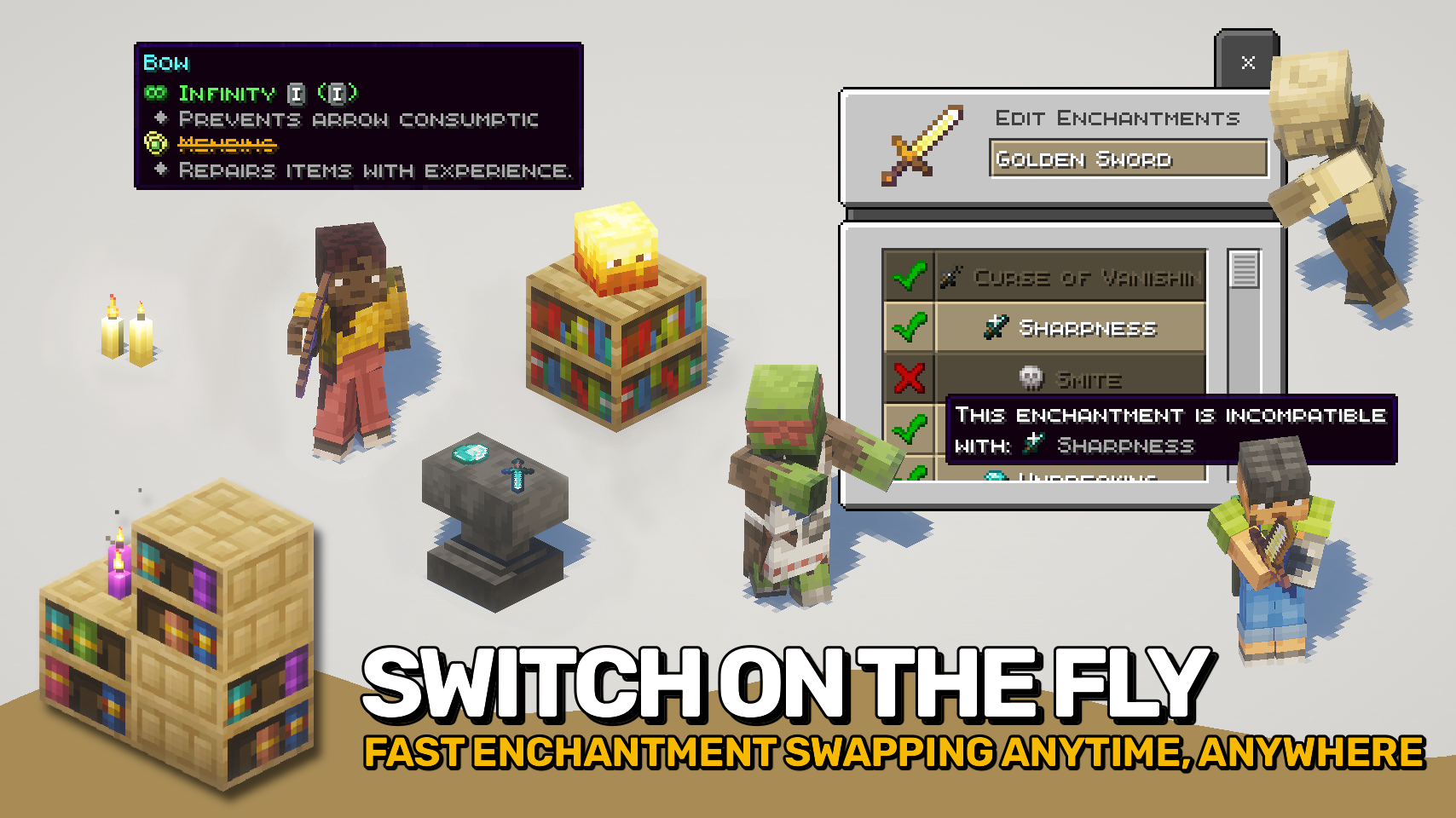
Enchantment Switch 让你能够控制工具、武器和盔甲上生效的附魔。只需在鼠标悬停在带有附魔的物品上时按下快捷键,即可打开一个菜单,显示该物品上的所有附魔。你可以随时开启或关闭每个附魔,以适应不同的情况。
这使得原本无法共存的附魔得以结合使用,只要同一时间只生效一个即可。例如,你可以在弓上切换经验修补(Mending)与无限(Infinity),或在剑上切换锋利(Sharpness)与亡灵杀手(Smite)。当你想再次游泳时,甚至可以暂时关闭冰霜行者(Frost Walker)。
诅咒和其他特殊附魔无法被关闭,从而保证游戏公平性。被禁用的附魔仍会显示在物品提示中,并带有明显的删除线效果,让你始终清楚哪些附魔处于生效状态。

- ⚙️ 快速切换: 通过简单的按键操作,从背包中打开附魔菜单。
- ? 兼容不互斥的附魔: 在弓上交换经验修补(Mending)与无限(Infinity),或在弩上切换穿透(Piercing)与多重射击(Multishot)。
- ? 智能切换: 在不必要时关闭荆棘(Thorns)或灵魂疾行(Soul Speed)等附魔,需要时再重新开启。
- ? 公平游戏: 特殊附魔将永久生效,无法被禁用。
- ?️ 清晰的物品提示: 被禁用的附魔会以删除线文字显示,避免混淆。
- ? 数据驱动: 模组支持与兼容性通过
enchantmentswitch:persistent_enchantments标签进行处理。


⏩ 客户端与服务端均需安装
⏩ 需要安装 PUZZLES LIB(适用于 Fabric 和 NeoForge)
⏩ 需要安装 FABRIC API(适用于 Fabric)
⏩ 需要安装 FORGE CONFIG API PORT(适用于 Fabric)

如果模组支持配置,可以直接通过游戏内的模组菜单进行配置(Fabric 端需安装由 Prospector 开发的 Mod Menu)。
若使用外部文本编辑器手动配置,所有文件均位于 .minecraft/config 目录下,文件名分别为 MOD_ID-client.toml、MOD_ID-common.toml 或 MOD_ID-server.toml,具体取决于配置文件的类型。并非所有类型的配置文件都会存在于某个模组中,甚至可能完全没有。
 |
 |
|
 |
 |
|
 |
 |
|
 |
 |
|
 |
 |

© 2026 @heyitsfuzs. 保留所有权利。此页面最后编辑时间为 2026 年 9 月 11 日 06:44 (UTC)。
Enchantment Switch lets you control which enchantments are active on your tools, weapons, and armor. With a simple key press while hovering your mouse cursor over an enchanted item, a menu appears showing all enchantments on that item. You can then turn each one on or off to match the situation.
This makes it possible to combine enchantments that normally cannot exist together, as long as only one is active at a time. For example, switch between Mending and Infinity on your bow, or Sharpness and Smite on your sword. Even Frost Walker can be toggled off when you want to go swimming again.
Curses and other special enchantments cannot be turned off, keeping gameplay fair. Disabled enchantments still appear on the tooltip with a clear strike-through effect so you always know what is active.
- ⚙️ Quick Switching: Open the enchantment menu from your inventory with a simple key press.
- ? Combine Incompatible Enchantments: Swap between Mending and Infinity on one bow, or toggle from Piercing to Multishot on your crossbow.
- ? Smart Switching: Turn enchantments like Thorns or Soul Speed off when not needed, then back on anytime.
- ? Fair Gameplay: Special enchantments stay permanently active and cannot be disabled.
- ?️ Clear Tooltips: Disabled enchantments show with strike-through text so nothing is confusing.
- ? Data Driven: Mod support and compatibility handled through the
enchantmentswitch:persistent_enchantmentstag.
⏩ INSTALLATION REQUIRED ON CLIENT & REQUIRED ON SERVER
⏩ REQUIRES PUZZLES LIB TO BE INSTALLED (FABRIC & NEOFORGE)
⏩ REQUIRES FABRIC API TO BE INSTALLED (FABRIC)
⏩ REQUIRES FORGE CONFIG API PORT TO BE INSTALLED (FABRIC)
If available for a mod, configuration is possible directly from in-game using the mod menu (requires Mod Menu by Prospector to be installed on Fabric).
For manual configuration using an external text editor all files are found at .minecraft/config, named as MOD_ID-client.toml, MOD_ID-common.toml, or MOD_ID-server.toml, depending on the type of config. Not all types might exist for a mod, if any at all.
|
|
|
|
|
|
|
|
|
|
|
|
|
|
© 2026 @heyitsfuzs. All rights reserved. This page was last edited on 11 September 2026, at 06:44 (UTC).

下载 Enchantment Switch
下载 Enchantment Switch
下载 Enchantment Switch
下载 Enchantment Switch
下载 Enchantment Switch
需要联机服务器吗?
稳定流畅、一键部署,几分钟即可和朋友联机开服
最低仅需 8 元/月 即可畅快联机
下载 Enchantment Switch
下载 Enchantment Switch
下载 Enchantment Switch
下载 Enchantment Switch
下载 Enchantment Switch
更新日志
本项目的所有重要更改都将记录在此文件中。
格式遵循 Keep a Changelog, 并且本项目遵循 语义化版本控制。
[v26.3.0-mc26.3.x] - 2026-09-26
已更改
- 更新至 Minecraft 26.3.x
关于这个资源的讨论、问题反馈与使用心得
还没有讨论,来发第一帖吧
你是这个资源的作者?登录后可认领此资源。
相似资源
 模组

可定制的鞘翅模组,支持装饰纹饰、旗帜图案等更多功能!
 模组

显示你正在注视的方块的信息。(适用于 Minecraft 1.16+ 的 Hwyla/Waila 分支)
 模组
在游戏画面角落显示附近世界地形、玩家、生物和实体的地图。可创建路径点,帮助你找到标记过的位置。
 模组

查看物品与配方
 模组
使用 JavaScript 编辑配方、添加自定义物品、编写世界事件!
 模组
AE2:一款流行的自动化与存储模组
评论 0
登录后参与评分
还没有评论,来抢沙发吧