
[EqS]EquipSet
非英语母语者,本文使用翻译软件生成
本模组帮助玩家在游戏中快速切换预设的护甲和副手物品。

使用方法
定义你的预设
首先,你需要了解如何使用预设管理器并定义自定义装备预设,请遵循以下语法确认:
- 按 'B' 键打开设置界面。
- 在左侧的装备预设管理界面中,你将看到以下选项:
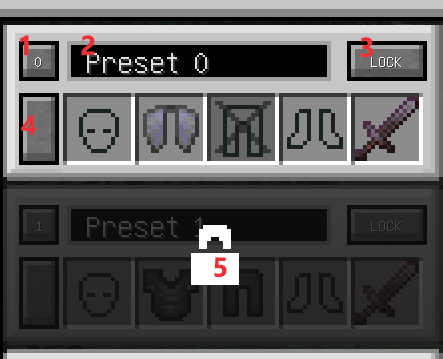
- 打开管理器屏幕时使用预设,数字为当前预设的 ID。
- 修改当前预设的名称。
- 锁定并禁用当前预设,主要用于将其排除在循环切换之外。
- 通过保存穿戴的装备(护甲和副手)来更新当前预设。
- 解锁当前预设。
- 图片中显示的装备槽本质上是按钮,而非容器。请勿将物品拖拽到它们上面,否则物品会被丢弃。
- 点击图片中的装备槽以启用或禁用它们。禁用的槽位在预设切换时不会触发装备交换。(如图片中的腿部槽位)
- 如果没有其他需求,只需像往常一样穿戴护甲物品,然后点击图片中标记为红色 4 的左侧按钮。预设将会被更新并保存。
使用预设:
模组提供了两种切换方法:循环切换和选择性切换。
- 循环切换:使用命令 "/eqs use_preset" 或默认快捷键 'R'。
- 选择性切换:使用命令 "/eqs use_preset [Id]",其中 [Id] 是目标预设的 ID,或使用默认快捷键 "Ctrl" + ?,其中 "?" 随目标预设 ID 而变化。由于配置文件的更改,范围可能会有所不同,因此请参阅按键绑定设置屏幕。
注意事项与配置
- 可用预设的数量可以在配置文件中修改,最少 2 组,最多 10 组,默认为 4 组。当超过 4 组时,虽然管理器界面中没有滚动条,但你可以将鼠标悬停在界面上以查看所有预设。
- 使用预设的功能是通过命令实现的,快捷键本质上执行的是预定义的命令。如果需要,你可以在配置文件中禁用快捷键注册。当然,你需要其他模组来支持快速输入命令。
- 模组的本质是在背包中搜索目标装备并强制交换它。通常情况下,即使是 cursed bound(诅咒绑定)物品也会被移除。你可以在配置文件中启用诅咒检测以防止这种情况发生。
- 在搜索物品时,模组会考虑名称、类型和附魔与所需物品相同的物品,请避免拥有多个具有这些相同特征的装备物品。
- 此模组仅在默认背包中搜索物品。
致开发者
如果你想扩展物品搜索的容器类型。
找到 com.AutomaticalEchoes.equipset.api.ContainerType,并将你的自定义容器添加到 TYPE 中,如下所示:
 public static ContainerType TYPE_INVENTORY = new ContainerType("type_inventory", Player::getInventory) ;
 public static ContainerType TYPE_ENDER_CHEST = new ContainerType("type_ender_chest",Player::getEnderChestInventory);

    public static void init(){
        TYPES.clear();
        TYPES.put(TYPE_INVENTORY.Name(),TYPE_INVENTORY);
//        TYPES.put(TYPE_ENDER_CHEST.Name(), TYPE_ENDER_CHEST);
    }
中文百科:[Eqs]装备预设
[EqS]EquipSet
Not a native English speaker,This article used translation app
This mod help players to quickly switch between preseted armors and off-hand items in the game.
How to use
Define your preset
First, you need to know how to use the preset manager and define your custom equipment preset, follow these syntax confirmations:
- Open the settings interface by pressing the key 'B'.
- In the equipment preset management interface on the left side, you will see the following options:
- Use presets while opening the manager screen, the numbers is the ID of current preset.
- Modify the name of the current preset.
- Lock and disable the current preset, mainly to exclude it from cycling switching.
- Update the current preset by saving the wearing equipments(Armors and off-hand).
- Unlock the current preset.
- The equipment slots shown in the image are essentially buttons, not as containers. Do not drag items onto them, it just throw your items.
- Click on the equipment slots in the image to enable or disable them. Disabled slots will not trigger equipment swapping when using presets.(Like the leg slot in image)
- If no other needs, just wear armor item as usual and then click the left side button which marked with Red 4 in the picture. The preset will update and save.
Use presets:
Mod provides two switching methods: cyclic switching and selective switching.
- Cyclic switching: Use the command "/eqs use_preset" or the default shortcut key 'R'.
- Selective switching: Use the command "/eqs use_preset [Id]" where [Id] is the target preset's ID, or use the default shortcut keys "Ctrl" + ? where "?" varies with the target preset ID, Due to changes in configuration files, the range may vary, so please refer to the key binding setting screen.
Notes and Configuration
- The number of available presets can be modified in the configuration file, with a minimum of 2 sets, a maximum of 10 sets, and a default of 4 sets. When exceeding 4 sets, although there is no scrollbar in the manager interface, you can scroll to view all presets by hovering your mouse over the interface.
- The functionality of using presets is achieved through commands, with shortcut keys essentially executing predefined commands. If needed, you can disable shortcut key registration in the configuration file. Of course, you will need other mod to support quick input commands.
- The essence of the mod is to search for the target equipment in the inventory and forcibly swap it. Normally, even cursed bound items will be removed. You can enable curse detection in the configuration file to prevent this.
- When searching the item, mod considers items with the same name, type, and enchantments as the desired items, please avoid having multiple equipment item same with these.
- This mod searching item in deafult inventory only.
To Developers
If you wanna expland item searching container type.
find com.AutomaticalEchoes.equipset.api.ContainerType, and add your custom container to TYPE,like this:
 public static ContainerType TYPE_INVENTORY = new ContainerType("type_inventory", Player::getInventory) ;
 public static ContainerType TYPE_ENDER_CHEST = new ContainerType("type_ender_chest",Player::getEnderChestInventory);

    public static void init(){
        TYPES.clear();
        TYPES.put(TYPE_INVENTORY.Name(),TYPE_INVENTORY);
//        TYPES.put(TYPE_ENDER_CHEST.Name(), TYPE_ENDER_CHEST);
    }
中文百科:[Eqs]装备预设

下载 EquipSet
下载 EquipSet
下载 EquipSet
下载 EquipSet
需要联机服务器吗?
稳定流畅、一键部署,几分钟即可和朋友联机开服
最低仅需 8 元/月 即可畅快联机
下载 EquipSet
需要联机服务器吗?
稳定流畅、一键部署,几分钟即可和朋友联机开服
最低仅需 8 元/月 即可畅快联机
下载 EquipSet
下载 EquipSet
下载 EquipSet
下载 EquipSet
下载 EquipSet
移除了附魔检查。装备附魔更新不再需要重置预设。
关于这个资源的讨论、问题反馈与使用心得
还没有讨论,来发第一帖吧
你是这个资源的作者?登录后可认领此资源。
相似资源
 模组

可定制的鞘翅模组,支持装饰纹饰、旗帜图案等更多功能!
 模组

显示你正在注视的方块的信息。(适用于 Minecraft 1.16+ 的 Hwyla/Waila 分支)
 模组

查看物品与配方
 模组
在游戏画面角落显示附近世界地形、玩家、生物和实体的地图。可创建路径点,帮助你找到标记过的位置。
 模组
使用 JavaScript 编辑配方、添加自定义物品、编写世界事件!
 模组
添加区块认领和玩家组队功能,并与 Xaero's Minimap 和 World Map 集成
评论 0
登录后参与评分
还没有评论,来抢沙发吧