
 EssentialClient
 是一个客户端模组,提供了众多客户端实用工具,并允许通过图形界面修改 Carpet 规则!
使用方法
本模组需要安装 fabric-launcher、fabric-api、fabric-kotlin 以及 YetAnotherConfigLib。
可选安装 fabric-carpet、 mod-menu、ChunkDebug, 以及 Kursive。
安装完成后,你可以通过 mod-menu 访问 EssentialClient 菜单,或者按下 EssentialClient 菜单的快捷键(默认为 F7,可在选项中进行更改)。
在该菜单中你可以:
- 查看和修改 EssentialClient 的设置。
- 查看和修改 Carpet 服务器设置。
- 打开 ChunkDebug 地图(前提是你已安装 ChunkDebug 且连接至支持 ChunkDebug 的服务器)。
- 打开 Kursive 脚本菜单(前提是你已安装 Kursive)。
EssentialClient 的设置保存于 ./config/EssentialClient/config.json。
Carpet 客户端
EssentialClient 允许你通过图形界面查看和修改 carpet
规则,而无需使用 /carpet 命令。
你无需在客户端安装 carpet 即可使用此功能。 打开 Carpet 服务器设置菜单将按类别显示所有规则,包括规则描述及其附加信息。Carpet 扩展(如 carpet-extra 或 carpet-fixes)中的规则也会按模组分类显示。
你必须拥有在服务端修改 Carpet 规则的权限,你的更改才会生效;否则这些规则仅对你可见。
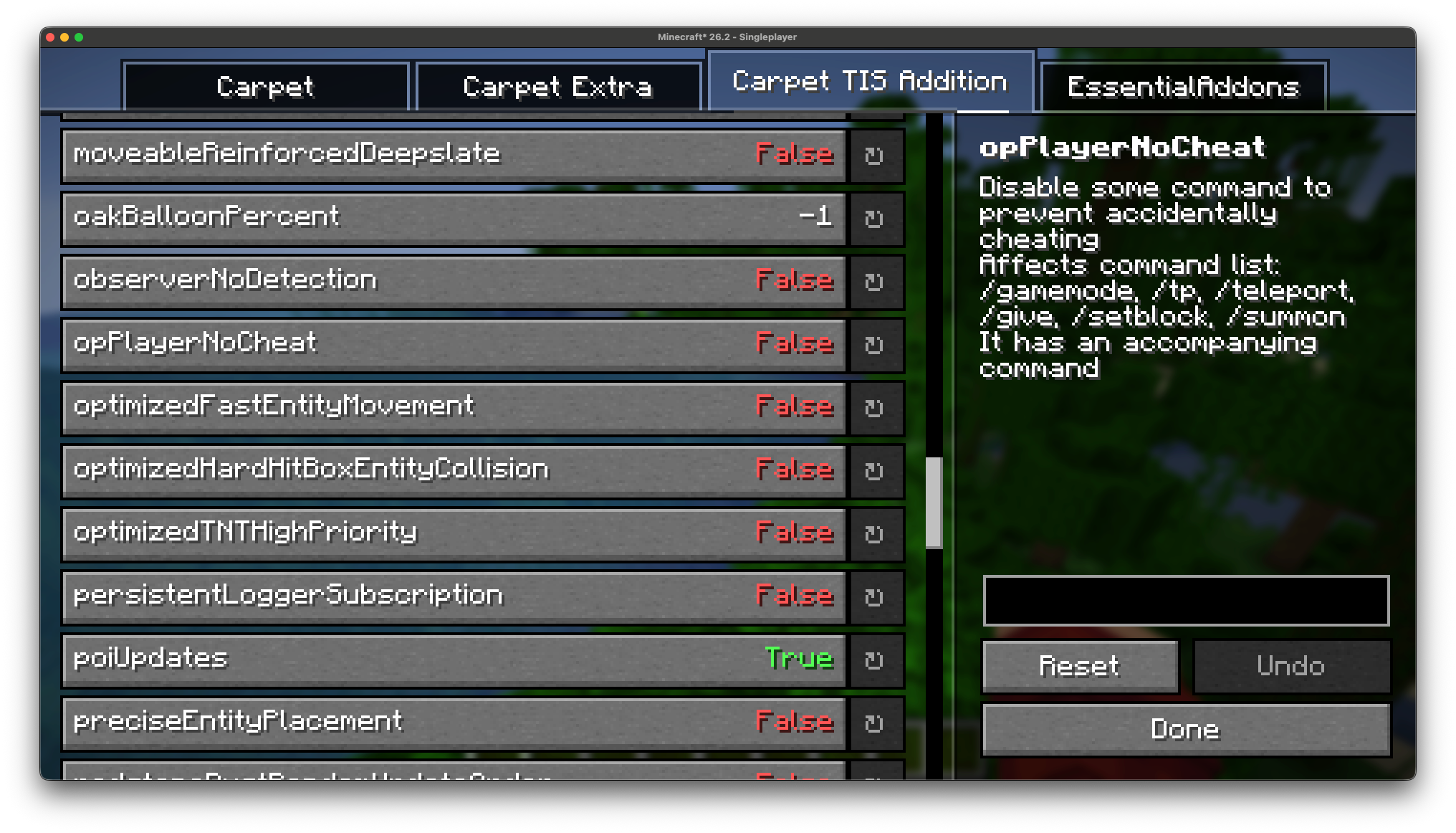
为了在游玩时获取规则描述,EssentialClient 会下载一个规则数据库,该数据库缓存在 ./config/EssentialClient/carpet_rules.json 中。
特别感谢 RubixDev 创建了 carpet database,EssentialClient 从中获取数据。
独立模组
ChunkDebug 和 Kursive 曾是 EssentialClient 的功能模块,但现已拆分为独立的模组。你仍可以从 EssentialClient 菜单中访问它们,但它们必须单独安装:
- ChunkDebug 让你查看世界中所有区块的加载状态,这要求服务端也安装该模组。
- Kursive 是 EssentialClient 客户端脚本功能的继任者,允许你在客户端编写和运行脚本。
如果未安装任一模组,其在 EssentialClient 菜单中的按钮将被禁用。
设置
以下所有设置均可在 EssentialClient 设置菜单中找到,它们被划分为与游戏中相同的类别。
游戏玩法
| 设置 | 描述 |
|---|---|
| 自动行走 | 在你按住前进键达到设定的刻数后,此选项会自动保持你的前进按键状态 |
| 更精确的方块放置 | 这与 Tweakeroo 的“精确方块放置”功能相同,但无需任何服务端模组支持 此功能使用了某些数据包黑客技术,在某些服务器上可能会触发反作弊系统的警告 |
| 合成技巧 | 允许你在合成配方时按住控制键(Ctrl)来丢弃已合成的物品 |
| 潜行以避免水体附着 | 允许你在使用桶操作可被水附着的方块时潜行,从而避免水体附着 |
| 增加旁观者滚动速度 | 提高在旁观者模式下滚动以加快速度的上限限制 |
| 增加旁观者滚动灵敏度 | 提高在旁观者模式下滚动以加快速度的灵敏度 |
| 刻率影响聊天快捷键 | 是否让刻率影响你的聊天快捷键。当设为真时,较低的刻率会导致打开聊天窗口所需的时间变长(原版行为) |
| 修复 macOS 光标跳动问题 | 修复在按住命令键或选项键时文本框中光标跳转的位置,使其与 macOS 的行为保持一致 |
| 忽略无效聊天消息 | 忽略无效的聊天消息,并将其作为系统消息输出 |
技术相关
| 设置 | 描述 |
|---|---|
| 广播挂机状态 | 在达到设定的时间(以刻为单位)后,当你处于挂机状态时进行广播通知 |
| 广播挂机消息 | 这是你挂机后广播的消息 需要启用“广播挂机状态” |
| 广播回归消息 | 这是你从挂机状态回归后广播的消息 需要启用“广播挂机状态” |
| Carpet 始终重置默认值 | 这使得每当设置一个 Carpet 规则时,它都会自动将其重置为默认值 |
| 创造模式步行速度 | 允许你覆盖创造模式下的原版步行速度 |
| 自定义超时时间 | 允许你更改连接到服务器后的超时秒数 |
| 禁用快捷栏滚动 | 阻止你通过滚动来切换快捷栏,去熟悉你的快捷键吧! |
渲染
| 设置 | 描述 |
|---|---|
| 禁用护甲渲染 | 允许你为指定实体禁用护甲渲染 |
| 禁用受伤屏幕晃动 | 禁用受到伤害时的镜头倾斜效果 |
| 禁用 Boss 栏渲染 | 这将禁用所有 Boss 栏的渲染 |
| 禁用显示文本渲染 | 这将禁用所有显示文本的渲染 |
| 禁用手臂摆动 | 禁用玩家的手臂摆动动画 |
| 禁用地图渲染 | 禁用物品框中地图的渲染 |
| 禁用名称标签渲染 | 这将禁用所有名称标签的渲染 |
| 禁用夜视闪烁 | 禁用夜视效果即将耗尽时的闪烁提示 |
| 禁用配方 toast | 禁用配方解锁 toast 通知的显示 |
| 禁用进度 toast | 禁用进度达成 toast 通知的显示 |
| 禁用教程 toast | 禁用新手教程 toast 通知的显示 |
| 禁用加入/离开消息 | 这将阻止玩家加入/离开服务器的消息显示 |
| 禁用截图消息 | 移除截图时弹出的提示信息 |
| 显示游戏时长 | 在暂停菜单角落显示客户端运行的时间 |
| EssentialClient 按钮 | 在主菜单和暂停菜单上渲染 EssentialClient 菜单入口 |
| 忽略服务端渲染距离 | 渲染时忽略服务端的渲染距离设置 |
| 岩浆透明度 | 更改岩浆的不透明度 |
| 高亮岩浆源 | 更改岩浆源的纹理,使其更明显 |
| 高亮水源 | 更改水源的纹理,使其更明显 |
| 保留聊天记录 | 防止聊天被清空,切换世界/服务器时也适用 |
| 切换 Tab 键 | 允许通过按下而非按住 Tab 键来查看玩家列表菜单 |
杂项
| 设置 | 描述 |
|---|---|
| 移除无效区块警告 | 从日志中移除无效区块的警告信息 |
按键绑定
这些可以在 EssentialClient 设置菜单中更改,也可以在原版控制设置界面的 EssentialClient 分类下修改。
| 设置 | 描述 |
|---|---|
| EssentialClient 菜单快捷键 | 这是打开 EssentialClient 菜单的快捷键 |
| 精准反向放置快捷键 | 这是激活精准反向方块放置的快捷键 |
| 精准插入放置快捷键 | 这是激活精准插入方块放置的快捷键 |
EssentialClient
EssentialClient is a client-side mod that adds many client utilities as well as providing a gui to modify carpet rules!
Usage
This mod requires the fabric-launcher, fabric-api, fabric-kotlin, and YetAnotherConfigLib.
Optionally, you can install fabric-carpet, mod-menu, ChunkDebug, and Kursive.
Once installed, you can access the EssentialClient menu through mod-menu, or by
pressing the EssentialClient Menu keybind, which is F7 by default and can be
changed in options.
From this menu you can:
- View and modify the EssentialClient settings.
- View and modify the Carpet server settings.
- Open the ChunkDebug map, provided you have ChunkDebug installed and are connected to a server which supports ChunkDebug.
- Open the Kursive scripting menu, provided you have Kursive installed.
EssentialClient's settings are saved to ./config/EssentialClient/config.json.
Carpet Client
EssentialClient lets you view and modify carpet
rules through a gui instead of having to use the /carpet command.
You do not need to have carpet installed on your client for this to work. Opening the Carpet Server Settings menu will show you every rule, sorted by category, with the rule's description and its extra info. Rules from carpet extensions (such as carpet-extra or carpet-fixes) are also shown, separated by mod.
You must have permission to modify carpet rules on the server for your changes to apply, otherwise the rules will just be displayed to you.
To get rule descriptions when playing on a server, EssentialClient downloads a rule
database which is cached in ./config/EssentialClient/carpet_rules.json. A massive
thank you to RubixDev for creating his carpet database
which EssentialClient pulls from.
Separate Mods
ChunkDebug and Kursive used to be features of EssentialClient but have since been split into their own mods. You can still access both of them from the EssentialClient menu, but they must be installed separately:
- ChunkDebug lets you view the chunk loading status of all the chunks in a world, this requires the mod to be installed on the server as well.
- Kursive is the successor to EssentialClient's client-side scripting, letting you write and run scripts on your client.
If either mod is not installed then its button in the EssentialClient menu will be disabled.
Settings
All the settings below can be found in the EssentialClient settings menu, they are split into the same categories that you will find in game.
Gameplay
| Setting | Description |
|---|---|
| Auto Walk | This will hold your forward key after you have held it for the set amount of ticks |
| Better Accurate Block Placement | This is the same as accurate block placement for tweakeroo but without the need for any server-side mods This uses some packet hacking, which may flag anti-cheat on some servers |
| Crafting Hax | Allows you to drop crafted recipes by holding control when crafting a recipe |
| Sneak To Not Waterlog | Allows you to sneak when using a bucket on a waterloggable block to avoid waterlogging |
| Increase Spectator Scroll Speed | Increases the limit at which you can scroll to go faster in spectator |
| Increase Spectator Scroll Sensitivity | Increases the sensitivity at which you can scroll to go faster in spectator |
| Tick Rate Affects Chat Key | Whether the tick rate affects your chat key, when true, with a lower tick rate it will take longer to open chat (vanilla behaviour) |
| Fix MacOS Cursor Jumping | Fixes the position of where the cursor jumps in text boxes when holding command or option to be consistent with MacOS |
| Ignore Invalid Chat Messages | Ignores invalid chat messages and outputs them as system messages instead |
Technical
| Setting | Description |
|---|---|
| Announce AFK | This announces when you become AFK after a set amount of time (in ticks) |
| Announce AFK Message | This is the message you announce after you are AFK Requires 'Announce AFK' to be enabled |
| Announce Back Message | This is the message you announce after you are back from being AFK Requires 'Announce AFK' to be enabled |
| Carpet Always Set Default | This makes it so whenever you set a carpet rule, it automatically sets it to default |
| Creative Walk Speed | This allows you to override the vanilla walk speed in creative mode |
| Custom Time Out | This lets you change the amount of seconds until you timeout when connected to a server |
| Disable Hotbar Scrolling | Prevents you from scrolling to use your hotbar, learn your keybinds! |
Rendering
| Setting | Description |
|---|---|
| Disable Armor Rendering | This allows you to disable armor rendering for the specified entities |
| Disable Damage Tilt | Disables the camera tilt effect when taking damage |
| Disable Bossbar Rendering | This will disable any bossbars from rendering |
| Disable Display Text Rendering | This will disable any display texts from rendering |
| Disable Hand Swinging | Disables player hand swinging |
| Disable Map Rendering | Disables maps in item frames from rendering |
| Disable Nametag Rendering | This disables all name tags from rendering |
| Disable Night Vision Flashing | Disables the flash that occurs when night vision is about to run out |
| Disable Recipe Toasts | Disables the recipe toast notifications from showing |
| Disable Advancement Toasts | Disables the advancement toast notifications from showing |
| Disable Tutorial Toasts | Disables the tutorial toast notifications from showing |
| Disable Join/Leave Messages | This will prevent player join/leave messages from displaying |
| Disable Screenshot Messages | Removes the message that pops up when you take a screenshot |
| Display Play Time | Displays the amount of time your client has been running in the corner of the pause menu |
| EssentialClient Button | This renders the EssentialClient Menu on the main menu screen and pause screen |
| Ignore Server Render Distance | Ignores the server's render distance when rendering |
| Lava Opacity | Changes the opacity of lava |
| Highlight Lava Sources | Changes the texture for lava sources to make them more visible |
| Highlight Water Sources | Changes the texture for water sources to make them more visible |
| Persistent Chat History | This prevents the chat from being cleared, also applies when changing worlds/servers |
| Toggle Tab | This allows you to toggle tab instead of holding it to see the tab menu |
Miscellaneous
| Setting | Description |
|---|---|
| Remove Warn Invalid Chunk | Removes invalid chunk warnings from your logs |
Keybinds
These can be changed in the EssentialClient settings menu, or in the vanilla controls screen under the EssentialClient category.
| Setting | Description |
|---|---|
| EssentialClient Menu Keybind | This is the keybind to open the EssentialClient Menu |
| Accurate Reverse Keybind | This is the keybind to activate reverse accurate block placement |
| Accurate Into keybind | This is the keybind to activate into accurate block placement |

下载 EssentialClient
下载 EssentialClient
下载 EssentialClient
下载 EssentialClient
需要联机服务器吗?
稳定流畅、一键部署,几分钟即可和朋友联机开服
最低仅需 8 元/月 即可畅快联机
下载 EssentialClient
下载 EssentialClient
下载 EssentialClient
下载 EssentialClient
下载 EssentialClient
下载 EssentialClient
需要联机服务器吗?
稳定流畅、一键部署,几分钟即可和朋友联机开服
最低仅需 8 元/月 即可畅快联机
- 更新至 26.3
关于这个资源的讨论、问题反馈与使用心得
还没有讨论,来发第一帖吧
你是这个资源的作者?登录后可认领此资源。
相似资源
 模组

显示你正在注视的方块的信息。(适用于 Minecraft 1.16+ 的 Hwyla/Waila 分支)
 模组

查看物品与配方
 模组
在游戏画面角落显示附近世界地形、玩家、生物和实体的地图。可创建路径点,帮助你找到标记过的位置。
 模组
使用 JavaScript 编辑配方、添加自定义物品、编写世界事件!
 模组
添加区块认领和玩家组队功能,并与 Xaero's Minimap 和 World Map 集成
 模组
添加全屏世界地图,显示你在世界中已探索的区域。与 Xaero's Minimap 搭配使用效果极佳。
评论 0
登录后参与评分
还没有评论,来抢沙发吧